
giriiş
The Trust Gaming GXT 498B Forta Gaming Headset is officially licensed for PlayStation 5 and PlayStation 4 consoles, designed to provide an immersive audio experience. This wired over-ear headset features 50mm drivers for powerful sound, a detachable microphone with a pop filter for clear communication, and comfortable ear pads for extended gaming sessions. This manual provides instructions for setup, operation, maintenance, and troubleshooting to ensure optimal performance of your headset.
Kutuda Neler Var?
- Trust Gaming GXT 498B Forta Gaming Headset
- Detachable Microphone with Pop Filter
- 1.2m Audio Cable (3.5mm jack)
- Kullanıcı Kılavuzu

Image: The retail packaging for the Trust Gaming GXT 498B Forta Gaming Headset, showing the headset and included accessories.
Kurulum Talimatları
- Ses kablosunu bağlayın: Locate the 3.5mm audio jack on your PlayStation 5 DualSense wireless controller or PlayStation 4 DualShock 4 wireless controller. Insert the 3.5mm audio cable from the headset firmly into the controller's audio jack.
- Mikrofonu takın: The microphone is detachable. Align the microphone's connector with the port on the left earcup of the headset and push it in until it clicks securely into place. Ensure the pop filter is correctly positioned over the microphone for optimal voice clarity.
- Kulaklığın uyumunu ayarlayın: Extend or retract the adjustable padded headband to fit comfortably over your head. The earcups are moveable to ensure a snug fit over your ears.
- Configure Audio Settings (PlayStation):
- PS5 için: Git Ayarlar > Ses > Ses Çıkışı. Seçme Kulaklıklar as the output device. Adjust the volume and microphone levels as needed.
- PS4 için: Git Ayarlar > Cihazlar > Ses Aygıtları. Seçme Denetleyiciye Bağlı Kulaklık as the input and output device. Adjust the volume and microphone levels.
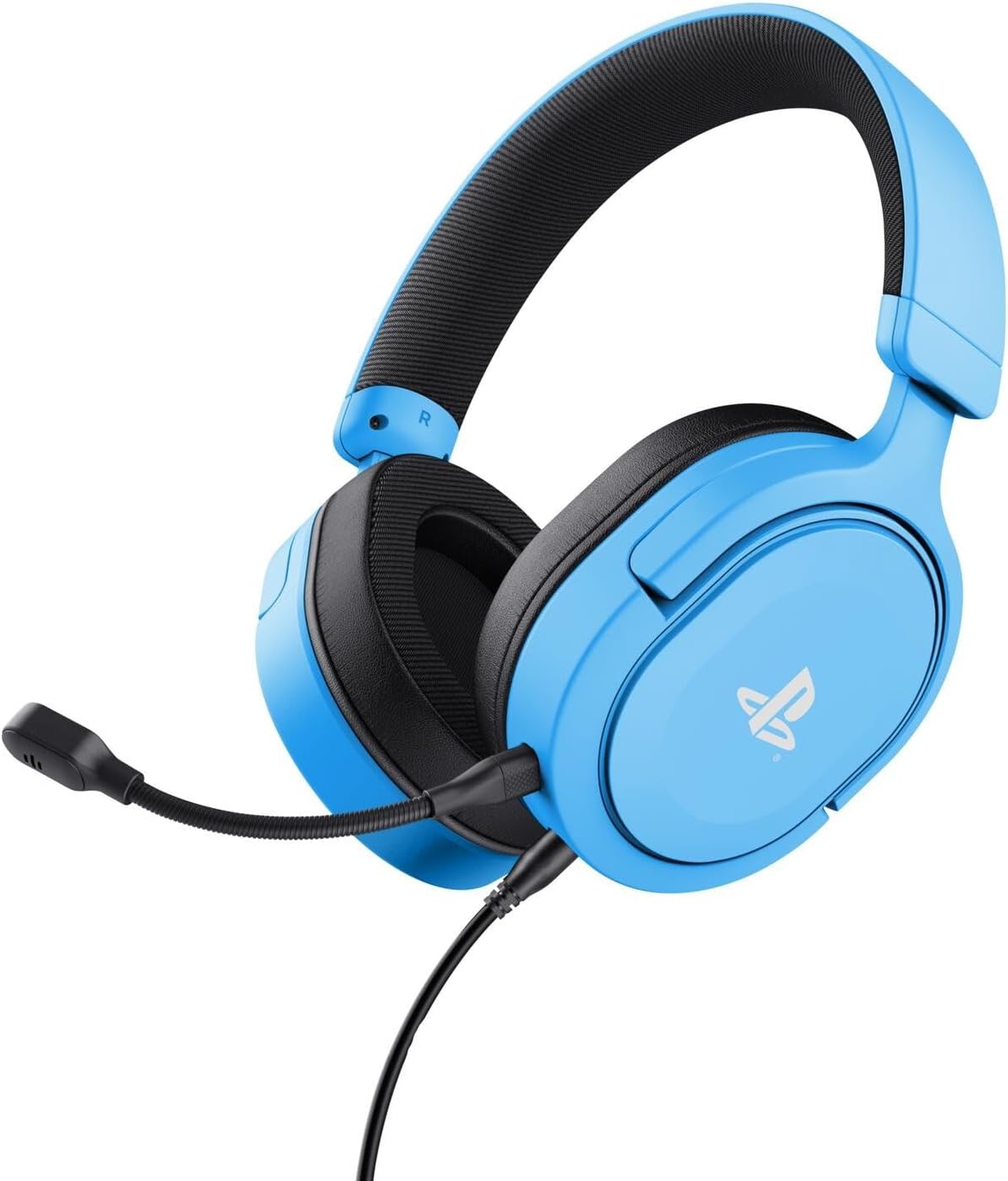
Image: The Trust Gaming GXT 498B Forta Gaming Headset, showcasintasarımı ve çıkarılabilir mikrofonuyla öne çıkıyor.
Kullanım Talimatları
- Ses Kontrolü: The headset features an in-line volume control wheel on the audio cable. Rotate the wheel up or down to adjust the audio output level.
- Mikrofonun Sesini Kapatma: An in-line mute switch is located on the audio cable. Slide the switch to mute or unmute the microphone.
- 3D Ses: The headset supports 3D Audio on compatible PlayStation 5 games, providing an enhanced spatial sound experience. Ensure 3D Audio is enabled in your PS5 sound settings for optimal immersion.
- Çıkarılabilir Mikrofon: The microphone can be detached when not in use for a more streamlined headset profile. Store it safely to prevent loss or damage.

Resim: Yakın çekim view of the Trust Gaming GXT 498B Forta headset, highlighting the earcups and the attached audio cable with controls.
Bakım
- Temizlik: Kulaklığı temizlemek için yumuşak, kuru bir bez kullanın. Kulak yastıkları için ise hafifçe kuru bir bez yeterlidir.amp Bez kullanılabilir, ancak hoparlör ızgaralarına nem girmemesine dikkat edin. Sert kimyasallar veya aşındırıcı temizleyiciler kullanmayın.
- Depolamak: Kulaklığınızı doğrudan güneş ışığından ve aşırı sıcaklıklardan uzak, serin ve kuru bir yerde saklayın. Kulaklığın üzerine ağır nesneler koymaktan kaçının.
- Kablo Bakımı: Avoid sharp bends or kinks in the audio cable. Do not pull the cable forcefully when disconnecting.
- Mikrofon Bakımı: Handle the detachable microphone with care. When not in use, detach it and store it safely to prevent damage.
Sorun giderme
- Kulaklıktan Ses Gelmiyor:
- Ensure the 3.5mm audio cable is fully inserted into both the headset and the controller.
- Check the in-line volume control wheel on the cable and turn it up.
- Verify audio settings on your PlayStation console (refer to "Setup Instructions" section).
- Test the headset with another device (e.g., smartphone, PC) to determine if the issue is with the headset or the console.
- Mikrofon Çalışmıyor:
- Çıkarılabilir mikrofonun kulaklığa güvenli bir şekilde takılı olduğundan emin olun.
- Check the in-line microphone mute switch and ensure it is in the "unmute" position.
- Verify microphone input settings on your PlayStation console (refer to "Setup Instructions" section).
- Ensure the pop filter is not obstructing the microphone's input.
- Sound Quality Issues (Distortion, Low Volume):
- Adjust the volume levels on both the headset's in-line control and your console's settings.
- Ses kablosunun hasarlı veya bükülmüş olmadığından emin olun.
- Try connecting the headset to a different audio source to rule out console-specific issues.
Özellikler
| Model Adı | GXT 498B Forta |
| Model Numarası | 25556 |
| Bağlantı | Kablolu (3.5 mm Jak) |
| Kablo Uzunluğu | 1.2 metre |
| Sürücü Boyutu | 50 mm |
| Frekans Aralığı | 20 Hz - 20,000 Hz |
| Empedans | 32 Ohm |
| Hassasiyet | 90 dB |
| Mikrofon Türü | Detachable with Pop Filter |
| Kulak Yerleşimi | Kulak Üstü |
| Ürün Ağırlığı | 253 Gram |
| Uyumlu Cihazlar | PlayStation 5, PlayStation 4, PC |
| Malzeme | Plastic (up to 65% recycled) |
Garanti ve Destek
This Trust Gaming GXT 498B Forta Gaming Headset is covered by the manufacturer's standard warranty. For detailed warranty information, please refer to the documentation included with your purchase or visit the official GXTrust website. For technical support, troubleshooting assistance beyond this manual, or warranty claims, please contact GXTrust customer service through their official support channels.
Lütfen garanti amaçlı satın alma belgenizi saklayın.