
1. Giriş
This manual provides detailed instructions for the installation, operation, and maintenance of the TMEZON MZ-VDP-NE160 4-wire doorbell camera. This outdoor station is designed to work seamlessly with compatible TMEZON videophone monitors, such as the MZ-IP-V728TW, to provide secure and convenient visitor management for your property.
2. Güvenlik Bilgileri
Please read and understand all safety instructions before installing or operating this device. Failure to follow these instructions may result in electric shock, fire, or damage to the product.
- Elektriksel Güvenlik: Installation should be performed by a qualified electrician or technician. Ensure power is disconnected before any wiring work.
- Suya Maruz Kalma: While designed for outdoor use, avoid direct high-pressure water jets. Ensure all connections are properly sealed.
- Sıcaklık: Cihazı çalışma aralığının dışındaki aşırı sıcaklıklara maruz bırakmayın.
- Temizlik: Temizlik için yumuşak, kuru bir bez kullanın. Aşındırıcı temizleyiciler veya çözücüler kullanmayın.
3. Paket İçeriği
Paketin tüm bileşenlerinin mevcut olduğunu doğrulayın:
- 1 x TMEZON MZ-VDP-NE160 Doorbell Camera Unit
- Montaj Vidaları ve Duvar Dübelleri
- Kablolama Konnektörleri
- Kullanım Kılavuzu (bu belge)
4. Ürün Bittiview
The TMEZON MZ-VDP-NE160 is an outdoor doorbell camera unit. It features a camera for video surveillance, a microphone for audio input, a speaker for audio output, and a call button to initiate communication with the indoor monitor.
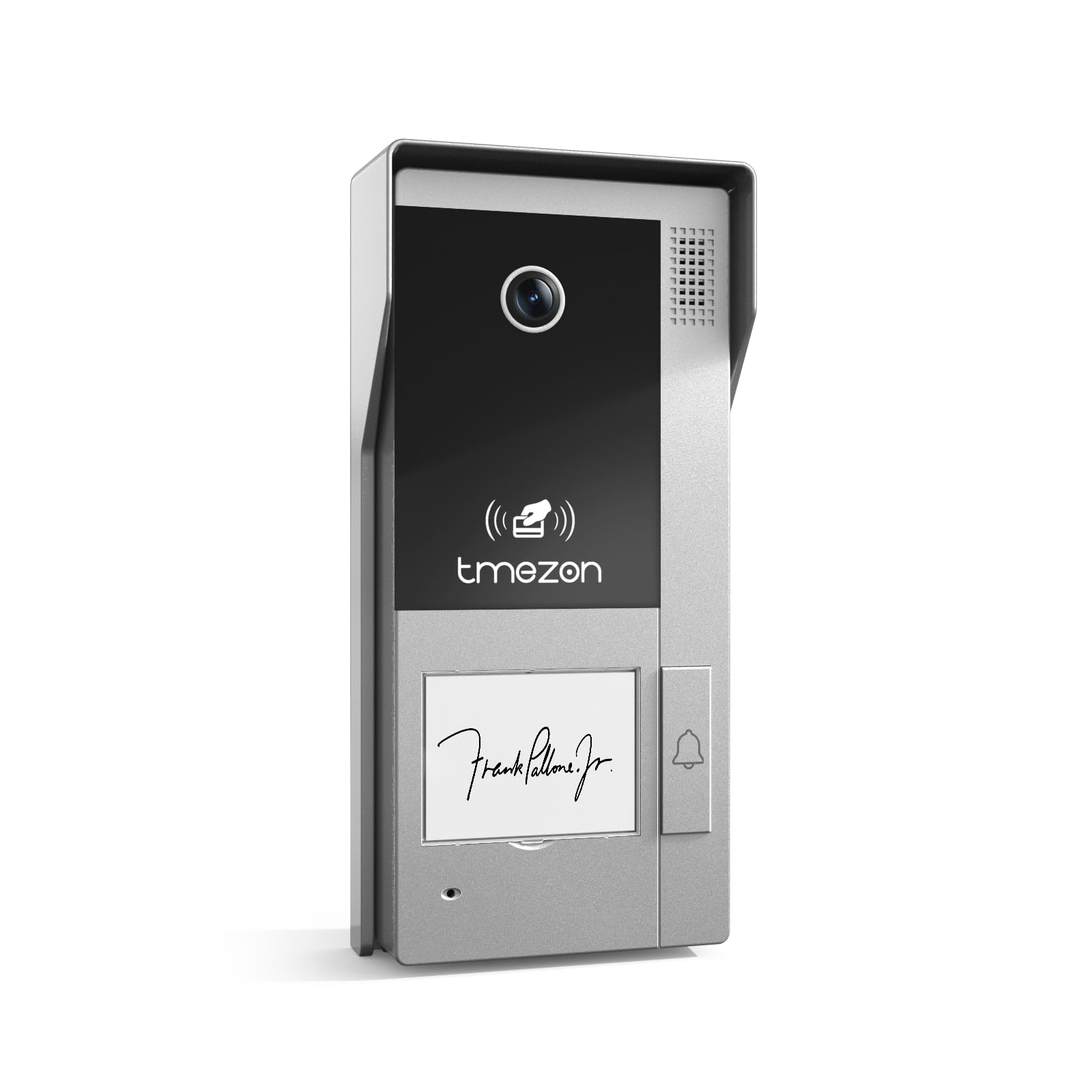
Şekil 1: Ön view of the TMEZON MZ-VDP-NE160 doorbell camera, showing the camera lens, call button, microphone, and speaker grille.
Temel bileşenler şunlardır:
- Kamera Lensi: Video görüntüsünü yakalar.
- Arama tuşu: Activates the indoor monitor and initiates communication.
- Mikrofon: Ziyaretçilerden ses kayıtları alır.
- Konuşmacı: Allows two-way audio communication.
- Wiring Terminal (Rear): For connecting the 4-wire cable to the indoor monitor and power supply.
5. Kurulum ve Kurulum
The MZ-VDP-NE160 is a 4-wire system. Proper wiring is crucial for correct operation. It is recommended to consult a professional for installation if you are unfamiliar with electrical wiring.
5.1 Montaj Yeri
- Choose a location near your entrance, typically at a height of 1.4 to 1.6 meters (4.6 to 5.2 feet) from the ground, ensuring a clear view Ziyaretçilerin.
- Avoid direct sunlight or strong light sources that could cause glare on the camera.
- Montaj yüzeyinin düz ve sağlam olduğundan emin olun.
5.2 Kablolama Şeması (Genel)
The doorbell camera connects to the indoor monitor (e.g., MZ-IP-V728TW) using a 4-wire cable. The typical connections are:
- Tel 1: Ses
- Tel 2: Video
- Tel 3: Zemin (GND)
- Tel 4: Güç (DC 12V)
Note: Refer to the specific wiring diagram provided with your indoor monitor for precise connection details. Ensure polarity is correct for power connections.
5.3 Kurulum Adımları
- Gücü Kesin: Before starting, ensure all power to the existing doorbell system and the indoor monitor is turned off at the circuit breaker.
- Montaj dirseği: Secure the mounting bracket (if applicable, or the unit directly) to the wall using the provided screws and wall plugs.
- Kablo Bağlantısı: Connect the 4-wire cable from the indoor monitor to the corresponding terminals on the rear of the MZ-VDP-NE160 doorbell camera. Ensure connections are secure.
- Güvenli Ünite: Attach the doorbell camera unit to the mounting bracket or directly to the wall, ensuring it is firmly in place.
- Gücü Geri Yükle: Tüm bağlantılar yapılıp güvenli hale getirildikten sonra, sisteme tekrar güç verin.
- Deneme sistemi: Test the doorbell functionality by pressing the call button and verifying communication with the indoor monitor.
6. Kullanım Talimatları
The TMEZON MZ-VDP-NE160 doorbell camera operates in conjunction with your TMEZON indoor monitor.
- Ziyaretçi Çağrısı: When a visitor presses the call button on the MZ-VDP-NE160, the indoor monitor will ring and display the video feed from the doorbell camera.
- Çift Yönlü İletişim: On the indoor monitor, you can answer the call to engage in two-way audio communication with the visitor.
- Kapı Açma Mekanizması (bağlıysa): If an electronic door lock is connected to your indoor monitor system, you can typically unlock the door from the indoor monitor during a call.
- İzleme: Some indoor monitors allow you to manually view the live video feed from the doorbell camera at any time, even without a visitor pressing the button.
7. Bakım
Regular maintenance helps ensure the longevity and optimal performance of your doorbell camera.
- Temizlik: Periodically wipe the camera lens and the front panel with a soft, slightly damp Toz ve kiri temizlemek için bez kullanın. Sert kimyasallar veya aşındırıcı malzemeler kullanmayın.
- Bağlantıları Denetle: Annually, inspect the wiring connections for any signs of corrosion or loosening. Ensure the unit is securely mounted.
- Yazılım Güncellemeleri: While this specific unit does not have user-updatable software, ensure your indoor monitor's firmware is up to date for best compatibility and features.
8. Sorun Giderme
If you encounter issues with your MZ-VDP-NE160 doorbell camera, refer to the following common problems and solutions:
| Sorun | Olası Neden | Çözüm |
|---|---|---|
| No video/audio on indoor monitor |
|
|
| Call button not responding |
|
|
| Video kalitesi zayıf |
|
|
If the problem persists after attempting these solutions, please contact TMEZON customer support.
9. Özellikler
| Özellik | Detay |
|---|---|
| Örnek | MZ-VDP-NE160 |
| Marka | TEMEZON |
| Ürün Boyutları (U x G x Y) | 1x1x1 cm |
| Kablolama Türü | 4 Telli Sistem |
| Çalışma Hacmitage | 240 Volts (System dependent, typically 12V DC for the unit itself, 240V might refer to power supply input) |
| Güç Tüketimi | 5 Watt |
| Renk | Gri |
| Dahil Bileşenler | Kapı zili ünitesi |
10. Garanti ve Destek
For warranty information and technical support, please refer to the documentation provided with your complete TMEZON videophone system or visit the official TMEZON webSite. Satın alma fişinizi, garanti talepleriniz için satın alma belgeniz olarak saklayın.
For direct assistance, you may contact TMEZON customer service through their official channels.