
1. Giriş
This manual provides detailed instructions for the ZORNHER ZH980 Wireless Mechanical Keyboard. The ZH980 is a 95% layout mechanical keyboard designed for various uses, featuring multiple connectivity options, customizable RGB lighting, and hot-swappable switches.
Temel özellikler şunlardır:
- Dipped PBT keycaps with clear, side-printed legends.
- 95% layout with number pad, F-row, and navigation keys.
- Linear creamy switches for tactile feedback.
- 22 preset RGB lighting modes with south-facing LEDs and edge glow.
- Hot-swappable PCB supporting 3-pin and 5-pin mechanical switches.
- Triple-mode connection: Bluetooth 5.0, 2.4GHz wireless, and USB-C.
- 6000mAh battery for extended wireless use.
- Ergonomic design with dual-angle kickstand.

Image 1.1: ZORNHER ZH980 Wireless Mechanical Keyboard overview.
2. Paket İçeriği
Paketin içinde tüm öğelerin mevcut olduğundan emin olun:
- 1 x Fully Assembled Mechanical Keyboard Body
- 1 x Kullanım Kılavuzu
- 1 x Tuş Takımı Çıkartıcısı
- 3 x Yedek Anahtar
- 1 x 2.4GHz Alıcı
- 1 x Type-C USB Cable (1.8m nylon)

Image 2.1: Package contents for the ZORNHER ZH980.
3. Başlangıç (Kurulum)
3.1 Klavyeyi Şarj Etme
Before first use, it is recommended to fully charge the keyboard. Connect the included USB-C cable to the keyboard's Type-C port and the other end to a USB power source (e.g., computer, wall adapter). The keyboard features a 6000mAh battery.
3.2 Bağlantı Modları
The ZORNHER ZH980 supports three connection modes: 2.4GHz wireless, Bluetooth 5.0, and wired USB-C. You can seamlessly switch between up to 5 devices.

Image 3.1: Triple-mode connection options.
3.2.1 2.4 GHz Kablosuz Bağlantı
- Genellikle klavyenin bir bölmesinde saklanan 2.4 GHz USB alıcısını bulun.
- Alıcıyı bilgisayarınızdaki veya cihazınızdaki kullanılabilir bir USB bağlantı noktasına takın.
- Ensure the keyboard's mode switch (usually on the back or side) is set to 2.4GHz wireless mode.
- Klavyenin otomatik olarak bağlanması gerekir.
3.2.2 Bluetooth 5.0 Bağlantısı
- Klavyenin mod anahtarını Bluetooth moduna getirin.
- Cihazınızda (bilgisayar, tablet, akıllı telefon) Bluetooth'u etkinleştirin ve yeni cihazları arayın.
- The keyboard should appear as "ZORNHER ZH980" or similar. Select it to pair.
- İstenirse ekranınızda görüntülenen eşleştirme kodunu girin.
- Klavye, 5 adede kadar Bluetooth Pro cihazı saklayabilir.files. Refer to the keyboard's specific key combinations (e.g., Fn + 1/2/3/4/5) to switch between paired devices.
3.2.3 USB-C Kablolu Bağlantı
- Connect the USB-C cable to the keyboard's Type-C port.
- Kablonun diğer ucunu bilgisayarınızdaki boş bir USB portuna takın.
- Klavye, kablolu bir cihaz gibi çalışacak ve aynı anda şarj olacaktır.
3.3 Ergonomik Ayarlama
The keyboard is designed with a dual-angle kickstand on the underside, allowing you to adjust the typing angle for improved comfort and reduced strain during extended use.

Image 3.2: Dual-angle kickstand and robust construction.
4. Temel İşlem
4.1 Klavye Düzeni
The ZH980 features a 95% layout, which includes a full number pad, F-row keys, arrow keys, and essential navigation keys, providing comprehensive functionality in a compact form factor.
4.2 Fonksiyon Tuşu Kombinasyonları (Fn)
The Fn key (Function key) is used in combination with other keys to access secondary functions, such as media controls, volume adjustment, and lighting effects. Specific combinations are detailed in the RGB Lighting Control section.
5. RGB Aydınlatma Kontrolü
The ZORNHER ZH980 features vibrant RGB lighting with 22 preset modes, south-facing LEDs, and edge glow. The lighting can be customized for brightness, speed, and direction.

Image 5.1: RGB lighting controls using Fn key combinations.
5.1 Basic Lighting Adjustments
- Fn + Backspace: Cycle through 22 preset RGB lighting modes.
- Fn + Yukarı Ok: Increase Main Backlight Brightness.
- Fn + Aşağı Ok: Decrease Main Backlight Brightness.
- Fn + Sol Ok: Decrease Main Backlight Speed.
- Fn + Sağ Ok: Increase Main Backlight Speed.
- Fn + Page Up: Switch Dynamic Light Direction.
- Fn + Page Down: L anahtarıamp Effect.
- Fn + Esc: Restore to Factory Settings (also used for troubleshooting).
- Fn + Win: Window Lock (disables Windows key).

Image 5.2: RGB lighting on vs. off.
6. Özelleştirme
6.1 Sıcak Değiştirilebilir Anahtarlar
The ZH980 features a hot-swappable PCB, allowing you to change mechanical switches without soldering. It supports both 3-pin and 5-pin switches, offering compatibility with a wide range of switch types (approximately 98% of switches on the market).

Image 6.1: Hot-swappable PCB for switch replacement.
Anahtarların Değiştirilmesi:
- Birlikte verilen tuş kapağı sökme aparatını kullanarak istediğiniz tuş kapağını dikkatlice çıkarın.
- Use the included switch puller to gently remove the switch from the PCB.
- Yeni anahtarın pinlerini PCB üzerindeki deliklerle hizalayın. Bükülmeyi önlemek için pinlerin düz olduğundan emin olun.
- Yeni anahtarı yerine oturuncaya kadar sıkıca bastırın.
- Tuş başlığını değiştirin.
6.2 Yazılım Özelleştirmesi
Utilize the dedicated driver software to unlock full customization options. This software allows you to:
- Tuşları farklı işlevlere yeniden atayın.
- Karmaşık komutlar için makrolar oluşturun ve atayın.
- Tailor RGB lighting effects beyond the preset modes, including custom colors and dynamic patterns.
- Özel pro kurulumufileFarklı uygulamalar veya oyunlar için.
The software is compatible with Windows and Mac operating systems. Please visit the official ZORNHER webYazılım indirme ve yükleme talimatları için site.

Image 6.2: ZORNHER customization software interface.
7. Bakım
7.1 Klavyeyi Temizleme
Optimum performans ve görünümü korumak için:
- Temizlemeden önce klavyeyi tüm güç kaynaklarından ayırın.
- Yumuşak, tiftiksiz bir bez kullanın ve hafifçe kurulayın.ampTuş takımlarını ve klavye yüzeyini silmek için su veya hafif bir temizleme solüsyonu kullanın.
- Daha detaylı temizlik için, tuş kapaklarını çıkarmak üzere tuş kapağı sökücüsünü kullanın ve altını basınçlı hava veya küçük bir fırça ile temizleyin.
- Tuş kapaklarına veya yüzeyine zarar verebilecek sert kimyasallar veya aşındırıcı malzemeler kullanmaktan kaçının.
7.2 Tuş Kapağı ve Anahtar Bakımı
The PBT Dipped keycaps are designed for durability and resistance to shine and wear. When replacing keycaps or switches, handle them carefully to avoid damage to the switch stems or keycap mounts.
8. Sorun Giderme
If you encounter issues with your ZORNHER ZH980 keyboard, refer to the following common problems and solutions:
| Sorun | Olası Çözüm |
|---|---|
| Klavye yanıt vermiyor (kablolu) | USB-C kablosunun hem klavyeye hem de bilgisayara güvenli bir şekilde bağlandığından emin olun. Farklı bir USB bağlantı noktası veya kablo deneyin. |
| 2.4GHz wireless connection issues | Ensure the 2.4GHz receiver is properly plugged in and the keyboard is in 2.4GHz mode. Move the keyboard closer to the receiver to reduce interference. |
| Bluetooth bağlantı sorunları | Ensure the keyboard is in Bluetooth mode and discoverable. On your device, remove any previous pairings and attempt to re-pair. Check if your device's Bluetooth is enabled. |
| RGB aydınlatma çalışmıyor veya takılı kalmış durumda. | Basmak Fn + Geri tuşu to cycle through lighting modes. Adjust brightness with Fn + Yukarı/Aşağı Ok. If issues persist, perform a factory reset (Fn + Esc). |
| Anahtarlar kaydedilmiyor veya çift yazılıyor | Ensure switches are fully seated. If a specific switch is faulty, replace it using the hot-swap feature. Perform a factory reset (Fn + Esc). |
| Keyboard randomly types garbled characters | This may indicate a software issue or interference. Try performing a factory reset (Fn + Esc). Ensure the keyboard firmware is up to date via the ZORNHER software. |
| Battery not charging or low battery life | Ensure the USB-C cable is working and connected to a reliable power source. Reduce RGB brightness or turn off lighting to conserve battery. |
If these solutions do not resolve the issue, please contact ZORNHER customer support for further assistance.
9. Özellikler
| Özellik | Detay |
|---|---|
| Örnek | ZH980 |
| Düzen | 95% (with number pad) |
| keycaps | Dipped PBT, Side-Printed Legends |
| Anahtarlar | Sakura Linear Switches (Creamy Sounding) |
| Sıcak-Swap | Yes, supports 3-pin and 5-pin mechanical switches |
| Bağlantı | Bluetooth 5.0, 2.4 GHz Kablosuz, USB-C Kablolu |
| Pil Kapasitesi | 6000mAh Lityum İyon |
| RGB Arka Aydınlatma | 22 Preset Modes, 16 Million Colors (via software), South-facing LEDs, Edge Glow |
| Uyumlu Cihazlar | Dizüstü bilgisayar, Mac, PC, Akıllı telefon, Tablet |
| Ürün Boyutları | 14.96 x 7.99 x 2.75 inç (38 x 20.3 x 7 cm) |
| Ürün Ağırlığı | 4.27 pound (1.94 kg) |
| Üretici | ZORNHER |
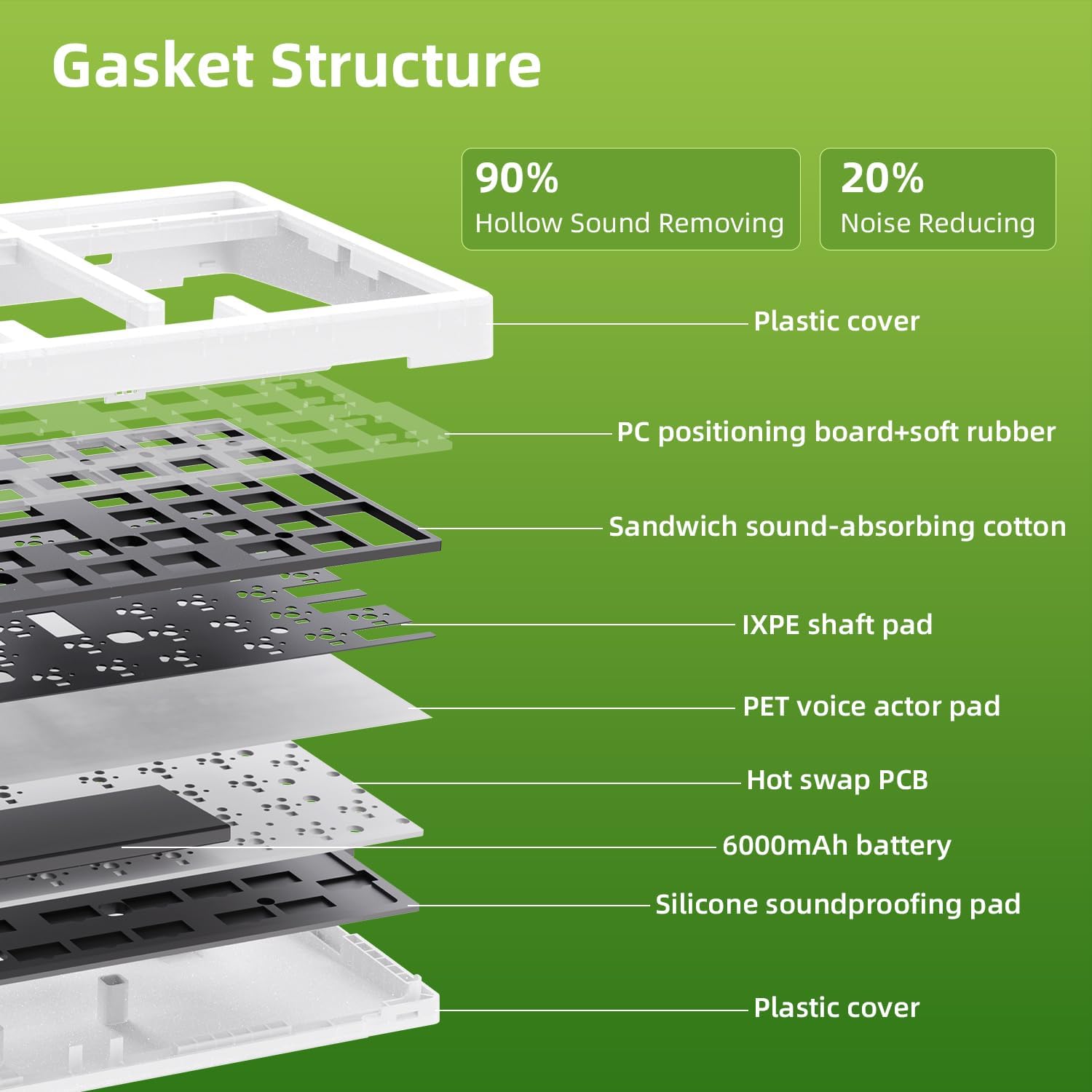
Image 9.1: Internal Gasket Structure diagram.
10. Garanti ve Destek
10.1 Garanti Bilgileri
The ZORNHER ZH980 Wireless Mechanical Keyboard is covered by a 2 yıllık garanti Satın alma tarihinden itibaren geçerlidir. Bu garanti, üretim hatalarını ve normal kullanımdan kaynaklanan sorunları kapsar. Yanlış kullanım, kaza, yetkisiz değişiklikler veya uygunsuz bakımdan kaynaklanan hasarları kapsamaz.
Garanti talepleri için lütfen satın alma belgenizi saklayın.
10.2 Müşteri Desteği
For technical assistance, warranty claims, or any other inquiries regarding your ZORNHER ZH980 keyboard, please contact ZORNHER customer support through the following channels:
- Resmi Webalan: Visit the ZORNHER official webDestek kaynakları, sıkça sorulan sorular ve iletişim formları için site.
- E-posta Desteği: Refer to your product packaging or the ZORNHER webMüşteri destek e-posta adresinin bulunduğu site.
- Online Store Support: If purchased from an online retailer, you may also contact their customer service for initial support or to facilitate warranty claims.
When contacting support, please provide your product model (ZH980), purchase date, and a detailed description of the issue.