
1. Ürün Bittiview
The MOVE SPEED 145W Laptop Power Bank is a high-capacity portable charging solution designed for a wide range of electronic devices, including laptops, smartphones, and tablets. Featuring PD 3.1 fast charging technology and a 25,000mAh capacity, it ensures your devices remain powered during travel, work, or outdoor activities. The integrated digital display provides real-time charging insights, enhancing user convenience.
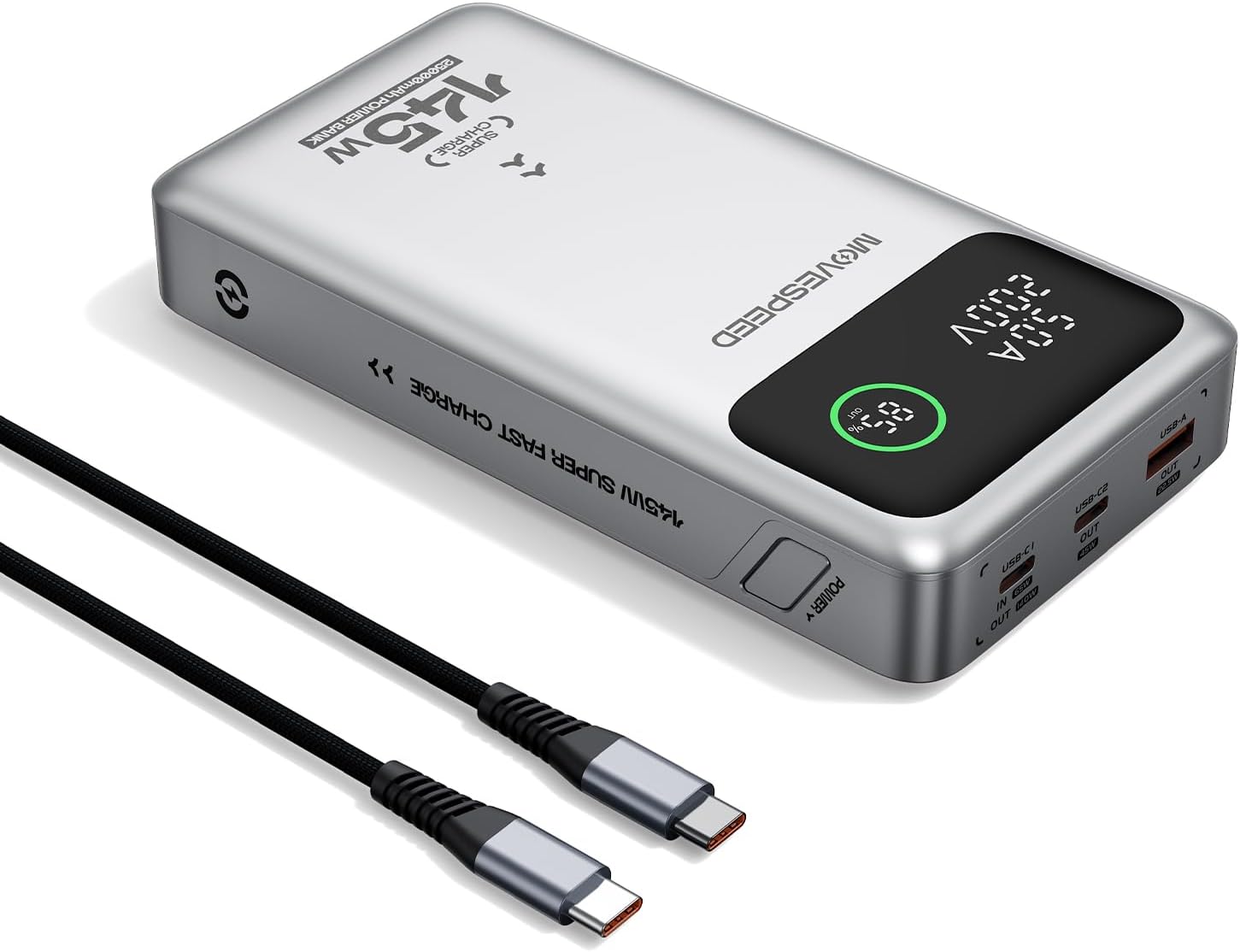
Figure 1.1: MOVE SPEED 145W Laptop Power Bank and 240W Type-C Cable.
2. Güvenlik Bilgileri
Önemli Güvenlik Önlemleri:
- Powerbank'i aşırı sıcaklıklara, doğrudan güneş ışığına veya ateşe maruz bırakmayın.
- Cihazınızı düşürmekten, parçalamaktan veya kendiniz onarmaya çalışmaktan kaçının.
- Sudan ve yüksek nemden uzak tutun.
- Kullanım ve şarj sırasında uygun havalandırmayı sağlayın.
- This power bank is flight-approved (25000mAh/92.5Wh) and meets FAA and TSA carry-on regulations.
- The device incorporates 9-layer protection against overcharging, overheating, and short circuits.

Figure 2.1: The power bank is designed to be air-travel friendly.

Figure 2.2: Built-in NTC Temperature Sensor and comprehensive protection features.
3. Paket İçeriği
Paketin içinde tüm öğelerin mevcut olduğundan emin olun:
- MOVE SPEED 145W Laptop Power Bank x 1
- 240W 3.28Ft Type-C Cable x 1
- Kullanıcı Kılavuzu x 1

Figure 3.1: Items included in the product package.
4. Ürün Özellikleri
- 140W Ultra-Fast Single-Port Charging: Supports PD 3.1, capable of charging a 16-inch MacBook Pro to 56% in approximately 30 minutes.
- 65W Ultra-Fast Recharging: Fully recharges the power bank in about 2 hours using a compatible high-wattage şarj cihazı.
- Muazzam 25,000mAh Kapasite: Provides multiple charges for various devices (e.g., 4 full charges for iPhone 16, 3 for Galaxy S24, 2 for iPad 11).
- Triple-Port Output:
- USB-C1 (IN/OUT): Up to 140W output, 65W input.
- USB-C2 (OUT): Up to 45W output.
- USB-A (OUT): Up to 22.5W output.

Figure 4.1: Single port output capabilities.

Figure 4.2: Two-port simultaneous output capabilities.

Figure 4.3: Three-port simultaneous output capabilities.
- Smart Dynamic Charging: Optimizes power distribution up to 145W combined output when multiple USB-C ports are active.
- Akıllı LED Ekran: Shows precise battery percentage, charging status (INPUT/OUTPUT), and real-time voltage and current for each active port.
- Geçişli Şarj: Allows simultaneous charging of devices while the power bank itself is being recharged.

Figure 4.4: Key features of the MOVE SPEED 145W Power Bank.

Figure 4.5: Fast charging capability for laptops.

Figure 4.6: Extended power supply for multiple devices.

Figure 4.7: Simultaneous charging of up to three devices.

Figure 4.8: Rapid recharging of the power bank.

Figure 4.9: The smart LED display provides comprehensive charging information.

Figure 4.10: Pass-through charging capability for convenience.
5. Kurulum
Before first use, it is recommended to fully charge the power bank.
- Connect the included 240W Type-C cable to the USB-C1 port (IN/OUT) on the power bank.
- Connect the other end of the cable to a compatible USB-C wall charger (65W or higher recommended for optimal charging speed).
- The digital display will show "IN" and the battery percentage artışasing, indicating that the power bank is charging.
- Once the display shows 100%, the power bank is fully charged and ready for use.
6. Kullanım Talimatları
6.1 Şarj Cihazları
Elektronik cihazlarınızı şarj etmek için:
- Cihazınızın şarj kablosunu power bank üzerindeki uygun çıkış portuna (USB-C1, USB-C2 veya USB-A) bağlayın.
- Kablonun diğer ucunu cihazınıza bağlayın.
- The digital display will show "OUT" and the real-time voltage and current, indicating that your device is charging.
- The power bank will automatically detect the connected device and deliver the optimal charging speed.
Video 6.1: Demonstration of the MOVE SPEED power bank charging a laptop. This video highlights the product's ability to provide power to larger devices.
Video 6.2: Bittiview of the MOVE SPEED laptop power bank's features and usage. This video provides a general demonstration of the product.
Video 6.3: Demonstration of the MOVESPEED portable laptop charger and its 145W power bank capabilities. This video showcases the power bank in action with various devices.
6.2 Power Bank'in Şarj Edilmesi
Powerbank'i şarj etmek için:
- Connect the included 240W Type-C cable to the USB-C1 port (IN/OUT) on the power bank.
- Connect the other end of the cable to a power source, such as a wall adapter or a computer's USB-C port.
- The digital display will indicate "IN" and the charging progress.
Note: For optimal recharging speed, use a power adapter that supports 65W Power Delivery (PD) or higher.
7. Özellikler
| Özellik | Detay |
|---|---|
| Model Numarası | YSPB-M25pro-US |
| Pil Kapasitesi | 25,000mAh / 92.5Wh |
| USB-C1 Girişi | 65W Max |
| USB-C1 Çıkışı | 140W Max (PD 3.1) |
| USB-C2 Çıkışı | 45W Max |
| USB-A Çıkışı | 22.5W Max |
| Toplam Çıktı | 145W Max (Dynamic Distribution) |
| Boyutlar | 8.19 x 4.49 x 1.56 inç |
| Ağırlık | 1.41 pound |
| Dahil Kablo | 240W 3.28Ft Type-C Cable |
| Güvenlik Özellikleri | 9-layer protection (overcharging, overheating, short circuits, etc.), UN38.3 certified |
| Uçuş Onaylandı | Yes (under 100Wh limit) |
8. Bakım
- Powerbank'i yumuşak ve kuru bir bezle temizleyin. Sert kimyasallar veya aşındırıcı malzemeler kullanmayın.
- Powerbank cihazınızı serin, kuru ve doğrudan güneş ışığından ve aşırı sıcaklıklardan uzak bir yerde saklayın.
- If storing for an extended period, recharge the power bank every 3-6 months to maintain battery health.
- Avoid exposing the ports to dust or debris.
9. Sorun Giderme
Yaygın Sorunlar ve Çözümleri:
- Powerbank şarj olmuyor:
- Ensure the charging cable is securely connected to both the power bank (USB-C1 port) and the power adapter.
- Verify that the wall adapter is functioning correctly and provides sufficient power (65W recommended).
- Farklı bir şarj kablosu veya güç adaptörü deneyin.
- Cihaz powerbank'ten şarj olmuyor:
- Güç bankasının yeterli şarjı olup olmadığını kontrol edin.
- Şarj kablosunun hem power bank'e hem de cihazınıza güvenli bir şekilde bağlı olduğundan emin olun.
- Powerbank'in farklı bir çıkış portunu deneyin.
- Verify that your device's charging cable is not damaged.
- Yavaş şarj oluyor:
- Ensure you are using the included 240W Type-C cable or another high-quality cable that supports fast charging.
- For recharging the power bank, use a 65W or higher PD-compatible wall adapter.
- When charging multiple devices, the total output power is dynamically distributed, which may result in slower charging for individual devices compared to single-port charging.
- Dijital ekran çalışmıyor:
- Powerbank'in yeterli şarja sahip olduğundan emin olun.
- Sorun devam ederse müşteri desteği ile iletişime geçin.
10. Garanti ve Destek
MOVE SPEED offers a 36-month protection plan for this product. If you encounter any issues or have questions regarding your MOVE SPEED 145W Laptop Power Bank, please contact our customer support team for assistance.
For further support, visit the official MOVE SPEED store on Amazon: MOVE SPEED Store