
1. Giriş
The ESSAGER USB to Dual 3.5mm Jack Audio Adapter is an external sound card designed to provide dedicated audio input and output ports via a USB-A connection. It allows users to connect headphones, speakers, and microphones to devices that lack these ports or have malfunctioning internal sound cards. This adapter offers a plug-and-play solution for enhanced audio experience across various platforms.
Temel Özellikler:
- Evrensel Uyumluluk: Works with PCs, laptops, desktops, PlayStation 4/5, and Nintendo Switch.
- Tak ve Çalıştır: Sürücü veya yazılım kurulumuna gerek yok.
- Dual 3.5mm Ports: Separate jacks for microphone (audio-in) and headphones/speakers (audio-out).
- Yüksek Kaliteli Ses: Bypasses internal audio for clear, high-fidelity sound.
- Dayanıklı Tasarım: Alüminyum alaşımından üretilmiştir.asing uzun ömür için.

Image 1.1: The ESSAGER USB to 3.5mm External Sound Card, highlighting its features and compact design.
2. Ürün Bittiview
The ESSAGER USB Audio Adapter features a USB-A connector on one end and two 3.5mm audio jacks on the other. These jacks are clearly labeled for their respective functions:
- Microphone Jack (Audio In): Marked with a microphone icon, this port is for connecting external microphones or the microphone plug of a headset.
- Headphone/Speaker Jack (Audio Out): Marked with a headphone icon, this port is for connecting headphones or speakers.
The adapter's compact size and durable aluminum alloy body ensure portability and resistance to daily wear.

Resim 2.1: Ayrıntılı view of the ESSAGER adapter's dual 3.5mm audio jacks, showing the microphone and headphone icons.
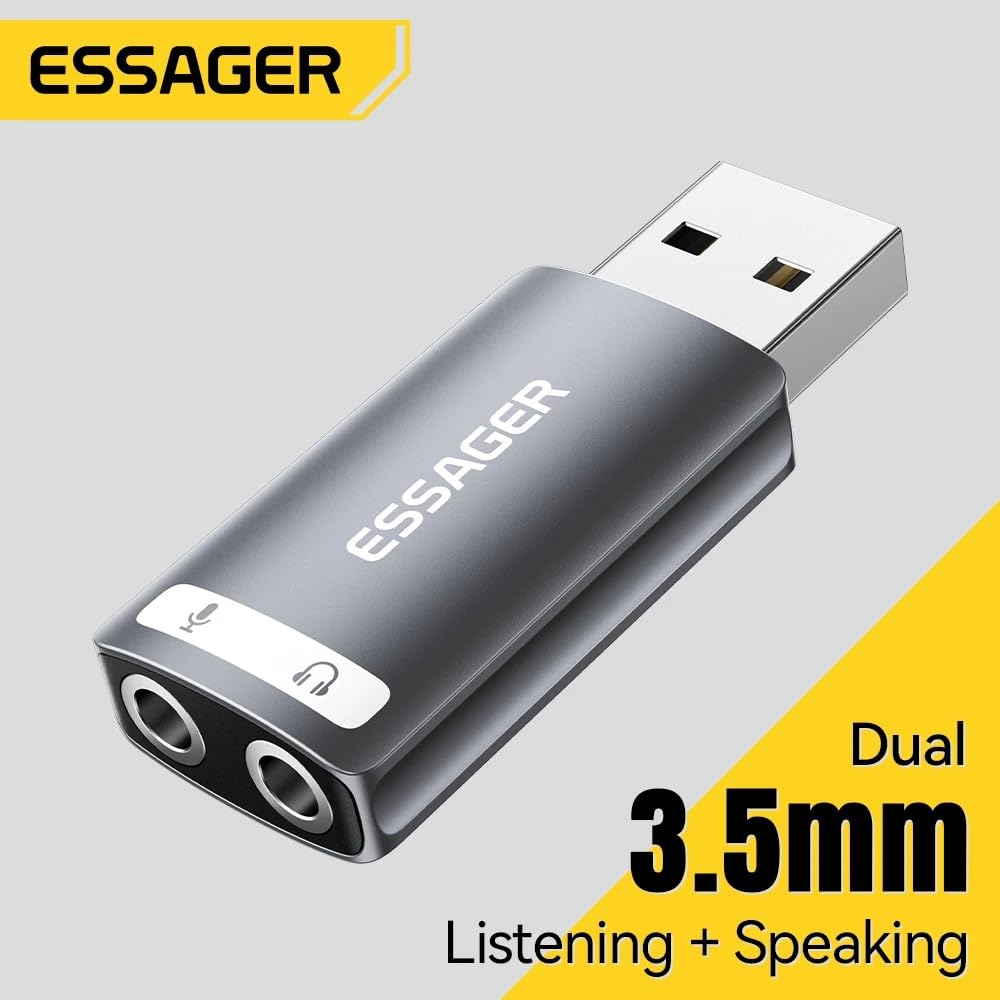
Image 2.2: The ESSAGER USB audio adapter, illustrating its dual functionality for listening and speaking.
3. Kurulum Talimatları
Setting up the ESSAGER USB Audio Adapter is a straightforward plug-and-play process.
- USB Portuna Bağlan: Insert the USB-A connector of the adapter into an available USB port on your computer (PC, Mac, Linux), PlayStation 4/5, or Nintendo Switch.
- Sistem Tanıma: Your operating system will automatically detect and install the necessary drivers. No manual driver installation is required.
- Ses Cihazlarını Bağlayın:
- For headphones or speakers, plug the 3.5mm audio jack into the port marked with the headphone icon.
- For a microphone, plug the 3.5mm audio jack into the port marked with the microphone icon.
- Select Audio Device (if necessary): In some operating systems (e.g., Windows, macOS), you may need to manually select the "USB Audio Device" or similar as your default playback and recording device in the sound settings.
Önemli Not:
This USB audio adapter is not compatible with the USB ports of TVs, amplifiers, CD players, cars, or trucks. Ensure your device is a compatible computer or gaming console as listed above.

Image 3.1: The ESSAGER USB audio adapter connected to a laptop, demonstrating a typical setup.

Image 3.2: Compatibility chart for the ESSAGER USB audio adapter, showing supported USB devices, audio devices, and operating systems.
4. Kullanım Talimatları
Once connected and recognized by your device, the ESSAGER USB Audio Adapter functions as your primary sound input and output device.
- Ses Oynatma: Any audio played on your device will be routed through the headphone/speaker jack. Adjust volume using your device's system controls.
- Mikrofon Girişi: Audio captured by a connected microphone will be processed through the adapter. Ensure the microphone is selected as the input device in your application settings (e.g., communication software, game settings).
- Gelişmiş Ses: The built-in external sound card is designed to bypass your device's internal audio, providing clearer sound and improved fidelity for both playback and recording.

Image 4.1: Illustration of the advanced audio processing chip, responsible for high-fidelity audio reproduction.
5. Bakım
The ESSAGER USB Audio Adapter is designed for durability and requires minimal maintenance.
- Temizlik: Use a soft, dry cloth to wipe the adapter. Avoid liquid cleaners or abrasive materials.
- Depolamak: Adaptörü kullanılmadığı zamanlarda serin ve kuru bir yerde saklayın.
- İşleme: Avoid dropping the adapter or exposing it to extreme temperatures or moisture. The aluminum alloy casing provides protection, but proper handling extends its lifespan.

Image 5.1: The ESSAGER USB audio adapter, showcasing its full aluminum alloy shell and durable metal connector.
6. Sorun Giderme
If you encounter issues with your ESSAGER USB Audio Adapter, consider the following troubleshooting steps:
- No Sound Output/Input:
- Adaptörün USB portuna tam olarak takıldığından emin olun.
- Verify that your headphones/speakers and microphone are correctly plugged into the respective jacks on the adapter.
- Check your device's sound settings (e.g., Windows Sound Control Panel, macOS System Preferences > Sound) and ensure the "USB Audio Device" is selected as the default playback and recording device.
- Test with another pair of headphones/microphone to rule out faulty audio peripherals.
- Adaptör Tanınmadı:
- Adaptörü cihazınızdaki farklı bir USB bağlantı noktasına takmayı deneyin.
- Bilgisayarınızı veya oyun konsolunuzu yeniden başlatın.
- Confirm your device is compatible (PC, Mac, PS4/PS5, Switch). Remember, it is not compatible with TVs, amplifiers, cars, etc.
- Ses Kalitesi Düşük/Parazit:
- Tüm bağlantıların güvenli olduğundan emin olun.
- Avoid placing the adapter near sources of electromagnetic interference.
- Farklı seslerle test edin files or applications to determine if the issue is specific to certain content.

Image 6.1: Common audio challenges that the ESSAGER USB External Sound Card is designed to resolve.
7. Özellikler
| Özellik | Detay |
|---|---|
| Marka | ÖĞRETİCİ |
| Model Adı | usb a to 3.5mm |
| Model Numarası | EZJ2K-YY0G-P |
| Donanım Arayüzü | USB |
| Ses Çıkışı Modu | Stereo |
| Uyumlu Cihazlar | Personal Computer, Laptop, Desktop, PS4/PS5, Nintendo Switch |
| Platform Uyumluluğu | Linux, Windows, Mac OS, Android |
| Maksimum Sample Oranı | 48 KHz |
| Ürün Boyutları (U x G x Y) | 30L x 19W x 50H Millimeters |
| Ürün Ağırlığı | 0.1 Gram |
| Kutu İçeriği | USB Sound Card only |
8. Garanti ve Destek
Garanti Bilgileri:
This product comes with a 6-month warranty. Please note that the warranty is void if there is no original packaging or if any kind of damage occurs to the product.
Destek İletişim:
For any support inquiries or assistance, please contact:
MRJ ELECTRONICS AHMEDABAD
İletişim: 9023265213