
1. Giriş
The TONGVEO 20X Optical Zoom NDI AI Auto Tracking PTZ Camera (Model: NV620A-NDI-US) is a versatile live streaming camera designed for professional video production in various environments such as churches, conference rooms, events, and weddings. It features advanced AI auto-tracking, 20X optical zoom, and multiple output options including HDMI, SDI, USB 3.0, and IP streaming with NDI technology for ultra-low latency and high-quality video.

Figure 1: TONGVEO 20X Optical Zoom NDI AI Auto Tracking PTZ Camera.
2. Kutuda Neler Var?
Aşağıda listelenen tüm öğelerin paketinizde bulunduğunu doğrulayın:
- 1 x PTZ Kamera
- 1 x IR Uzaktan Kumanda
- 1 x 9.8ft USB 3.0 Cable
- 1 x DC 12V/2A Güç Adaptörü
- 1 x Wall Bracket with Screws
- 1 x Kullanım Kılavuzu

Video 1: Kutudan çıkarma ve sonrasıview of the TONGVEO PTZ Camera, showing included accessories.
3. Ürün Bittiview
3.1 Temel Özellikler
- Yapay Zeka Otomatik Takip: Three modes available: Presenter Tracking, Zone Tracking, and Hybrid Tracking for intelligent subject tracking.
- 20X Optik Zoom: High-quality optical zoom lens for capturing details from a distance.
- Çok Yönlü Çıkışlar: HDMI, SDI, USB 3.0, and IP streaming (NDI) for broad compatibility.
- NDI Technology: Ultra-low latency 1080P 60fps video for professional broadcasting, NDI license included.
- Ethernet Üzerinden Güç (PoE): Simplifies installation and reduces cable clutter.
- Web Arayüz: Dahili web interface for easy configuration and control.
- Kontrol Seçenekleri: Supports Visca over IP, OBS plugins, and dedicated physical controllers.
- Dayanıklı Tasarım: Compact build with smooth preset switching and fast auto-focus.

Şekil 2: Üzeriview of the TONGVEO PTZ Camera's main features including 20X Optical Zoom, Audio Line in/out, PoE, 1080P 60FPS, AI Humanoid Auto-Tracking, 2D&3D Digital Noise Reduction, 4 Video Outputs, IP/NDI Live streaming, and 65° FOV.
3.2 Camera Components and Interfaces
The camera features a robust set of input and output ports for various professional setups.

Figure 3: Detailed diagram of the PTZ Camera's rear interface, showing Audio Line In/Out, LAN (PoE), HDMI, 3G-SDI, USB 3.0, RS485/232, and power input.
- HAT GİRİŞİ/HAT ÇIKIŞI: 3.5mm audio input/output for external audio devices.
- LAN (RJ45): Ethernet port for IP control, NDI streaming, and Power over Ethernet (PoE).
- HDMI: High-definition video output for display monitors.
- 3G-SDI: Professional video output for long-distance transmission.
- USB 3.0: Connects to a computer for video output and control.
- RS485/RS232: Control ports for external PTZ controllers.
- DC 12V/2A: Kamera için güç girişi.
4. Kurulum
4.1 İlk Çalıştırma ve Bağlantı
- Kamerayı ve aksesuarlarını ambalajından çıkarın.
- Lens kapağını çıkarın.
- Connect the DC 12V/2A power adapter to the camera's power input and plug it into a power outlet.
- Flip the power switch on the rear of the camera to the 'ON' position. The camera will perform an initial self-test, moving its head to various positions before settling.
- Connect the USB 3.0 cable from the camera to your computer for direct video feed, or connect an HDMI/SDI cable to a monitor/switcher.
- For network control and NDI streaming, connect an Ethernet cable from the camera's LAN port to your network switch.
Video 2: Demonstrates the physical setup and connection of the TONGVEO PTZ Camera, including power, USB, and HDMI connections.
4.2 Montaj Seçenekleri
The camera can be placed on a table, mounted to a wall, or ceiling using the provided wall bracket and screws. Ensure the mounting surface is stable and can support the camera's weight.
5. Kullanım Talimatları
5.1 Uzaktan Kumanda İşlevleri
The included IR remote control allows for comprehensive camera operation:
- Güç Düğmesi: Kamerayı açar/kapatır.
- PTZ Sıfırlama: Kamerayı başlangıçtaki konumuna geri döndürür.
- Camera Select: Selects which camera to control (up to 4 cameras).
- Ön Ayar Düğmeleri (0-9): Saves and recalls up to 9 preset positions.
- Yön Tuşu: Pan ve tilt hareketlerini kontrol eder.
- Yakınlaştırma Düğmeleri: Adjusts optical zoom (slow/fast).
- Focus Buttons: Auto, Manual (Near/Far).
- AI Key: Activates AI auto-tracking modes.
- Menü Düğmesi: Accesses the On-Screen Display (OSD) menu for advanced settings.

Figure 4: Layout of the remote control with descriptions of key functions for camera operation.
5.2 Yapay Zeka Otomatik Takip
The camera features advanced AI auto-tracking with three distinct modes:
- Sunucu Takibi: Ideal for single subjects, keeping the speaker in frame as they move.
- Bölge Takibi: Defines specific areas for tracking, useful for classrooms or stagee.
- Hybrid Tracking: Combines elements of presenter and zone tracking for flexible scenarios.
Activate AI tracking using the dedicated AI button on the remote or through the web arayüz.

Figure 5: The camera demonstrating AI Humanoid Tracking, keeping a person in frame as they move.

Video 3: A demonstration of the TONGVEO PTZ Camera's AI auto-tracking capabilities in a classroom setting.
5.3 NDI Streaming Setup
To utilize NDI streaming, follow these steps:
- Connect the PTZ camera to your local network (LAN) via an Ethernet cable.
- Kameraya erişim web interface (see Section 5.4) and enable NDI mode in the network settings.
- Use NDI Tools (e.g., NDI Studio Monitor) on your computer to discover and select the camera's NDI name.
- Integrate the NDI feed into your preferred streaming software (e.g., OBS, vMix).
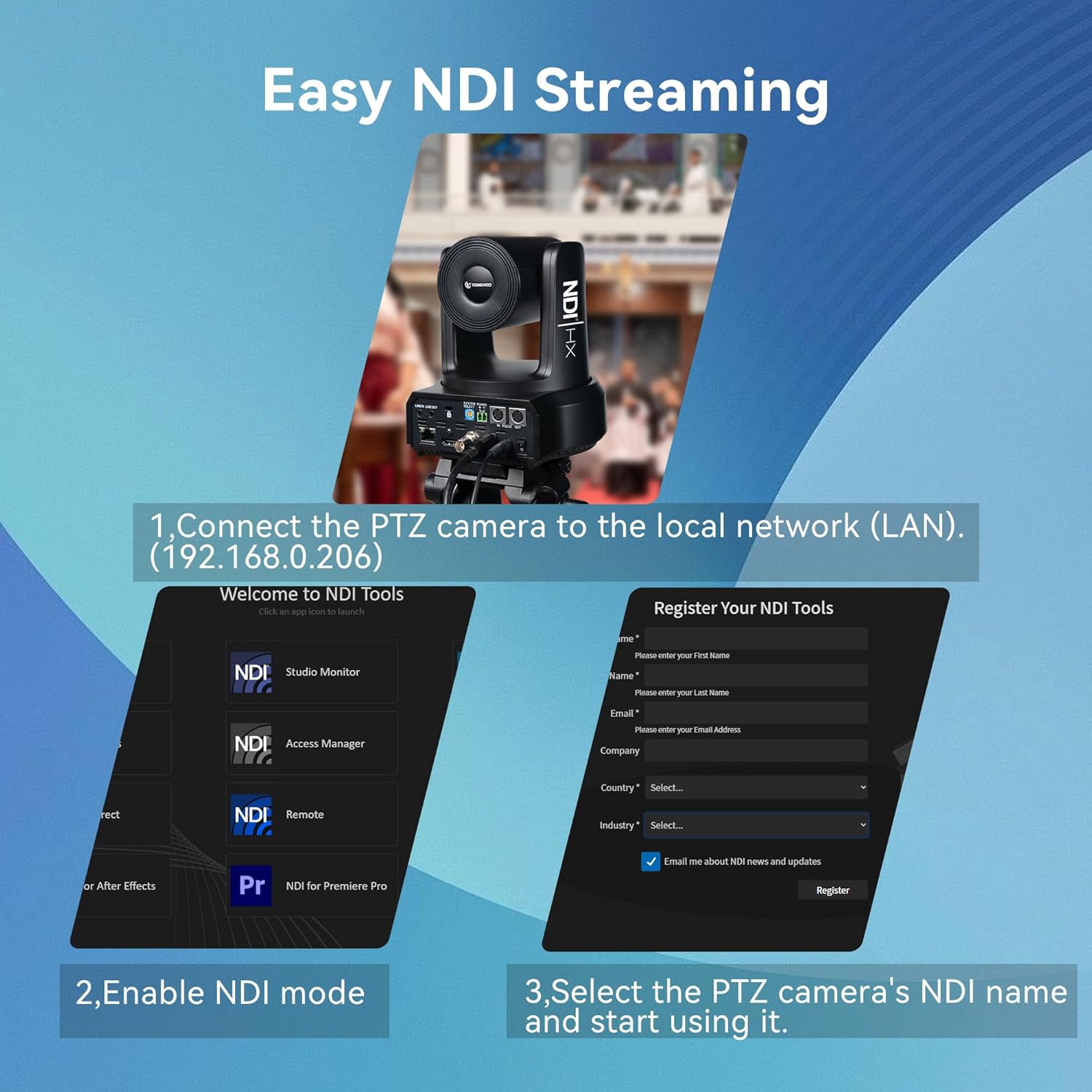
Figure 6: Visual guide for setting up NDI streaming, showing network connection and NDI Tools interface.
5.4 Web arayüz Yapılandırma
The camera features a built-in web interface for comprehensive control and configuration:
- Connect the camera to your network and obtain its IP address (usually found on a sticker at the bottom of the camera or via NDI Tools).
- Bir tane aç web tarayıcınıza gidin ve kameranın IP adresini girin.
- Log in using the default credentials (typically admin/admin, refer to the manual for specifics).
- Şuradan: web interface, you can adjust image settings (exposure, color, display), PTZ controls, communication setup, tracking modes, and network settings.

Video 4: A detailed walkthrough of the TONGVEO PTZ Camera's web interface, demonstrating various settings and controls.
6. Bakım
6.1 Temizlik
- Kamera gövdesini temizlemek için yumuşak ve kuru bir bez kullanın.
- For the lens, use a lens cleaning cloth and specialized lens cleaning solution.
- Sert kimyasallar veya aşındırıcı malzemeler kullanmaktan kaçının.
6.2 Firmware Güncellemesi
Regular firmware updates are released to improve performance and add new features. Check the TONGVEO official website for the latest firmware and instructions on how to update your camera.
7. Sorun Giderme
- Güç Yok: Ensure the power adapter is securely connected and the power switch is on. If using PoE, verify the Ethernet cable is properly connected to a PoE-enabled switch or injector.
- Video Çıkışı Yok: Check all cable connections (HDMI, SDI, USB, Ethernet). Verify the correct input source is selected on your display or switcher.
- Otomatik Takip Sorunları: Ensure the AI tracking mode is correctly selected (Presenter, Zone, Hybrid) via the remote or web interface. Ensure the subject is clearly visible and not obscured.
- Görüntü Kalitesi Sorunları: Adjust lighting conditions. Use the web interface to fine-tune exposure, color, and image settings. Ensure the lens is clean.
- Uzaktan Kumanda Yanıt Vermiyor: Check battery levels in the remote. Ensure there are no obstructions between the remote and the camera's IR receiver.
8. Özellikler
| Özellik | Detay |
|---|---|
| Marka | TONGVEO |
| Model Numarası | NV620A-NDI-US |
| Sensör | 1/2.8" CMOS, 2.07MP |
| Optik Yakınlaştırma | 20X |
| Video Resolution (Main Stream) | 1920x1080p @ 60 fps |
| Video Çıkışları | USB 3.0, HDMI, SDI, RJ45 (IP/NDI) |
| Yatay Dönüş | 350° (±175°) |
| Dikey Dönüş | 180° (±90°) |
| Güç Kaynağı | DC 12V/2A or PoE (802.3af) |
| Güç Tüketimi | 18W |
| Ürün Boyutları | 7 x 7 x 6.6 inç |
| Ürün Ağırlığı | 5.5 pound |
9. Garanti ve Destek
TONGVEO is committed to providing high-quality products and customer satisfaction. For warranty information, technical support, or service inquiries, please refer to the contact details provided in the product packaging or visit the official TONGVEO webalan.
Regular firmware updates and dedicated customer support ensure a hassle-free experience with your TONGVEO PTZ camera.