
1. Giriş
This manual provides detailed instructions for the ATTACK SHARK X68 HE 60% Gaming Keyboard. Designed for high-performance gaming, this keyboard features magnetic switches, rapid trigger technology, and extensive customization options. Please read this manual thoroughly to ensure proper use and to maximize your gaming experience.

Resim 1.1: Üzeriview of the ATTACK SHARK X68 HE keyboard showcasing its magnetic switches, 0.01mm RT accuracy, adjustable actuation point, 0.125ms latency, Snap Tap, RGB lighting, and PC/Mac compatibility.
2. Ürün Özellikleri
- Magnetic Switches (Hall Effect Technology): Provides precise and consistent key presses with high durability.
- 8000Hz Sorgulama Oranı: Delivers an ultra-fast 0.125ms response time for competitive gaming.
- 0.01mm Rapid Trigger (RT) Accuracy: Allows for instant key reset and re-press, enhancing responsiveness.
- Ayarlanabilir Çalıştırma Noktası: Customize the key press distance from 0.1mm to 3.4mm to suit your playstyle.
- Snap Tap and Dynamic Keystroke: Advanced features for precise control and rapid input.
- Tam RGB Aydınlatma: Over 20 preset light effects with customizable colors and patterns.
- Web Sürücü Yazılımı: Comprehensive customization available via a web-based driver, compatible with Windows and Mac.
- Dayanıklı Yapı: Features PBT keycaps, an aluminum alloy plate, and PORON foam for enhanced sound and feel.
- Kompakt %60 Düzeni: Space-saving design without compromising essential gaming functions.

Image 2.1: Detail showing the 8000Hz polling rate, providing a 0.125ms response time for faster performance.
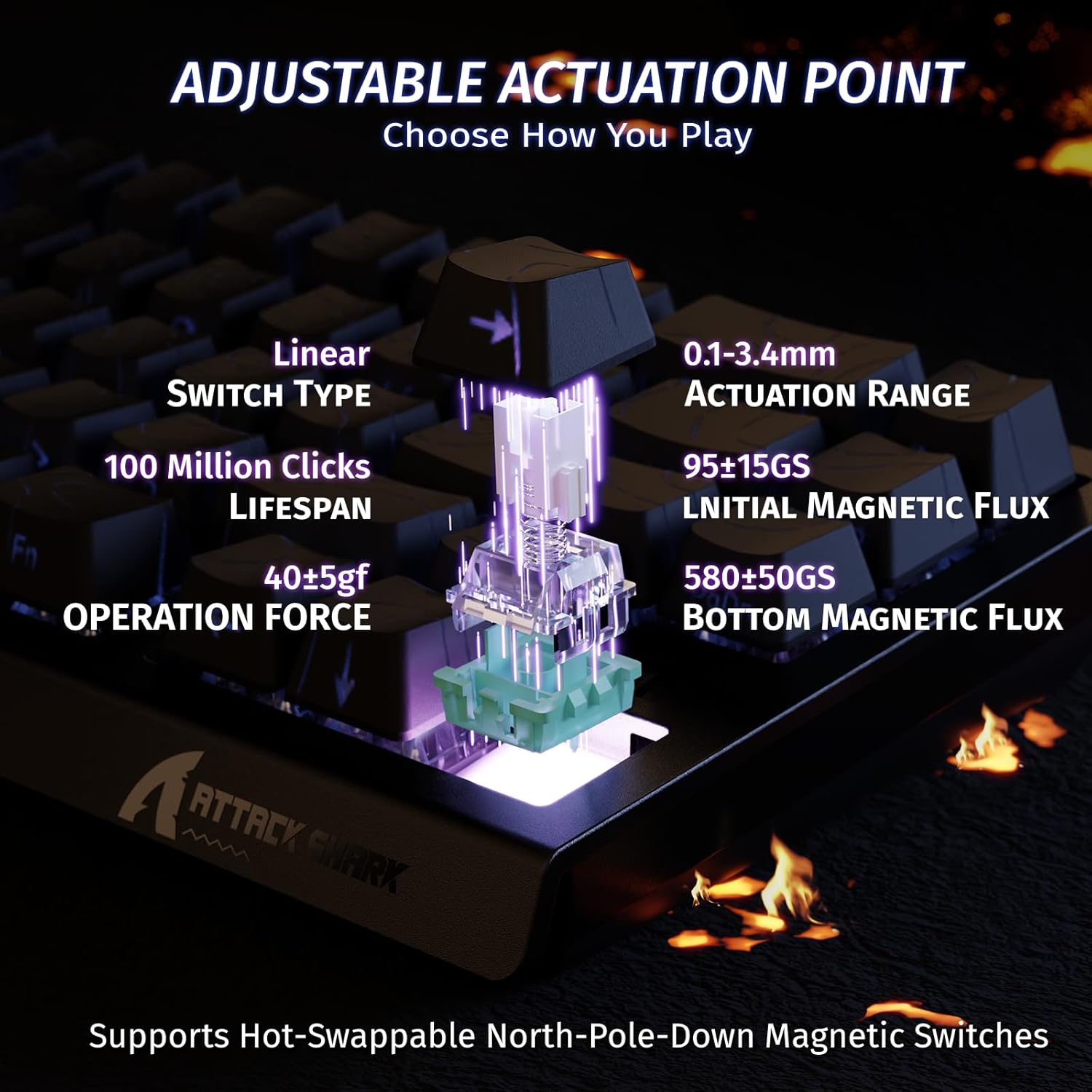
Image 2.2: Visual representation of the adjustable actuation point, allowing users to set the key press distance between 0.1mm and 3.4mm.

Image 2.3: The keyboard illuminated with full RGB light effects, demonstrating the variety of 20+ preset lighting options.

Image 2.4: An exploded diagram of the X68 HE keyboard, showing its internal layers including PBT keycaps, top case, aluminum alloy plate, PCB, PORON foam, ATTACK SHARK magnetic switches, and bottom case.
3. Kurulum
3.1 Klavyenin Bağlanması
- Klavyenin arka tarafında bulunan USB-C bağlantı noktasını bulun.
- Kutuda bulunan USB-C kablosunu klavyeye bağlayın.
- Plug the other end of the USB-C cable into an available USB port on your computer (PC or Mac).
- Klavye işletim sisteminiz tarafından otomatik olarak tanınacaktır.
3.2 Sistem Uyumluluğu
The ATTACK SHARK X68 HE keyboard is compatible with Windows and Mac operating systems. No additional drivers are required for basic functionality, but the web driver is recommended for full customization.
4. Kullanım Talimatları
4.1 Temel Tuş Fonksiyonları
The keyboard features a standard QWERTY layout with 61 keys. All keys function as labeled. For secondary functions (e.g., F-keys, media controls), use the Fn key in combination with the corresponding key.
4.2 RGB Aydınlatma Kontrolü
The keyboard offers various RGB lighting effects. Use the following key combinations to adjust:
- fn + ↑Arka Aydınlatma Parlaklığını Artırın
- fn + ↓Arka Aydınlatma Parlaklığını Azalt
- fn + ←Arka Aydınlatma Hızını Azalt
- + →Arka Aydınlatma Hızını Artırın
- Fn + Alt: Işık Modunu Değiştir
- Fn + Enter: Işık Rengini Değiştir
- Fn + Geri tuşuIşığı Aç/Kapat

Image 4.1: Detail of the pattern shine-through keycaps with side-printed characters, aiding in visibility of secondary functions.
4.3 Web Sürücü Özelleştirme
For advanced customization, including adjusting actuation points, setting Rapid Trigger sensitivity, configuring Snap Tap, and creating macros, use the ATTACK SHARK web driver. Access the web driver through your internet browser. The web driver allows for:
- Key remapping and combination settings.
- Macro creation and management.
- Dynamic Keystroke (DKS) settings.
- Adjusting Trigger Sensitivity Level (TGL).
- Snap Tap configuration.
- Zero Deadzone settings.
- Bellenim güncellemeleri.

Image 4.2: Screenshot of the web driver interface, demonstrating options for key settings, stroke settings, shaft settings, and advanced settings for comprehensive customization.

Image 4.3: Illustration of 0.01mm RT accuracy and 128kHz scan rate, showing the advantage of Rapid Trigger over regular switches in games like Valorant, CSGO, APEX, and osu!.
5. Bakım
5.1 Klavyeyi Temizleme
- Temizlemeden önce klavyeyi bilgisayarınızdan ayırın.
- Tuş başlıklarını ve kasayı silmek için yumuşak, kuru bir bez kullanın.
- İnatçı kirler için, hafifçeamp Klavyeye sıvı girmemesine dikkat edilerek, hafif sabunlu bir bez kullanılabilir.
- Tuş başlıkları arasındaki toz ve kalıntıları temizlemek için basınçlı hava kullanın.
5.2 Genel Bakım
- Klavyeyi aşırı sıcaklıklara, doğrudan güneş ışığına veya yüksek neme maruz bırakmaktan kaçının.
- Klavyeye sıvı dökmeyin. Sıvı dökülmesi durumunda, hemen çıkarın ve tekrar takmadan önce tamamen kurumasını bekleyin.
- Klavyeyi düşürmekten veya sert darbelere maruz bırakmaktan kaçının.
6. Sorun Giderme
If you encounter any issues with your ATTACK SHARK X68 HE keyboard, please refer to the following common solutions:
- Klavye yanıt vermiyor: USB-C kablosunun hem klavyeye hem de bilgisayarınıza güvenli bir şekilde bağlı olduğundan emin olun. Farklı bir USB bağlantı noktası veya kablo deneyin.
- RGB aydınlatma çalışmıyor: Check the lighting control key combinations (Fn + Backspace to toggle, Fn + Alt to change mode). Ensure the web driver settings haven't disabled lighting.
- Tuşlar doğru şekilde kaydedilmiyor: Ensure the keyboard is clean and free of debris. If using the web driver, check actuation point settings and perform calibration if available.
- Software/Web Sürücü sorunları: Ensure your internet connection is stable when accessing the web driver. Try clearing your browser cache or using a different browser. Check the ATTACK SHARK official website for any announcements or updated web driver links.
- Beklenmedik davranış: Disconnect and reconnect the keyboard. If the issue persists, a factory reset (if available via web driver) might be necessary.
7. Özellikler
| Özellik | Detay |
|---|---|
| Marka | SALDIRI KÖPEKBALIĞI |
| Model Numarası | X68 HE |
| Bağlantı Teknolojisi | USB-C (Kablolu) |
| Klavye Açıklaması | Oyun |
| Önerilen Kullanımlar | Daily Use, Gaming, Programming, Business |
| Anahtar Anahtar Türü | Linear Magnetic Switches |
| Harekete Geçme Noktası | Ayarlanabilir (0.1 mm - 3.4 mm) |
| Hızlı Tetikleme Doğruluğu | 0.01mm |
| Tarama Hızı | 128 kHz |
| Anket Oranı | 8000 Hz |
| RGB Arka Aydınlatma | Yes (20+ preset effects) |
| Dil | English (QWERTY Layout) |
| Anahtar Sayısı | 61 |
| Uyumlu İşletim Sistemi | Windows, Mac |
| Malzeme | Polybutylene Terephthalate (PBT Keycaps) |
| UPC | 752010391158 |
8. Garanti ve Destek
8.1 Garanti Bilgileri
This product comes with an Importer Guaranteed warranty. Please retain your proof of purchase for any warranty claims. For specific warranty terms and conditions, refer to the documentation provided at the time of purchase or contact your retailer.
8.2 Teknik Destek
For technical assistance, software updates, or advanced customization, please visit the official ATTACK SHARK website and access their web driver or support resources. The web driver includes integrated memory for saving your settings.