
giriiş
This manual provides instructions for setting up and using your ECONTROLLY BN59-01385B Voice Remote Control. This replacement remote is designed to be compatible with various Samsung Smart TV models, offering voice control functionality and direct access buttons for popular streaming services.

Ön view of the ECONTROLLY BN59-01385B Voice Remote Control.
Kurulum Kılavuzu
1. Pillerin Takılması
The remote control requires two AAA alkaline batteries (not included).
- Uzaktan kumandanın arkasındaki pil bölmesi kapağını açın.
- İki adet AAA pil takın ve pozitif (+) ve negatif (-) kutupların bölmenin içindeki göstergelerle doğru şekilde hizalandığından emin olun.
- Pil bölmesi kapağını sıkıca kapatın.
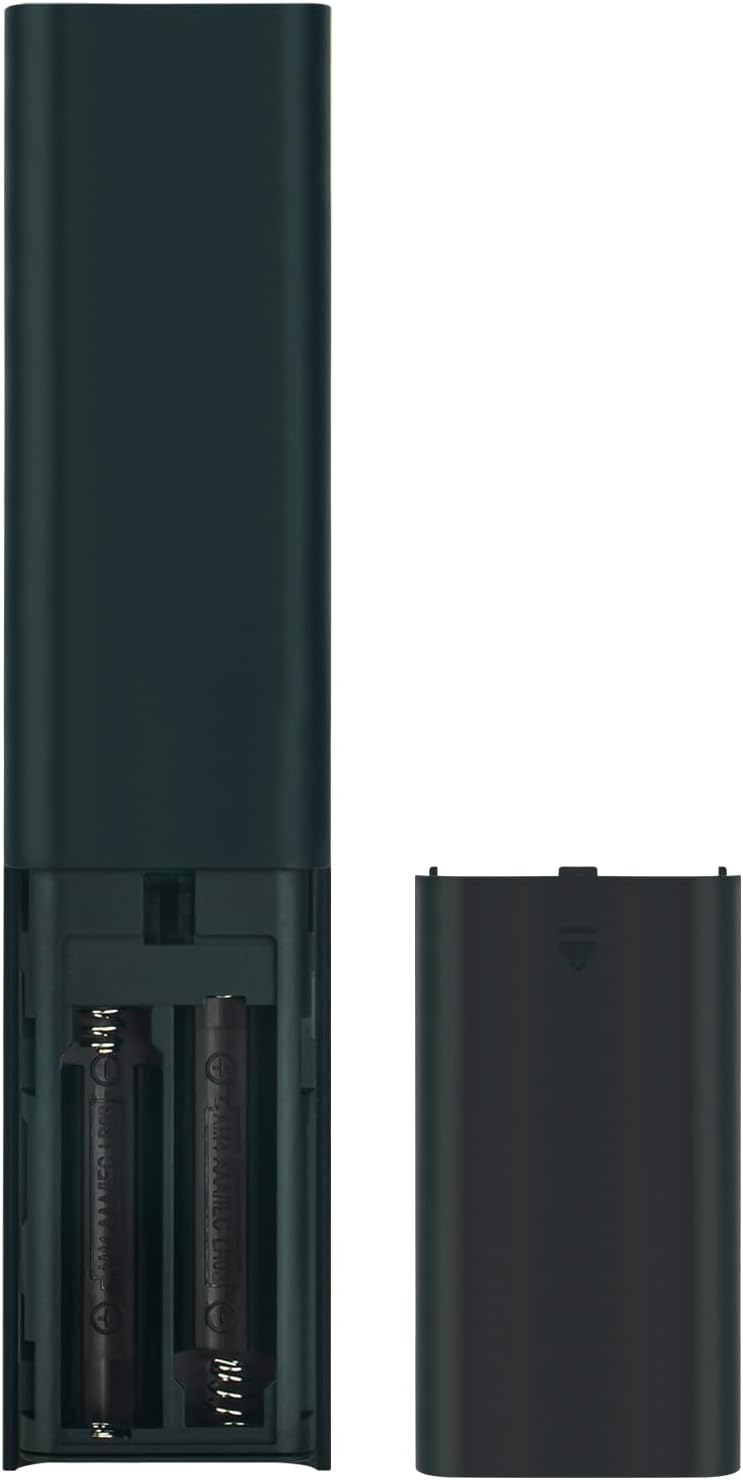
Image showing the battery compartment for AAA batteries.
2. Pairing the Remote Control with Your TV
This remote control uses Bluetooth connectivity and requires pairing with your Samsung TV before use. Follow these steps to pair:
- Samsung TV'nizin açık olduğundan emin olun.
- Point the remote control towards your TV.
- Aynı anda basılı tutun Geri dönmek düğme (kavisli ok) ve Oynat/Duraklat düğmesini 3 saniye veya daha fazla basılı tutun.
- Başarılı eşleştirmeyi gösteren bir mesaj televizyon ekranınızda görünmelidir.
If pairing is unsuccessful, ensure the batteries are correctly installed and try again. Move closer to the TV if necessary.
Kullanım Talimatları
The ECONTROLLY BN59-01385B remote control provides intuitive navigation and voice command capabilities.
Temel Fonksiyonlar:
- Güç Düğmesi: Located at the top right, typically marked with a circle and a vertical line. Turns the TV on or off.
- Ses Kontrol Düğmesi (
 ): Located near the top, marked with a microphone icon. Press and hold to activate voice commands for searching content, changing settings, or controlling smart home devices.
 - Navigation Pad (Directional Buttons & Enter): The large circular pad in the center. Use to navigate menus and select items.
- Geri Dönüş Düğmesi: Located below the navigation pad, marked with a curved arrow. Returns to the previous screen or menu.
- Ana Sayfa Düğmesi: Located below the navigation pad, marked with a house icon. Accesses the Smart Hub or home screen.
- Oynat/Duraklat Düğmesi: Located below the navigation pad, marked with a play/pause icon. Controls media playback.
- Sesi Açma/Azaltma Düğmeleri (+/-): Adjusts the TV volume.
- Kanal Yukarı/Aşağı Düğmeleri (up/down arrows): Changes TV channels.
- Hızlı Erişim Düğmeleri: Dedicated buttons for Netflix, Samsung TV Plus, Prime Video, and Disney+ for direct app launch.
The microphone button activates voice control for your Samsung TV.
Bakım ve Özen
- Keep the remote control dry. Moisture can damage the internal circuits.
- Avoid exposing the remote to extreme temperatures.
- Kumandayı yumuşak, kuru bir bezle temizleyin. Aşındırıcı temizleyiciler veya çözücüler kullanmayın.
- Uzaktan kumandayı uzun süre kullanmayacaksanız, pil sızıntısını önlemek için pilleri çıkarın.
- Handle the remote with care to prevent drops or impacts.
Sorun giderme
| Sorun | Çözüm |
|---|---|
| Uzaktan bağlantı yanıt vermiyor. |
|
| Sesli kontrol çalışmıyor. |
|
| Tuşlar yapışkan veya tepkisiz. |
|
Özellikler
- Model Numarası: PT-BN59-01385B
- Marka: EKONTROLLÜ
- Bağlantı: Bluetooth
- Denetleyici Tipi: Ses Kontrolü
- Özel Özellikler: Voice Search, Quick Access Buttons
- Uyumlu Cihazlar: Samsung Televizyonları
- Güç Kaynağı: 2 adet AAA alkalin pil (dahil değildir)
- Maksimum Menzil: 10 metre (33 fit)
- Malzeme: ABS
- Renk: Siyah
- Boyutlar (U x G): Approximately 16.1 cm (6.33 in) x 3.5 cm (1.37 in)
- Ağırlık: Yaklaşık 2 Ons (56.7 gram)

Physical dimensions of the remote control.
Uyumlu TV Modelleri
This remote control is compatible with various Samsung Smart TV models, including but not limited to:
- QN85B Serisi: QA55QN85BA, QA65QN85BA, QA75QN85BA, QA85QN85BA, QA65QN85BAW, QA75QN85BAW, QA85QN85BAW, QA55QN85BAWXXY, QA65QN85BAWXXY, QA75QN85BAWXXY
- Q60B Series: QA55Q60BA, QA65Q60BA, QA75Q60BA, QA85Q60BA, QA55Q60BAW, QA65Q60BAW, QA75Q60BAW, QA85Q60BAW, QA55Q60BAWXXY, QA65Q60BAWXXY, QA75Q60BAWXXY, QA85Q60BAWXXY
- Q70B Series: QA55Q70BA, QA65Q70BA, QA75Q70BA, QA85Q70BA, QA55Q70BAW, QA65Q70BAW, QA75Q70BAW, QA85Q70BAW, QA55Q70BAWXXY, QA65Q70BAWXXY, QA75Q70BAWXXY, QA85Q70BAWXXY
- Q80B Series: QA55Q80BA, QA65Q80BA, QA75Q80BA, QA85Q80BA, QA55Q80BAW, QA65Q80BAW, QA75Q80BAW, QA85Q80BAW, QA55Q80BAWXXY, QA65Q80BAWXXY, QA75Q80BAWXXY, QA85Q80BAWXXY
- QN90B Serisi: QA43QN90BA, QA50QN90BA, QA55QN90BA, QA65QN90BA, QA75QN90BA, QA85QN90BA, QA43QN90BAW, QA50QN90BAW, QA55QN90BAW, QA65QN90BAW, QA75QN90BAW, QA85QN90BAW, QA43QN90BAWXXY, QA50QN90BAWXXY, QA55QN90BAWXXY
This list is not exhaustive. If your TV model is not listed, please refer to your TV's user manual or contact ECONTROLLY support for compatibility information.

Visual comparison of the replacement remote with an original remote.
Destek ve İletişim
For further assistance or inquiries, please refer to the product listing on Amazon or contact ECONTROLLY customer support.