
HETP HX160Q2
HETP Wireless Power Bank User Manual
Model: HX160Q2
giriiş
Thank you for choosing the HETP Wireless Power Bank. This 40800mAh portable charger is designed to provide versatile and efficient power for your electronic devices. Featuring 7-in-1 charging capabilities, including built-in cables, multiple output ports, and wireless charging, it ensures your devices remain powered on the go. Please read this manual carefully before use to ensure proper operation and maintenance.

Resim: Ön view of the HETP Wireless Power Bank, displaying its LCD screen with 100% charge and the wireless charging pad. The side shows the built-in cables.
Ürün Özellikleri
- Yüksek Kapasite: 40800mAh premium Li-polymer battery for multiple device charges.
- 7'ü 1 arada Şarj: Simultaneously charge up to 7 devices.
- Dahili Kablolar: Includes iOS, USB-C, and Micro USB cables for convenience.
- Çoklu Çıkış Bağlantı Noktaları: Two USB-A ports and one USB-C port.
- Kablosuz Şarj: 15W wireless charging compatible with all wireless-enabled devices.
- Hızlı Şarj: 25W PD 3.0 and QC 4.0 fast charging technology.
- LCD Ekran: Clear digital display showing battery percentage.
- Güvenlik Özellikleri: Multi-security protection for safe charging.

Image: Diagram illustrating the wide compatibility of the power bank with various electronic devices, including smartphones, tablets, smartwatches, and earbuds.
Paket İçeriği
- 1 x HETP Wireless Portable Charger Power Bank (40800mAh)
- 1 x Product Instruction Manual (this document)
Güvenlik Önlemleri
- Powerbank'i aşırı sıcaklıklara (sıcak veya soğuk), doğrudan güneş ışığına veya ateşe maruz bırakmayın.
- Cihazı kendiniz sökmeyin, değiştirmeyin veya tamir etmeyin.
- Su ve diğer sıvılardan uzak tutunuz.
- Güç bankasını düşürmekten veya güçlü darbelere maruz bırakmaktan kaçının.
- Kullanmadığınız zaman serin ve kuru bir yerde saklayınız.
- Çocukların erişemeyeceği yerde saklayınız.
Kurulum ve İlk Kullanım
Power Bank'ı Şarj Etme
Before first use, fully charge the power bank. The LCD display will show the charging progress and battery percentage.
- Dahili USB-C Kablosunu Kullanma: Connect the built-in USB-C cable from the power bank to a USB wall adapter (not included).
- USB-C Giriş Portunu Kullanma: Connect a USB-C cable (not included) from a USB wall adapter to the USB-C input port on the power bank.
The LCD screen will illuminate and display the charging percentage. Once it reaches 100%, the power bank is fully charged.

Image: Illustration demonstrating two methods to recharge the power bank: via its integrated USB-C cable or by connecting an external USB-C cable to the dedicated input port.
Kullanım Talimatları
Şarj Cihazları
The HETP Wireless Power Bank offers multiple ways to charge your devices simultaneously.
1. Wired Charging (Using Built-in Cables)
- Pull out the appropriate built-in cable (iOS, USB-C, or Micro USB) from its slot.
- Kabloyu cihazınızın şarj portuna bağlayın.
- The power bank will automatically begin charging your device. The LCD display will show "OUT" indicating output.
2. Wired Charging (Using Output Ports)
- Use your device's original charging cable or a compatible cable.
- Connect one end of the cable to one of the power bank's output ports (USB-A1, USB-A2, or USB-C).
- Diğer ucunu cihazınıza bağlayın.
- Şarj işlemi otomatik olarak başlayacaktır.
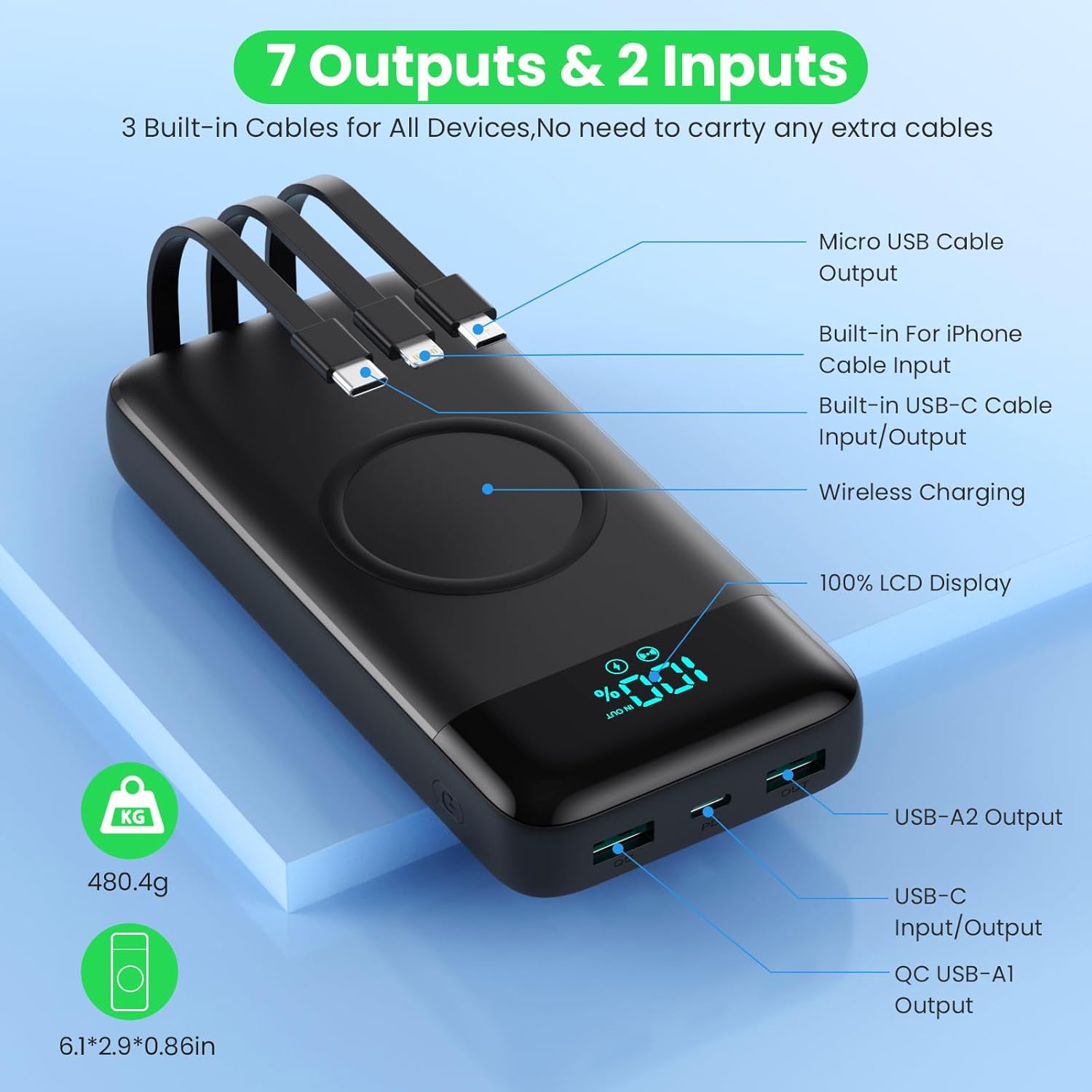
Image: Detailed diagram highlighting all 7 output options (3 built-in cables, 3 USB ports, 1 wireless) and 2 input options (built-in USB-C cable, USB-C port) on the power bank, along with the LCD display.
3. Kablosuz Şarj
- Cihazınızın kablosuz şarj özelliğini desteklediğinden emin olun.
- Place your wireless-enabled device directly onto the wireless charging pad located on the top surface of the power bank.
- Align the device centrally on the pad for optimal charging.
- The power bank will automatically detect and begin wireless charging.

Image: A smartphone being wirelessly charged on the power bank, illustrating the fast wireless charging feature and supported wattagee.
Eşzamanlı Şarj
The HETP Wireless Power Bank is designed to charge multiple devices concurrently using a combination of its built-in cables, output ports, and wireless charging pad.

Resim: Bir üstten görünüm view showing the power bank simultaneously charging a tablet, multiple smartphones, and a smartwatch using its various charging methods.
Bakım
- Temizlik: Use a soft, dry cloth to clean the surface of the power bank. Do not use abrasive cleaners or solvents.
- Depolamak: If storing for an extended period, charge the power bank to approximately 50-70% capacity. Recharge every 3-6 months to maintain battery health.
- Kablo Bakımı: When retracting built-in cables, do so gently to avoid damage.
Sorun giderme
| Sorun | Olası Neden | Çözüm |
|---|---|---|
| Güç bankası şarj olmuyor | Charging cable or adapter faulty; power bank fully discharged; input port issue. | Try a different charging cable and wall adapter. Ensure the power bank is connected correctly. Allow a few minutes for the LCD to activate if fully discharged. |
| Cihaz güç bankasından şarj olmuyor | Power bank low on charge; device cable faulty; device not compatible; incorrect port used; wireless charging misalignment. | Check power bank's charge level. Try a different cable. Ensure device is compatible. For wireless charging, reposition device on the pad. |
| Yavaş şarj oluyor | Cable not supporting fast charging; device not supporting fast charging; multiple devices charging simultaneously. | Use a fast-charging compatible cable. Ensure your device supports fast charging. Charging multiple devices may reduce individual charging speeds. |
| LCD ekran çalışmıyor | Power bank kapalı; dahili bir sorun. | Press the power button to activate the display. If problem persists, contact customer support. |
Özellikler
| Özellik | Detay |
|---|---|
| Model Numarası | HX160Q2 |
| Pil Kapasitesi | 40800mAh |
| Pil Türü | Li-polimer |
| Ürün Boyutları | 10.58x6.78x1.31 cm |
| Ürün Ağırlığı | 100 gr |
| Giriş (USB-C) | 25W PD Hızlı Şarj |
| Çıkış (USB-C) | 25W PD Hızlı Şarj |
| Çıkış (USB-A) | QC 4.0 Fast Charging |
| Kablosuz Çıkış | 15W (5W, 7.5W, 10W, 15W compatible) |
| Dahili Kablolar | iOS, USB-C, Micro USB |
| Görüntülemek | LCD Dijital Ekran |
| Renk | Siyah |
Garanti ve Destek
Each HETP product is safety certified. If you encounter any problems or have questions regarding your Wireless Power Bank, please do not hesitate to contact our customer support team. We are committed to providing professional after-sales service and satisfactory solutions within 12 hours.
Garanti koşulları ve iletişim bilgileri için lütfen satın alma belgelerinize bakın.
Ask a question about this manual
Ask about setup, troubleshooting, compatibility, parts, safety, or missing instructions. Manuals+ will review the question and use this page’s manual context to help answer it.