
BYTECH BC-AU-BE-146-WT
User Manual: BYTECH TWS Earbuds
Model: BC-AU-BE-146-WT
giriiş
Thank you for choosing the BYTECH TWS Earbuds. This manual provides essential information for setting up, operating, and maintaining your new wireless earbuds. Please read this manual carefully before use to ensure optimal performance and longevity of your device.
These earbuds feature advanced Bluetooth 5.3 technology and True Wireless Stereo (TWS) connectivity, offering a seamless audio experience.
Kutuda Neler Var?
- BYTECH TWS Earbuds (Left and Right)
- Kablosuz Şarj Kutusu
- Kullanım Kılavuzu (bu belge)
- (Note: Charging cable may be included but not explicitly listed in product specifications. Please check packaging.)
Ürün Bittiview

Şekil 1: The BYTECH TWS Earbuds in their open wireless charging case. The case features a digital display indicating the battery level, and the earbuds are white with a sleek design. The case also shows subtle color gradients, possibly from an LED indicator.
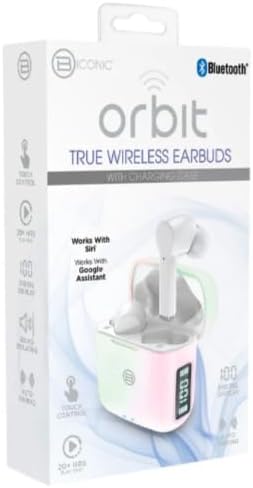
Şekil 2: Retail packaging for the BYTECH Orbit True Wireless Earbuds. The box highlights key features such as Bluetooth connectivity, touch control, 20+ hours of play, auto pairing, and compatibility with Siri and Google Assistant.
Kurmak
1. Kulaklıkları ve Kutuyu Şarj Etme
Before first use, fully charge the earbuds and the charging case. Place the earbuds into the charging case. The case is equipped with wireless charging capability. Connect the charging case to a power source using a compatible charging cable (not explicitly listed as included, please check your package) or place it on a wireless charging pad.
- Şarj kutusunun üzerindeki dijital ekran pil seviyesini gösterecektir.
- Ensure the earbuds are properly seated in their slots for charging.
2. Cihazınızla Eşleştirme (Bluetooth)
- Kulaklıkların şarj edildiğinden emin olun.
- Open the charging case. The earbuds will automatically enter pairing mode (indicated by flashing lights on the earbuds, if applicable).
- Akıllı telefonunuzda veya Bluetooth özellikli cihazınızda Bluetooth ayarlarına gidin.
- Bluetooth’u açın.
- Arama new devices. You should see "BYTECH BC-AU-BE-146-WT" or a similar name appear in the list of available devices.
- Select the device name to connect. Once connected, a voice prompt will confirm the successful pairing, and the indicator lights on the earbuds will stop flashing.
- For subsequent uses, the earbuds will automatically connect to the last paired device when taken out of the case, provided Bluetooth is enabled on your device.
These earbuds support True Wireless Stereo (TWS) connectivity, meaning both earbuds connect to each other wirelessly to provide a stereo sound experience.
Kulaklıkların Çalıştırılması
The BYTECH TWS Earbuds feature intuitive touch controls for various functions. While specific touch gestures are not detailed in the product description, common functions typically include:
- Oynat/Duraklat: Her iki kulaklığa da bir kez dokunun.
- Sonraki Parça: Sağ kulaklığa iki kez dokunun.
- Önceki parça: Sol kulaklığa iki kez dokunun.
- Çağrıyı Cevapla/Sonlandır: Gelen arama sırasında kulaklığınızın herhangi birine tek dokunuş.
- Çağrıyı Reddet: Gelen bir arama sırasında kulaklığınızdan herhangi birini 2 saniye basılı tutun.
- Voice Assistant'ı etkinleştirin: Triple tap or press and hold (check specific model behavior) to activate Siri (for iOS devices) or Google Assistant (for Android devices).
- Ses Kontrolü: Some models allow volume adjustment via touch (e.g., tap and hold left for volume down, right for volume up). If not, adjust volume directly on your connected device.
Please refer to the quick start guide included in your packaging for precise touch control instructions specific to your BC-AU-BE-146-WT model.
Bakım
Doğru bakım, kulaklığınızın uzun ömürlü olmasını ve optimum performans göstermesini sağlar.
- Temizlik: Regularly clean the earbuds and charging case with a soft, dry, lint-free cloth. Do not use abrasive cleaners, alcohol, or chemical solvents. Gently remove any earwax or debris from the earbud tips and speaker mesh using a small, soft brush or cotton swab.
- Depolamak: Kullanılmadığı zamanlarda kulaklıkları tozdan, kirden ve fiziksel hasardan korumak için her zaman şarj kutusunda saklayın. Şarj kutusunu serin, kuru ve doğrudan güneş ışığından ve aşırı sıcaklıklardan uzak bir yerde muhafaza edin.
- Pil Bakım: Pil ömrünü korumak için kulaklıkları ve şarj kutusunu sık sık tamamen boşaltmaktan kaçının. Uzun süre kullanılmasalar bile düzenli olarak şarj edin.
- Suya Dayanıklılık: These earbuds are not specified as water-resistant. Avoid exposure to water, sweat, and high humidity to prevent damage.
Sorun giderme
If you encounter issues with your BYTECH TWS Earbuds, try the following solutions:
- Kulaklıklar cihazla eşleşmiyor:
- Kulaklıkların şarjının dolu olduğundan ve kutusundan çıkarıldığından emin olun.
- Cihazınızın Bluetooth özelliğini kapatıp açın.
- Forget the device ("BYTECH BC-AU-BE-146-WT") from your device's Bluetooth settings and try pairing again.
- Kulaklıklara başka hiçbir cihazın bağlı olmadığından emin olun.
- Sadece bir kulaklık çalışıyor:
- Her iki kulaklığı da şarj kutusuna geri yerleştirin, kapağı kapatın, birkaç saniye bekleyin ve ardından tekrar çıkarın.
- Her iki kulaklığın da şarjlı olduğundan emin olun.
- Try resetting the earbuds (refer to quick start guide for specific reset procedure).
- Ses yok veya ses seviyesi düşük:
- Hem bağlı cihazınızdaki hem de kulaklıklarınızdaki ses seviyesini kontrol edin.
- Kulaklıkların kulağınıza tam oturduğundan emin olun.
- Kulaklık hoparlörünün ağındaki kalıntıları temizleyin.
- Şarj sorunları:
- Ensure the charging cable (if used) is securely connected and functional.
- Kablosuz şarj kullanıyorsanız, kılıfın şarj pedine doğru şekilde yerleştirildiğinden emin olun.
- Kılıfın şarj portunda herhangi bir kalıntı olup olmadığını kontrol edin.
Sorunlar devam ederse lütfen müşteri desteğiyle iletişime geçin.
Özellikler
| Özellik | Şartname |
|---|---|
| Marka | BYTECH |
| Model Adı | BC-AU-BE-146-WT |
| Model Numarası | BC-AU-BE-146-WT |
| Bağlantı Teknolojisi | Bluetooth 5.3 |
| Form Faktörü | Kulak İçi (İntraurales) |
| Renk | Beyaz |
| Dahil Bileşenler | Kablosuz Şarj Kutusu |
| Üretici | İki konik |
| ASIN | B0DPRCBT76 |
| İlk Mevcut Tarih | 6 Aralık 2024 |
Garanti ve Destek
For warranty information and customer support, please refer to the documentation included with your product packaging or visit the official BYTECH webSite. Garanti şartları ve koşulları bölgeye ve perakendeciye göre değişiklik gösterebilir.
Herhangi bir garanti talebiniz olması durumunda satın alma belgenizi saklayın.
Ask a question about this manual
Ask about setup, troubleshooting, compatibility, parts, safety, or missing instructions. Manuals+ will review the question and use this page’s manual context to help answer it.