
1. Giriş
The Audizio Avola is a comprehensive audio system designed to provide a wide range of listening options. It integrates Internet Radio, DAB+, FM radio, a CD player, and Bluetooth connectivity into a single, elegant unit. This manual will guide you through the setup, operation, and maintenance of your Avola system, ensuring you can fully utilize its features for an optimal audio experience.
2. Güvenlik Talimatları
- Güç Kaynağı: Yalnızca kutu içeriğinde bulunan güç adaptörünü kullanın. Ses seviyesinin doğru ayarlandığından emin olun.tage bölgenizin gereksinimlerine uygundur.
- Su ve Nem: Cihazı yağmur, nem veya sıvılara maruz bırakmayın. Vazo gibi sıvı dolu nesneleri cihazın üzerine koymaktan kaçının.
- Havalandırma: Ünitenin etrafında yeterli havalandırma olduğundan emin olun. Havalandırma açıklıklarını kapatmayın.
- Isı Kaynakları: Cihazı radyatörler, ısıtma petekleri, sobalar veya ısı üreten diğer cihazlar gibi ısı kaynaklarından uzak tutun.
- Temizlik: Disconnect the unit from the power supply before cleaning. Use a soft, dry cloth. Do not use liquid cleaners or aerosol cleaners.
- Servis: Cihazın bakımını kendiniz yapmaya çalışmayın. Tüm bakım işlemlerini yetkili servis personeline yaptırın.
- CD Çalar: Do not insert foreign objects into the CD tray. Handle CDs by their edges to avoid scratches.
3. Paket İçeriği
Tüm öğelerin ambalajda mevcut olduğunu doğrulayın:
- 1x Audizio Avola Internet Radio
- 1x Uzaktan Kumanda
- 1x Güç Adaptörü
- 1x User Manual (Quick Start Guide)

Image: Audizio Avola unit shown with its remote control and power adapter.
4. Ürün Bittiview
4.1 Ön Panel

Resim: Ön view of the Audizio Avola with the CD tray closed.
The front panel features the main display, control buttons, a CD tray, and input ports.
- Görüntülemek: Color display for navigation and information.
- Kontrol Düğmeleri: MENU, INFO, REC/DEL, PRESET/REPEAT, STANDBY, I/R, Play/Pause, Stop, Skip/Fast Forward/Rewind.
- CD Tepsisi: Ses CD'lerini takmak için.
- TUNE/SELECT Knob: Rotate to navigate menus, press to select.
- SES Düğmesi: Ses çıkış seviyesini ayarlar.
- USB Bağlantı Noktası: USB depolama aygıtlarını bağlamak için.
- SD Kart Yuvası: SD hafıza kartlarını takmak için.
- AUX Girişi: 3.5mm jack for external audio sources.
- Kulaklık girişi: Özel dinleme için 3.5 mm jak girişi.

Image: Close-up of the Audizio Avola front panel showing USB, SD, AUX, and headphone ports.
4.2 Arka Panel
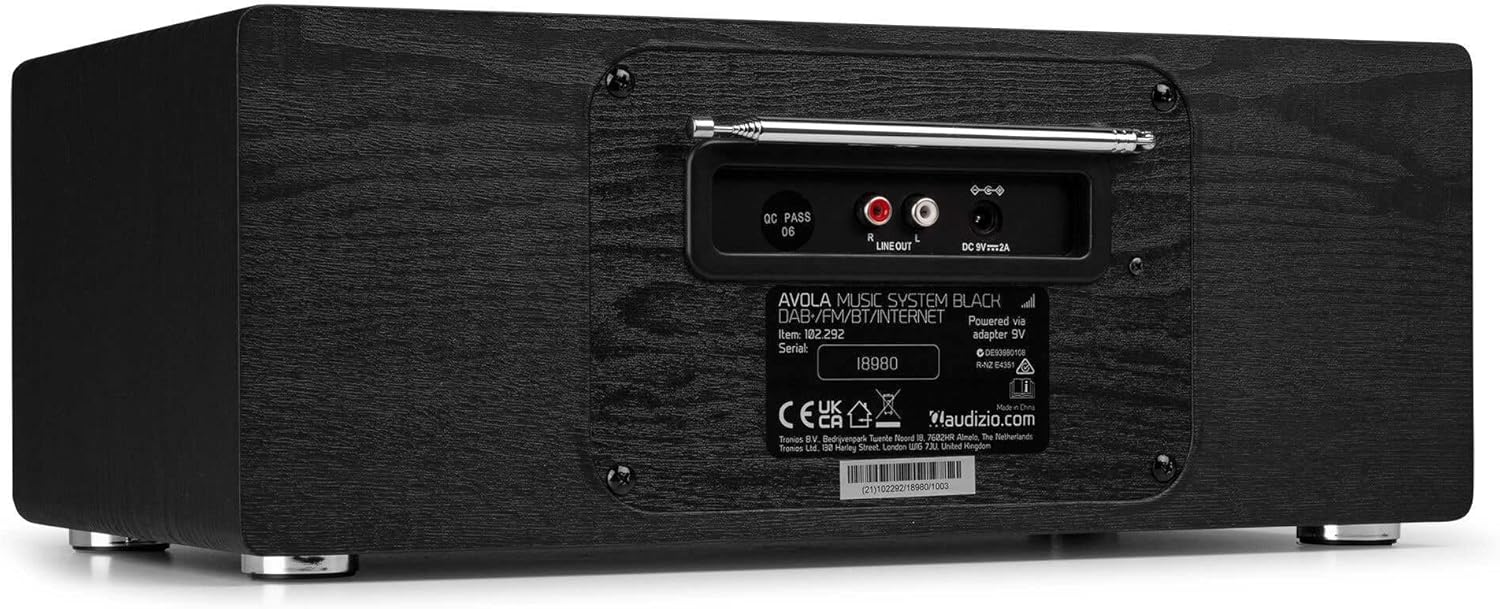
Resim: Arka view of the Audizio Avola, highlighting the antenna and connection ports.
The rear panel houses essential connections:
- Teleskopik Anten: For DAB+ and FM radio reception. Extend fully for best signal.
- HAT ÇIKIŞI (RCA): Harici bağlantı için amphayat verenler veya konuşmacılar.
- DC 9V 2A Güç Girişi: Güç adaptörünü bağlamak için.
5. Kurulum
5.1 Güç Bağlantısı
- Connect the power adapter to the DC 9V 2A input on the rear of the Avola unit.
- Güç adaptörünü uygun bir duvar prizine takın.
- The unit will enter standby mode. Press the STANDBY button on the unit or remote control to power on.
5.2 Anten Kurulumu
For optimal DAB+ and FM radio reception, fully extend the telescopic antenna located on the rear panel. Adjust its position for the best signal quality.
5.3 Initial Setup (WLAN Connection)
To access Internet Radio features, the Avola must be connected to a Wi-Fi network.
- Upon first power-on, the unit may prompt you to set up the network connection. If not, press MENU, navigate to 'System Settings' and then 'Network'.
- Select 'Wi-Fi Network' and choose 'Scan' to find available networks.
- Listeden Wi-Fi ağınızı seçin.
- Enter your Wi-Fi password using the TUNE/SELECT knob to navigate characters and press to confirm each character.
- Once connected, the display will show a Wi-Fi icon.
6. Çalışma Modları
6.1 İnternet Radyosu
Wi-Fi bağlantınız üzerinden dünya çapındaki binlerce radyo istasyonuna erişin.
- Press the MENU button and select 'Internet Radio'.
- İstasyonları konuma, türe göre inceleyebilir veya belirli istasyonları arayabilirsiniz.
- Use the TUNE/SELECT knob to navigate and select.
- To save a station as a preset, press and hold the PRESET/REPEAT button until the preset menu appears, then select a preset number.

Image: The Audizio Avola display showing the Internet Radio interface.
6.2 DAB+ Radyo
Digital Audio Broadcasting Plus offers high-quality digital radio.
- Press the MENU button and select 'DAB Radio'.
- Cihaz, mevcut DAB+ istasyonlarını otomatik olarak tarayacaktır.
- Use the TUNE/SELECT knob to browse and select stations.
- Save presets as described for Internet Radio.
6.3 FM Radyo
Listen to traditional analog FM radio broadcasts.
- Press the MENU button and select 'FM Radio'.
- Use the TUNE/SELECT knob to manually tune or press and hold to auto-scan for stations.
- Save presets as described for Internet Radio.
6.4 CD Çalar
En sevdiğiniz ses CD'lerini çalın.
- Press the MENU button and select 'CD Player'.
- Press the 'Open' button next to the CD tray to open it.
- Carefully place an audio CD onto the tray with the label side facing up.
- Press the 'Open' button again to close the tray. The unit will begin playing the CD automatically.
- Use the Play/Pause, Stop, and Skip buttons for playback control.
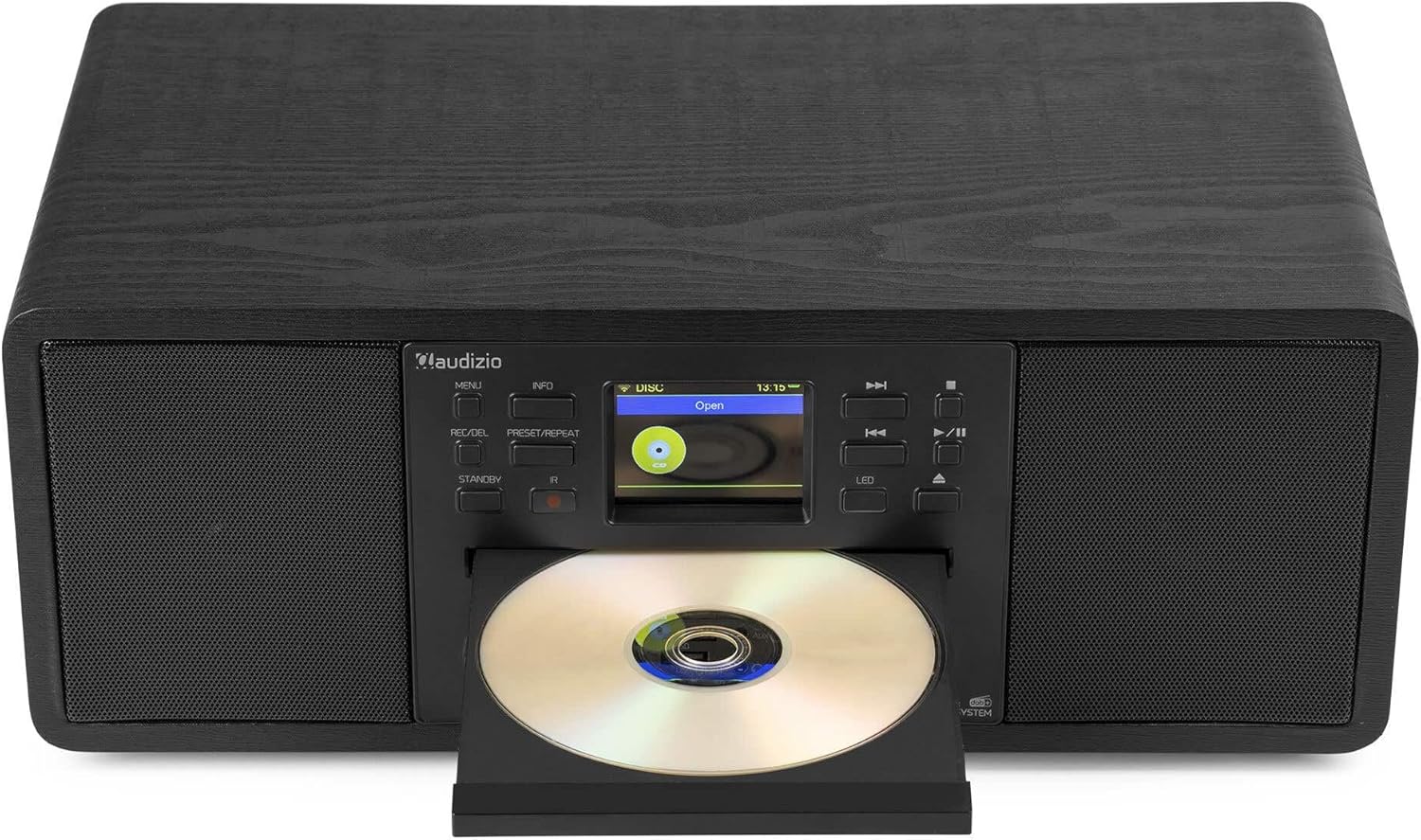
Image: The Audizio Avola with its CD tray open, ready for disc insertion.
6.5 Bluetooth Bağlantısı
Akıllı telefonunuzdan, tabletinizden veya Bluetooth özellikli diğer cihazlarınızdan kablosuz olarak ses akışı yapın.
- Press the MENU button and select 'Bluetooth'.
- The Avola will enter pairing mode and become discoverable.
- On your Bluetooth device, search for 'Audizio Avola' in the Bluetooth settings and select it to pair.
- Once connected, the display will show 'BT Connected'. You can now play audio from your device through the Avola.

Image: The Audizio Avola display indicating a successful Bluetooth connection.
6.6 USB/SD Oynatma
Sesi çal fileUSB sürücülerden veya SD kartlardan.
- Insert a USB drive into the USB port or an SD card into the SD card slot on the front panel.
- Press the MENU button and select 'USB' or 'SD' (the unit may automatically switch to the correct mode).
- Gezinmenizi sağlayın files and folders using the TUNE/SELECT knob.
- Press the TUNE/SELECT knob to play a selected track.
7. Bakım
- Ünitenin Temizlenmesi: Use a soft, dry, lint-free cloth to clean the exterior of the unit. Do not use abrasive cleaners, waxes, or solvents.
- CD Lens Temizliği: If CD playback becomes erratic, use a commercially available CD lens cleaner disc to clean the laser lens.
- Depolamak: Cihazı uzun süre saklayacaksanız, güç kaynağından ayırın ve serin, kuru bir yerde muhafaza edin.
8. Sorun Giderme
| Sorun | Olası Neden | Çözüm |
|---|---|---|
| Güç yok | Güç adaptörü bağlı değil veya priz arızalı. | Güç bağlantılarını kontrol edin. Farklı bir priz deneyin. |
| Ses yok | Volume too low, mute activated, or incorrect source selected. | Increase volume. Check if mute is active. Ensure correct input source is selected. |
| İnternet radyosuna bağlanılmıyor. | Yanlış Wi-Fi şifresi, zayıf sinyal veya ağ sorunu. | Re-enter Wi-Fi password. Move unit closer to router. Check router status. |
| DAB+/FM reception poor | Anten uzatılmamış veya sinyal alanı zayıf. | Fully extend and adjust the telescopic antenna. Try repositioning the unit. |
| CD çalmıyor | CD inserted incorrectly, dirty/scratched CD, or unsupported format. | Ensure CD is inserted label-side up. Clean or replace CD. Verify CD format (supports CD-DA, MP3). |
| Bluetooth eşleştirmiyor | Device not in pairing mode, or Avola not discoverable. | Ensure both devices are in pairing mode. Check Bluetooth settings on your device. |
9. Özellikler
| Özellik | Şartname |
|---|---|
| Model Adı | Avola |
| Ürün Numarası | 102.292 |
| Boyutlar (UxGxY) | 45.8x25.8x19.7 cm |
| Ağırlık | 4 kilo |
| Güç Girişi | 220 Volt (güç adaptörü aracılığıyla) |
| Speaker Output Power (Max) | 60 Vat |
| Ses Çıkışı Modu | Stereo |
| Desteklenen Ses Biçimleri | CD-DA, MP3 |
| Bağlantı Teknolojisi | WLAN, Bluetooth, AUX, RCA |
| Uyumlu Cihazlar | MP3 Player, PC, Smartphone, Tablet |
| Renk | Siyah |
10. Garanti ve Destek
Audizio products are designed and manufactured to the highest standards. In the unlikely event of a problem with your product, please contact your retailer for assistance. Keep your proof of purchase for warranty claims. For further support or inquiries, please refer to the official Audizio websitesine gidin veya müşteri hizmetleriyle iletişime geçin.