
HETP HX100N9
HETP Portable Charger User Manual
Model: HX100N9
1. Giriş
Thank you for choosing the HETP Portable Charger. This device is designed to provide convenient and fast charging for a wide range of electronic devices, including smartphones, tablets, and Apple Watches. Featuring built-in cables and multiple output options, it is an ideal companion for travel and daily use. Please read this manual carefully before using the product to ensure safe and optimal performance.
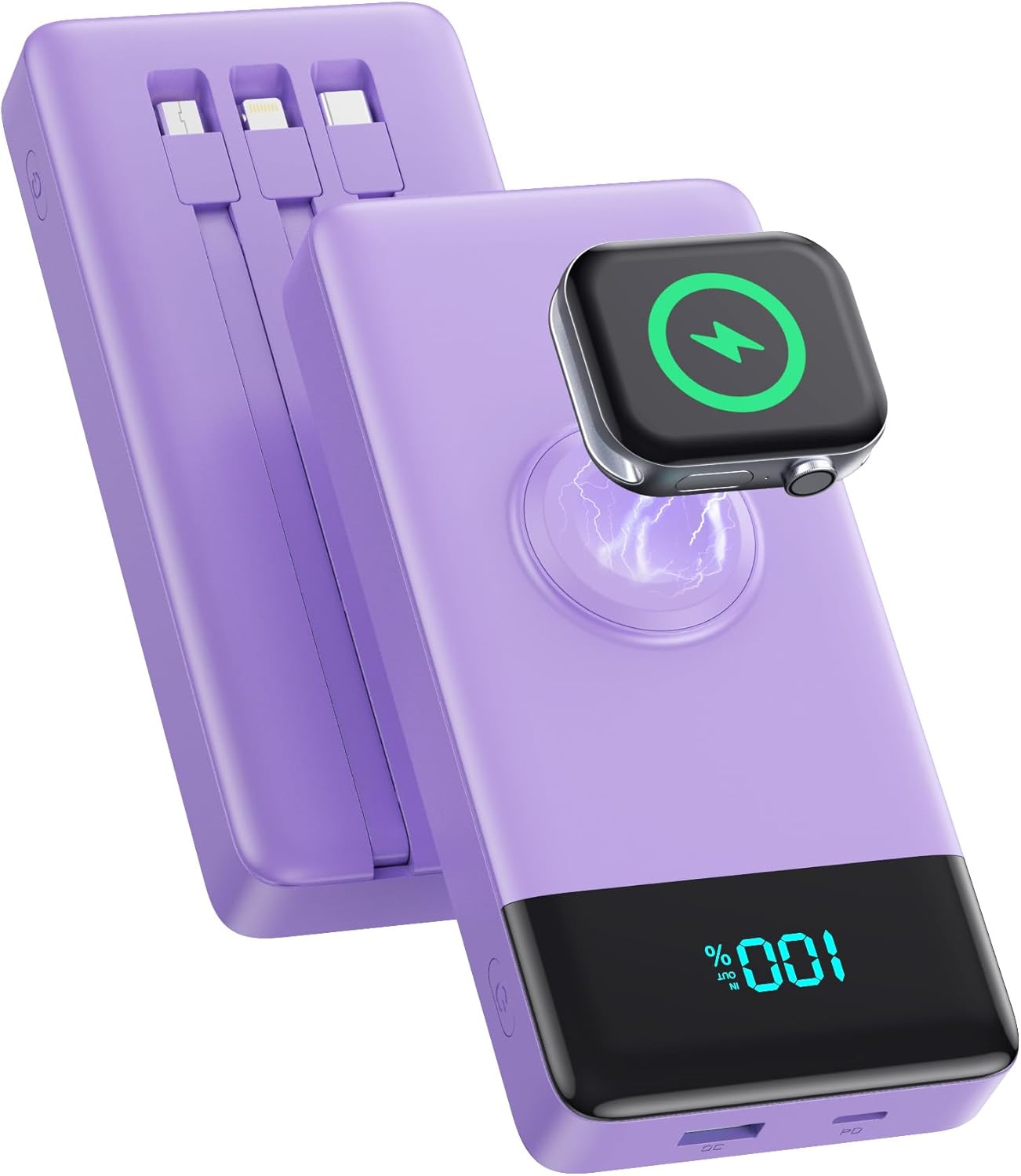
Image: The HETP Portable Charger, showcasing its compact design, built-in cables, and integrated iWatch charging pad. The device is purple with a black display showing "100%".
2. Güvenlik Bilgileri
Cihazınızda yaralanma veya hasar oluşmasını önlemek için lütfen aşağıdaki güvenlik önlemlerine uyun:
- Güç bankasını aşırı sıcaklıklara (60°C/140°F üzeri) veya doğrudan güneş ışığına maruz bırakmayın.
- Cihazı kendiniz sökmeyin, değiştirmeyin veya onarmaya çalışmayın.
- Power bank'i sudan, nemden ve yanıcı maddelerden uzak tutun.
- Cihazı düşürmekten veya güçlü darbelere maruz bırakmaktan kaçının.
- Sadece sertifikalı şarj kabloları ve adaptörleri kullanın.
- Çocukların erişemeyeceği yerde saklayınız.
- Taşınabilir güç bankasını yerel yönetmeliklere uygun şekilde imha edin; evsel atıklarla birlikte atmayın.

Image: Diagram illustrating the multi-protection smart microchip features of the power bank, including temperature, over-current, overvoltage, overcharge, recovery, over-power, short circuit, and over-discharge protection.
3. Paket İçeriği
Lütfen paketi aşağıdaki öğeler açısından kontrol edin:
- 1 x HETP Portable Charger (10800mAh) with 3 Built-in Cables (USB-C, iOS, Micro USB) and iWatch Charger
- 1 x Kullanım Kılavuzu
4. Ürün Bittiview
The HETP Portable Charger is equipped with multiple features for versatile charging:
- Dahili Kablolar: Includes USB-C, iOS (Lightning), and Micro USB cables for direct connection to various devices.
- iWatch Wireless Charger: Integrated magnetic charging pad for Apple Watch.
- USB-C Bağlantı Noktası (PD 25W): Supports both input and output for fast charging.
- USB-A Port (QC Output): Provides Quick Charge output for compatible devices.
- LED Dijital Ekran: Kalan pil yüzdesini gösterirtage.
- Güç Düğmesi: Power bank'i ve ekranı etkinleştirir.

Image: A detailed diagram of the HETP Portable Charger highlighting its various ports and built-in cables, including USB C Cable Input/Output, iOS Cable Output, Micro USB Cable Output, Charge for iWatch, Power On/Off button, PD USB-C Input/Output, and QC USB-A Output. The LED display shows "100% IN OUT".

Image: Two images demonstrating the compact size and lightweight nature of the HETP Portable Charger. One shows it fitting into a pant pocket, and the other shows it fitting into a small handbag, with dimensions 6.02x2.8x0.59 inches and weight 280g indicated.
5. Kurulum
The HETP Portable Charger comes ready for use. Before first use, it is recommended to fully charge the power bank.
5.1 Power Bank'ın İlk Şarjı
To ensure optimal performance, fully charge your power bank before its first use.
- Connect the power bank to a wall charger (not included) using either the built-in USB-C cable or an external USB-C cable plugged into the USB-C port.
- The LED display will show the charging progress. It is fully charged when the display shows "100%".

Image: A visual guide demonstrating two methods to recharge the HETP Portable Charger: using the dedicated Type-C input port with an external cable and adapter, or using the built-in Type-C input cable with an adapter.
6. Kullanım Talimatları
6.1 Cihazlarınızı Şarj Etme
The HETP Portable Charger offers multiple ways to charge your devices simultaneously.
- Dahili Kabloların Kullanımı:
- Pull out the appropriate built-in cable (USB-C, iOS, or Micro USB) for your device.
- Kabloyu cihazınızın şarj portuna bağlayın.
- Taşınabilir şarj cihazı otomatik olarak şarj olmaya başlayacaktır.
- USB Bağlantı Noktalarını Kullanma:
- Connect your device's charging cable to either the USB-C (PD) or USB-A (QC) output port on the power bank.
- Kablonun diğer ucunu cihazınıza bağlayın.
- Taşınabilir şarj cihazı otomatik olarak şarj olmaya başlayacaktır.
- Apple Watch'u şarj etme:
- Place your Apple Watch onto the magnetic wireless charging pad on the power bank.
- Şarj işleminin başlaması için saatin doğru şekilde hizalandığından emin olun.
The power bank supports charging up to 6 devices simultaneously. The LED display will show the remaining battery percentage şarj sırasında.

Image: The HETP Portable Charger actively charging multiple devices at once, including three smartphones via built-in cables, an Apple Watch on its wireless pad, a tablet via the USB-C port, and AirPods via the USB-A port, demonstrating its capability to charge 6 devices simultaneously.

Image: A visual representation of the PD 25W fast charging capability of the HETP Portable Charger, showing an iPhone charging rapidly. A graph indicates that it can charge an iPhone to 50% in 30 minutes, significantly faster than standard charging.
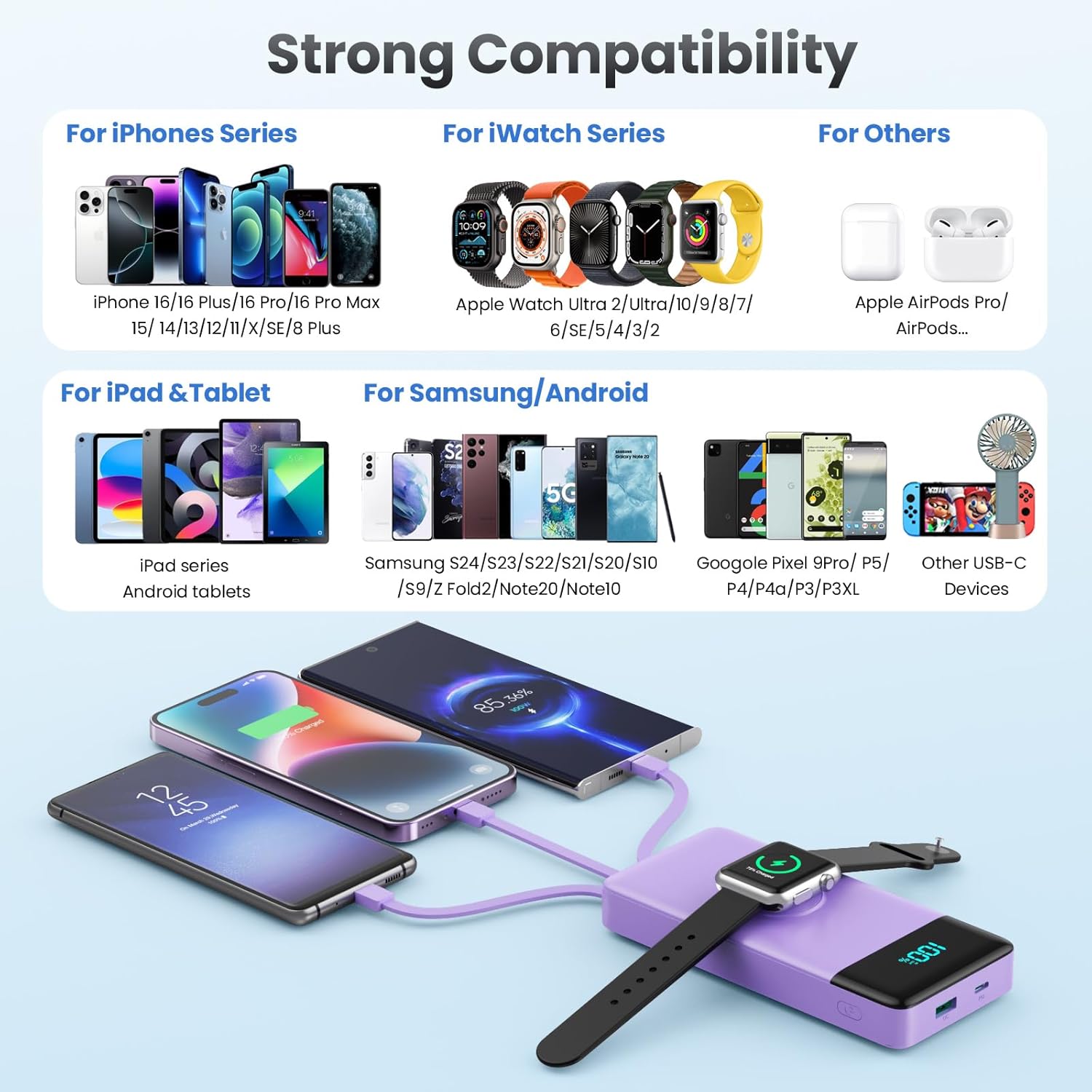
Image: A comprehensive compatibility chart for the HETP Portable Charger, categorizing compatible devices for iPhone Series, iWatch Series, iPad & Tablet, Samsung/Android, and other USB-C devices, illustrating its wide range of support.
7. Bakım
Proper care will extend the life of your HETP Portable Charger:
- Cihazı yumuşak ve kuru bir bezle temizleyin. Aşındırıcı temizleyiciler veya çözücüler kullanmayın.
- Kullanılmadığı zaman güç bankasını serin ve kuru bir yerde saklayın.
- If the device will not be used for an extended period, charge it to about 50% every three months to maintain battery health.
8. Sorun Giderme
| Sorun | Olası Neden | Çözüm |
|---|---|---|
| Powerbank şarj olmuyor. | Charging cable or adapter faulty; power bank battery depleted; connection issue. | Try a different cable or adapter. Ensure connections are secure. Allow power bank to charge for a few minutes. |
| Cihaz, power bank'ten şarj olmuyor. | Power bank battery depleted; cable faulty; device not compatible; power bank in standby. | Check power bank battery level. Try a different cable. Ensure your device is compatible. Press the power button to activate the power bank. |
| Yavaş şarj. | Cable or adapter not supporting fast charging; multiple devices charging simultaneously; device's charging input limit. | Use a fast-charging compatible cable and adapter. Disconnect other devices to test speed. Check your device's charging specifications. |
| iWatch not charging wirelessly. | Watch not aligned correctly; watch case interfering; power bank battery depleted. | Adjust watch position on the charging pad. Remove any thick cases. Ensure power bank has sufficient charge. |
9. Özellikler
| Özellik | Detay |
|---|---|
| Model Numarası | HX100N9 |
| Pil Kapasitesi | 10800mAh |
| Giriş (USB-C Bağlantı Noktası) | PD 25W Maks |
| Çıkış (USB-C Bağlantı Noktası) | PD 25W Maks |
| Çıkış (USB-A Bağlantı Noktası) | QC Compatible |
| Dahili Kablolar | USB-C, iOS (Lightning), Micro USB |
| iWatch Şarj Cihazı | Manyetik Kablosuz Şarj |
| Boyutlar | 6.02 x 2.8 x 0.59 inç |
| Ağırlık | 11.7 ons (280 gr) |
| Renk | Mor |
10. Garanti ve Destek
Your HETP Portable Charger comes with a 24 ay garanti Satın alma tarihinden itibaren geçerlidir. Bu garanti, üretim hatalarını ve işçilik kusurlarını kapsar. Yanlış kullanım, kazalar, yetkisiz değişiklikler veya normal aşınma ve yıpranmadan kaynaklanan hasarları kapsamaz.
For technical support, warranty claims, or any questions regarding your product, please contact HETP customer service. Refer to the contact information provided on the product packaging or the official HETP webalan.
Ömür boyu teknik destek is available for this product.
Ask a question about this manual
Ask about setup, troubleshooting, compatibility, parts, safety, or missing instructions. Manuals+ will review the question and use this page’s manual context to help answer it.