
THINKYA Y19
THINKYA Portable CD Player User Manual
Model: Y19 | Marka: THINKYA
1. Giriş
Thank you for choosing the THINKYA Portable CD Player Y19. This multi-functional device combines classic CD playback with modern connectivity options, including Bluetooth, USB, AUX, and Optical modes. Featuring built-in HiFi stereo speakers and a convenient remote control, it offers a versatile audio experience for your home or on the go. Please read this manual thoroughly before use to ensure proper operation and longevity of your device.
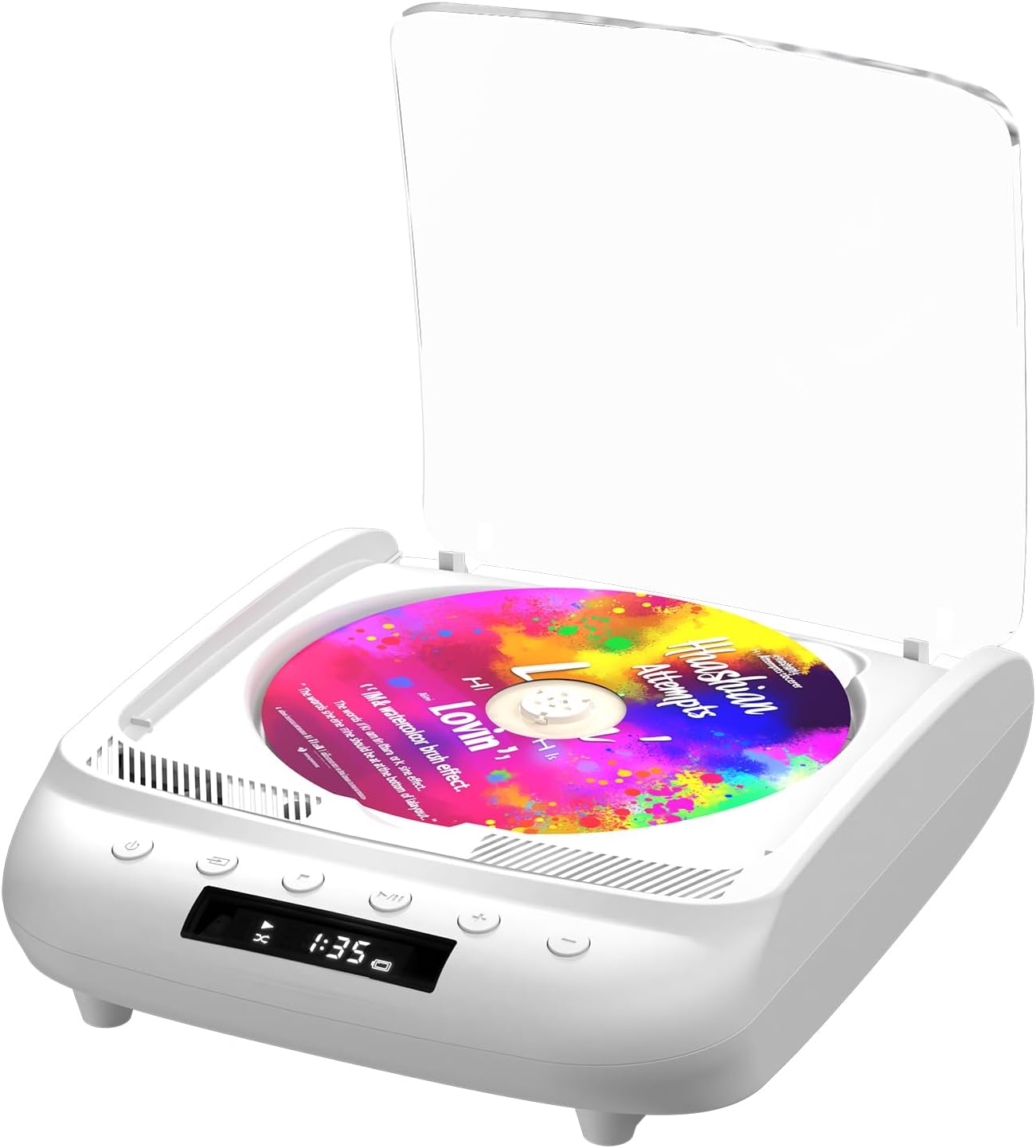
Figure 1.1: THINKYA Portable CD Player Y19
2. Paket İçeriği
Kutuyu açtığınızda tüm parçaların eksiksiz ve iyi durumda olduğundan emin olun:
- Taşınabilir CD Çalar x 1
- Uzaktan Kumanda x 1
- USB-C Kablosu x 1
- 3.5mm AUX Kablosu x 1
- Kullanıcı Kılavuzu x 1
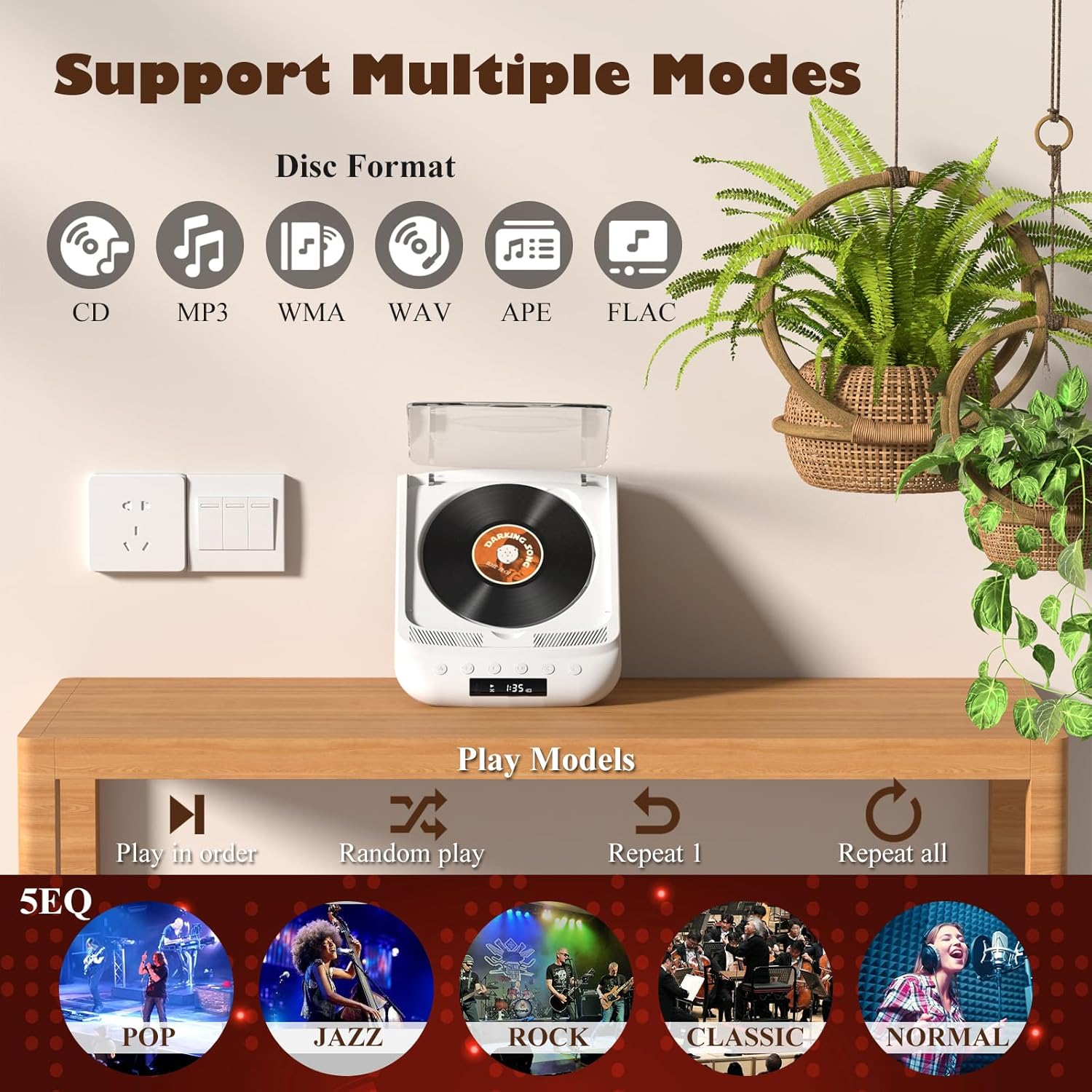
Figure 2.1: All items included in the package.
3. Ürün Bittiview ve Kontroller
Familiarize yourself with the player's layout and functions:

Figure 3.1: Front panel controls and rear ports. (1) Optical, (2) Headphone, (3) AUX, (4) USB, (5) DCIN 5V, (6) On/Off switch.
Ön Panel Düğmeleri:
- Güç Düğmesi: Cihazı açar/kapatır.
- Mod Düğmesi: Cycles through playback modes (CD, USB, Bluetooth, AUX, Optical).
- Durdurma düğmesi: Oynatmayı durdurur.
- Oynat/Duraklat Düğmesi: Oynatmayı başlatır veya duraklatır.
- Ses - / Önceki Parça: Sesi azaltır veya önceki parçaya geçer.
- Ses Seviyesi + / Sonraki Parça: Sesi açar veya bir sonraki parçaya atlar.
Arka Panel Bağlantı Noktaları:
- SPDIF (Optical) Output: Optik kablo aracılığıyla harici ses sistemlerine bağlanmak için.
- Kulaklık Jakı (3.5 mm): Kulaklıkla özel dinleme için.
- AUX Girişi (3.5 mm): For connecting external audio devices via AUX cable.
- USB Bağlantı Noktası: Ses oynatmak için files bir USB sürücüsünden.
- DCIN 5V (USB-C): Power input for charging and continuous operation.
- Açma/Kapama Anahtarı: Cihazın ana güç anahtarı.

Şekil 3.2: Ayrıntılı view of 3.5mm Earphone Jack and USB Playback port.

Figure 3.3: Enjoying purer singing with Optical Mode connection to external speakers.
4. İlk Kurulum
4.1 Cihazı Şarj Etme
The THINKYA CD Player has a built-in 2600mAh rechargeable battery. Before first use, fully charge the device.
- Connect the provided USB-C cable to the DCIN 5V port on the rear of the player.
- Connect the other end of the USB-C cable to a compatible 5V/2A USB power adapter (not included), power bank, or computer USB port.
- The LED screen will indicate charging status. A full charge takes approximately 3 hours and provides 4-8 hours of playback time.

Figure 4.1: Flexible charging options for the built-in rechargeable battery.
4.2 CD Takma
To insert a CD:
- CD çaların şeffaf kapağını yavaşça kaldırın.
- If present, remove the protective cardboard from the CD compartment.
- Place the CD onto the spindle with the label side facing up. Ensure it clicks securely into place.
- Close the transparent lid.
Figure 4.2: Correct placement of a CD in the player.
5. Kullanım Talimatları
The THINKYA CD Player supports multiple playback modes. Press the Mod Düğmesi on the front panel or remote control to switch between them.
5.1 CD Playback Mode
After inserting a CD and powering on the device, it will automatically enter CD mode and begin playback. The LED screen will display the track number and playback time.
- Oynat/Duraklat: Oynat/Duraklat düğmesine basın.
- Sonraki / Önceki Parça: Use the Volume +/- buttons (short press) to skip tracks.
- Durdur: Durdur düğmesine basın.

Figure 5.1: Dual HiFi Stereo Speakers and CD playback options (Repeat All, Random, In Order, Repeat 1).
5.2 Bluetooth Mode (Input & Output)
The player can act as both a Bluetooth transmitter and receiver.
Bluetooth Receiver (Connect your phone/tablet to the CD Player):
- Switch the CD player to Bluetooth mode (BT will flash on the LED screen).
- On your mobile device, search for "THINKYA Y19" in the Bluetooth settings.
- Select to pair. Once connected, the BT indicator will stop flashing. You can now play audio from your device through the CD player's speakers.
Bluetooth Transmitter (Connect the CD Player to Bluetooth headphones/speakers):
- Ensure the CD player is in CD, USB, or AUX mode.
- Bluetooth kulaklığınızda veya hoparlörünüzde eşleştirme modunu etkinleştirin.
- The CD player will automatically search for and connect to nearby Bluetooth audio devices. Once connected, audio will be transmitted to your external Bluetooth device.

Figure 5.2: Bluetooth 5.0 connectivity for both transmitting and receiving audio.
Video 5.1: Demonstration of THINKYA Portable CD Player's Bluetooth functionality, including pairing with external speakers.
5.3 USB Playback Mode
Insert a USB flash drive into the USB port on the rear panel. The player supports MP3/WMA/WAV/APE/FLAC formats. Switch to USB mode using the Mode button.
5.4 AUX Modu
Connect an external audio device (e.g., smartphone, MP3 player) to the AUX input port using the provided 3.5mm AUX cable. Switch to AUX mode using the Mode button.
5.5 Optik Mod
Connect the SPDIF (Optical) output port to an external audio system with an optical input. This mode is for digital audio output from the CD player to a compatible receiver or soundbar.
6. Uzaktan Kumandanın Kullanımı
The included remote control allows for convenient operation from a distance (up to 15ft). It requires 2 AAA batteries (not included).
Şekil 6.1: Kolay kullanım için uzaktan kumanda.
Uzaktan Kumanda Fonksiyonları:
- Güç: Açık/Kapalı.
- SES +/-: Sesi ayarlar.
- Önceki Sonraki: Parçaları atlıyor.
- Oynat/Duraklat: Oynatmayı başlatır veya duraklatır.
- Durdur: Oynatmayı durdurur.
- EQ: Cycles through equalizer presets (POP, JAZZ, ROCK, CLASSIC, NORMAL).
- BT: Switches to Bluetooth mode.
- Diğer düğmeler: May include Bass, Treble adjustments depending on the remote version.
7. Teknik Özellikler
| Özellik | Şartname |
|---|---|
| Örnek | Y19 |
| Giriş Voltage | 5V-2A |
| Pil Kapasitesi | 2600 mAh Lityum İyon |
| Şarj Süresi | Yaklaşık 3 saat |
| Oynatma Süresi | Yaklaşık 4-8 saat |
| Taşınabilir Boyut | 8.27 x 6.69 x 3.03 inç |
| Ağırlık | 2.2 lb (1.72 pounds listed in specs, using A+ content for consistency) |
| Konuşmacı | 4Ω-2*2W (Bağımsız Ses Boşluğu) |
| CD Format Support | CD-DA, CD-R, MP3 |
| USB Format Support | MP3 / WMA / WAV / APE / FLAC |
| Arayüz | 3.5mm Audio, USB, Optical, Headphone, USB-C Charge |
| Oyuncu Modu | CD Çalar, Bluetooth, USB, AUX, Optik |
8. Bakım ve Onarım
- Temizlik: Oynatıcının dış yüzeyini temizlemek için yumuşak, kuru bir bez kullanın. CD merceği için özel bir CD mercek temizleyici kullanın. Aşındırıcı temizleyiciler veya çözücüler kullanmayın.
- CD Kullanımı: Always hold CDs by their edges. Avoid touching the playing surface. Store CDs in their cases to prevent scratches and dust accumulation.
- Depolamak: Uzun süre kullanılmadığı zamanlarda, oynatıcıyı serin, kuru bir yerde, doğrudan güneş ışığından ve aşırı sıcaklıklardan uzakta saklayın.
- Pil Bakım: Pil ömrünü uzatmak için pili sık sık tamamen boşaltmaktan kaçının. Cihaz aktif olarak kullanılmasa bile düzenli olarak şarj edin.
9. Sorun Giderme Kılavuzu
If you encounter issues with your THINKYA CD Player, refer to the common problems and solutions below:
9.1 Güç Yok / Cihaz Açılmıyor
- Ensure the main On/Off switch on the rear panel is in the 'On' position.
- Check if the device is properly charged. Connect the USB-C cable and verify the charging indicator.
- Farklı bir USB-C kablosu veya güç adaptörü deneyin.
9.2 CD Not Playing / Disc Error
- Ensure the CD is clean and free of scratches or smudges. Clean with a soft, lint-free cloth from the center outwards.
- Verify the CD is inserted correctly with the label side facing up and securely on the spindle.
- Make sure the player is in CD mode.
- Try a different CD to rule out a faulty disc.
9.3 Ses Yok
- Adjust the volume using the buttons on the player or the remote control.
- If using headphones or external speakers, ensure they are properly connected and functional.
- If in Bluetooth mode, ensure the player is correctly paired with your external device and the volume on both devices is adjusted.
- If in AUX mode, check the AUX cable connection and ensure the external device's volume is up.
- Ensure the correct playback mode is selected (CD, USB, BT, AUX, Optical).
9.4 Bluetooth Bağlantı Sorunları
- Ensure the player is in Bluetooth mode (BT flashing).
- Keep the player and the Bluetooth device within the effective range (typically 10 meters/33 feet).
- Turn off and on the Bluetooth function on both the player and your external device, then try pairing again.
- Clear previous Bluetooth pairings on your external device and try to connect again.
10. Garanti ve Müşteri Desteği
10.1 Garanti Bilgileri
THINKYA products are manufactured to the highest quality standards. For specific warranty details, please refer to the warranty card included in your product packaging or contact THINKYA customer support. Keep your purchase receipt as proof of purchase.
10.2 Müşteri Desteği
Daha fazla yardıma ihtiyacınız varsa veya bu kılavuzda yer almayan sorularınız varsa, lütfen müşteri destek ekibimizle iletişime geçin:
- E-posta: support@thinkya.com
- Webalan: www.thinkya.com
İlgili belgelerY19

Ask a question about this manual
Ask about setup, troubleshooting, compatibility, parts, safety, or missing instructions. Manuals+ will review the question and use this page’s manual context to help answer it.