
giriiş
This manual provides detailed instructions for the safe and efficient operation of your Phomemo M836-B Portable Thermal Printer. The M836-B is an inkless, wireless thermal printer designed for portability and convenience, supporting various paper sizes including US Letter and A4. Please read this manual thoroughly before using the printer to ensure optimal performance and longevity.
Ürün Bittiview
Temel Özellikler
- Mürekkepsiz Termal Baskı: Utilizes thermal technology, eliminating the need for ink cartridges or ribbons.
- Kablosuz bağlantı: Supports Bluetooth for seamless connection with iOS and Android devices.
- USB Bağlantısı: Compatible with Windows, macOS, ChromeOS, and Linux via USB Type-C.
- Yüksek Çözünürlük: Offers a print resolution of 300 DPI for clear text and graphics.
- Taşınabilir Tasarım: Compact and lightweight, ideal for travel and on-the-go printing.
- Multi-Size Paper Support: Accommodates various thermal paper sizes, including US Letter (8.5'' x 11'') and A4.
- Tek Renkli Çıkış: Prints in black and white.

Image: The Phomemo M836-B printer demonstrating its inkless thermal printing capability, highlighting no mess from ink.

Resim: Bir overview of the Phomemo M836-B's key features, including wireless connectivity, inkless operation, 2600mAh battery capacity, and 300 DPI resolution.
Paket İçeriği
Paketin içinde tüm öğelerin mevcut olduğundan emin olun:
- Phomemo M836-B Portable Thermal Printer
- Thermal Paper (as specified in the box)
- USB C Tipi Kablo
- Kullanım Kılavuzu (bu belge)
Kurulum Kılavuzu
1. Yazıcıyı Şarj Etme
- Connect the provided USB Type-C cable to the printer's charging port.
- USB kablosunun diğer ucunu uyumlu bir USB güç adaptörüne (dahil değildir) veya bilgisayarın USB portuna bağlayın.
- The indicator light will show charging status. Charge the printer fully before first use.
2. Kağıt Yükleme
The Phomemo M836-B supports both thermal paper rolls and sheet-fed thermal paper.
- Kağıt bölmesi kapağını açın.
- For roll paper: Insert the thermal paper roll into the designated slot, ensuring the printing side faces upwards. Gently pull a small length of paper out.
- For sheet-fed paper: Insert the thermal paper sheet into the input slot, ensuring it is straight and aligned.
- Kağıt bölmesinin kapağını sıkıca kapatın.

Image: Illustration of how to load different types of thermal paper (roll and sheet) into the Phomemo M836-B printer, showing the paper selection mechanism.
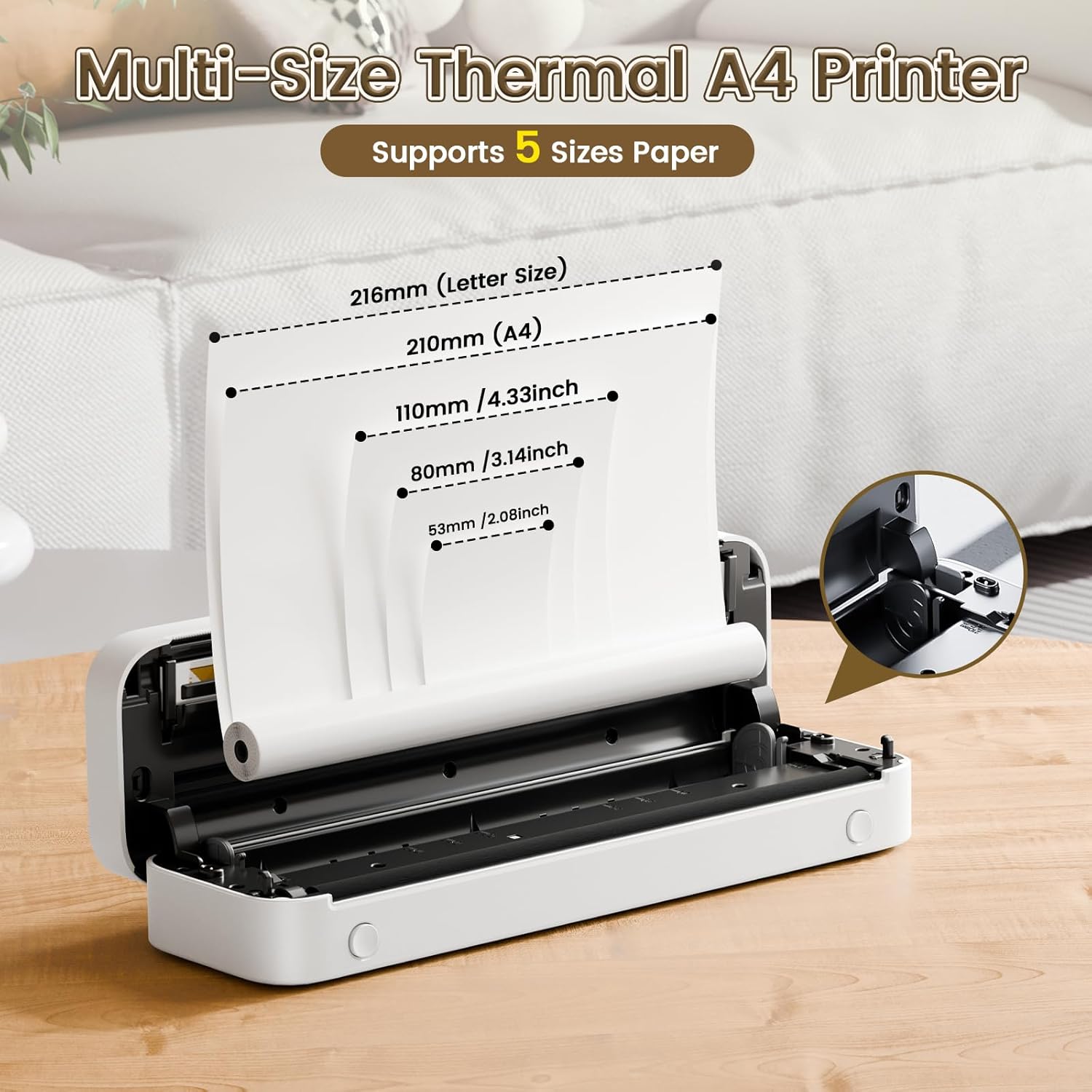
Image: The Phomemo M836-B printer demonstrating support for multiple paper sizes, including US Letter (216mm) and A4 (210mm).
3. Cihazlara Bağlanma
The printer supports both Bluetooth and USB connections.
Bluetooth Connection (for iOS/Android)
- Download the official Phomemo app from your device's app store.
- Turn on the printer by pressing and holding the power button.
- Mobil cihazınızda Bluetooth'u etkinleştirin.
- Open the Phomemo app, search for the printer (M836-B), and pair with it.
- Eşleştirme işlemini tamamlamak için ekrandaki talimatları izleyin.
USB Connection (for Windows/macOS/ChromeOS/Linux)
- Yazıcının açık olduğundan emin olun.
- Kutu içeriğinde bulunan USB Type-C kablosunu kullanarak yazıcıyı bilgisayarınıza bağlayın.
- Phomemo'nun resmi sitesini ziyaret edin. webalan (www.phomemo.com) to download and install the appropriate drivers for your operating system.
- Once drivers are installed, the printer should be recognized by your computer.

Image: Diagram illustrating the two types of connections supported by the Phomemo M836-B: Bluetooth for Android, iOS, and iPad, and USB for Windows, macOS, ChromeOS, and Linux.
Kullanım Talimatları
Printing from Mobile Devices
- Ensure your printer is charged, loaded with paper, and connected via Bluetooth to your mobile device.
- Phomemo uygulamasını açın.
- Select the document or image you wish to print from within the app.
- Adjust print settings (e.g., paper size, density) as needed.
- Tap the print button to initiate printing.
Printing from Computers
- Ensure your printer is charged, loaded with paper, and connected via USB to your computer with drivers installed.
- Belgeyi açın veya file Bilgisayarınızda yazdırmak istiyorsunuz.
- " adresine gidinFile" > "Yazdır" (veya Ctrl+P/Cmd+P kısayolunu kullanın).
- Select the Phomemo M836-B from the list of available printers.
- Adjust print preferences (e.g., paper size, orientation) as required.
- "Yazdır" seçeneğine tıklayın.
Paper Handling Tips
- Always use high-quality thermal paper for best results.
- Ensure the paper is loaded correctly with the printable side facing the print head.
- Avoid exposing thermal paper to direct sunlight or high temperatures, as this can degrade print quality over time.
- Manually tear off printed documents carefully after printing, as the printer does not have an automatic cutter.
Bakım
Yazıcıyı Temizleme
- Yazıcıyı kapatın ve güç kaynağıyla bağlantısını kesin.
- Yumuşak, tiftiksiz bir bez kullanın ve hafifçe kurulayın.ampYazıcı kafasını izopropil alkolle nazikçe silin. Kullanmadan önce tamamen kurumasını bekleyin.
- Clean the exterior of the printer with a soft, dry cloth. Do not use abrasive cleaners or solvents.
Depolamak
- Yazıcıyı serin, kuru bir yerde, doğrudan güneş ışığından ve aşırı sıcaklıklardan uzakta saklayın.
- If storing for an extended period, ensure the printer is fully charged to maintain battery health.
- Keep thermal paper in its original packaging in a dark, cool place to prevent premature fading.
Sorun giderme
If you encounter issues with your Phomemo M836-B printer, refer to the following common problems and solutions:
Printer Not Turning On
- Pili Kontrol Edin: Ensure the printer is sufficiently charged. Connect it to a power source and try again.
- Güç Düğmesi: Cihazın düzgün şekilde etkinleştirildiğinden emin olmak için güç düğmesini birkaç saniye basılı tutun.
Connectivity Issues (Bluetooth/USB)
- Bluetooth:
- Ensure Bluetooth is enabled on your device and the printer is within range.
- Unpair and re-pair the printer in your device's Bluetooth settings.
- Hem yazıcıyı hem de mobil cihazınızı yeniden başlatın.
- USB BAĞLANTI:
- USB kablosunun hem yazıcıya hem de bilgisayara güvenli bir şekilde bağlı olduğundan emin olun.
- Ensure the correct printer drivers are installed on your computer. Reinstall if necessary.
- Farklı bir USB portu veya kablo deneyin.
Poor Print Quality (Blurry, Faded, Streaks)
- Yazıcı Kafasını Temizle: Bakım bölümündeki temizlik talimatlarını izleyin.
- Paper Quality/Type: Ensure you are using high-quality thermal paper and that it is loaded correctly.
- Baskı yoğunluğu: Adjust print density settings in the Phomemo app or printer driver.
- Kağıt Depolama: Thermal paper exposed to heat or light can degrade. Try a fresh roll of paper.
Kağıt Sıkışmaları
- Turn Off Printer: Immediately turn off the printer.
- Kağıdı Çıkarın: Gently pull out any jammed paper. Do not force it, as this can damage the printer.
- Tekrar yükle: Ensure paper is loaded correctly and not wrinkled or bent before restarting.
Teknik Özellikler
| Özellik | Şartname |
|---|---|
| Marka | Phomemo |
| Model Adı | M836-B |
| Bağlantı Teknolojisi | Bluetooth, USB Tip C |
| Baskı Teknolojisi | Termal |
| Yazıcı Çıktısı | Tek renkli |
| Maksimum Baskı Çözünürlüğü | 300 DPI |
| Maksimum Baskı Hızı (Siyah Beyaz) | Dakikada 1.5 sayfa |
| Uyumlu Cihazlar | Android Devices, Mac, Windows, iPhone, iPad |
| Maksimum Medya Boyutu | 8.5 x 11 inç (ABD Mektup boyutu) |
| Kağıt Boyutu Desteği | US Letter, A4 |
| Printing Media Type | Termal Kağıt |
| Ürün Ağırlığı | 1.53 Pound (yaklaşık 694g) |
| Ürün Boyutları (D x G x Y) | 7.8D x 26.4G x 4.5Y Santimetre |
| Kontrol Yöntemi | Uygulama |
| Menşei ülke | Çin |
Garanti ve Destek
Specific warranty details for the Phomemo M836-B Portable Thermal Printer are not provided within this document. For information regarding warranty coverage, technical support, or service, please refer to the warranty card included with your product or contact Phomemo customer service directly through their official website veya ürün ambalajınızda yer alan iletişim bilgileri.
Resmi Phomemo Webalan: www.phomemo.com