
LOFREE OE921
LOFREE Flow Lite 84 Tuşlu Düşük Profilli Klavyefile Mekanik Klavye Kullanım Kılavuzu
Model: OE921 | Marka: LOFREE
1. Giriş
LOFREE Flow Lite 84 Tuşlu Düşük Profilli Klavyefile Mechanical Keyboard is a versatile and compact keyboard designed for enhanced typing comfort and productivity. Featuring multi-mode connectivity (2.4G wireless, Bluetooth, and wired USB-C), hot-swappable switches, and PBT double-shot keycaps, it offers a premium typing experience for both Windows and Mac users. This manual provides detailed instructions for setup, operation, maintenance, and troubleshooting to help you get the most out of your new keyboard.
2. Temel Özellikler
- Affordable Low-Profile Mekanik Klavye: The Flow Lite is engineered for cost-efficiency while maintaining a premium feel. Its ABS body with a textured surface ensures a comfortable touch.
- Düşük Profesyonelfile Design for Wrist Comfort: Designed with a lower front height than previous models, the Flow Lite84 promotes a more natural wrist position, reducing strain during extended typing sessions.
- Specter Tam POM Doğrusal Anahtarlar: Equipped with new Lofree and Kailh low-profile full POM switches, these linear switches feature a reduced operating force of 40gf (from 50gf), minimizing finger joint fatigue and providing a softer touch.
- PBT Çift Katmanlı Tuş Kapakları: For durable and sharp characters, the keyboard features PBT keycaps with a comfortable matte texture. The two-tone design incorporates PC for backlighting, ensuring optimal typing and visibility.
- Gasket Design for Soft & Cushioned Feel: The upgraded Gasket Mount includes a sound-dampening layer, enhancing each keystroke with a richer, more satisfying tone and accommodating various typing styles.
- Flexible 3-Mode Connectivity: Seamlessly switch between 2.4GHz WiFi, Bluetooth, and wired (Type-C) connections. Compatible with iOS and Windows, laptops, and desktops.
- 1000Hz Sorgulama Oranı: Experience fast and responsive performance, both wired and wirelessly, ideal for high-performance tasks.
- Lofree Configurator: Customize every key function to your preference using the new Lofree Key Mapper software (Windows only).
- Built-in Adjustable Kickstand and Roller Volume: The integrated kickstand offers convenience without extra accessories. The aluminum volume wheel provides intuitive audio control.
- Remarkable Battery Life: A built-in 2000mAh lithium battery provides up to 80 hours of working time (with all lights off) on a single charge, fully charging in approximately 3 hours via USB-C.
3. Kurulum Kılavuzu
3.1 Kutudan Çıkarma ve Bileşenler
Upon opening your LOFREE Flow Lite keyboard package, you will find the following components:
- LOFREE Flow Lite 84 Tuşlu Mekanik Klavye
- USB-C - USB-A Kablosu
- 2.4GHz USB Receiver (stored in the keyboard's back compartment)
- Kullanım Kılavuzu ve Garanti Kartı
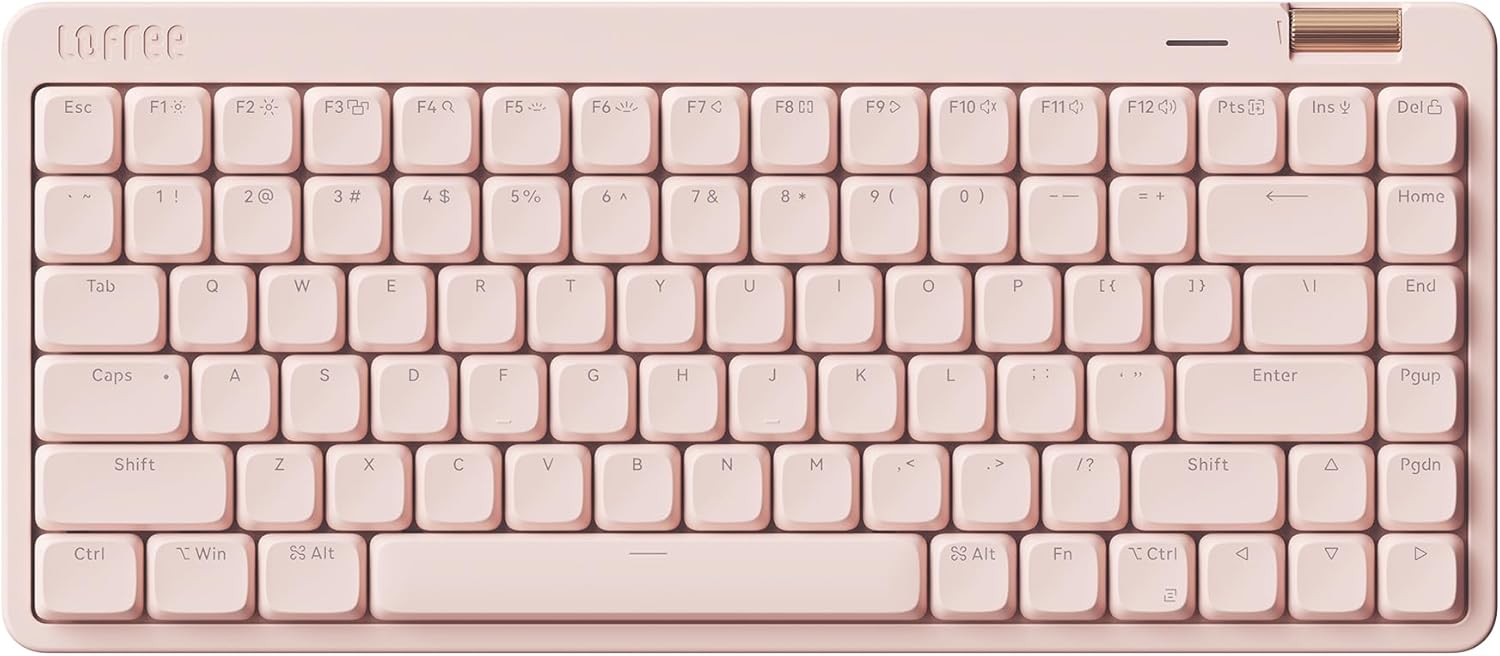
Image: The LOFREE Flow Lite 84 Keys Low Profile Mechanical Keyboard in Flamingo color.

Image: Visual representation of the keyboard's three connection modes: Bluetooth, 2.4G Wireless, and USB-C Wired.
3.2 Kablolu Bağlantı
To connect your keyboard via USB-C cable:
- Klavyenin üzerindeki USB-C bağlantı noktasını bulun (genellikle üst kenarda bulunur).
- Verilen USB-C kablosunun bir ucunu klavyeye bağlayın.
- Kablo ucunu bilgisayarınızdaki kullanılabilir bir USB-A bağlantı noktasına bağlayın.
- The keyboard will automatically be recognized and powered.
3.3 2.4 GHz Kablosuz Bağlantı
İstikrarlı ve hızlı bir kablosuz bağlantı için:
- Retrieve the 2.4GHz USB receiver from its magnetic storage slot on the back of the keyboard.
- USB alıcısını bilgisayarınızdaki kullanılabilir bir USB-A bağlantı noktasına takın.
- Locate the toggle switch on the side of the keyboard. Slide it to the '2.4G' position (indicated by a wireless icon).
- Klavye alıcıya otomatik olarak bağlanmalıdır.
3.4 Bluetooth Bağlantısı
Bluetooth ile bağlanmak için:
- Locate the toggle switch on the side of the keyboard. Slide it to the 'Bluetooth' position (indicated by a Bluetooth icon).
- Bilgisayarınızda veya cihazınızda Bluetooth ayarlarını açın.
- The keyboard should appear as 'Flow Lite' or similar in the list of available devices. Select it to pair.
- İstenirse, ekranınızda görüntülenen eşleştirme kodunu klavyeyi kullanarak girin.
Video: Bir fazlaview of the LOFREE FLOW LITE Mechanical Keyboard, demonstrating unboxing, features, and connectivity options.
4. Kullanım Talimatları
4.1 Temel Klavye Kullanımı
The LOFREE Flow Lite keyboard functions as a standard QWERTY keyboard. Simply begin typing after successful connection.
4.2 Ses Kontrolü
The keyboard features a convenient roller wheel for volume adjustment:
- Roll the wheel forward to increase volume.
- Roll the wheel backward to decrease volume.
- Press the wheel down to mute/unmute audio.

Resim: Yakın çekim view of the integrated volume roller wheel on the keyboard.
4.3 Adjustable Kickstand
The built-in kickstand allows you to adjust the keyboard's typing angle for ergonomic comfort:
- Flip out the kickstand on the back of the keyboard for a 6° angle.
- Fold the kickstand back in for a flatter 3° angle.

Image: A diagram illustrating the two available typing angles (3° and 6°) provided by the adjustable kickstand.
4.4 Key Remapping (Windows Only)
Utilize the Lofree Key Mapper software to customize key functions:
- Download the Lofree Key Mapper from the official LOFREE webalan.
- Install and launch the software on your Windows computer.
- Connect the keyboard via wired USB-C connection to ensure proper software detection.
- Follow the on-screen instructions within the software to remap keys and configure settings.

Image: A screenshot of the Lofree Key Mapper software interface, used for customizing keyboard functions.
4.5 Sıcak Değiştirilebilir Anahtarlar
The Flow Lite keyboard supports hot-swappable switches, allowing you to easily change them without soldering:
- Tuş kapağını bir tuş kapağı sökme aleti kullanarak yavaşça çıkarın.
- Anahtar sökme aleti kullanarak anahtarı PCB'den dikkatlice çıkarın.
- Yeni anahtarın pimlerini PCB üzerindeki deliklerle hizalayın.
- Yeni anahtarı yerine oturuncaya kadar sıkıca bastırın.
- Tuş başlığını değiştirin.

Resim: Bir diyagram gösteriyor...asing the Specter Full POM Linear Switches, highlighting their lighter 40gf actuation force and hot-swappable design.
5. Bakım
5.1 Temizlik
- Klavyeyi düzenli olarak yumuşak, kuru bir bezle temizleyin.
- Daha detaylı temizlik için tuş kapaklarını çıkarın ve tuşlar arasındaki kalıntıları temizlemek için basınçlı hava kullanın.
- Sert kimyasallar veya aşındırıcı malzemeler kullanmaktan kaçının.
5.2 Pil Bakımı
The keyboard is equipped with a 2000mAh lithium battery. To prolong battery life:
- Charge the keyboard fully before first use (approx. 3 hours).
- Pilin sık sık tamamen bitmesini önleyin.
- Uzun süre kullanılmayacaksa klavyeyi serin ve kuru bir yerde saklayın.
6. Sorun Giderme
6.1 Bağlantı Sorunları
- Keyboard not connecting (2.4GHz/Bluetooth): Ensure the toggle switch on the side of the keyboard is in the correct position. For Bluetooth, ensure your device's Bluetooth is enabled and the keyboard is in pairing mode.
- Aralıklı bağlantı: Check for interference from other wireless devices. Ensure the keyboard is within range of your device/receiver.
6.2 Temel Tepki Hızı
- Tuşlar yanıt vermiyor: Check if the keyboard is powered on and connected. If using wireless, ensure sufficient battery charge. Try a wired connection to rule out wireless issues.
- Double typing or missed inputs: This could indicate a switch issue. As the keyboard is hot-swappable, consider replacing the affected switch.
6.3 Arka Aydınlatma Sorunları
- Arka ışık çalışmıyor: Ensure the keyboard is powered on. Check the battery level. Some backlight modes might consume more power.
- Tutarsız aydınlatma: This might be due to software settings. Use the Lofree Key Mapper (Windows) to adjust backlight effects and brightness.
7. Özellikler
| Özellik | Detay |
|---|---|
| Ürün Boyutları | 12.45 x 5.43 x 0.93 inç |
| Ürün Ağırlığı | 1.83 pound |
| Üretici | LOFREE |
| Menşei ülke | Çin |
| Model Numarası | OE921 |
| Piller | 1 Lityum Polimer pil gerekli (dahil) |
| Uyumlu Cihazlar | Dizüstü Bilgisayar |
| Bağlantı Teknolojisi | Bluetooth, Wi-Fi (2.4GHz), USB-C |
| Klavye Açıklaması | Mekanik |
| Özel Özellikler | Hotkeys and Media Keys, Volume Roller, Backlit, Low-Profile Tuş, Çalışırken Değiştirilebilir |
| Renk | Flamingo |
| Anahtar Sayısı | 84 |
| Arka Aydınlatma Rengi | Tek Renk |
| Stil | Hafif |
| Kutuda Neler Var? | USB kablosu |
8. Garanti ve Destek
Your LOFREE Flow Lite keyboard is verified by Transparency, ensuring product authenticity. For any warranty claims, technical support, or further inquiries, please contact LOFREE Direct, the manufacturer. Refer to the warranty card included in your package for specific warranty terms and conditions.