
giriiş
Welcome to the Revolution R180 Connect Plus Smart Toaster. This appliance features advanced InstaGLO 2.0 heating technology, a full-color touchscreen, and Wi-Fi connectivity for a personalized toasting experience. This bundle includes the Toastie Press and Warming Rack accessories, expanding your culinary options beyond traditional toast. Please read this manual thoroughly before first use to ensure safe and optimal operation.
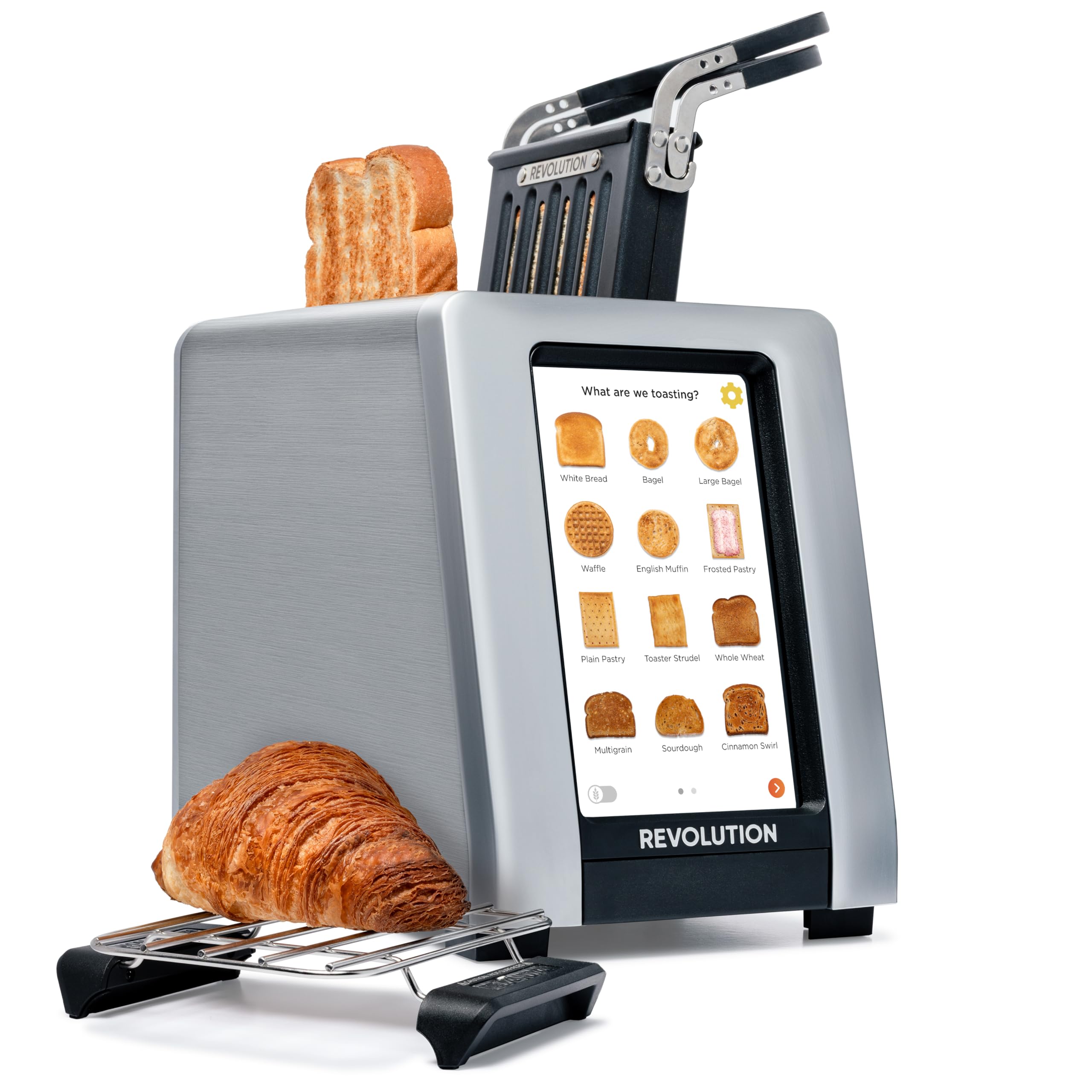
Image: The Revolution R180 Connect Plus Smart Toaster shown with the Toastie Press and Warming Rack accessories, highlighting its touchscreen interface and sleek design.
Önemli Güvenlik Bilgileri
Elektrikli aletleri kullanırken, aşağıdakiler de dahil olmak üzere temel güvenlik önlemlerine her zaman uyulmalıdır:
- Tüm talimatları okuyun.
- Sıcak yüzeylere dokunmayın. Kulp veya düğmeleri kullanın.
- Elektrik çarpmasına karşı korunmak için kabloyu, fişleri veya tost makinesini suya veya başka bir sıvıya batırmayın.
- Herhangi bir cihazın çocuklar tarafından veya çocukların yakınında kullanılması durumunda yakın gözetim gereklidir.
- Kullanılmadığında ve temizlemeden önce fişini prizden çekin. Parçaları takıp çıkarmadan önce soğumasını bekleyin.
- Kablo veya fişi hasarlı olan veya cihaz arızalandıktan veya herhangi bir şekilde hasar gördükten sonra hiçbir cihazı çalıştırmayın.
- Açık havada kullanmayınız.
- Kablonun masa veya tezgah kenarından sarkmasına veya sıcak yüzeylere temas etmesine izin vermeyin.
- Sıcak gazlı veya elektrikli ocakların üzerine veya yakınına, ya da ısıtılmış fırına koymayın.
- Cihazı kullanım amacı dışında kullanmayınız.
- Yangın veya elektrik çarpması riski oluşturabileceğinden, büyük boyutlu yiyecekler, metal folyo paketler veya mutfak eşyaları tost makinesine konulmamalıdır.
- Tost makineleri çalışırken perde, drape, duvar vb. yanıcı maddelerle örtülürse veya temas ederse yangın çıkabilir.
- Tost makinesi fişe takılıyken yiyecekleri çıkarmaya çalışmayın.
- Gözetimsiz çalıştırmayın.
Kutuda Neler Var?
Your Revolution R180 Connect Plus Smart Toaster package includes:
- Revolution R180 Connect Plus Smart Toaster
- Toastie Press accessory
- Warming Rack accessory
- Kullanım Kılavuzu (bu belge)
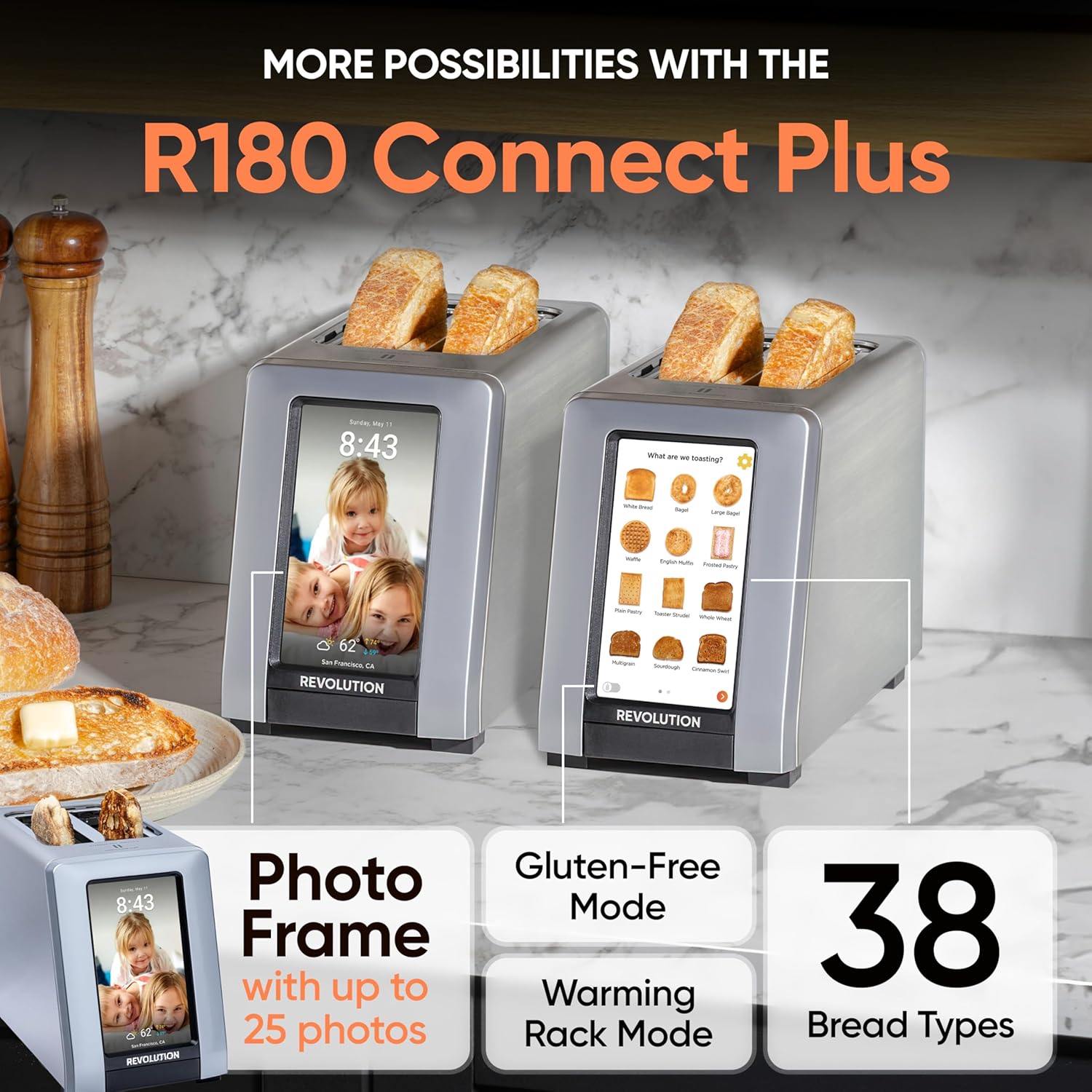
Image: The Revolution R180 Connect Plus Smart Toaster, Toastie Press, and Warming Rack are shown in their respective packaging, ready for unboxing.
Kurmak
- Kutudan Çıkarma: Carefully remove all components from the packaging. Ensure all protective films and packing materials are removed from the toaster and accessories.
- Atama: Place the toaster on a stable, flat, heat-resistant surface, away from flammable materials. Ensure adequate ventilation around the unit.
- Güç Bağlantısı: Plug the toaster into a grounded electrical outlet. The touchscreen will illuminate upon connection.
- İlk kurulum: Follow the on-screen prompts to complete the initial setup. This includes connecting to your Wi-Fi network, which enables features like auto-set clock and live weather updates.
- Photo Frame Setup: To personalize your toaster with photos, scan the QR code displayed on the screen or in the manual with your mobile phone. Follow the instructions to upload up to 25 of your favorite images.

Image: The Revolution R180 Connect Plus Smart Toaster displays the current time, date, and weather forecast on its touchscreen, demonstrating its smart connectivity features.
Video: A user demonstrates the unboxing and initial setup of the Revolution R180 Connect Plus Smart Toaster, highlighting its packaging and first power-on sequence.
Kullanım Talimatları
Dokunmatik Ekran Arayüzünü Kullanma
The R180 Connect Plus features an intuitive touchscreen for selecting your desired toasting settings:
- Select Food Type: Tap on the icon corresponding to the food item you wish to toast (e.g., White Bread, Bagel, Waffle, Pastry). The toaster offers over 40 bread types, including a dedicated Gluten-Free mode.
- Choose State: Select whether the item is Fresh, Frozen, or if you are Reheating it.
- Kızarma Seviyesini Ayarlayın: Adjust the browning level using the visual indicators, typically from 1 (lightest) to 7 (darkest).
- Tost Yapmaya Başlayın: Press the "Start" button. The toaster will automatically lower the item and begin the toasting cycle. The screen will display a progress indicator.
Video: This video demonstrates the touchscreen interface of the Revolution R180 Connect Plus, showing how to select different bread types and browning levels for toasting.
Using the Toastie Press (Included)
The Toastie Press allows you to make perfectly crispy, melty sandwiches directly in your toaster without butter or oil.
- Prepare Sandwich: Assemble your grilled cheese, panini, or quesadilla. Ensure it fits within the Toastie Press dimensions.
- Insert into Press: Open the Toastie Press, place your sandwich inside, and close it securely.
- Insert into Toaster: Slide the loaded Toastie Press into one of the toaster slots.
- Select Panini Mode: On the toaster's touchscreen, navigate to the second page of food options and select "Toastie Press" mode.
- Başlangıç: Press "Start". The toaster will automatically lower the press and begin cooking.

Image: The Toastie Press accessory is shown in use, preparing a grilled cheese sandwich within the toaster slots.
Video: A user demonstrates the process of making a quesadilla using the Revolution Toastie Press, from preparation to the final toasted product.
Using the Warming Rack (Included)
The Warming Rack is designed to gently warm and crisp items like croissants, pastries, cookies, or leftover pizza.
- Place Rack: Position the Warming Rack securely over the toaster slots. The rubberized handles ensure stability.
- Yemek Yeri: Place the item(s) you wish to warm directly on the rack.
- Select Warming Rack Mode: On the toaster's touchscreen, navigate to the second page of food options and select "Warming Rack" mode.
- Başlangıç: Press "Start". The toaster will activate its heating elements to warm the items on the rack.

Image: The Warming Rack accessory is shown placed on top of the toaster, with various items like pastries, pizza, and cookies being warmed.
Özellikler
- SigortataGLO 2.0 Technology: Heats up in 2 seconds, searing the outside of bread to lock in flavor and prevent drying, resulting in a crispy exterior and soft interior.
- Dijital Fotoğraf Çerçevesi: Displays up to 25 of your favorite images when the toaster is idle, transforming it into a personalized kitchen display.
- Live Weather Display: Provides updated weather forecasts on the touchscreen via Wi-Fi connectivity.
- Auto-Set Clock: Automatically sets the time via Wi-Fi, ensuring accuracy.
- Yazılım Güncellemeleri: Wi-Fi connectivity allows for over-the-air software updates, adding new features and improving performance.

Image: A visual comparison highlights the InstaGLO technology of the Revolution Toaster versus a standard toaster, emphasizing faster and tastier results.
Bakım
- Kırıntı Tepsisi Temizliği: The toaster will remind you when the crumb tray needs cleaning. Simply push the tray to release it, empty crumbs, and reinsert. The Toastie Press is dishwasher safe.
- Dış Temizlik: Dış yüzeyini yumuşak bir bezle silin.amp bez. Aşındırıcı temizleyiciler kullanmayın veya ekmek kızartma makinesini suya batırmayın.
Sorun giderme
- Ekmek Kızartma Makinesi Açılmıyor: Güç kablosunun çalışan bir elektrik prizine güvenli bir şekilde takıldığından emin olun.
- Wi-Fi Bağlantı Sorunları: Check your home Wi-Fi network. If issues persist, try restarting your router or the toaster.
- Düzensiz Kızartma: Ensure bread is centered in the slots. Different bread types may require slight adjustments to browning levels.
- Food Stuck: Unplug the toaster and carefully remove the food item using non-metallic utensils.
Özellikler
| Marka | Devrim |
| Model Numarası | 1359080 |
| Renk | Paslanmaz çelik |
| Malzeme | Paslanmaz çelik |
| Ürün Boyutları | 16"D x 10"G x 14"Y |
| Netage | 600 watt |
| Dilim Sayısı | 2 |
| Ürün Ağırlığı | 8.98 pound |
Garanti ve Destek
Your Revolution R180 Connect Plus Smart Toaster comes with a manufacturer's warranty. For detailed warranty information, please refer to the warranty card included in your packaging or visit the official Revolution Cooking webalan.
Genişletilmiş koruma planları satın alınabilir:
- 3 Yıllık Koruma Planı
- 4 Yıllık Koruma Planı
- Complete Protect (aylık plan)
For technical support, troubleshooting assistance, or to inquire about replacement parts, please contact Revolution Cooking customer service through their official website or the contact information provided in your product registration.
Ask a question about this manual
Ask about setup, troubleshooting, compatibility, parts, safety, or missing instructions. Manuals+ will review the question and use this page’s manual context to help answer it.