
Tojock DVP-503
Tojock DVP-503 DVD Oynatıcı Kullanım Kılavuzu
Model: DVP-503
Brand: Tojock
1. Giriş
This manual provides detailed instructions for the setup, operation, and maintenance of your Tojock DVP-503 DVD Player. This region-free DVD player is designed to enhance your home entertainment experience with 1080P upscaling, USB input, and versatile connectivity options.
2. Kutuda Neler Var?
- 1 x Tojock DVP-503 DVD Player
- 1 x Uzaktan Kumanda
- 1 x AV Kablosu
- 1 x HDMI Kablosu
- 1 x Kullanım Kılavuzu (bu belge)

Figure 2.1: Tojock DVP-503 DVD Player with included accessories.
3. Ürün Bittiview
3.1 Ön Panel
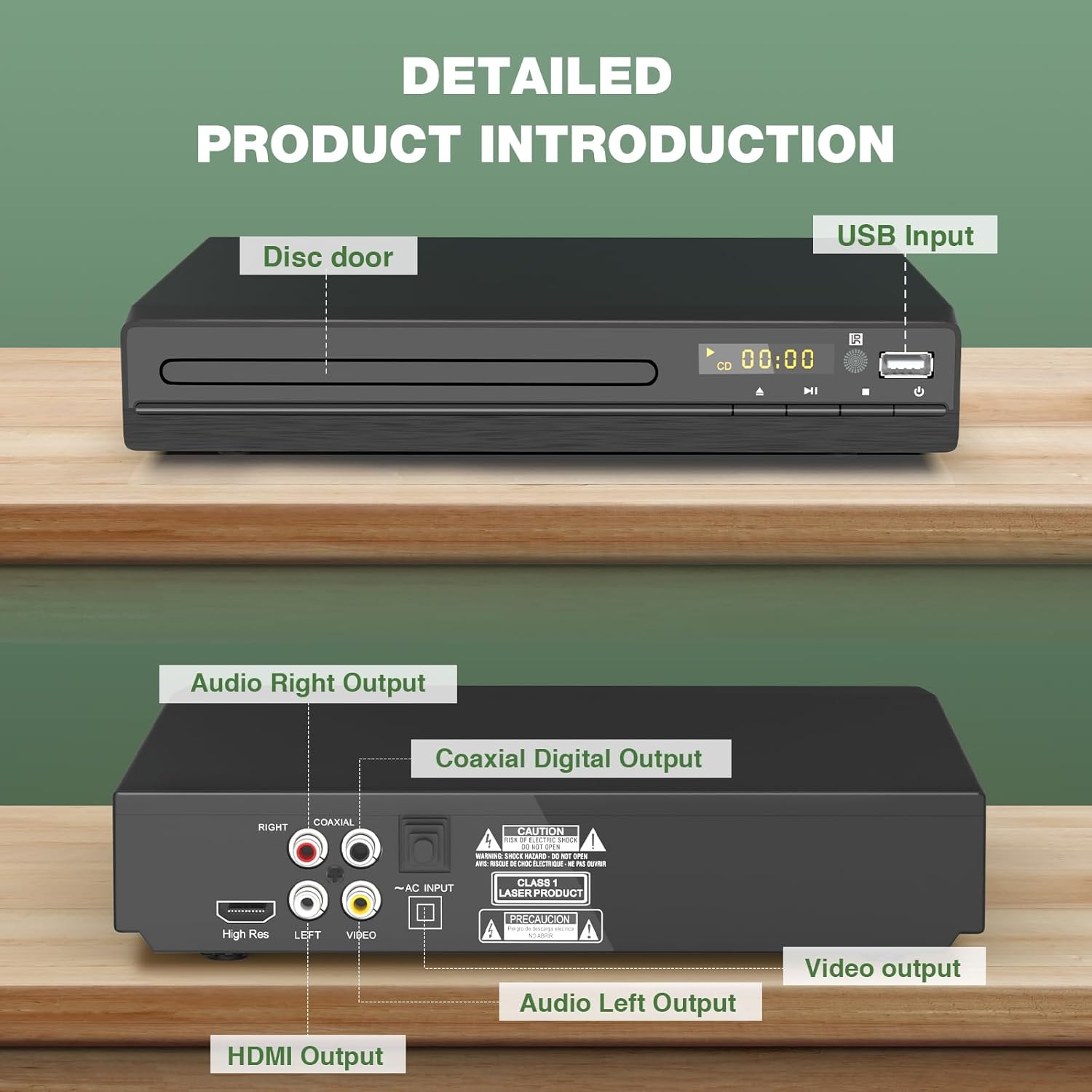
Şekil 3.1: Ön ve Arka Panel Üzeriview.
- Disc Door: Insert DVDs and CDs here.
- USB Girişi: Connect USB 2.0 Flash Drives (up to 32GB) for media playback.
- Kontrol Düğmeleri: Play/Pause, Stop, Next, Previous, Eject, Power.
- Ekran Görüntüsü: Shows playback status and track information.
3.2 Arka Panel Bağlantıları

Figure 3.2: Rear Panel Connection Ports.
- HDMI Çıkışı: For connecting to Smart TVs, monitors, and projectors for high-definition video and audio.
- RCA Output (Video, Left Audio, Right Audio): For connecting to older TVs, speakers, and ampcankurtaranlar
- Coaxial Digital Output: For connecting to audio receivers for digital audio.
- DC-5V Giriş: Güç girişi bağlantı noktası.
4. Kurulum Kılavuzu
4.1 TV'ye Bağlanma
The Tojock DVP-503 DVD Player offers multiple connection options to your television or display device.
- HDMI Connection (Recommended for HD Quality):
Connect one end of the included HDMI cable to the HDMI Output port on the rear of the DVD player. Connect the other end to an available HDMI Input port on your TV. Select the corresponding HDMI input on your TV using its remote control.

Figure 4.1: HDMI Connection Setup.
- RCA Connection (Standard Definition):
Connect the included RCA cable (red, white, yellow) to the corresponding RCA Output ports on the rear of the DVD player. Connect the other end to the matching RCA Input ports on your TV. Select the AV input on your TV.
Figure 4.2: RCA Connection Setup.
4.2 Güç Bağlantısı
Connect the power adapter to the DC-5V input on the rear of the DVD player, then plug the adapter into a standard electrical outlet.
5. Kullanım Talimatları
5.1 Temel Disk Oynatma
- Ensure the DVD player is connected to your TV and powered on.
- Basın Çıkarmak Disk tepsisini açmak için ön paneldeki düğmeyi veya uzaktan kumandayı kullanın.
- DVD veya CD diskini, etiket yüzü yukarı bakacak şekilde tepsiye nazikçe yerleştirin.
- Basın Çıkarmak Tepsiyi kapatmak için düğmeye tekrar basın. Oynatıcı otomatik olarak diski okumaya başlayacaktır.
- Use the remote control to navigate menus, select tracks/chapters, and control playback (Play, Pause, Stop, Fast Forward, Rewind, Next, Previous).

Figure 5.1: DVD Player in operation with remote and cables.
5.2 USB Medya Oynatma
The player supports playback of digital audio and video files from a USB 2.0 Flash Drive (up to 32GB). Supported formats include AVI, MPG, MPEG4, VOB for video, and MP3, JPG, JPEG for audio/images.
- USB flash sürücünüzü DVD oynatıcının ön panelindeki USB bağlantı noktasına takın.
- The player should automatically detect the USB drive and display a menu for file selection. If not, press the USB button on the remote control or navigate to the USB input option.
- Use the remote control's navigation buttons to browse and select your desired media files.
NOTE: Does not support USB 3.0 or MP4 file USB üzerinden oynatma.
Figure 5.2: USB Input for Media Playback.
5.3 Region-Free Playback
This DVD player is designed to play DVDs from any region (1-6), except for Japan CPRM Discs. It supports various disc formats including CD, DVD, DVD-R/+R, DVD-/+RW, CD-R/-RW, VCD, and SVCD.
NOTE: Does not support Blu-ray Discs.

Figure 5.3: Region-Free Disc Compatibility.
5.4 Kesme Noktası Bellek Fonksiyonu
The player features a breakpoint memory function, allowing it to resume playback from where it was last stopped, even after being powered off. This is particularly useful for movies or long videos.

Figure 5.4: Breakpoint Memory in Action.
6. Bakım
To ensure the longevity and optimal performance of your Tojock DVP-503 DVD Player, follow these maintenance guidelines:
- Temizlik: Use a soft, dry cloth to clean the exterior of the player. Do not use liquid cleaners or abrasive chemicals.
- Disk Bakımı: Handle discs by their edges. Keep them clean and free of dust, fingerprints, and scratches. Use a soft, lint-free cloth to wipe discs from the center outwards.
- Havalandırma: Ensure the player has adequate ventilation. Do not block the ventilation slots on the sides or bottom of the unit. Avoid placing it in enclosed spaces that can trap heat.
- Depolamak: When not in use for extended periods, disconnect the power cable and store the player in a cool, dry place.
7. Sorun Giderme
DVD oynatıcınızda sorunlarla karşılaşırsanız, aşağıdaki yaygın sorunlara ve çözümlere bakın:
| Sorun | Olası Neden | Çözüm |
|---|---|---|
| Güç Yok | Güç kablosu bağlı değil; Elektrik prizi çalışmıyor. | Güç kablosu bağlantısını kontrol edin; farklı bir priz deneyin. |
| Görüntü/Ses Yok | Incorrect TV input selected; Loose HDMI/RCA cables. | Select correct TV input (HDMI/AV); Securely connect cables. |
| Disk Çalmıyor | Disc is dirty, scratched, or unsupported format (e.g., Blu-ray). | Clean disc; Try a different disc; Ensure it's not a Blu-ray. |
| USB Not Recognized | USB drive not formatted correctly; Unsupported USB version (e.g., USB 3.0); Drive capacity too large. | Ensure USB 2.0 and FAT32 format; Use drive up to 32GB. |
8. Özellikler
| Özellik | Detay |
|---|---|
| Model Numarası | DVP-503 |
| Boyutlar (U x G x Y) | 8.9" x 8.1" x 1.4" (yaklaşık) |
| Ağırlık | 1.14 lbs (yaklaşık) |
| Desteklenen Disk Formatları | CD, DVD, DVD-R/+R, DVD-/+RW, CD-R/-RW, VCD, SVCD |
| Supported USB Playback Formats | Video: AVI, MPG, MPEG4, VOB; Audio/Image: MP3, JPG, JPEG |
| USB Uyumluluğu | USB 2.0 Flash Drive up to 32GB (Does not support USB 3.0 or MP4 files) |
| Video Çıkış Çözünürlüğü | Up to 1080P (Upscaling) |
| Bağlantı | HDMI, RCA, USB2.0, Coaxial |
| Özel Özellikler | Region-Free (except Japan CPRM), Anti-Shock, Instant Replay, Multi-Language Support, Breakpoint Memory |
9. Garanti ve Destek
Tojock products typically come with a manufacturer's warranty. Please refer to the warranty card included in your product packaging or visit the official Tojock webDetaylı garanti bilgileri ve kayıt için site.
For technical support, troubleshooting assistance, or inquiries about your product, please contact Tojock customer service through the contact information provided on their official websitenizde veya ürün dokümanlarınızda.
Çevrimiçi Kaynaklar: For additional support and FAQs, you may visit the Tojock store on Amazon or their official support page.
İlgili Belgeler - DVP-503
 |
Tojock DVD Oynatıcı Hızlı Kullanım Kılavuzu ve Garanti Bilgileri Tojock DVD Oynatıcı için kapsamlı bir hızlı kullanım kılavuzu; kurulum önerileri, ekran görüntüsü ve disk okuma gibi yaygın sorunlar için sorun giderme ipuçları ve ayrıntılı garanti aktivasyonu ve kapsam bilgileri sunar. Destek için iletişim bilgileri de dahildir. |
 |
Sony DVP-NS305/NS310/NS315/NS405/NS410/NS415 Service Manual This service manual provides detailed technical information and block diagrams for the Sony DVP-NS305, DVP-NS310, DVP-NS315, DVP-NS405, DVP-NS410, and DVP-NS415 DVD players. It includes specifications, circuit diagrams, and component layouts essential for maintenance and repair. |
 |
Sony DVP-S530D Digital Video Player Training Manual This training manual for the Sony DVP-S530D Digital Video Player provides in-depth technical information, including circuit descriptions, block diagrams, DVD features across multiple models (DVP-S330, DVP-S550D, DVP-C600, DVP-S7700), audio format analysis (DTS, AC-3), mechanical sequences, and troubleshooting guides. |
 |
BLU-BD1080 Bölge Kodu Değiştirme Kılavuzu - Laser Laser BLU-BD1080 oynatıcınızda DVD ve Blu-ray bölge kodlarını nasıl değiştireceğinizi öğrenin. Bu kılavuz, farklı ülkelerden diskler için bölge kodlarını ayarlama konusunda adım adım talimatlar sunmaktadır. |
 |
User Manual: VBESTLIFE DVD Player 26102502176 User manual for the VBESTLIFE 1080P Upscaling DVD Player (Model 26102502176). Includes technical specifications, manufacturer details, and usage instructions. |
 |
Sony DVP-S360/S363/S365 CD/DVD Player Operating Instructions Detailed operating instructions and setup guide for the Sony DVP-S360, DVP-S363, and DVP-S365 CD/DVD players, covering connections, playback features, and troubleshooting. |
Ask a question about this manual
Ask about setup, troubleshooting, compatibility, parts, safety, or missing instructions. Manuals+ will review the question and use this page’s manual context to help answer it.