
1. Giriş
Thank you for choosing the Moman Wireless Lavalier Microphone MP-BM 3-in-1 Set. This versatile microphone system is designed to provide high-quality audio recording for a wide range of devices, including iPhones, Android smartphones, cameras, laptops, and PCs. Featuring active noise cancellation, a professional reverb effect, and multiple receiver interfaces, it is ideal for interviews, vlogs, outdoor shooting, and various content creation needs. Please read this manual thoroughly to ensure proper setup and operation.
2. Kutuda Neler Var?
The Moman Wireless Lavalier Microphone MP-BM 3-in-1 Set includes the following components:
- Kablosuz Mikrofon (Verici)
- Interchangeable Receivers (Lightning, USB-C, 3.5mm TRS)
- Taşınabilir Şarj Kutusu
- USB Şarj Kablosu
- Windshields (for microphone)
3. Ürün Özellikleri
- Multiple Receiver Interfaces: Includes Lightning, USB-C, and 3.5mm TRS receivers for broad compatibility with various devices.
- Aktif Gürültü Azaltma: One-click activation to effectively filter out background noise for clear audio.
- Professional Reverb Effect: Built-in reverb function to add depth and enhance vocal recordings.
- Güçlü Manyetik Bağlantı: Coin-sized microphone with a strong magnet for secure and flexible wearing.
- Yüksek Kaliteli Ses: 48kHz 16-bit'i desteklerampling rate for high-fidelity sound recording with low latency.
- Uzun Pil Ömrü: Portable charging case provides up to 48 hours of total usage time.

Image: The Moman Wireless Lavalier Microphone system highlighting its 48kHz 16-bit studio-grade audio capabilities.
4. Kurulum Kılavuzu
4.1 Cihazı Şarj Etme
Before first use, fully charge the microphone (transmitter) and the charging case. Place the microphone into the charging case. Connect the charging case to a power source using the provided USB charging cable. The indicator lights on the case will show charging status.

Image: The charging case for the Moman Wireless Lavalier Microphone, illustrating its extended battery life and how components fit inside.
4.2 Cihazınıza Bağlanma
The Moman Wireless Lavalier Microphone offers three interchangeable receivers for various devices:
- Lightning Receiver: For Apple iPhones and iPads.
- USB-C Alıcı: For Android smartphones, laptops, and other USB-C enabled devices.
- 3.5mm TRS Receiver: For cameras, laptops, and other devices with a 3.5mm audio input.
Bağlanmak için:
- Select the appropriate receiver for your recording device.
- Plug the chosen receiver into your device's port (Lightning, USB-C, or 3.5mm jack).
- Power on the microphone (transmitter). It will automatically pair with the receiver. A solid indicator light on both units confirms a successful connection.
- For optimal audio quality, ensure the transmitter and receiver are properly paired before initiating recording.
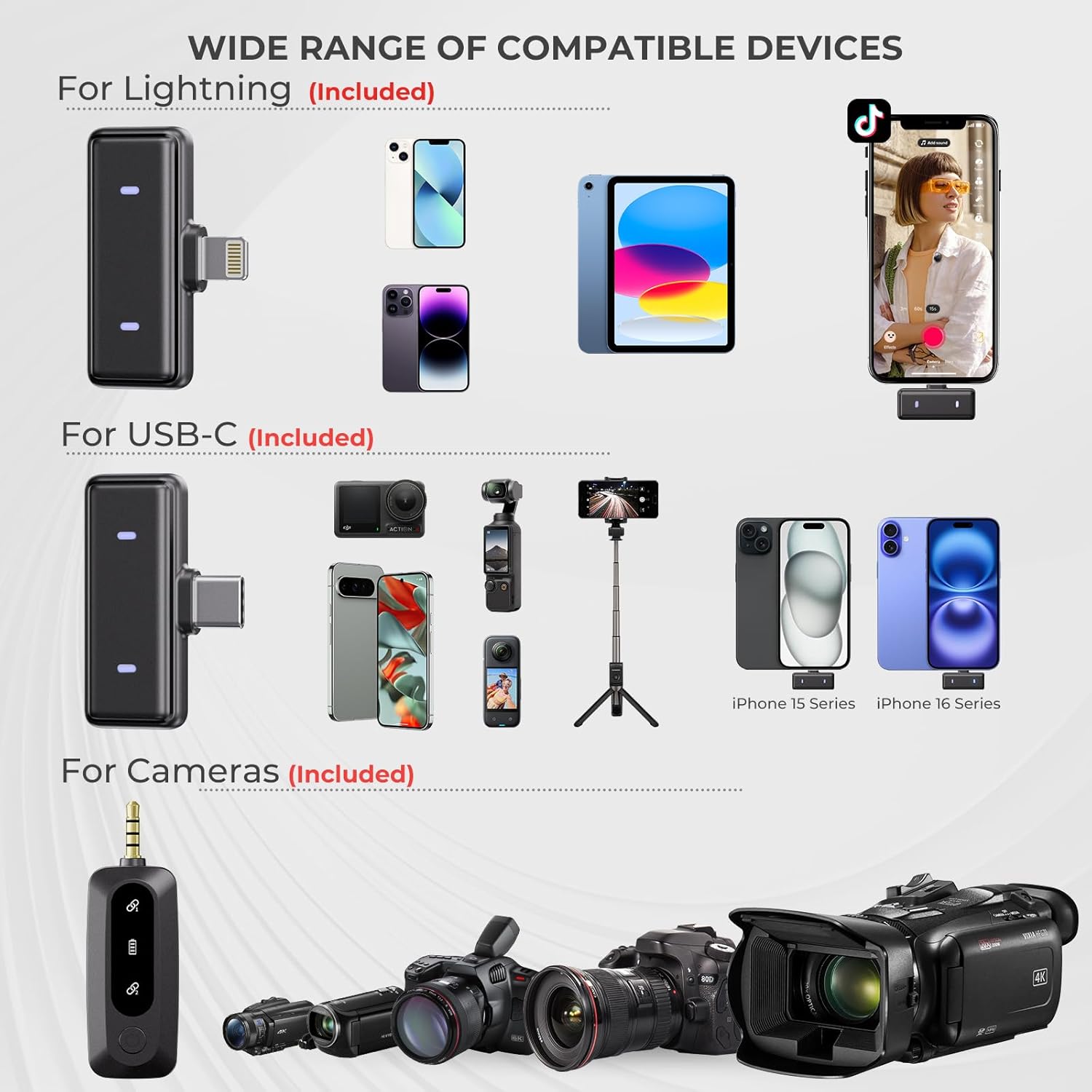
Image: An illustration of the Moman Wireless Lavalier Microphone's wide compatibility with Lightning, USB-C, and 3.5mm devices, including various smartphones and cameras.
Video: An official Moman video demonstrating the setup and features of the Moman Coin Wireless Lavalier Microphone, including its various connectors and ease of use.
5. Kullanım Talimatları
5.1 Güç Açma/Kapatma
Press and hold the power button on the microphone (transmitter) for a few seconds to turn it on or off. The indicator light will illuminate when powered on.
5.2 Aktif Gürültü Önleme (ANC)
To activate or deactivate the Active Noise Cancellation feature, press the dedicated ANC button on the microphone. This feature helps reduce ambient background noise, providing clearer audio in noisy environments.

Image: A visual representation of the Moman Wireless Lavalier Microphone's active noise cancellation technology, showing a 98% noise reduction capability.
5.3 Yankı Efekti
The microphone includes a professional reverb effect to add depth to your voice. Consult the product's quick start guide or manufacturer's website for specific instructions on activating and adjusting this feature, as button functions may vary.
5.4 Mikrofonun Takılması
The Moman Wireless Lavalier Microphone is designed for discreet and secure placement. Utilize its powerful magnetic attachment to clip it onto clothing, such as a collar or lapel. Ensure the microphone is positioned to capture your voice clearly, typically 6-8 inches from your mouth.

Image: The Moman Wireless Lavalier Microphone demonstrating its flexible magnetic clip setup, showing it attached to a hat and a shirt.
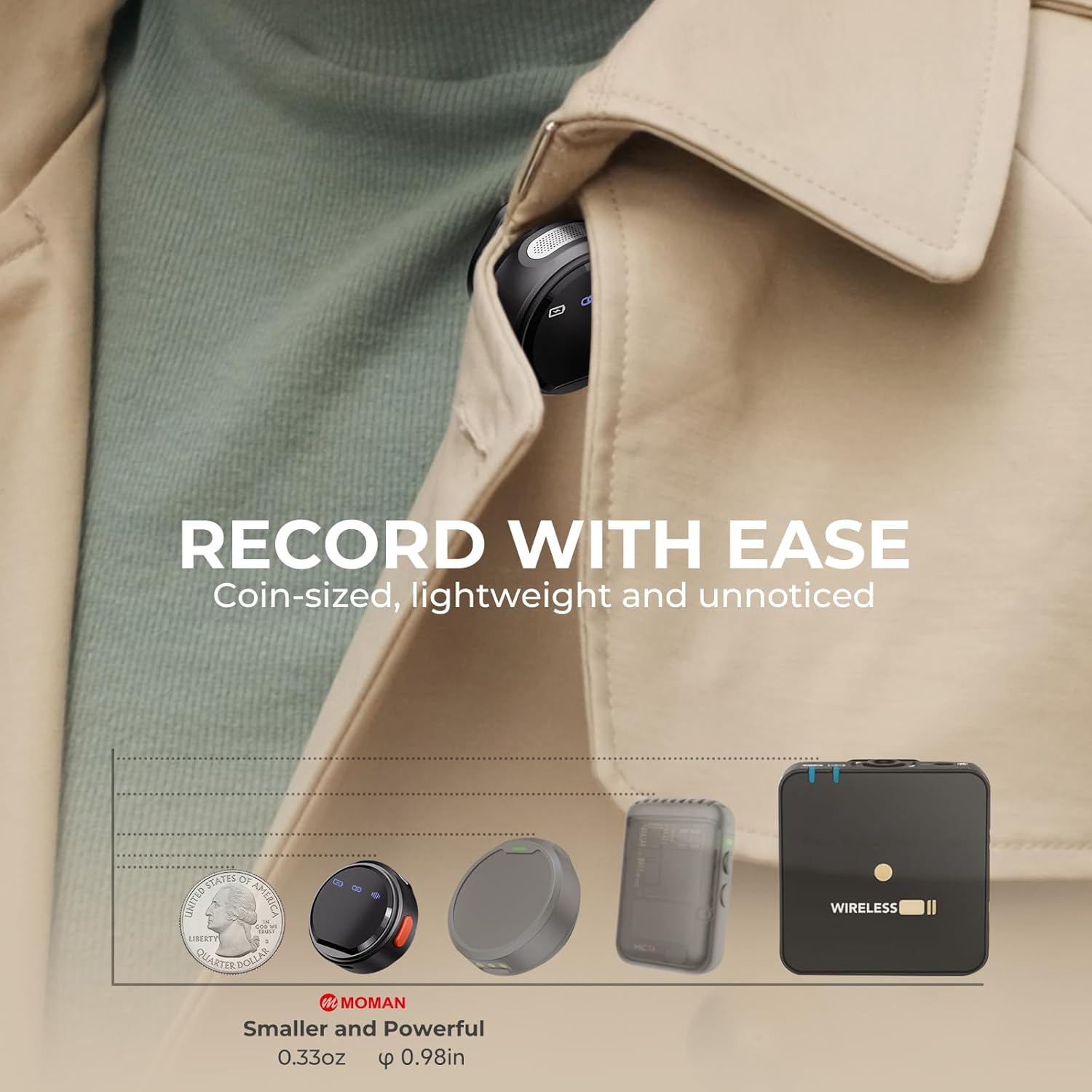
Image: The Moman Wireless Lavalier Microphone shown next to a quarter, emphasizing its compact, coin-sized design for discreet recording.
6. Bakım
6.1 Temizlik
Wipe the microphone and receivers with a soft, dry cloth. Do not use liquid cleaners or solvents, as they may damage the device. Ensure no moisture enters the ports or microphone grille.
6.2 Depolama
When not in use, store the microphone and receivers in the provided charging case. Keep the device in a cool, dry place away from direct sunlight and extreme temperatures. The 3.5mm receiver is a separate component and cannot be stored together with the other two receivers in the charging case.
6.3 Pil Bakımı
To prolong battery life, avoid fully discharging the device frequently. Recharge the device regularly, even if not in constant use. Store the device with a partial charge (around 50%) if storing for extended periods.
7. Sorun Giderme
If you encounter issues with your Moman Wireless Lavalier Microphone, please refer to the following common solutions:
- Ses Yok veya Ses Düşük:
- Ensure the microphone and receiver are fully charged and powered on.
- Alıcının kayıt cihazınıza güvenli bir şekilde takılı olduğundan emin olun.
- Check the audio input settings on your recording device (smartphone, camera, laptop) to ensure the external microphone is selected.
- Confirm that the microphone and receiver are successfully paired (indicated by solid lights).
- Poor Sound Quality / Buzzing Noise:
- Ensure the microphone is positioned correctly, not too far or too close to the sound source.
- Activate the Active Noise Cancellation feature if recording in a noisy environment.
- If using the 3.5mm receiver with a camera and experiencing buzzing noise, try the following:
- Ensure the 3.5mm cable is fully inserted into both the receiver and the camera's microphone input.
- Check for any ground loop issues by trying a different power source for your camera or microphone.
- Test with a different 3.5mm cable if available.
- Adjust the input gain levels on your camera. High gain can sometimes introduce noise.
- Avoid placing the microphone near strong electromagnetic interference sources.
- Eşleştirme Sorunları:
- Turn off both the microphone and receiver, then turn them back on to re-initiate pairing.
- Ensure they are within the effective operating range (up to 50m/164ft in open areas).
- Limited Range / Signal Drops:
- Maintain a clear line of sight between the microphone and receiver. Obstacles like walls or bodies can interfere with the signal.
- Avoid using the microphone in areas with high wireless interference (e.g., near Wi-Fi routers, other 2.4GHz devices).
If the issue persists after trying these steps, please contact Moman customer support for further assistance.
8. Özellikler
| Marka | Annem |
| Model Adı | MP-BM |
| Bağlantı Teknolojisi | 2.4GHz Kablosuz |
| Bağlayıcı Türü | 3.5 mm Jack, Lightning/USB-C |
| Özel Özellik | Clip, Magnetic Attachment, Active Noise Cancellation, Reverb Effect |
| Uyumlu Cihazlar | iPhone, Android Smartphones (Samsung Galaxy, Google Pixel, Sony, OnePlus, etc.), Cameras, Laptops, PCs |
| Renk | Siyah |
| Dahil Bileşenler | Charging Case, Microphone, Receiver |
| Kutup Deseni | Çok yönlü |
| Ses Hassasiyet | 38 Desibel |
| Mikrofon Form Faktörü | Yakalı yaka |
| Güç Kaynağı | Pil ile çalışır |
| Sinyal-Gürültü Oranı | 70 dB |
| Kanal Sayısı | 1 |
| Frekans Tepkisi | 20Hz-20KHz |
| Ürün Ağırlığı | 0.18 Kilogram |
| Muhafaza Malzemesi | Akrilonitril Bütadien Stiren |
9. Garanti ve Destek
9.1 Garanti Bilgileri
The Moman Wireless Lavalier Microphone MP-BM 3-in-1 Set comes with a 1 Yıllık Garanti from the date of purchase. This warranty covers manufacturing defects and malfunctions under normal use. It does not cover damage caused by misuse, accidents, unauthorized modifications, or improper storage.
9.2 Müşteri Desteği
For technical support, warranty claims, or any questions regarding your Moman product, please contact Moman customer service through the retailer's platform or visit the official Moman webiletişim bilgileri için site.