
Idatalink MD-8400
Momento M8 MAX Araç İçi Kamera Kullanım Kılavuzu
Model: MD-8400 | Brand: Idatalink
1. Giriş
This manual provides comprehensive instructions for the installation, operation, and maintenance of your Momento M8 MAX Dash Camera Kit (MD-8400). The M8 MAX is a 3-channel 4K UHD dash camera system featuring dual 5.0GHz Wi-Fi, GPS, and a Sony IMX image sensor, designed to capture high-quality video footage of your journeys and provide 24/7 vehicle protection.
Ürünün düzgün çalışmasını sağlamak ve kullanıcı deneyiminizi en üst düzeye çıkarmak için lütfen ürünü kullanmadan önce bu kılavuzu dikkatlice okuyun.

Image 1.1: Momento M8 MAX Dash Camera Kit, showing the main front camera unit, rear camera, and product packaging.
2. Neler Dahil?
Paketin tüm bileşenlerinin mevcut olduğunu doğrulayın:
- M8 Ön 4K Araç İçi Kamera, Dahili Çift 5.0GHz Wi-Fi + GPS Özelliğiyle
- FHD Arka Kamera ve Montaj Kablosu
- Kablolu Montaj Kablo Demeti
- 64 GB Micro SD Kart ve SD Kart Adaptörü
- Dağ
- 2 Yıllık Garanti Bilgileri
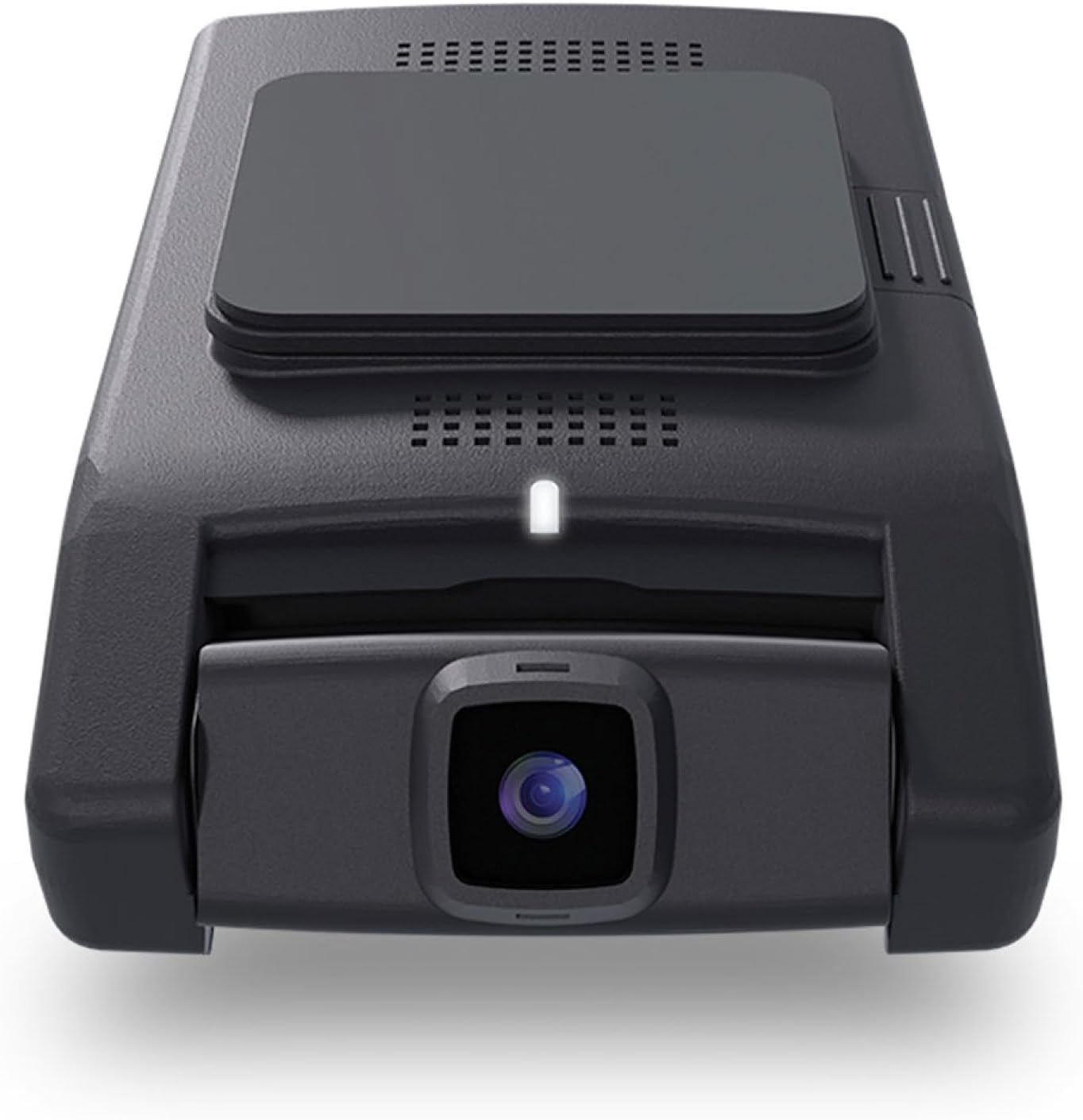
Resim 2.1: Ön view of the Momento M8 MAX dash camera, highlighting the lens and compact design.
3. Temel Özellikler
- 4K UHD (2160p) Image Resolution: Records sharp, detailed footage for clear evidence.
- Ön ve Arka Kameralar: Provides comprehensive coverage of your vehicle's surroundings.
- 30 Frames per Second: Ensures smooth video capture.
- Sony IMX Image Sensor: Enhances image quality, especially in low-light conditions.
- 64GB Micro-SD Card Included: Ample storage for recorded footage. Supports up to 256GB.
- ECO Parking Mode Battery Saving Technology: Activates automatically when motion or impact is detected while parked, conserving battery.
- Ses Kontrolü: Allows hands-free operation of certain functions.
- Dual 5.0GHz Wi-Fi Smartphone Connectivity: Enables direct download of footagve yaşa viewing via the Momento App.
- Dahili GPS: Records location and speed data with video footage.
4. Kurulum ve Kurulum
4.1 MicroSD Kartın Hazırlanması
Before first use, insert the included 64GB MicroSD card into the designated slot on the main dash camera unit. Ensure the card is inserted correctly until it clicks into place. It is recommended to format the MicroSD card periodically through the Momento App or the dash camera's settings to maintain optimal performance.

Resim 4.1: Yan view of the Momento M8 MAX dash camera, indicating the MicroSD card slot.
4.2 Ön Kameranın Montajı
- Clean the windshield area where the camera will be mounted. Ensure it is free of dust and grease.
- Montaj aparatını ön kameraya takın.
- Montaj aparatının yapışkan yüzeyindeki koruyucu filmi soyun.
- Firmly press the mount onto the chosen location on your windshield, ideally behind the rearview görüşünüzü engellememesi için ayna viewEn az 30 saniye bekleyin.
- Net bir görüntü elde etmek için kamera açısını ayarlayın. view Önümüzdeki yolun.
4.3 Arka Kameranın Kurulumu
- Determine the optimal mounting location for the rear camera, typically on the rear windshield.
- Route the rear camera's installation cable from the front camera to the rear of the vehicle, tucking it neatly along the headliner and pillar trim.
- Connect the rear camera cable to the main front camera unit.
- Mount the rear camera using its adhesive pad, ensuring a clear view arka camdan.
4.4 Power Connection (Hardwire Installation)
The M8 MAX includes a hardwire installation harness for continuous power and parking mode functionality. Professional installation is recommended for hardwiring.
- Connect the ACC (Accessory) wire of the harness to a fuse that is active only when the ignition is on.
- Connect the BATT (Battery) wire to a constant power fuse (always active).
- Connect the GND (Ground) wire to a metal part of the vehicle chassis.
- Plug the hardwire harness into the main dash camera unit.
4.5 Momento App Connection
- Download the "Momento" app from your smartphone's app store (iOS or Android).
- Turn on your vehicle's ignition to power the dash camera.
- On your smartphone, go to Wi-Fi settings and connect to the dash camera's Wi-Fi network (SSID and password can be found on the camera or in the quick start guide).
- Open the Momento App. The app should automatically detect and connect to the dash camera.

Image 4.2: Momento App interface on a smartphone, displaying live view ve menü seçenekleri.
5. Kullanım Talimatları
5.1 Otomatik Kayıt
Once powered on, the Momento M8 MAX will automatically begin continuous loop recording. Older files will be overwritten when the MicroSD card is full, unless they are protected (event recordings).
5.2 Event Recording (G-Sensor)
The built-in G-sensor detects sudden impacts or rapid acceleration/deceleration. When an event is detected, the current video segment will be automatically locked and saved to prevent overwriting.
5.3 Parking Mode (ECO Battery Saving Technology)
With the hardwire kit installed, the dash camera will automatically switch to parking mode when the vehicle's ignition is turned off. In ECO Parking Mode, the camera consumes minimal power and activates recording only when motion or impact is detected, providing 24/7 surveillance.
5.4 Ses Kontrolü
The M8 MAX supports voice commands for certain operations. Refer to the quick start guide or Momento App for a list of available voice commands.
5.5 Using the Momento App
The Momento App provides full control and access to your dash camera:
- Canlı View: Stream real-time video from the front and rear cameras to your smartphone.
- Galeri: Browse, play back, and download recorded video footage'yi doğrudan telefonunuza gönderin.
- Ayarlar: Adjust camera settings such as video resolution, G-sensor sensitivity, parking mode options, and Wi-Fi settings.
- Donanım Yazılımı Güncellemeleri: The app can notify you of and facilitate firmware updates for your dash camera.

Resim 5.1: Üst view of the Momento M8 MAX dash camera, showing the Wi-Fi and manual recording buttons.
6. Bakım
6.1 MicroSD Kart Yönetimi
Regularly format the MicroSD card (at least once a month) to prevent data corruption and ensure optimal recording performance. This can be done through the Momento App. Replace the MicroSD card if you experience frequent recording errors or data loss.

Image 6.1: The included Momento 64GB MicroSD card.
6.2 Lenslerin Temizlenmesi
Fotoğraf makinesi lenslerini nazikçe silmek için yumuşak, tüy bırakmayan bir bez kullanın. Lens kaplamasına zarar verebilecek aşındırıcı temizleyiciler veya çözücüler kullanmaktan kaçının.
6.3 Firmware Güncellemesi
Check the Momento App periodically for available firmware updates. Keeping your dash camera's firmware up-to-date ensures access to the latest features and performance improvements.
7. Sorun Giderme
| Sorun | Olası Neden | Çözüm |
|---|---|---|
| Kamera açılmıyor. | Loose power connection, vehicle power issue. | Check all power cable connections. Ensure vehicle's ignition is on if not hardwired to constant power. Verify fuse connections if hardwired. |
| Kayıt duruyor veya donuyor. | MicroSD card error, full card, or incompatible card. | Format the MicroSD card via the app. If issues persist, try a new, high-quality MicroSD card (Class 10 or higher, U3 recommended). |
| Wi-Fi bağlantı sorunları. | Incorrect password, too far from camera, app issue. | Ensure you are within close proximity to the camera. Re-enter Wi-Fi password. Restart the camera and the app. |
| Kötü video kalitesi. | Dirty lens, low light, incorrect resolution setting. | Clean the camera lens. Ensure sufficient lighting. Check video resolution settings in the Momento App (4K for front, 1080p for rear). |
| GPS sinyali yok. | Engellenmiş view of sky, camera not properly positioned. | Kameranın net olduğundan emin olun view of the sky. Avoid mounting near metallic tints or other signal-blocking materials. |
For further assistance, please refer to the Momento App's help section or contact customer support.
8. Özellikler
| Özellik | Detay |
|---|---|
| Model Adı | Momento M8 MAX MD-8400 |
| Ön Kamera Çözünürlüğü | 4K UHD (2160p) @ 30fps |
| Arka Kamera Çözünürlüğü | FHD (1080p) @ 30fps |
| Görüntü Sensörü | Sony IMX Sensörü |
| ViewAçı | 270°'ye kadar (Ön + Arka) |
| Wi-Fi Bağlantısı | Dual 5.0GHz Wi-Fi |
| Küresel Konumlama Sistemi | Dahili |
| Park Modu | ECO Battery Saving Technology (Motion/Impact Detection) |
| Ses Kontrolü | Evet |
| MicroSD kart dahildir. | 64GB (Supports up to 256GB) |
| Güç Bağlantısı | Kablolu Montaj Kablo Demeti |
| Boyutlar | 5 x 5 x 3 inç |
| Ürün Ağırlığı | 1.2 pound |
9. Garanti ve Destek
9.1 Garanti Bilgileri
The Momento M8 MAX Dash Camera Kit (MD-8400) comes with an industry-leading 2 Yıllık Garanti from the date of purchase. This warranty covers manufacturing defects and ensures the product performs as specified under normal use. Please retain your proof of purchase for warranty claims.
9.2 Müşteri Desteği
For technical support, troubleshooting assistance, or warranty inquiries, please contact Idatalink customer service. You can also find helpful resources and FAQs within the Momento App.
Üretici: Anı
Marka: Idatalink
For the most up-to-date support contact information, please visit the official Idatalink or Momento webalan.
Ask a question about this manual
Ask about setup, troubleshooting, compatibility, parts, safety, or missing instructions. Manuals+ will review the question and use this page’s manual context to help answer it.