
1. Giriş
Thank you for choosing the Intenso O400HA Over-Ear Headphones. These headphones are designed to provide a superior audio experience with advanced features such as Hybrid Active Noise Cancelling (ANC), Transparency Mode, and Bluetooth 5.3 connectivity. This manual will guide you through the setup, operation, and maintenance of your new headphones.
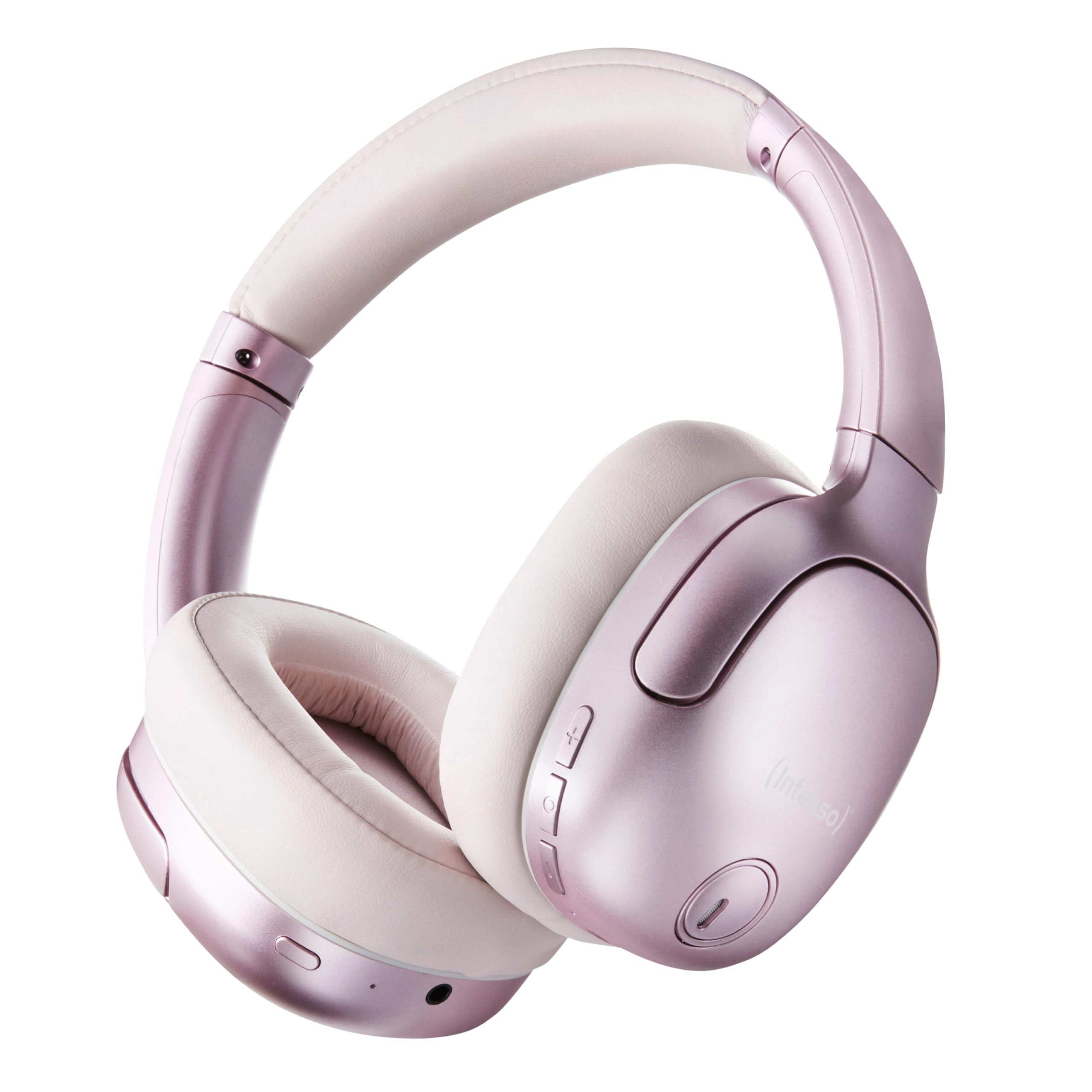
Image 1.1: Intenso O400HA Over-Ear Headphones (Pink)
The Intenso O400HA headphones feature a comfortable over-ear design with soft ear pads, an adjustable headband, and intuitive controls on the earcups.
2. Paket İçeriği
Lütfen paketi aşağıdaki öğeler açısından kontrol edin:
- Intenso O400HA Over-Ear Headphones
- USB-C - USB-C Şarj Kablosu
- 1.5m Audio Cable (3.5mm jack)
- Kullanıcı Kılavuzu
3. Ürün Bittiview
Familiarize yourself with the various parts and controls of your Intenso O400HA headphones.

Resim 3.1: Yan view of Intenso O400HA headphones with controls
This image displays the right earcup with its control buttons and ports. These typically include power, volume, multi-function buttons, and a charging port.
Kontroller ve Bağlantı Noktaları:
- Güç Düğmesi: Kulaklıkları açıp kapatmak ve Bluetooth eşleştirmesini başlatmak için kullanılır.
- Sesi Aç/Sonraki Parça Düğmesi: Kısa basışla ses seviyesini artırır, uzun basışla bir sonraki parçaya geçer.
- Sesi Azaltma/Önceki Parça Düğmesi: Kısa basışla ses seviyesini düşürür, uzun basışla önceki parçaya geçer.
- Çok Fonksiyonlu Düğme (MFB): Controls playback (play/pause), answers/ends calls, activates voice assistant.
- ANC/Saydamlık Modu Düğmesi: Toggles between Hybrid Active Noise Cancelling, Transparency Mode, and normal mode.
- USB-C Şarj Portu: Kulaklıkları şarj etmek için.
- 3.5 mm Ses Jakı: Kablolu bağlantı için.
- Mikrofonlar: Internal and external microphones for ANC and calls.
4. Kurulum
4.1. Kulaklıkları Şarj Etme
İlk kullanımdan önce kulaklıklarınızı tamamen şarj edin.
- Kutu içeriğinde bulunan USB-C şarj kablosunu kulaklıktaki USB-C bağlantı noktasına bağlayın.
- Kablonun diğer ucunu bir USB güç adaptörüne (dahil değildir) veya bir bilgisayarın USB portuna bağlayın.
- The LED indicator will show the charging status. It typically turns off or changes color when fully charged.
A full charge takes approximately 2 hours. A quick charge of 15 minutes provides up to 6 hours of playtime.
4.2. Bluetooth Eşleştirme
Kulaklıklarınızı Bluetooth özellikli bir cihaza bağlamak için:
- Kulaklıkların kapalı olduğundan emin olun.
- Güç düğmesini yaklaşık 5-7 saniye basılı tutun; LED göstergesi mavi ve kırmızı yanıp sönmeye başlayacak ve eşleştirme moduna geçecektir.
- Cihazınızda (akıllı telefon, tablet, dizüstü bilgisayar) Bluetooth ayarlarına gidin ve Bluetooth'u etkinleştirin.
- Arama available devices and select "Intenso O400HA" from the list.
- Once connected, the LED indicator will typically flash blue slowly or remain solid blue.
Kulaklık açıldığında, son eşleştirilen cihaza otomatik olarak yeniden bağlanmaya çalışacaktır.
5. Kulaklıkların Kullanımı
5.1. Güç Açma/Kapatma
- Güç Açık: Güç tuşuna 2-3 saniye basılı tutun.
- Kapat: Güç tuşuna 3-4 saniye basılı tutun.
5.2. Audio Modes: ANC, Transparency, Music
The Intenso O400HA headphones offer three distinct audio modes to suit your environment.

Resim 5.1: Üzeriview of Noise Control Modes
This image illustrates the key noise control technologies: Hybrid Active Noise Cancellation (ANC) for reducing ambient noise, Environmental Noise Cancellation (ENC) for clear calls, and Transparency Mode for hearing your surroundings.

Image 5.2: Hybrid Active Noise Cancelling Explained
This diagram shows how Hybrid ANC works using both external and internal microphones to filter out up to 95% of ambient noise, such as engine sounds.
- Hibrit Aktif Gürültü Önleme (ANC): Press the ANC/Transparency Mode button to activate. This mode significantly reduces ambient noise, ideal for travel or noisy environments.
- Şeffaflık Modu: Press the ANC/Transparency Mode button again to switch to Transparency Mode. This allows external sounds to pass through, enabling you to hear your surroundings without removing the headphones.
- Normal Mode (Music Mode): Press the ANC/Transparency Mode button a third time to return to normal mode, where ANC and Transparency are off. This mode provides balanced sound for a comprehensive listening experience.
5.3. Müzik Çalma ve Aramalar
- Oynat/Duraklat: Short press the Multi-function Button (MFB).
- Sonraki Parça: Sesi Açma tuşuna uzun basın.
- Önceki parça: Sesi Azaltma düğmesine uzun basın.
- Sesi aç: Sesi Açma tuşuna kısa basın.
- Sesi kıs: Sesi Azaltma düğmesine kısa basın.
- Çağrıyı Cevapla/Sonlandır: MFB'ye kısa basın.
- Çağrıyı Reddet: MFB düğmesine uzun süre basılı tutun.
- Voice Assistant'ı etkinleştirin: MFB'ye iki kez basın.
5.4. Wired Connection (Passive Mode)
You can use the headphones in passive mode even if the battery is depleted or if you prefer a wired connection.
- 3.5 mm ses kablosunun bir ucunu kulaklıktaki ses girişine bağlayın.
- Kabloyu diğer ucundan cihazınızın 3.5 mm ses çıkışına bağlayın.
Note: ANC and Transparency modes may not function or may have reduced performance when using the wired connection without power.
6. Bakım
To ensure the longevity and optimal performance of your Intenso O400HA headphones, follow these maintenance guidelines:
- Temizlik: Kulaklıkları temizlemek için yumuşak, kuru bir bez kullanın. Aşındırıcı temizleyiciler, çözücüler veya sert kimyasallar kullanmayın.
- Depolamak: Store the headphones in a cool, dry place away from direct sunlight and extreme temperatures. When not in use, it is recommended to store them in a protective case (if provided or purchased separately).
- Suya Maruz Kalma: Bu kulaklıklar su geçirmez değildir. Suya, neme veya yağmura maruz bırakmaktan kaçının.
- Pil Bakım: For optimal battery life, avoid fully discharging the battery frequently. Charge the headphones regularly, even if not used for extended periods.
- Kablo Bakımı: Handle the charging and audio cables gently. Avoid bending or twisting them excessively.
7. Sorun Giderme
Kulaklıklarınızla ilgili herhangi bir sorunla karşılaşırsanız, aşağıdaki yaygın sorunlar ve çözümlere bakın:
| Sorun | Olası Neden | Çözüm |
|---|---|---|
| Kulaklıklar açılmıyor | Düşük pil | Kulaklığı tam şarj edin. |
| Bluetooth üzerinden eşleştirilemiyor | Headphones not in pairing mode; Device Bluetooth off; Interference | Ensure headphones are in pairing mode (flashing blue/red). Turn Bluetooth on your device. Move closer to the device. Forget previous pairings and try again. |
| Ses yok veya düşük ses seviyesi | Volume too low; Incorrect audio source; Loose cable (wired mode) | Kulaklık ve cihazınızdaki ses seviyesini artırın. Cihazınızda doğru ses çıkışının seçili olduğundan emin olun. 3.5 mm kablonun güvenli bir şekilde bağlı olduğundan emin olun. |
| ANC etkili değil | ANC not activated; Improper fit | Aktif gürültü engelleme (ANC) düğmesine basarak etkinleştirin. Kulaklıkları kulaklarınıza tam oturacak şekilde ayarlayın. |
| Ses bozulması | Distance from device; Interference; Low battery | Move closer to your device. Avoid strong electromagnetic fields. Charge the headphones. |
8. Özellikler
| Özellik | Detay |
|---|---|
| Model Adı | Over-Ear O400HA |
| Bağlantı Teknolojisi | Wireless (Bluetooth 5.3) / Wired (3.5mm jack) |
| Gürültü Kontrolü | Hibrit Gürültü Engelleme |
| Pil Ömrü | 75 Saate Kadar |
| Şarj Süresi | Approximately 2 Hours (15 min for 6 hours playtime) |
| kablosuz Menzil | 15 metreye kadar |
| Frekans Tepkisi | 20 Hz ila 20 KHz |
| Empedans | 32 Ohm |
| Kontrol Yöntemi | Touch/Buttons |
| Ağırlık | 0.25 Kilogram |
| Malzeme | Termoplastik Elastomer (TPE) |
| Uyumlu Cihazlar | Mobile phones, Laptops, Tablets, Gaming Consoles, Car Audio Systems |
9. Garanti ve Destek
Intenso products are designed for reliability and performance. For warranty information and customer support, please refer to the warranty card included with your purchase or visit the official Intenso webSite. Satın alma belgenizi herhangi bir garanti talebi için saklayın.
For further assistance, you may contact Intenso customer service through their official channels.