
1. Ürün Bittiview
The MOBAPAD N1 HD is a versatile wireless controller designed for an enhanced gaming experience across multiple platforms. It features advanced technologies such as Hall Effect Joysticks for precise control, ALPS Dual-Axis Motors for immersive HD vibration, and six-axis motion control. This controller is compatible with Nintendo Switch, PC, iOS, and Android devices, offering seamless connectivity and responsive performance.

Resim: Ön view of the MOBAPAD N1 HD Wireless Controller, showcasing ergonomik tasarımı ve tuş dizilimi.
2. Temel Özellikler
- Çoklu Platform Uyumluluğu: Fully compatible with Nintendo Switch, PC, iOS, and Android devices, ensuring broad usability.
- Hall Etkili Joystickler: Provides smooth, precise, and durable control with minimal wear, ideal for accurate gaming.
- ALPS Dual-Axis Motors with HD Vibration: Delivers realistic and immersive haptic feedback for enhanced gameplay.
- Altı Eksenli Hareket Kontrolü: Built-in gyroscope enables enhanced motion control for compatible games.
- NFC for Amiibo Scanning: Supports NFC technology for scanning Amiibo figures on Nintendo Switch.

Image: The controller illustrating its immersive motion control capabilities with swirling lines around it.

Image: The controller positioned in front of a collection of Amiibo figures, highlighting its NFC scanning function.

Image: The controller shown alongside icons for Switch, Android/iOS, and PC, demonstrating its multi-device compatibility.
3. Kurulum ve Bağlantı
Follow these steps to connect your MOBAPAD N1 HD controller to your desired device.
3.1. Nintendo Switch'e bağlanma
- HOME Menüsünden, seçin Kontrolörler, Daha sonra Tutma Yerini/Sırayı Değiştir.
- While the screen is displaying "Press L + R on the controller", press and hold the Ana sayfa düğmesi on the MOBAPAD N1 HD controller for 3-5 seconds until the player LEDs begin to flash.
- Bağlantı kurulduktan sonra, kumanda numarasına karşılık gelen oyuncu LED'leri yanık kalacaktır.
3.2. Connecting to PC (Windows)
- Connect the controller to your PC using a USB-C cable. The controller will be recognized as a wired controller.
- For wireless connection, ensure your PC has Bluetooth enabled. Go to Bluetooth & other devices settings.
- "Bluetooth veya başka cihaz ekle" seçeneğini seçin ve "Bluetooth"u seçin.
- Basılı tutun Ana sayfa düğmesi on the controller until the LEDs flash rapidly, indicating pairing mode.
- Select "MOBAPAD N1 HD" from the list of available devices.
3.3. Connecting to iOS/Android Devices
- iOS veya Android cihazınızda Bluetooth'u etkinleştirin.
- Bluetooth ayarlarına gidin ve yeni cihazları arayın.
- Basılı tutun Ana sayfa düğmesi on the controller until the LEDs flash rapidly.
- Select "MOBAPAD N1 HD" from the list of available devices to pair.
4. Kontrol Cihazının Çalıştırılması
Familiarize yourself with the controller's layout and functions for optimal gameplay.
4.1. Düğme Düzeni
- Sol Analog Çubuk: For movement and camera control. Features Hall Effect technology.
- Sağ Analog Çubuk: For camera control and aiming. Features Hall Effect technology.
- Yön Düğmesi: Menü navigasyonu ve belirli oyun eylemleri için yön tuşları.
- A/B/X/Y Düğmeleri: Standart eylem düğmeleri.
- Sol/Sağ Düğmeler: Omuz düğmeleri.
- ZL/ZR Düğmeleri: Tetikleme düğmeleri.
- Eksi (-) Düğmesi: Typically for opening in-game menus or specific functions.
- Artı (+) Düğmesi: Typically for opening in-game menus or specific functions.
- Ana menü tuşu: Returns to the system's home screen. Also used for pairing and NFC scanning.
- Yakalama Düğmesi: Takes screenshots or video clips (Nintendo Switch).
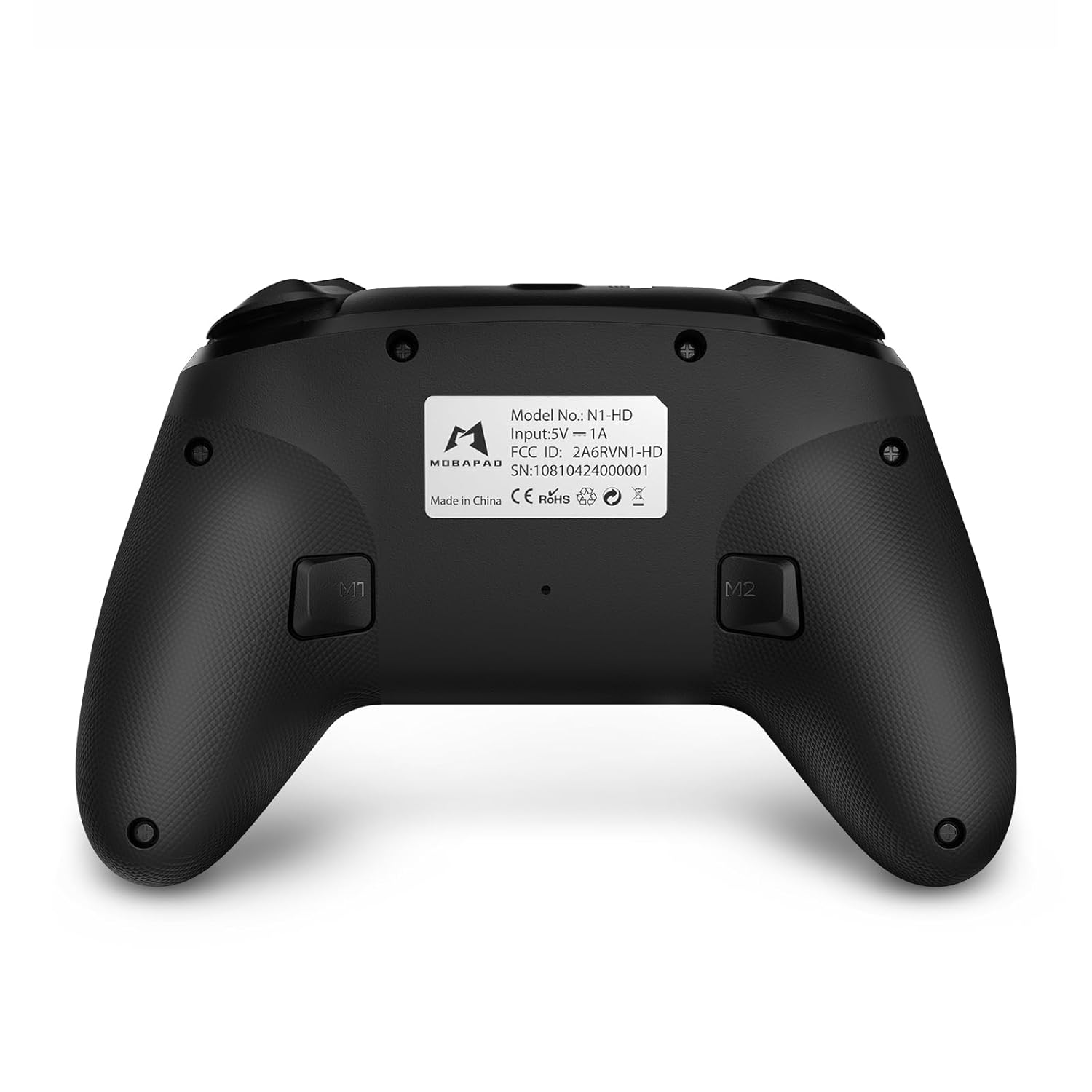
- M1/M2 Düğmeleri: Programmable back buttons for custom macros or remapping.
Resim: Detaylı ön view of the MOBAPAD N1 HD controller, showing all buttons and joysticks.

Resim: Arka view of the MOBAPAD N1 HD controller, highlighting the M1 and M2 programmable buttons and product label.
4.2. NFC Functionality (Amiibo Scanning)
To use the NFC function for Amiibo scanning on Nintendo Switch:
- Ensure your controller is connected to the Nintendo Switch.
- In a compatible game, when prompted to scan an Amiibo, place the Amiibo figure directly over the Ana sayfa düğmesi area on the controller.
- Hold the Amiibo in place until the game registers the scan.
5. Bakım ve Özen
Düzenli bakım, kontrol cihazınızın uzun ömürlü olmasını ve en iyi performansı göstermesini sağlar.
- Temizlik: Kumandayı silmek için yumuşak ve kuru bir bez kullanın. İnatçı kirler için hafifçe silin.ampBezi suyla yıkayın. Sert kimyasallardan veya aşındırıcı malzemelerden kaçının.
- Depolamak: Kontrol cihazını serin, kuru ve doğrudan güneş ışığından ve aşırı sıcaklıklardan uzak bir yerde saklayın.
- Pil Bakım: The controller contains a Lithium Ion battery. Avoid fully discharging the battery frequently. If storing for extended periods, charge the battery to about 50% to prolong its lifespan. Do not expose the battery to fire or extreme heat.
- İşleme: Kontrol cihazını düşürmekten veya sert darbelere maruz bırakmaktan kaçının, çünkü bu dahili bileşenlere zarar verebilir.
6. Sorun Giderme
If you encounter issues with your MOBAPAD N1 HD controller, refer to the following common solutions.
| Sorun | Olası Neden | Çözüm |
|---|---|---|
| Kumanda bağlanmıyor. | Pil zayıf, menzil dışında, yanlış eşleştirme modu, parazit. | Charge the controller fully. Ensure it is within range of the device. Re-enter pairing mode (hold Home button). Move closer to the device or away from other wireless devices. |
| Düğmeler veya joystickler çalışmıyor. | Software glitch, physical obstruction, damage. | Restart the controller and the connected device. Check for any debris around the buttons/joysticks. If issues persist, contact customer support. |
| Vibration is weak or absent. | Vibration setting off, game does not support vibration, motor issue. | Check in-game settings and system settings to ensure vibration is enabled. Verify if the game supports vibration feedback. |
| NFC scanning fails. | Incorrect placement, game not prompting scan, controller not connected. | Ensure the Amiibo is placed directly over the Home button area. Confirm the game is prompting for an Amiibo scan. Verify controller is properly connected to the Switch. |
7. Özellikler
| Özellik | Detay |
|---|---|
| Model Numarası | Mobapad N1 HD Black |
| Boyutlar (U x G x Y) | 5.91 x 2.36 x 3.94 inç |
| Ağırlık | 7.05 ons |
| Pil Türü | 1 Lityum İyon pil (dahil) |
| Bağlantı | Kablosuz (Bluetooth), USB-C (kablolu) |
| Uyumluluk | Nintendo Switch, PC, iOS, Android |
| Özel Özellikler | Hall Effect Joysticks, ALPS Dual-Axis Motors, HD Vibration, Six-Axis Gyroscope, NFC |
8. Garanti ve Destek
For warranty information or technical support, please contact MOBAPAD customer service. Refer to the official MOBAPAD webBelirli garanti koşulları ve iletişim bilgileri için siteye veya satın alma belgelerinize bakın.
You can visit the official MOBAPAD store on Amazon for more information: MOBAPAD Store