
1. Giriş
This manual provides detailed instructions for the installation, operation, and maintenance of your VANBAR 2-in-1 Android Car Wireless Adapter. This device converts your car's wired Apple CarPlay or Android Auto system into a wireless connection, enhancing convenience and user experience.
2. Güvenlik Bilgileri
- Cihazı sökmeye veya değiştirmeye çalışmayın.
- Cihazı sudan, nemden ve aşırı sıcaklıklardan uzak tutun.
- Ensure the device is securely placed to avoid obstruction while driving.
- Cihazı sorumluluk bilinciyle kullanın ve sürüş sırasında dikkatinizi dağıtacak şeylerden kaçının.
3. Paket İçeriği
Lütfen paketi aşağıdaki öğeler açısından kontrol edin:
- VANBAR 2-in-1 Wireless Adapter (Model: Carplay01)
- USB-A - USB-C Adaptör Kablosu
- Kullanım Kılavuzu (bu belge)
4. Ürün Bittiview
The VANBAR 2-in-1 Wireless Adapter is a compact device designed to enable wireless Apple CarPlay and Android Auto in compatible vehicles. It features a durable alloy casing for efficient heat dissipation and includes both USB-A and USB-C connectivity options.

Image 4.1: VANBAR 2-in-1 Wireless Adapter showing USB-A and USB-C connectivity. The adapter is a small black square with a USB cable attached, and an additional USB-C adapter is shown.

Image 4.2: Diagram illustrating the internal structure of the adapter, highlighting the glass and metal alloy components for excellent heat dissipation.
5. Kurulum Talimatları
İlk kurulum için şu adımları izleyin:
- Adaptörü bağlayın:
Plug the VANBAR wireless adapter into your car's USB port that supports wired Apple CarPlay or Android Auto. Use the provided USB-C adapter if your car has a USB-C port.
- Bluetooth ile eşleştirin:
Akıllı telefonunuzda Bluetooth ve Wi-Fi'yi etkinleştirin. Arama the adapter's Bluetooth name (e.g., "VANBAR-XXXX") and pair with it. Confirm any pairing requests on your phone and car display.
- Otomatik Bağlantı:
Once paired, the adapter will automatically connect to your phone via Wi-Fi to initiate Apple CarPlay or Android Auto. The car's display should switch to the CarPlay or Android Auto interface.

Image 5.1: Visual guide for connecting the adapter to the car's USB port, pairing via Bluetooth, and the automatic connection process.
6. Kullanım Talimatları
After successful setup, the adapter will automatically connect to your smartphone when you start your car. You can then use Apple CarPlay or Android Auto wirelessly.
- Navigasyon: Use your preferred navigation apps directly on your car's display.
- Müzik ve Medya: Stream music, podcasts, and audiobooks.
- Aramalar ve Mesajlar: Make and receive calls, and send/receive messages using voice commands or the car's interface.
- Ses Kontrolü: Utilize Siri (for Apple CarPlay) or Google Assistant (for Android Auto) for hands-free operation.

Resim 6.1: Örn.ample of a car display showing multiple CarPlay functions simultaneously, including navigation, music playback, and an incoming call.

Image 6.2: Illustration of different control methods for the car's infotainment system, including touchscreen, steering wheel buttons, and a central rotary knob.
7. Uyumluluk
This wireless adapter is designed for vehicles equipped with factory-wired Apple CarPlay or Android Auto. It supports:
- Araçlar: Compatible with most car models from 2015 onwards that have wired CarPlay/Android Auto.
- Akıllı telefonlar:
- Apple CarPlay: Requires iPhone with iOS 10 or later.
- Android Auto: Requires Android phone with Android 11 or later.
For detailed compatibility lists, please refer to the official resources:
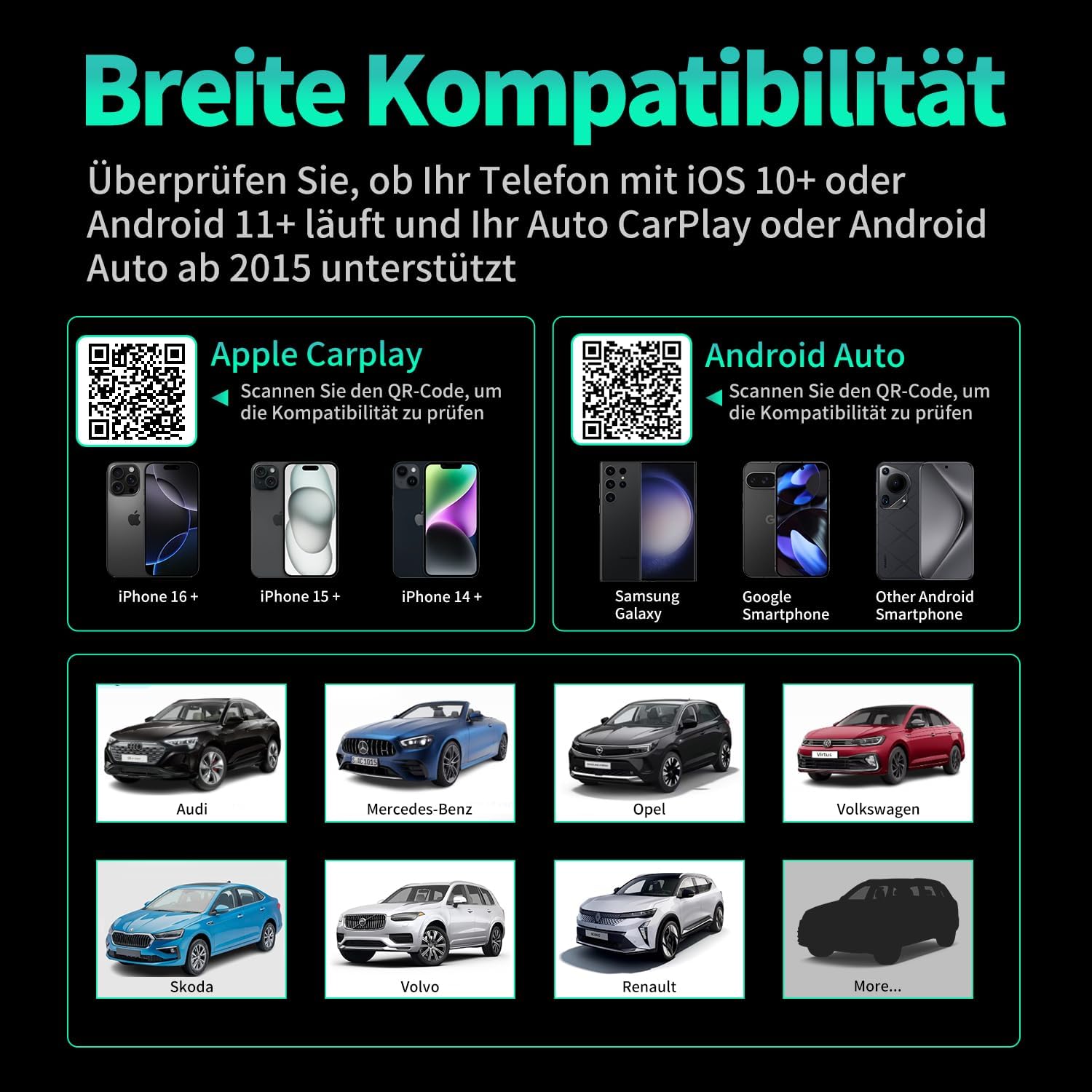
Image 7.1: Compatibility overview displaying supported iPhone models (14+, 15+, 16+), Samsung Galaxy, Google, and other Android smartphones, along with car brands like Audi, Mercedes-Benz, Opel, Volkswagen, Skoda, Volvo, and Renault.
8. Bakım
- Temizlik: Cihazı yumuşak, kuru bir bezle silin. Sıvı temizleyiciler veya aşındırıcı malzemeler kullanmayın.
- Depolamak: Uzun süre kullanılmayacaksa cihazı serin ve kuru bir yerde saklayın.
- Donanım Yazılımı Güncellemeleri: Üreticinin kontrol edin webEn iyi performans ve uyumluluğu sağlamak için siteyi düzenli olarak mevcut ürün yazılımı güncellemeleri açısından kontrol edin.
9. Sorun Giderme
| Sorun | Olası Neden | Çözüm |
|---|---|---|
| Adapter not connecting to car. | Incorrect USB port, car not compatible, loose connection. | Ensure the adapter is plugged into the correct USB port that supports wired CarPlay/Android Auto. Verify car compatibility. Re-plug the adapter firmly. |
| Phone not connecting to adapter. | Bluetooth/Wi-Fi off, incorrect pairing, phone OS not supported. | Ensure Bluetooth and Wi-Fi are enabled on your phone. Forget previous Bluetooth connections and re-pair. Check phone OS version for compatibility (iOS 10+, Android 11+). |
| Kesintili bağlantı veya gecikme. | Interference, weak signal, outdated firmware. | Ensure no other devices are causing Wi-Fi interference. Try restarting both the car's infotainment system and your phone. Check for firmware updates. |
| CarPlay/Android Auto başlatılamıyor. | CarPlay/Android Auto not enabled in car settings, app issues. | Check your car's infotainment settings to ensure CarPlay/Android Auto is enabled. Restart your phone and the car's system. |
10. Özellikler
| Model Numarası | Carplay01 |
| Marka | Vanbar |
| Bağlantı Teknolojisi | Bluetooth 5.0, Wi-Fi (2.4 GHz + 5 GHz), USB |
| Uyumlu Cihazlar | Akıllı telefonlar (iOS 10+, Android 11+) |
| Bağlayıcı Türü | USB Type A, USB Type C (with adapter) |
| Ürün Boyutları | 1x5.5x4.5 cm |
| Ürün Ağırlığı | 12 gr |
| Renk | Siyah |
| Özel Özellikler | Wireless Android Auto, Wireless Apple CarPlay, GPS Navigation, Spotify, iHeart Radio support |
11. Garanti ve Destek
For warranty information and technical support, please refer to the official VANBAR webSite üzerinden satın alabilir veya doğrudan müşteri hizmetleriyle iletişime geçebilirsiniz. Garanti talepleriniz için satın alma fişinizi saklayın.