
Ürün Bittiview
The XO BE18 is a stereo audio wireless Bluetooth headset featuring RGB lighting. It is designed for immersive listening experiences and convenient communication, offering multiple playback modes including Bluetooth, AUX, TF card, and FM radio.
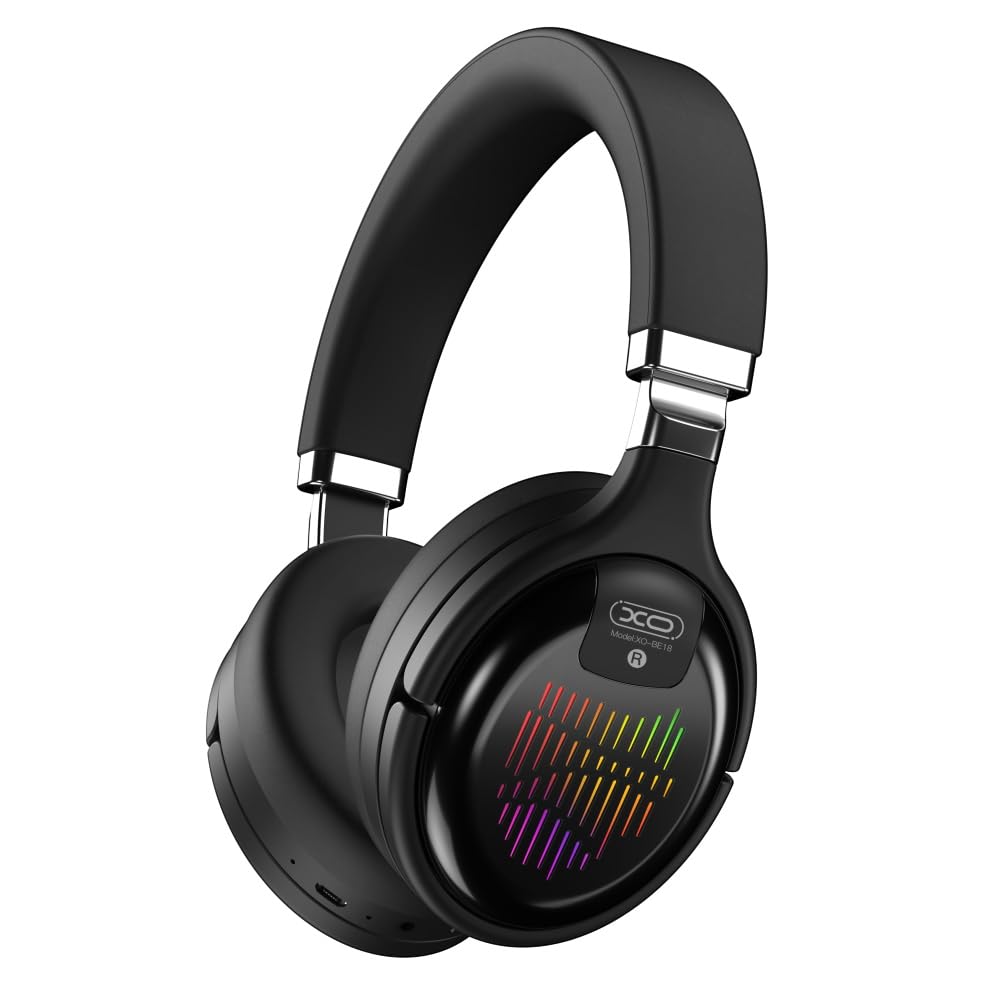
Image: The XO BE18 Wireless Bluetooth Headset, showcasing its over-ear design and integrated RGB lighting on the earcups.
Paket İçeriği
Lütfen pakette tüm öğelerin mevcut olduğundan emin olun:
- XO BE18 Wireless Bluetooth Headset
- Şarj kablosu
- Kullanım Kılavuzu (bu belge)

Image: The XO BE18 headset shown within its retail packaging, indicating the included accessories.
Kurmak
Kulaklığı Şarj Etme
- Kulaklığın üzerindeki şarj portunu bulun.
- Connect the provided charging cable to the headset and a compatible USB power source (e.g., computer USB port, USB wall adapter).
- The LED indicator on the headset will typically show a specific color (e.g., red) during charging and change (e.g., turn off or blue) when fully charged.
- Tam şarj yaklaşık 2.5 saat sürüyor.
Açma/Kapatma
- Açmak İçin: Press and hold the Power button for approximately 3-5 seconds until the LED indicator lights up and you hear an audible prompt.
- Kapatmak İçin: Press and hold the Power button for approximately 3-5 seconds until the LED indicator turns off and you hear an audible prompt.
Kullanım Talimatları
Bluetooth Eşleştirme
- Kulaklığın kapalı olduğundan emin olun.
- Press and hold the Power button for approximately 5-7 seconds until the LED indicator flashes rapidly (e.g., alternating blue and red), indicating pairing mode.
- Cihazınızda (akıllı telefon, tablet, bilgisayar) Bluetooth'u etkinleştirin ve kullanılabilir cihazları arayın.
- Select "XO BE18" from the list of found devices.
- Once paired, the LED indicator will typically flash slowly or turn solid blue, and you will hear a confirmation tone.
Temel Kontroller
The headset features various buttons for controlling audio playback and calls. Refer to the image below for button locations.

Resim: Yakın çekim view of the XO BE18 headset earcup, highlighting the control buttons and ports.
- Güç Düğmesi: Açmak/kapatmak için basılı tutun. Müziği oynatmak/duraklatmak veya aramaları cevaplamak/sonlandırmak için kısa basın.
- Sesi Aç (+): Kısa basışla sesi açın. Uzun basışla sonraki parçaya geçin.
- Sesi kıs (-): Kısa basıldığında ses kısılır. Uzun basıldığında önceki parça çalınır.
- Mod Düğmesi (M): Short press to switch between Bluetooth, AUX, TF card, and Radio modes.
RGB Aydınlatma
The headset features integrated RGB lighting on the earcups. This lighting typically activates automatically when the headset is powered on. Specific controls for the RGB lighting (if any) may be integrated with the mode button or a dedicated button not explicitly detailed.

Image: The XO BE18 headset displaying its colorful RGB lighting on the earcups.
Mikrofon Kullanımı
The built-in microphone allows for hands-free calls. When a call comes in, press the Power button once to answer. Press again to end the call.
AUX Modu
Connect an audio cable (not included) from your device's 3.5mm audio jack to the headset's AUX port to use it in wired mode. The headset does not require power in AUX mode.
TF Kart Modu
Sesli bir TF (microSD) kart takın files into the designated slot. Use the Mode button to switch to TF card mode.
Radyo Modu
Use the Mode button to switch to Radio mode. The headset will automatically scan for available FM radio stations.
Bakım
- Temizlik: Kulaklığı temizlemek için yumuşak ve kuru bir bez kullanın. Aşındırıcı temizleyiciler veya çözücüler kullanmayın.
- Depolamak: When not in use, store the headset in a cool, dry place. The headset features a portable folding design for compact storage.
- Pil Bakım: Pil ömrünü uzatmak için pili sık sık tamamen boşaltmaktan kaçının. Sürekli kullanılmasa bile kulaklığı düzenli olarak şarj edin.
- Suya Maruz Kalma: Bu kulaklık su geçirmez değildir. Suya veya aşırı neme maruz bırakmaktan kaçının.

Image: The XO BE18 headset shown in its folded configuration, demonstrating its portable design.
Sorun giderme
| Sorun | Olası Çözüm |
|---|---|
| Kulaklık açılmıyor. | Kulaklığın tamamen şarj olduğundan emin olun. Bir güç kaynağına bağlayın ve tekrar deneyin. |
| Cihazla eşleştirilemiyor. |
|
| Ses yok veya ses seviyesi düşük. |
|
| Mikrofon çalışmıyor. |
|
| RGB aydınlatma çalışmıyor. | Ensure the headset is powered on. If the issue persists, contact customer support. |
Özellikler
| Özellik | Detay |
|---|---|
| Model Adı | BE18 |
| Bağlantı | Kablosuz (Bluetooth V5.0) |
| kablosuz Menzil | Yaklaşık 10 metre |
| Ses Teknolojisi | Hi-Fis Audio, Intelligent Noise Reduction |
| Kulak Yerleşimi | Kulakta |
| Gürültü Kontrolü | Ses Yalıtımı |
| Mikrofon | Dahili |
| Pil Kapasitesi | 250mAh |
| Müzik Çalma Süresi | Yaklaşık 4 saat |
| Arama zamanı | Yaklaşık 4 saat |
| Şarj Süresi | Yaklaşık 2.5 saat |
| Bekleme Süresi | Long Standby Capability |
| Hoparlör Gücü | 3 mW |
| Hassasiyet | 94 ± 3dBm |
| S/N Oranı | >=75dB |
| Çalışma Frekansı | 20Hz-20KHz |
| Oyun modları | Bluetooth, AUX, TF Card, Radio |
| Bluetooth Protokolleri | A2DP, HSP, HFP |
| Ebatlar (Paket) | 195x195x80 mm |
| Renk | Siyah |

Image: A detailed table outlining the technical specifications and product information for the XO BE18 headset.
Garanti ve Destek
This product comes with a standard manufacturer's warranty. For specific warranty terms and conditions, please refer to the warranty card included in your product packaging or contact the retailer where you purchased the product.
For technical support or further assistance, please contact your retailer or visit the official XO websitesi (varsa).