
giriiş
Welcome to the GOBOULT Mirage Smart Watch user manual. This guide provides detailed instructions on how to set up, operate, and maintain your new smartwatch. Please read this manual thoroughly to ensure optimal performance and longevity of your device.
Ürün Bittiview
The GOBOULT Mirage Smart Watch is a feature-rich device designed to enhance your daily life with advanced health monitoring, communication, and fitness tracking capabilities. It features a vibrant 1.39-inch HD display, Bluetooth calling, and a durable zinc alloy frame.
Temel Özellikler:
- 1.39 inç HD Ekran: Bright and clear screen with 500 nits brightness and 360x360 pixel resolution.
- Bluetooth Araması: Make and receive calls directly from your wrist with a built-in speaker and microphone.
- Kapsamlı Sağlık Takibi: Includes SpO2, heart rate, blood pressure, sleep tracking, breath training, and menstrual cycle tracking.
- 120'den fazla Spor Modu: Track a wide range of physical activities with detailed metrics.
- Yapay Zeka Sesli Asistan: Hands-free control and access to features.
- IP67 Suya Dayanıklılık: Su sıçramalarına ve toza karşı dayanıklı olacak şekilde tasarlanmıştır.
- Özelleştirilebilir Saat Yüzleri: Over 300 cloud-based watch faces to personalize your device.
- Akıllı bildirimler: Aramalar, mesajlar ve uygulama bildirimleri için uyarılar alın.
- Uzun Pil Ömrü: 7 güne kadar tipik kullanım.
Kutuda Neler Var:
- GOBOULT Mirage Smart Watch (Coal Black)
- Şarj kablosu
- Kullanıcı Kılavuzu
- Garanti Kartı

Resim: Üzeriview of the GOBOULT Mirage Smart Watch highlighting its main features.
Kurulum Kılavuzu
1. Akıllı Saati Şarj Etme
- Manyetik şarj kablosunu akıllı saatinizin arkasındaki şarj pinlerine bağlayın.
- Kablo ucunu standart bir USB güç adaptörüne (5V/1A önerilir) veya bilgisayarın USB portuna takın.
- The watch display will show a charging indicator. A full charge takes approximately 120 minutes.
- Ensure the charging pins are clean and dry before charging to prevent corrosion.
2. Açma/Kapama
- Güç Açık: Press and hold the side button (digital crown) for a few seconds until the GOBOULT logo appears.
- Kapat: From the watch face, swipe down to access quick settings, or navigate to the settings menu. Select "Power Off" and confirm. Alternatively, press and hold the side button until the power off option appears.
3. Akıllı Telefonunuzla Eşleştirme
- Download the official GOBOULT companion app from your smartphone's app store (available for iOS and Android).
- Akıllı telefonunuzda Bluetooth'un etkinleştirildiğinden emin olun.
- Open the GOBOULT app and follow the on-screen instructions to create an account or log in.
- Uygulamada, akıllı saatinizi aramak için "Cihaz Ekle" veya benzer bir seçeneği seçin.
- Select "GOBOULT Mirage" from the list of available devices.
- Eşleştirme isteğini hem akıllı telefonunuzdan hem de akıllı saatinizden onaylayın.
- Eşleştirme işlemi tamamlandıktan sonra, saat verileri telefonunuzla senkronize edecek ve uygulama üzerinden ayarları özelleştirebileceksiniz.
Kullanım Talimatları
Temel Gezinme:
- Dokunmatik ekran: Menüler ve bildirimler arasında gezinmek için sola/sağa, yukarı/aşağı kaydırın. Öğeleri seçmek için dokunun.
- Digital Crown (Side Button):
- Bir kez basın: Return to the watch face from any screen, or wake the screen.
- Basılı tutun: Power on/off, or access the AI Voice Assistant (configurable).
- Döndür: Menülerde gezinin, listelerde dolaşın veya ayarları düzenleyin.
- Kısayol Düğmesi: The second physical button on the side can be customized for quick access to specific functions, such as launching sports modes.

Image: Digital crown and button functionalities for navigation and quick access.
Sağlık İzleme
The GOBOULT Mirage Smart Watch offers a comprehensive suite of health tracking features. For accurate readings, ensure the watch is worn snugly on your wrist, about one finger's width from your wrist bone.
- Nabız İzleme: The watch continuously tracks your heart rate. View Saatte gerçek zamanlı veriler veya uygulamada detaylı trendler.
- SpO2 (Kan Oksijeni) İzleme: Measure your blood oxygen levels on demand. Navigate to the SpO2 function on your watch and remain still for accurate results.
- Kan Basıncı İzleme: Access the blood pressure feature on your watch for readings.
- Uyku İzleme: Wear your watch to bed to track your sleep patterns, including deep sleep, light sleep, and awake times. Data is available in the app.
- Breath Training Mode: Stresi azaltmaya ve rahatlamayı artırmaya yardımcı olmak için rehberli nefes egzersizlerini uygulayın.
- Etkinlik Takibi: Gün boyunca atılan adımları, kat edilen mesafeyi ve yakılan kalorileri takip eder.
- Su İçme Hatırlatması: Set reminders in the app to ensure you stay hydrated.
- Hareketsizliğe Dikkat: Uzun süre hareketsiz kaldığınızda uyarı alın, bu da sizi harekete geçmeye teşvik eder.
- Adet Döngüsü Takibi: For female users, track and predict menstrual cycles through the companion app.

Image: The watch's health sensors and a summary of its health monitoring capabilities.
Spor Modları
The GOBOULT Mirage Smart Watch supports over 120 sports modes to accurately track your workouts. From running to yoga, you can monitor your performance and progress.
Using Sports Modes:
- Access the sports mode menu from the watch's main interface or by using the dedicated shortcut button.
- Scroll through the list and select your desired activity (e.g., Running, Cycling, Yoga, Cricket, Badminton, Basketball).
- Tap to start the activity. The watch will begin recording data such as duration, heart rate, calories burned, and distance (where applicable).
- To pause or end an activity, swipe right or press the side button and follow the on-screen prompts.
- Review your workout summaries on the watch or in detail within the companion app.

Image: The watch interface showing various sports modes and quick access options.
Bluetooth Calling & Smart Notifications
With Bluetooth 5.3 connectivity, your GOBOULT Mirage Smart Watch allows you to manage calls and receive notifications directly on your wrist.
Bluetooth Araması:
- Saatinizin Bluetooth aracılığıyla telefonunuzla eşleştirildiğinden emin olun.
- Arama Yapma: Arama başlatmak için saatinizdeki arama tuş takımına veya kişi listesine erişin.
- Çağrı Alma: When a call comes in, the watch will display the caller ID. You can answer or reject the call directly from your wrist using the built-in speaker and microphone.
- Kişi Senkronizasyonu: Synchronize your phone contacts with the watch through the companion app for easy access.
Akıllı bildirimler:
- Enable app notifications in the GOBOULT companion app on your smartphone.
- Your watch will display incoming messages, social media alerts, and other app notifications.
- Swipe up or down on the watch face to view bildirim geçmişiniz.

Image: Bluetooth calling features and interface on the smartwatch.

Image: Smart notifications and other quick access features like calculator and voice assistant.
Özelleştirme
Yüzleri İzle:
Personalize your GOBOULT Mirage Smart Watch with over 300 cloud-based watch faces. You can change the watch face directly from the device or through the companion app.
- Nöbette: Saat kadranından ekrana basılı tutun. Mevcut saat kadranlarını görüntülemek için sola veya sağa kaydırın ve seçmek için dokunun.
- Uygulama aracılığıyla: Open the GOBOULT app, navigate to the watch face section, and explore a wider selection of designs. Download and apply your preferred watch face.

Resim: Eskiamples of customizable watch faces available for the smartwatch.
Ek Özellikler
Yapay Zeka Sesli Asistan:
Activate the AI Voice Assistant (compatible with Hey Siri and Ok Google) by long-pressing the digital crown or through a dedicated menu option. Use voice commands to perform various tasks hands-free.
Telefonumu Bul:
If your paired smartphone is misplaced, use the "Find My Phone" feature on your watch to make it ring or vibrate, helping you locate it quickly.
- Go to the watch menu.
- Select the "Find Phone" option.
- The connected phone will ring or vibrate.
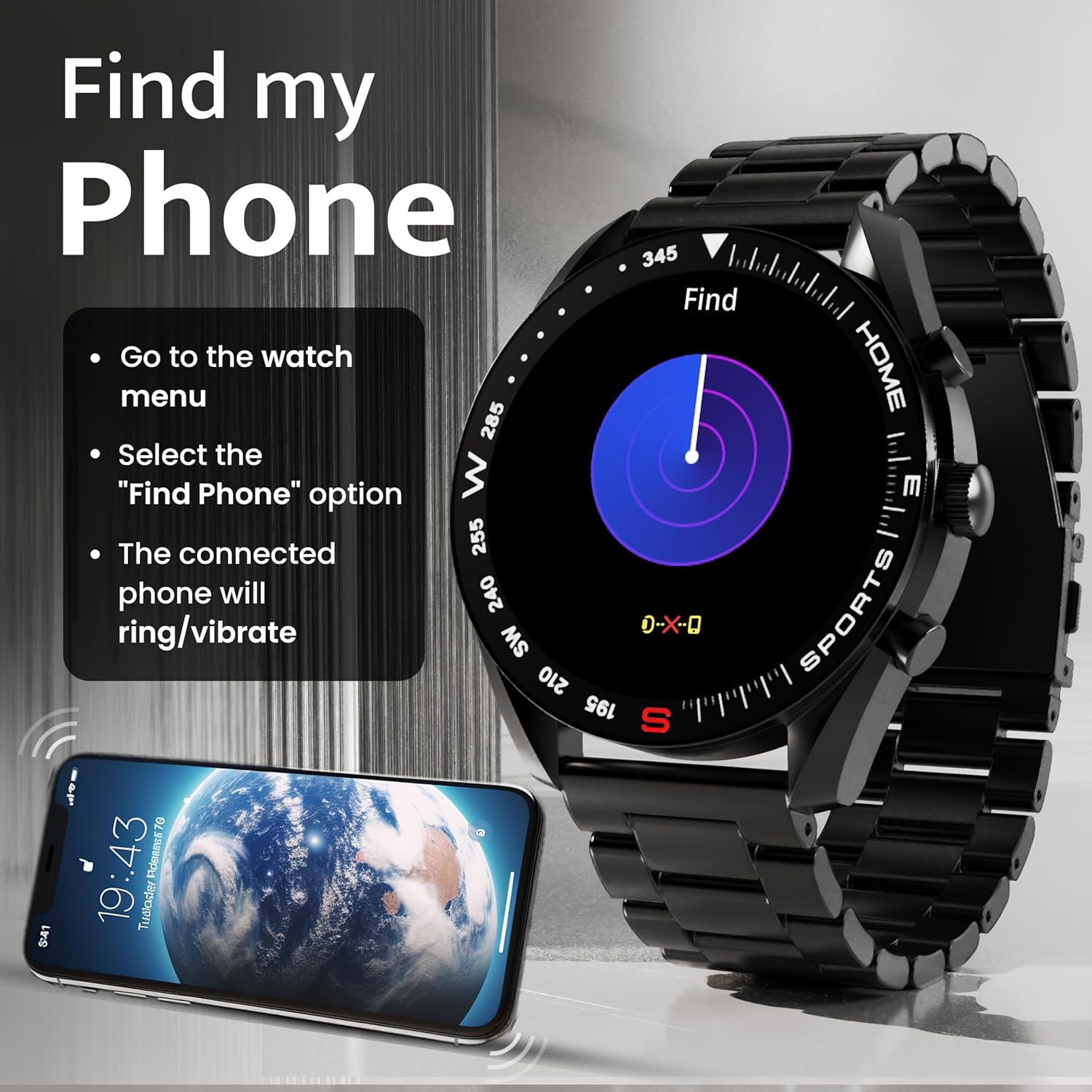
Image: How to use the 'Find My Phone' feature on the smartwatch.
Mini Oyunlar:
The watch includes several mini-games for entertainment, such as 2048, Battleship, Hamster, and Young Bird.

Resim: Eskiamples of mini-games available on the smartwatch.
Bakım
Cleaning Your Smart Watch:
- Saatinizin ekranını ve gövdesini yumuşak, tiftiksiz bir bezle silin.
- İnatçı kirler için hafifçeampBezi suyla yıkayın. Sert kimyasallar veya aşındırıcı malzemeler kullanmaktan kaçının.
- Clean the charging pins regularly with a dry cloth or cotton swab to ensure proper charging.
Suya Dayanıklılık (IP67):
The GOBOULT Mirage Smart Watch is IP67 water-resistant, meaning it is protected against dust ingress and can withstand immersion in water up to 1 meter for up to 30 minutes. However, it is not suitable for swimming, showering with hot water, or diving. Avoid exposure to high-pressure water or corrosive liquids.

Image: Information regarding the IP67 water and dust resistance of the smartwatch.
Kayış Ayarı:
The watch comes with a metallic strap adjustment tool. Refer to the included instructions or a professional for adjusting the strap length to ensure a comfortable and secure fit.

Image: The watch's zinc alloy frame and the metallic strap adjustment tool.
Sorun giderme
- Saat açılmıyor: Ensure the watch is fully charged. Connect it to the charging cable and allow it to charge for at least 30 minutes before attempting to power it on again.
- Telefonla eşleştirilemiyor:
- Telefonunuzda ve saatinizde Bluetooth'un etkinleştirildiğinden emin olun.
- Ensure the watch is within the Bluetooth range (up to 10 meters).
- Hem telefonunuzu hem de akıllı saatinizi yeniden başlatın.
- Clear the Bluetooth cache on your phone or forget the device and try pairing again.
- Ensure the GOBOULT companion app is updated to the latest version.
- Yanlış sağlık verileri: Saatin bileğinize tam oturduğundan, çok sıkı veya çok gevşek olmadığından emin olun. Saatin arkasındaki sensörleri temizleyin. Ölçümler sırasında aşırı hareketten kaçının.
- Bildirimler görünmüyor:
- Check if notifications are enabled for the specific apps in the GOBOULT companion app.
- Ensure your phone's notification settings allow the GOBOULT app to display alerts.
- Saatin Bluetooth aracılığıyla telefonunuza doğru şekilde bağlı olduğundan emin olun.
- Kısa pil ömrü: Reduce screen brightness, disable unnecessary features like continuous heart rate monitoring if not needed, and limit the number of active notifications. Ensure the watch is fully charged.
- Dokunmatik ekran tepki vermiyor: Saati yeniden başlatın. Sorun devam ederse, ekranın temiz ve kuru olduğundan emin olun.
Özellikler
| Özellik | Detay |
|---|---|
| Model Adı | Serap |
| Ekran Boyutu | 1.39 inç HD |
| Ekran Çözünürlüğü | 360 x 360 piksel |
| Parlaklık | 500 Nits Peak Brightness |
| Bağlantı | Bluetooth 5.3 |
| Suya Dayanıklılık | IP67 |
| Çerçeve Malzemesi | Çinko Alaşımı |
| Pil Türü | Lityum Polimer |
| Ortalama Pil Ömrü | 7 Güne Kadar |
| Şarj Süresi | Yaklaşık 120 Dakika |
| İşletim Sistemi Uyumluluğu | iOS, Android |
| Ürün Ağırlığı | 106 gr |
| Dahil Bileşenler | Akıllı Saat, Şarj Kablosu, Kullanım Kılavuzu, Garanti Kartı |
Garanti ve Destek
Garanti Bilgileri:
Your GOBOULT Mirage Smart Watch comes with a manufacturer's warranty. Please refer to the included Warranty Card for specific terms, conditions, and duration of the warranty. Keep your purchase receipt as proof of purchase.
Müşteri Desteği:
If you encounter any issues or have questions not covered in this manual, please contact GOBOULT customer support. Contact details can typically be found on the Warranty Card or the official GOBOULT webalan.