
OLTEANP UPS-TK1500W
OLTEANP 1500W Dalgıç Pompa Akü Yedekleme Sistemi Kullanım Kılavuzu
Model: UPS-TK1500W
Brand: OLTEANP
1. Giriş
The OLTEANP 1500W Sump Pump Battery Backup System is designed to provide continuous power to your sump pump during power outages, protecting your basement from flooding. This pure sine wave power inverter with a built-in charger automatically switches between grid power and battery power, ensuring reliable operation. It features an LCD screen remote controller for easy monitoring and multiple safety protections.
2. Güvenlik Bilgileri
Kurulum ve çalıştırmadan önce lütfen tüm güvenlik talimatlarını dikkatlice okuyun. Bu talimatlara uyulmaması elektrik çarpmasına, yangına veya ciddi yaralanmalara neden olabilir.
- Aşırı ısınmayı önlemek için ünite çevresinde uygun havalandırma olduğundan emin olun.
- Do not expose the unit to water, rain, snow, or spray.
- Connect the unit only to a 12V battery system.
- Ensure all connections are tight and secure to prevent arcing.
- Cihazı sökmeyin. Tüm servis işlemlerini yetkili personele yaptırın.
- Keep away from flammable materials and gases.
- Always wear appropriate personal protective equipment (PPE) when handling batteries and electrical connections.
3. Paket İçeriği
Paketin içinde tüm öğelerin mevcut olduğundan emin olun:
- 1500W Sump Pump Battery Backup System (Main Unit)
- Akü Kabloları (Kırmızı ve Siyah)
- Kullanım Kılavuzu (Bu belge)
- Remote Controller with LCD Screen
- Güç kablosu
- Accessories (e.g., wrench, earth wire)

Image: The main unit of the OLTEANP 1500W Sump Pump Battery Backup System along with its remote controller, battery cables, and power cable.
4. Ürün Bittiview
The OLTEANP 1500W system integrates an inverter, charger, and automatic transfer switch into one compact unit. Key features include:
- Saf Sinüs Dalgası Çıkışı: Hassas elektronik cihazlar için uygun, temiz ve stabil güç sağlar.
- Built-in 25A Battery Charger: Supports fast charging for various deep-cycle battery types (Lithium, AGM, Flooded/Wet).
- Otomatik Anahtarlama: Seamlessly transitions from grid power to battery power (and vice-versa) within 12ms during outagee.
- Çoklu Çıktılar: Features 3 AC outlets, a 36W Type-C port, and a 5V/3.1A USB port.
- LCD Remote Controller: Displays real-time battery status, AC output, and fault indicators.
- Multi-functional Safety Protection: Includes overheat, short circuit, low voltage, overcharge, high voltage, overload, and earth wire protection.

Image: Close-up of the remote controller's LCD screen, showing battery charge, DC input voltage, AC çıkış hacmitage ve netage. Fault indicators for overheat, overload, and short circuit are also visible.
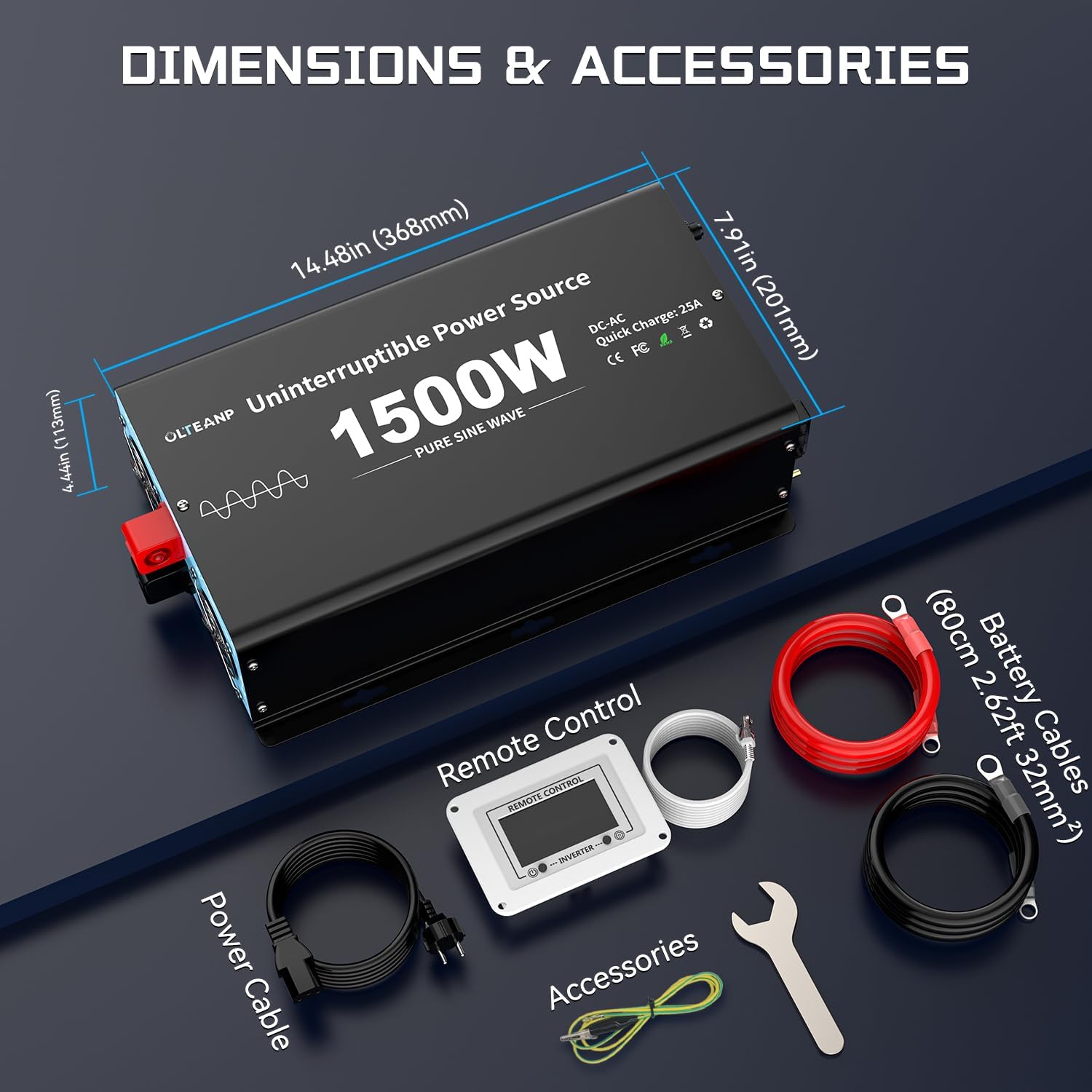
Image: Icons representing the multi-functional safety protections: High-Voltage Protection, Overload Protection, High-Temperature Protection, Smart IC, Low Voltage Protection, and Short-Circuit Protection.
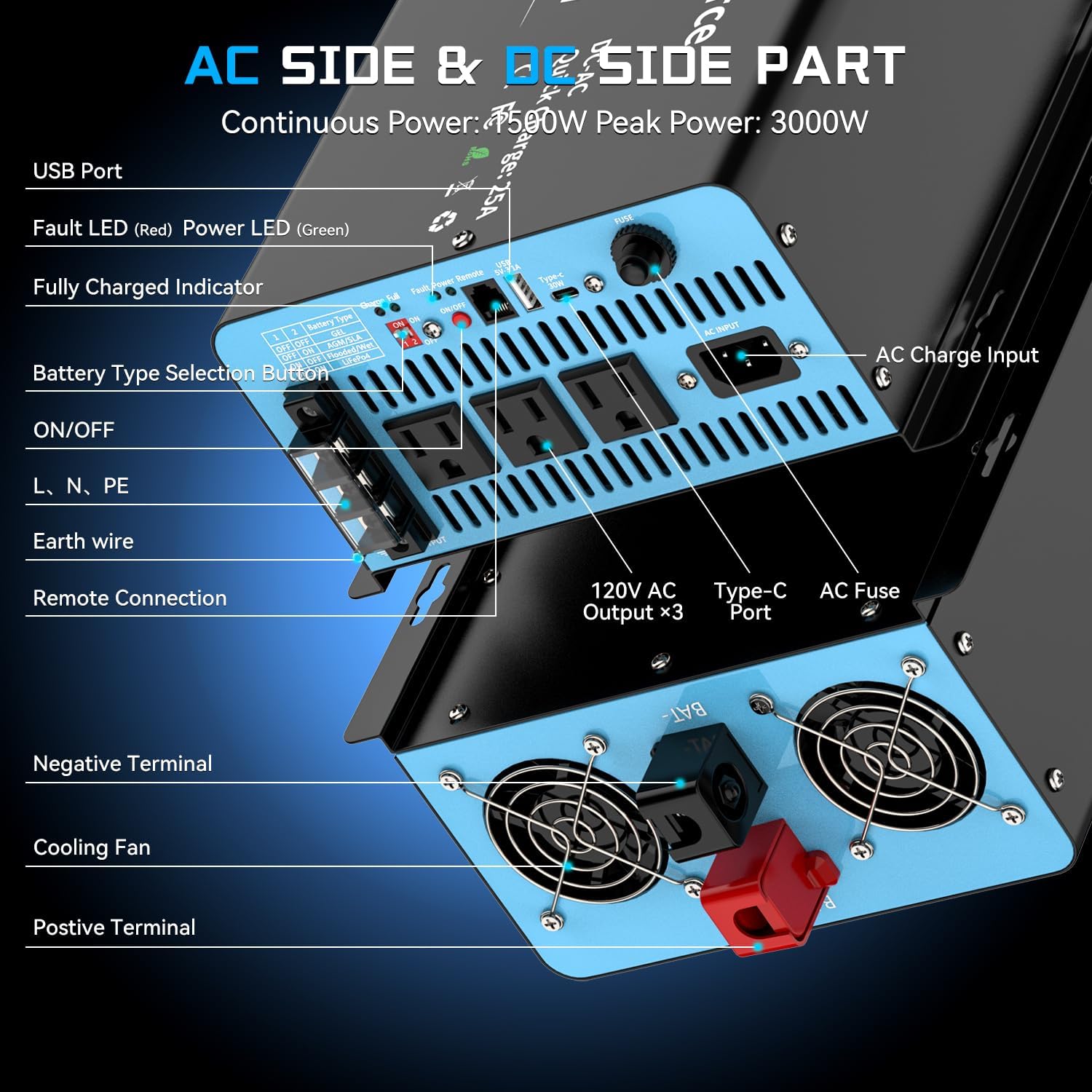
Image: A detailed diagram labeling the various ports and features on the inverter, including USB Port, Fault LED, Power LED, Fully Charged Indicator, Battery Type Selection Button, ON/OFF switch, L, N, PE terminals, Earth wire, Remote Connection port, Negative Terminal, Cooling Fan, Positive Terminal, 120V AC Outputs (x3), Type-C Port, AC Fuse, and AC Charge Input.
5. Kurulum
The OLTEANP sump pump battery backup system is designed for easy installation with minimal wiring required.
5.1 Bir Konum Seçmek
- Select a dry, well-ventilated area, away from direct sunlight, heat sources, and flammable materials.
- Ensure sufficient space around the unit for proper airflow and cooling.
- The unit can be placed flat or wall-mounted using the fixed holes on the side.
5.2 Akü Bağlantısı
A 12V deep-cycle battery (not included) is required for operation. Ensure the battery is compatible with the system (Lithium, AGM, Flooded/Wet).
- Connect the red battery cable to the positive (+) terminal of the battery and the positive (+) terminal on the inverter.
- Connect the black battery cable to the negative (-) terminal of the battery and the negative (-) terminal on the inverter.
- Tüm bağlantıların sıkı ve güvenli olduğundan emin olun.
5.3 AC Input and Output Connections
- Plug the provided AC power cable into the "AC Charge Input" port on the inverter and then into a standard wall outlet.
- Connect your sump pump(s) and other desired appliances (within the 1500W limit) to the 3 AC output sockets on the inverter.
- For additional charging, use the USB and Type-C ports as needed.

Image: A schematic illustrating the connection of the OLTEANP inverter to a 12V battery and a sump pump. It shows the AC charge input, 3 AC outlets, USB port, and Type-C port, with power flow indicated for charging the battery and powering the sump pump.
5.4 Uzaktan Kumanda Bağlantısı
- Connect the remote controller cable to the "Remote Connection" port on the inverter. This allows for convenient monitoring and control from a distance.
5.5 Pil Tipi Seçimi
Before turning on the inverter, select the correct battery type using the switches on the unit. Refer to the table below for settings:

Image: A table showing the switch settings (1 and 2, ON/OFF) for different battery types (GEL, AGM/SLA, Flooded/Wet, LiFePO4) along with their Bulk/Absorption and Float voltage ayarları.
| Anahtar 1 | Anahtar 2 | Pil Türü | Toplu/Soğurma Hacmitage | Şamandıra Hacmitage |
|---|---|---|---|---|
| KAPALI | KAPALI | JEL | 14.2V | 13.6V |
| KAPALI | ON | AGM/SLA | 14.4V | 13.6V |
| ON | KAPALI | Flooded/Wet | 14.7V | 13.6V |
| ON | ON | YaşamPO4 | 14.6V | 14.6V |
6. Kullanım Talimatları
6.1 İlk Güç Açma
- After all connections are made and the battery type is selected, turn on the main power switch on the inverter.
- The Power LED (Green) should illuminate.
- The LCD remote controller will display current battery voltage, AC output, and wattage.
6.2 Normal Operation (Grid Power Available)
When grid power is available, the system operates in charging mode:
- The connected sump pump(s) and other devices will be powered directly by the grid.
- The built-in 25A charger will automatically charge the connected 12V battery. The "Fully Charged Indicator" will show the charging status.
- The LCD remote controller will show the charging status and battery voltage.
6.3 Güç Çıkışıtage Operation (Battery Backup)
Bir elektrik kesintisi durumundatage, the system automatically switches to battery power:
- The system will detect the loss of grid power and instantly switch to inverter mode within 12ms.
- The sump pump(s) and other connected devices will continue to operate, powered by the battery through the inverter.
- The LCD remote controller will display the battery voltage and the power being drawn by the connected loads.
- When grid power is restored, the system will automatically switch back to grid power and resume charging the battery.

Image: A visual representation of the OLTEANP 1500W system connected to and powering three sump pumps simultaneously, demonstrating its capacity to handle multiple loads up to 1500 watts.
6.4 Using USB and Type-C Ports
The USB (5V/3.1A) and Type-C (36W) ports can be used to charge compatible electronic devices during both grid and battery operation.
7. Bakım
Regular maintenance ensures the longevity and optimal performance of your OLTEANP Sump Pump Battery Backup System.
- Temizlik: Cihazı temiz tutun ve tozdan ve kirden arındırın. Temizlik için kuru, yumuşak bir bez kullanın. Sıvı temizleyiciler kullanmayın.
- Havalandırma: Ensure the cooling fans and vents are not obstructed. Periodically check for dust buildup and clean if necessary.
- Pil Sağlığı: Regularly check the battery terminals for corrosion and ensure connections are tight. For flooded batteries, check electrolyte levels as per battery manufacturer's instructions.
- İşlevsellik Testi: Periodically test the system by simulating a power outage (e.g., by unplugging the AC input) to ensure it switches to battery power correctly.
- Depolamak: If storing the unit for an extended period, ensure the battery is fully charged and disconnect it from the inverter. Store in a cool, dry place.
8. Sorun Giderme
This section addresses common issues you might encounter with your OLTEANP Sump Pump Battery Backup System.
| Sorun | Olası Neden | Çözüm |
|---|---|---|
| AC prizlerden güç çıkışı yok. |
|
|
| Pil şarj olmuyor. |
|
|
| İnverter sık sık kapanıyor. |
|
|
| Inverter does not turn on automatically after full battery discharge and AC power returns. |
|
|
9. Özellikler
| Özellik | Detay |
|---|---|
| Örnek | UPS-TK1500W |
| Sürekli Güç | 1500W |
| Tepe Güç | 3000W |
| Giriş Voltage | 12V doğru akım |
| Çıkış Hacmitage | 120V AC |
| Çıkış Dalga Formu | Saf sinus dalgası |
| Batarya Şarj Akımı | 25A |
| Transfer Süresi | 12ms |
| AC Çıkışları | 3 x 120V AC Outlets |
| USB Bağlantı Noktası | 5V/3.1A |
| Tip-C Bağlantı Noktası | 36W |
| Boyutlar (U x G x Y) | 14.48 x 7.91 x 4.49 inç (368 x 201 x 114 mm) |
| Ürün Ağırlığı | 11.75 pound |
| Malzeme | Metal |
| Renk | Mavi |
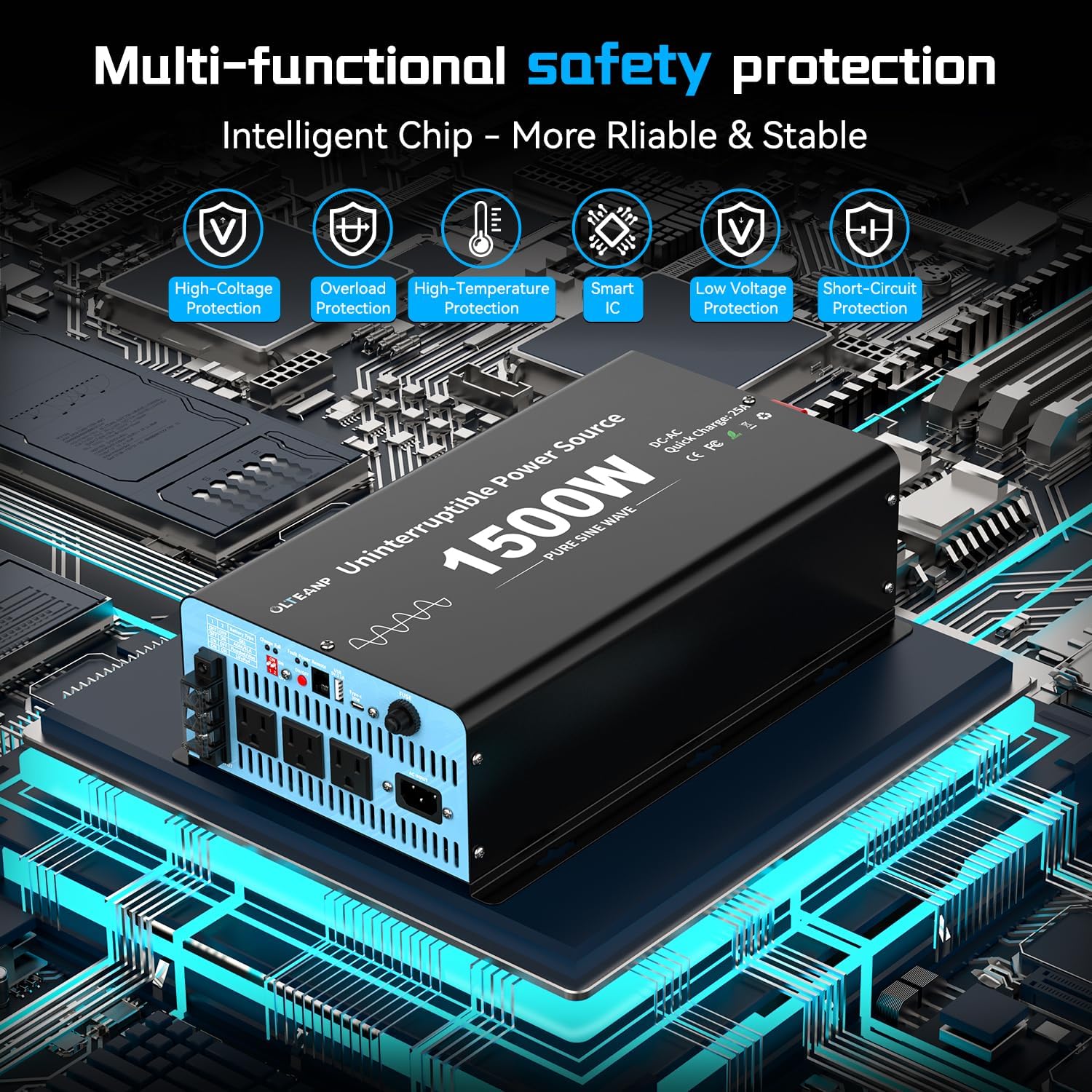
Image: A diagram illustrating the dimensions of the main inverter unit and showing all included accessories: power cable, remote control, battery cables (red and black), and additional accessories like a wrench.
10. Garanti ve Destek
The OLTEANP Sump Pump Battery Backup System comes with a 12 Ay Garanti satın alma tarihinden itibaren.
For technical support, warranty claims, or any questions regarding your product, please contact OLTEANP customer service through the retailer's platform or the official OLTEANP website. Please have your model number (UPS-TK1500W) and purchase date available when contacting support.
Daha fazla bilgi için şu adresi ziyaret edebilirsiniz: OLTEANP Store on Amazon.
Ask a question about this manual
Ask about setup, troubleshooting, compatibility, parts, safety, or missing instructions. Manuals+ will review the question and use this page’s manual context to help answer it.