
1. Giriş
This manual provides detailed instructions for the installation, operation, and maintenance of your Sharkoon MK6 RGB Micro ATX PC Case. Please read this manual thoroughly before beginning assembly to ensure proper setup and optimal performance.
The Sharkoon MK6 RGB is a compact Micro ATX PC case designed with a modern glass aesthetic, featuring tempered glass panels on the front and side. It includes three pre-installed addressable RGB PWM fans for efficient cooling and customizable lighting. The case supports BTF motherboards and offers ample space for various components, including large graphics cards and extensive cooling solutions.
2. Kurulum ve Bileşen Montajı
Before starting, ensure you have all necessary tools, including a screwdriver set and anti-static wrist strap.
2.1 Kasanın Açılması
Carefully remove the tempered glass side panel by unscrewing the retaining thumbscrews, typically located at the rear of the case. Gently slide the panel off and set it aside on a soft, flat surface to prevent scratches.
2.2 Anakart Kurulumu
- Giriş/çıkış koruma kalkanını kasanın arka tarafındaki belirlenmiş açıklığa takın.
- Align your Micro ATX or BTF motherboard with the standoffs inside the case. Ensure all standoffs match the motherboard's mounting holes.
- Anakartı, verilen vidaları kullanarak sabitleyin. Aşırı sıkmayın.
2.3 Güç Kaynağı Ünitesi (PSU) Kurulumu
The MK6 RGB supports bottom-mount power supplies up to 23.5 cm in length.
- Güç kaynağını kasanın arka alt kısmındaki özel bölmesine yerleştirin.
- Secure the PSU to the case using screws from the rear panel.
2.4 Depolama Sürücüsü Kurulumu
The case accommodates up to two 3.5" HDDs or three 2.5" SSDs.
- 3.5" HDD'ler: Locate the drive cage, typically near the PSU shroud. Mount the HDDs using the provided trays or screws.
- 2.5" SSD'ler: SSDs can be mounted on dedicated brackets behind the motherboard tray or within the drive cage.
2.5 Grafik Kartı (GPU) Kurulumu
The MK6 RGB supports graphics cards up to 41 cm in length and includes a rubberized graphics card holder for support.
- Kasanın arkasından gerekli PCIe yuvası kapaklarını çıkarın.
- Ekran kartınızı anakart üzerindeki uygun PCIe yuvasına takın.
- Secure the graphics card with screws. Adjust the graphics card holder to provide additional support if needed.
2.6 Soğutma Sistemi Kurulumu
The case comes with three pre-installed 120mm addressable RGB PWM fans. Two fans are inverted on the side for intake, and one is at the rear for exhaust. The case supports up to eight fans in total.
- Ek Fanlar: Install additional 120mm or 140mm fans in available mounting positions (top, bottom, side) as required for optimal airflow.
- Sıvı Soğutma Radyatörleri: The case supports a 360mm radiator and an additional 240mm radiator. Mount radiators to the designated areas (e.g., top, side) using appropriate screws.
2.7 Kablo Yönetimi
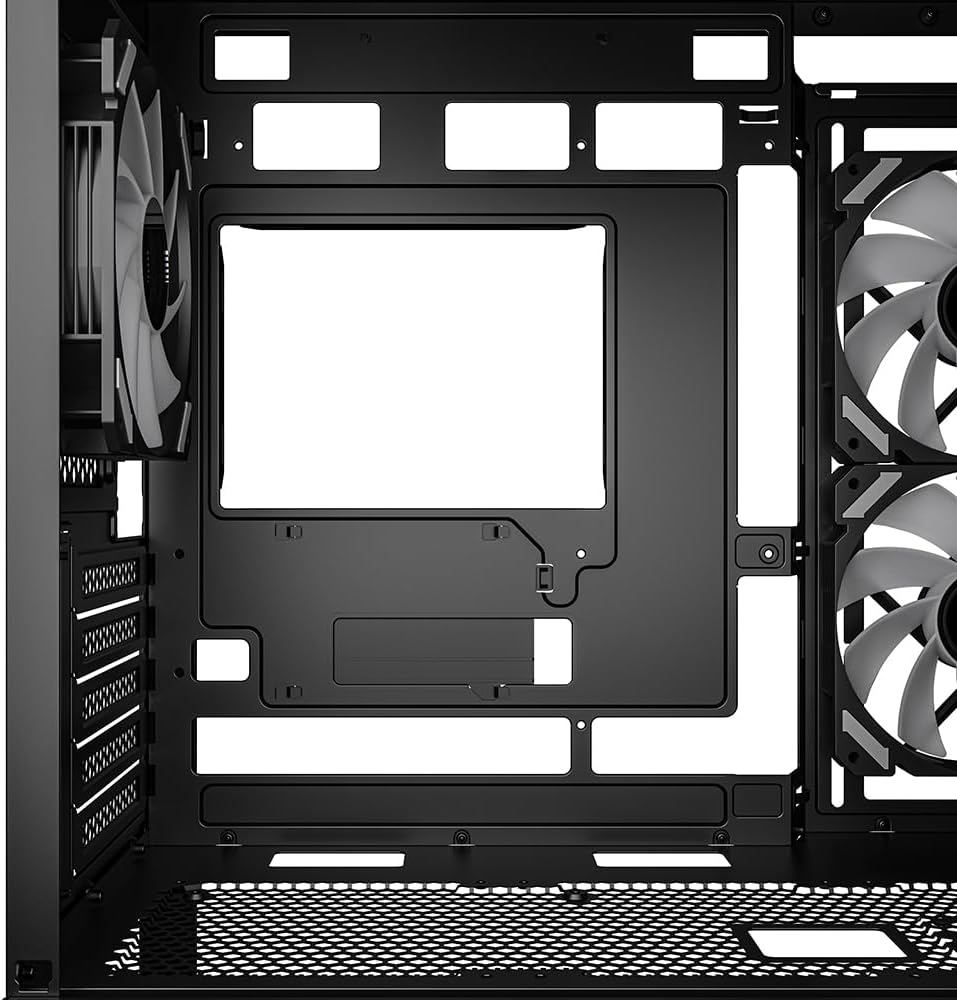
Kabloları yönetmek için anakart tepsisinin arkasındaki kablo yönlendirme kesiklerini ve bağlama noktalarını kullanın. Bu, hava akışını ve estetiği iyileştirir.

Şekil 1: Dahili view of the Sharkoon MK6 RGB PC case, highlighting the pre-installed fans and drive bay locations.

Şekil 2: Dahili view showing the motherboard tray and various cutouts for efficient cable management.

Şekil 3: Dahili view illustrating the available mounting points for liquid cooling radiators.

Şekil 4: Dahili view displaying the adjustable graphics card holder for enhanced GPU support.
3. Kullanım Talimatları
3.1 Açma
After all components are installed and cables are connected, close the side panel. Connect your monitor, keyboard, mouse, and power cable to the PC. Press the power button on the front panel to start your system.
3.2 RGB Aydınlatma Kontrolü
The MK6 RGB includes an RGB controller that provides connections for up to four LED elements and up to four PWM fans. The pre-installed fans are connected to this controller.
- Default Modes: The RGB lighting will typically cycle through default patterns upon startup.
- Yazılım Kontrolü: If connected to a compatible motherboard, RGB lighting can be controlled via the motherboard's RGB synchronization software. Refer to your motherboard manual for specific instructions.
- Manuel kontrol: Some cases may feature a dedicated button on the front panel to cycle through RGB modes. Consult the case's quick start guide for this feature.
3.3 Ön Panel Bağlantıları
The front panel features modern TRRS and USB-C ports for broad compatibility with various devices. Connect your peripherals and storage devices as needed.

Şekil 5: Ön view of the Sharkoon MK6 RGB PC case, showcasing the tempered glass panel and visible RGB fans.
4. Bakım
Düzenli bakım, PC bileşenlerinizin optimum performans ve uzun ömürlü olmasını sağlamaya yardımcı olur.
4.1 Toz Filtresi Temizliği
The case features dust filters to prevent dust accumulation. Regularly clean these filters to maintain good airflow.
- Toz filtrelerini bulun ve çıkarın (örneğin, üst, alt, ön).
- Clean the filters using compressed air or by rinsing them with water. Ensure they are completely dry before reinstallation.
4.2 Temperli Cam Temizliği
Use a soft, lint-free cloth and a non-abrasive glass cleaner to clean the tempered glass panels. Avoid harsh chemicals that could damage the glass or coatings.
4.3 Fan Cleaning
Over time, dust can accumulate on fan blades, reducing cooling efficiency. Use compressed air to gently clean the fan blades. Ensure the system is powered off before cleaning.
Şekil 6: Üst view of the Sharkoon MK6 RGB PC case, illustrating the removable magnetic dust filter for easy cleaning.
5. Sorun Giderme
Bu bölümde karşılaşabileceğiniz yaygın sorunlar ele alınmaktadır.
5.1 Sistem Açılmıyor
- Güç Bağlantıları: Verify that the PSU is properly connected to the wall outlet and the power switch on the PSU is in the 'ON' position.
- Ön Panel Konektörleri: Ensure the power button cable from the front panel is correctly connected to the motherboard's front panel header.
- Dahili Bileşenler: Check that all major components (motherboard, CPU, GPU, RAM) are securely seated and connected to the PSU.
5.2 Fans Not Spinning or RGB Not Lighting Up
- Fan Bağlantıları: Confirm that all fan power cables are securely connected to the motherboard or the RGB controller.
- RGB Controller Power: Ensure the RGB controller itself is receiving power, typically via a SATA power connector from the PSU.
- Software/Button: If using software control, check the software settings. If there's a physical RGB button, try cycling through modes.
5.3 Yetersiz Hava Akışı veya Aşırı Isınma
- Toz Filtreleri: Tıkanmış toz filtrelerini temizleyin.
- Fan Yönlendirmesi: Ensure fans are oriented correctly for optimal airflow (intake at front/side, exhaust at rear/top).
- Kablo yönetimi: Hava akışını engelleyen unsurları azaltmak için kablo yönetimini iyileştirin.
6. Özellikler
| Özellik | Detay |
|---|---|
| Model Adı | MK6 RGB |
| Marka | Köpekbalığı |
| Dava Türü | Orta kule |
| Anakart Uyumluluğu | Micro ATX, BTF |
| Malzeme | Temperli Cam |
| Renk | Siyah |
| Ürün Boyutları (UxGxY) | 17.13 x 8.86 x 17.52 inç (43.5 x 22.5 x 44.5 cm) |
| Ürün Ağırlığı | 13.42 pound (6.1 kg) |
| CPU Soğutucu Yükseklik Boşluğu | 17 cm'ye kadar |
| Graphics Card Length Clearance | 41 cm'ye kadar |
| PSU Uzunluk Boşluğu | 23.5 cm'ye kadar |
| Sürücü bölmeleri | 2 adet 3.5 inç HDD veya 3 adet 2.5 inç SSD |
| Önceden yüklenmiş Fanlar | 3x 120mm Addressable RGB PWM Fans |
| Maksimum Fan Desteği | 8 adede kadar fan |
| Radyatör Desteği | 1x 360mm, 1x 240mm |
| Ön G / Ç Bağlantı Noktaları | TRRS, USB-C, USB 3.0 (1 port listed in specs) |
| Soğutma Yöntemi | Hava |
| Güç Kaynağı Montaj Tipi | Alt Montaj |
7. Garanti Bilgileri
For detailed warranty information regarding your Sharkoon MK6 RGB PC Case, please refer to the official Sharkoon website or contact your local retailer. Warranty terms and conditions may vary by region and purchase location.
8. Teknik Destek
If you encounter any issues or require technical assistance beyond the scope of this manual, please visit the official Sharkoon support website for FAQs, driver downloads, and contact information. You may also reach out to your point of purchase for support.