
1. Giriş
Thank you for choosing the Sharkoon AK6 RGB ATX PC Case. This manual provides essential information for the proper installation, operation, and maintenance of your new PC case. Please read this guide thoroughly before beginning the assembly process to ensure optimal performance and longevity of your components.
2. Güvenlik Bilgileri
- Bilgisayar kasasının içine herhangi bir bileşen takmadan veya çıkarmadan önce daima güç kaynağını duvar prizinden ayırın.
- Temperli cam panelleri dikkatli kullanın. Kırılgandırlar ve düşürüldüklerinde veya darbe aldıklarında kırılabilirler.
- Avoid exposing the case to extreme temperatures, humidity, or direct sunlight.
- Keep small parts and screws out of reach of children.
- Ensure proper grounding to prevent electrostatic discharge (ESD) damage to sensitive electronic components.
3. Paket İçeriği
Lütfen paketinizde tüm öğelerin mevcut olduğundan emin olun:
- Sharkoon AK6 RGB ATX PC Kasası
- Aksesuar kutusu (vidalar, kablo bağları ve diğer küçük parçaları içerir)
- Kullanım Kılavuzu (bu belge)
4. Ürün Bittiview
The Sharkoon AK6 RGB ATX PC Case is designed with a modern glass aesthetic, featuring seamless integration of tempered glass on the front and side panels. It includes four pre-installed 120mm addressable RGB PWM fans for optimal airflow and visual appeal. The case supports a wide range of components, including BTF motherboards, and offers ample space for high-performance hardware.

Figure 4.1: Front interior view of the Sharkoon AK6 RGB PC case, showcasing the pre-installed addressable RGB fans and the spacious main chamber.

Şekil 4.2: Açısal view of the Sharkoon AK6 RGB PC case, highlighting the tempered glass side panel and the top mesh for ventilation.

Şekil 4.3: Arka view of the Sharkoon AK6 RGB PC case, showing the I/O shield cutout, rear exhaust fan mount, and expansion slots.
Ön G/Ç Paneli
The front I/O panel is located on the side of the case and includes:
- Güç Düğmesi
- Sıfırlama Düğmesi
- 2 x USB Ports (Type-A)
- 1 x USB Type-C Bağlantı Noktası
- Audio Jacks (TRRS)
5. Kurulum ve Kurulum
Follow these steps to install your components into the Sharkoon AK6 RGB PC Case.
5.1 Davanın Hazırlanması
- Kılıfı düz ve sağlam bir yüzeye yerleştirin.
- Carefully remove the tempered glass side panel by unscrewing the thumb screws at the rear and gently pulling the panel away.
- Remove the rear metal side panel by unscrewing the thumb screws.
5.2 Anakart Kurulumu
The AK6 RGB supports Mini-ITX, Micro-ATX, ATX, and BTF motherboards.
- Install the I/O shield into the cutout at the rear of the case (if not pre-installed on your motherboard).
- Align your motherboard with the standoffs inside the case. Ensure all standoffs match the motherboard's mounting holes.
- Anakartı, aksesuar kutusunda bulunan uygun vidalarla sabitleyin.
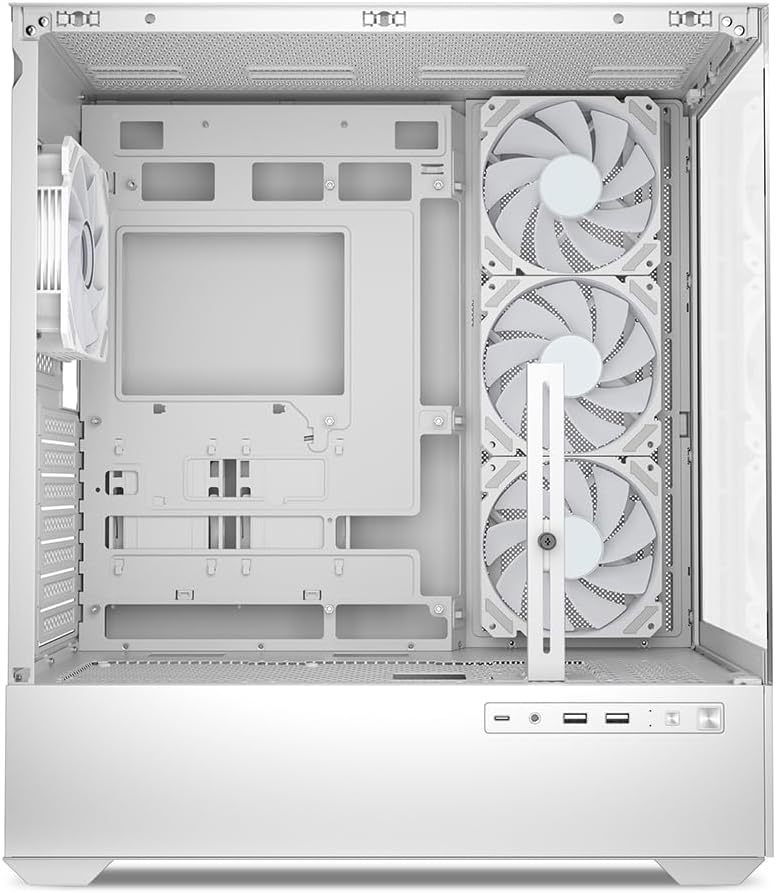
Şekil 5.1: İç mekan view of the Sharkoon AK6 RGB PC case, illustrating the motherboard tray, cable management cutouts, and front fan mounting points.
5.3 Güç Kaynağı Kurulumu
The case features a bottom-mount power supply design.
- Slide the power supply unit (PSU) into the dedicated compartment at the bottom rear of the case.
- Align the PSU with the screw holes at the rear of the case.
- Verilen vidalarla güç kaynağını sabitleyin.
5.4 Depolama Aygıtı Kurulumu
The AK6 RGB supports up to two 3.5" HDDs or four 2.5" SSDs.
- 3.5 inç HDD'ler için: Locate the drive cages beneath the PSU shroud. Slide the HDD into a drive tray and secure it with screws.
- 2.5 inç SSD'ler için: SSDs can be mounted on the dedicated brackets behind the motherboard tray or on the 3.5" drive trays using adapter screws.
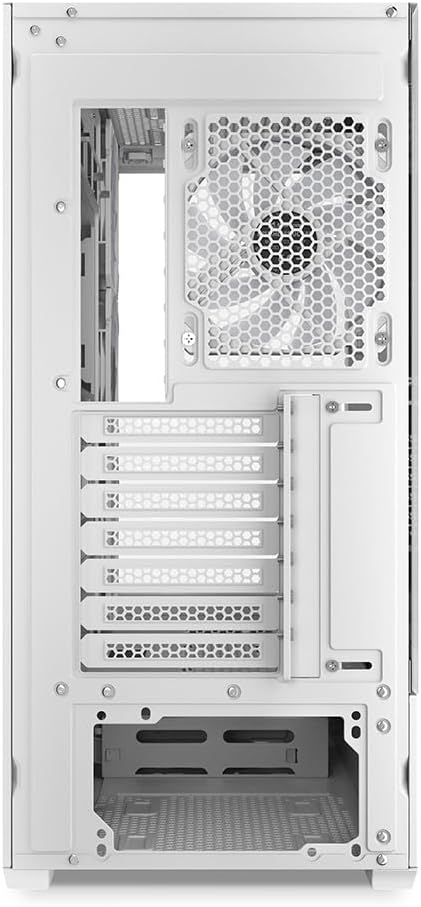
Şekil 5.2: Arka iç kısım view of the Sharkoon AK6 RGB PC case, detailing the drive cages for 3.5-inch HDDs and 2.5-inch SSDs, and the power supply shroud area.
5.5 Grafik Kartı ve Genişletme Kartı Kurulumu
- Kasanın arka tarafındaki gerekli genişletme yuvası kapaklarını çıkarın.
- Ekran kartınızı veya diğer genişletme kartlarınızı anakartınızdaki uygun PCIe yuvalarına takın.
- Secure the cards with screws. The case includes a rubberized graphics card support for larger cards.
5.6 CPU Cooler and Radiator Installation
The case supports CPU coolers up to 17 cm in height and allows for extensive liquid cooling setups.
- CPU soğutucunuzu üreticinin talimatlarına göre takın.
- For liquid cooling, the case can accommodate a 360mm radiator at the top and an additional 280mm radiator.
5.7 Kablo Yönetimi
Anakart tepsisinin arkasındaki kablo yönetim oyuklarını ve sabitleme noktalarını kullanarak kabloları yönlendirin ve sabitleyin. Bu, hava akışını iyileştirir ve estetiği artırır.
6. Kullanım Talimatları
6.1 Açma
After all components are installed and cables are connected, replace the side panels. Connect the power cable to your PSU and a wall outlet, then press the power button on the front I/O panel to start your system.
6.2 RGB Fan Control
The AK6 RGB comes with four pre-installed addressable RGB PWM fans. These fans are connected to an RGB controller which also provides connections for up to four LED elements and four PWM fans. The RGB lighting can typically be controlled via your motherboard's RGB software (if compatible) or through a dedicated button on the case (if present and connected).
6.3 Hava Akışı Optimizasyonu
The case is designed for ideal airflow, with three inverted fans drawing air from the side into the case. The top and rear fan mounts allow for additional exhaust fans. Ensure proper fan orientation for optimal cooling performance.

Şekil 6.1: Ör.ample of a fully assembled system within the Sharkoon AK6 RGB PC case, featuring various components and active RGB lighting.
7. Bakım
Düzenli bakım, bilgisayar bileşenlerinizin uzun ömürlü olmasını ve performansının korunmasını sağlar.
- Toz Filtreleri: Periodically clean the removable dust filters (e.g., on the top and bottom) to maintain optimal airflow and prevent dust buildup inside the case. Use compressed air or a soft brush.
- Cam Paneller: Temperli cam panelleri yumuşak, tüy bırakmayan bir bez ve cam temizleyici ile temizleyin. Yüzeyi çizebilecek aşındırıcı malzemelerden kaçının.
- İç Temizlik: İç bileşenlerden ve fanlardan tozu temizlemek için basınçlı hava kullanın. Temizlemeden önce sistemin kapalı ve fişinin çekilmiş olduğundan emin olun.
8. Sorun Giderme
If you encounter issues with your PC case, refer to the following common troubleshooting steps:
- Güç Yok: Ensure the power supply is properly connected to the wall outlet and the motherboard. Check all internal power cables (24-pin ATX, 8-pin CPU, PCIe power).
- Fanlar Dönmüyor/RGB Çalışmıyor: Verify that all fan and RGB cables are correctly connected to the motherboard or the included RGB controller. Check your motherboard's BIOS/UEFI settings or RGB software for fan speed and lighting control.
- Ön Giriş/Çıkış Portları Çalışmıyor: Confirm that the front panel connectors (USB, audio, power/reset switches) are correctly plugged into the corresponding headers on your motherboard.
- Aşırı Isınma: Ensure all fans are spinning correctly and oriented for proper airflow. Clean dust filters and internal components. Verify CPU cooler installation.
For further assistance, please contact Sharkoon support.
9. Özellikler
| Özellik | Şartname |
|---|---|
| Marka | Köpekbalığı |
| Model Adı | AK6 RGB |
| Model Numarası | C-AK6W |
| Dava Türü | ATX Kulesi |
| Renk | Beyaz |
| Malzeme | Temperli Cam |
| Anakart Uyumluluğu | Mini ITX, Micro ATX, ATX, BTF |
| Güç Kaynağı Montaj Tipi | Alt Montaj |
| Soğutma Yöntemi | Hava |
| Önceden yüklenmiş Fanlar | 4 x 120mm Addressable RGB PWM Fans |
| Maksimum CPU Soğutucu Yüksekliği | 17 cm |
| Maksimum Grafik Kartı Uzunluğu | 41 cm (with rubberized support) |
| Maksimum PSU Uzunluğu | 23.5 cm |
| Radyatör Desteği | Top: up to 360mm, Additional: up to 280mm |
| Sürücü bölmeleri | 2 x 3.5" HDD veya 4 x 2.5" SSD |
| Ön G / Ç Bağlantı Noktaları | 2 x USB Type-A, 1 x USB Type-C, Audio (TRRS) |
| Ürün Ağırlığı | 6.1 Kilogram |
| Özel Özellikler | RGB Lighting, Unique Glass Appearance, BTF Motherboard Support |
10. Garanti
Sharkoon ürünleri yüksek kalite standartlarında üretilmektedir. Detaylı garanti bilgileri için lütfen ürününüzle birlikte verilen garanti kartına bakın veya resmi Sharkoon web sitesini ziyaret edin. webSite. Garanti genellikle normal kullanım koşullarındaki malzeme ve işçilik kusurlarını kapsar.
11. Destek
If you require technical assistance or have questions regarding your Sharkoon AK6 RGB ATX PC Case, please visit the official Sharkoon website for support resources, FAQs, and contact information. You may also find updated drivers or software for the RGB controller there.
Webalan: www.sharkoon.com