
1. Giriş
Satın aldığınız için teşekkür ederizasing the Audizio Genua DAB Radio. This manual provides essential information for the safe and efficient operation of your device. Please read it thoroughly before use and retain it for future reference. The Audizio Genua is a versatile DAB+/FM stereo radio featuring Bluetooth connectivity, USB playback, and an alarm function, designed for both home and portable use.
2. Güvenlik Bilgileri
- Güç Kaynağı: Yalnızca kutu içeriğinde bulunan güç adaptörünü kullanın. Ses seviyesinin doğru ayarlandığından emin olun.tage bölgenizin gereksinimlerine uygundur.
- Su ve Nem: Cihazı yağmur, nem veya damlayan/sıçrayan sıvılara maruz bırakmayın. Vazo gibi sıvı dolu nesneleri cihazın üzerine koymayın.
- Havalandırma: Yeterli havalandırma sağlayın. Havalandırma açıklıklarını kapatmayın.
- Sıcaklık: Üniteyi radyatörler, kalorifer ızgaraları, sobalar veya diğer cihazlar (dahil) gibi ısı kaynaklarından uzak tutun. amp(ısı üreten)
- Temizlik: Sadece kuru bezle temizleyin.
- Servis: Bu ürüne kendiniz servis vermeye çalışmayın. Tüm servis işlemleri için kalifiye servis personeline başvurun.
- Anten: Do not bend or force the antenna.
3. Paket İçeriği
Lütfen paketi açarken tüm ürünlerin eksiksiz ve iyi durumda olduğunu kontrol edin:
- Audizio Genua DAB Radio
- Uzaktan kumanda
- Güç Adaptörü
- Quick Start Guide (language not guaranteed)
4. Ürün Bittiview
4.1 Ön Panel Kontrolleri ve Ekranı

Şekil 4.1: Ön view of the Audizio Genua DAB Radio.
The front panel features a clear color TFT display, two speaker grilles, and an array of control buttons and a central rotary knob. The display shows station information, track details, time, and menu options. Buttons include Menu, Preset, Scan, Dimmer, Alarm, and playback controls (Play/Pause, Skip). The central knob is used for volume adjustment, tuning, and selection.
4.2 Arka Panel Bağlantıları
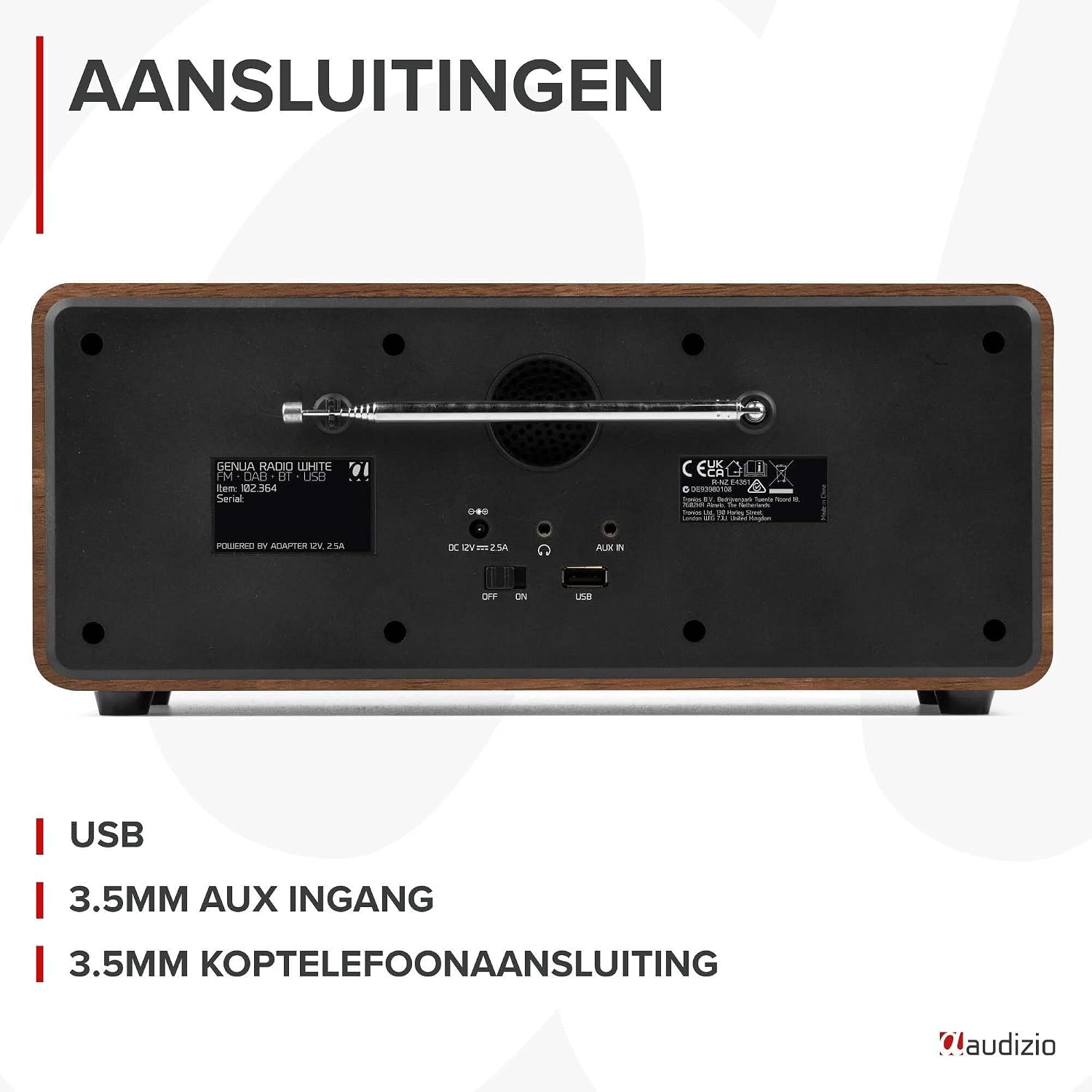
Şekil 4.2: Arka view of the Audizio Genua DAB Radio with connections.
The rear panel includes the telescopic antenna for radio reception, a USB port for media playback, a 3.5mm AUX input for external audio devices, a 3.5mm headphone output, a DC 12V power input, and a main power ON/OFF switch.
4.3 Uzaktan Kumanda

Figure 4.3: Remote control for the Audizio Genua DAB Radio.
The included remote control provides full functionality, allowing you to power on/off, adjust volume, change modes, navigate menus, set alarms, and control playback from a distance.
5. Kurulum
5.1 Güç Bağlantısı
- Connect the power adapter to the DC 12V input on the rear of the radio.
- Güç adaptörünü uygun bir duvar prizine takın.
- Flip the main power switch on the rear panel to the 'ON' position.
5.2 Anten Ayarı
DAB+ ve FM radyo alımında en iyi sonucu almak için teleskopik anteni tamamen açın. En iyi sinyal kalitesi için konumunu ayarlayın.
5.3 İlk Kurulum ve Otomatik Tarama
- Upon first power-on, the radio may prompt you to perform an auto-scan for DAB+ stations. Select 'Yes' or press the 'Scan' button.
- Radyo, mevcut DAB+ istasyonlarını tarayacak ve kaydedecektir. Bu işlem birkaç dakika sürebilir.
- Tarama işlemi tamamlandıktan sonra, radyo ilk müsait istasyona ayarlanacaktır.
6. Kullanım Talimatları
6.1 Mod Seçimi
Press the 'Mode' button on the remote control or the 'Menu' button on the unit to cycle through available modes: DAB+, FM, Bluetooth, USB, and AUX In.
6.2 DAB+ Radyo Çalışması
- Select DAB+ mode.
- If no stations are found or you wish to rescan, press the 'Scan' button to perform a full scan.
- Use the 'Tune/Select' knob or the navigation buttons on the remote to browse through the list of available stations.
- Press the 'OK' button (on remote) or push the 'Tune/Select' knob to select a station.
- Ön Ayarların Kaydedilmesi: To store a favorite station, press and hold the 'Preset' button until the preset menu appears. Use the knob/navigation to select a preset number (1-30) and press 'OK' to confirm.
- Ön Ayarların Geri Çağrılması: Briefly press the 'Preset' button, then use the knob/navigation to select the desired preset and press 'OK'.
6.3 FM Radyo Çalışması
- FM modunu seçin.
- Otomatik tarama: Press the 'Scan' button to automatically scan for and store available FM stations.
- Manuel Ayarlama: Use the 'Tune/Select' knob to manually tune to a specific frequency.
- Ön Ayarların Kaydedilmesi: Similar to DAB+ mode, press and hold 'Preset', select a number, and confirm.
- Ön Ayarların Geri Çağrılması: Briefly press 'Preset', select the desired preset, and confirm.
6.4 Bluetooth Bağlantısı
- Select Bluetooth mode. The display will show "Pairing" or "Waiting for connection".
- Akıllı telefonunuzda veya Bluetooth özellikli diğer cihazınızda Bluetooth'u etkinleştirin ve kullanılabilir cihazları arayın.
- Select "Audizio Genua" from the list of devices.
- Once paired, the radio will confirm the connection, and you can start playing audio from your device.
6.5 USB Oynatma
- MP3 içeren bir USB flash sürücü takın fileKabloyu arka paneldeki USB portuna takın.
- Select USB mode. The radio will automatically detect the USB drive and begin playing the first compatible audio file.
- Use the playback control buttons (Play/Pause, Skip Forward/Backward) on the unit or remote to manage your music.
6.6 AUX Girişi
- Connect an external audio device (e.g., MP3 player, smartphone) to the 3.5mm AUX IN port on the rear panel using an audio cable (not included).
- AUX modunu seçin.
- Harici cihazınızdan oynatmayı ve ses seviyesini kontrol edin.
6.7 Alarm ve Uyku Zamanlayıcısı
- Alarm Ayarlama: Press the 'Alarm' button on the unit or remote. Follow the on-screen prompts to set Alarm 1 and Alarm 2, including time, source (DAB/FM/Buzzer), and volume.
- Erteleme İşlevi: When the alarm sounds, press any button (except Power) to activate snooze. The alarm will sound again after a set interval.
- Uyku Zamanlayıcısı: Press the 'Sleep' button on the remote to set a sleep timer (e.g., 15, 30, 60 minutes). The radio will automatically turn off after the selected time.
6.8 Ekran Karartıcı
Press the 'Dimmer' button on the unit or remote to adjust the brightness of the display. This is useful for different lighting conditions or for use in a bedroom.
7. Bakım
- Temizlik: Radyonun dış yüzeyini temizlemek için yumuşak, kuru bir bez kullanın. Aşındırıcı temizleyiciler, cilalar veya çözücüler kullanmayın.
- Anten: Teleskopik anteni hasar görmemesi için dikkatli kullanın.
- Depolamak: If storing the radio for an extended period, disconnect it from the power supply.
8. Sorun Giderme
| Sorun | Olası Neden | Çözüm |
|---|---|---|
| Güç yok | Power adapter not connected; Main power switch off | Ensure power adapter is securely connected and plugged in; Turn main power switch to 'ON' |
| Zayıf radyo sinyali (DAB+/FM) | Antenna not extended; Weak signal area; Interference | Fully extend and adjust the telescopic antenna; Try repositioning the radio; Move away from other electronic devices |
| Bluetooth eşleştirmiyor | Radio not in Bluetooth mode; Device not discoverable; Already paired with another device | Select Bluetooth mode on the radio; Ensure Bluetooth is enabled on your device and it's in pairing mode; Disconnect from other Bluetooth devices |
| USB oynatma çalışmıyor | USB sürücüsü doğru şekilde takılmamış; Uyumsuz file format; USB drive corrupted | Ensure USB drive is fully inserted; Check if files are in MP3 format; Try a different USB drive |
| Ses yok | Ses seviyesi çok düşük; Sessize alma etkinleştirildi; Yanlış kaynak seçildi | Increase volume; Check if mute is active; Ensure correct input source (DAB/FM/BT/USB/AUX) is selected |
9. Özellikler

Figure 9.1: Audizio Genua DAB Radio dimensions.
- Marka: Audizio
- Model Numarası: Cenova
- Renk: Beyaz
- Özellik: Bluetooth Connectivity, DAB+ Radio
- Bağlantı Teknolojisi: Aux, Bluetooth, USB
- Ürün Ölçüleri (U x G x Y): 13.5x31x13.3 cm
- Ayarlayıcı Teknolojisi: DAB+
- Stil: Modern
- Güç Kaynağı: Kablolu Elektrik
- Desteklenen Radyo Bantları: FM, DAB+
- Uyumlu Cihazlar: Smartphone, Tablet, Laptop, MP3 Player, Headphones, Speaker
- Cilttage: 220 Volt
- Maksimum Hoparlör Çıkış Gücü: 50 Watt
- Pil Sayısı: 1 Non-standard battery (Type of battery required)
- Ekran Türü: TFT
- Ürün Ağırlığı: 2.25 Kilogram
10. Garanti ve Destek
This product is covered by a standard manufacturer's warranty. For detailed warranty terms and conditions, please refer to the documentation provided at the time of purchase or contact your retailer. For technical support or service inquiries, please contact the Audizio customer support team through their official website veya satın alma noktanız.