
giriiş
Thank you for choosing the XGP X1 Motorcycle Helmet Speakers. This manual provides detailed instructions for the proper installation, operation, and maintenance of your new Bluetooth headset. Designed for motorcycle riders, the X1 offers high-quality audio, stable wireless connectivity, and essential features to enhance your riding experience. Please read this manual thoroughly before use to ensure optimal performance and safety.
Kutuda Neler Var?
Paketinizde tüm bileşenlerin mevcut olduğunu doğrulayın:
- X1 Main Unit
- 40mm Hi-fi Speaker (2)
- Boom Mikrofonu
- Düğme Mikrofonu
- USB-C Kablosu
- Metal bileklik
- 3M Sticker Bracket
- Hoparlör Pedleri
- Kullanıcı Kılavuzu

Figure 1: XGP X1 Product Package Contents
Ürün Bittiview
The XGP X1 is a state-of-the-art motorcycle helmet communication system designed for clarity, durability, and ease of use. Key features include:
- Gelişmiş Bluetooth 5.3: Ensures faster data transmission, lower latency, and a broader transmission range for seamless connectivity.
- Uzun Pil Ömrü: An 800mAh battery provides up to 60 hours of music playback/phone calls and 360 hours of standby time on a 2-hour charge.
- IP67 Su Geçirmezlik Derecesi: Comprehensive sealing protects the unit from water ingress, allowing use in various weather conditions.
- Yüksek Kaliteli Ses: Equipped with 40mm Hi-fi speakers and professional tuning for clear, vibrant sound with deep bass and clear mids/highs.
- Dual Microphone Options: Includes both a boom microphone and a button microphone for compatibility with different helmet types.
- DSP/CVC Noise Cancellation: Effectively reduces environmental noise for clear voice communication.
- Sesli Asistan Entegrasyonu: Double-click the power button to activate Siri or Google Assistant for navigation, music control, and calls.
- Çift Telefon Bağlantısı: Supports simultaneous connection to two mobile phones without re-pairing, allowing convenient switching.
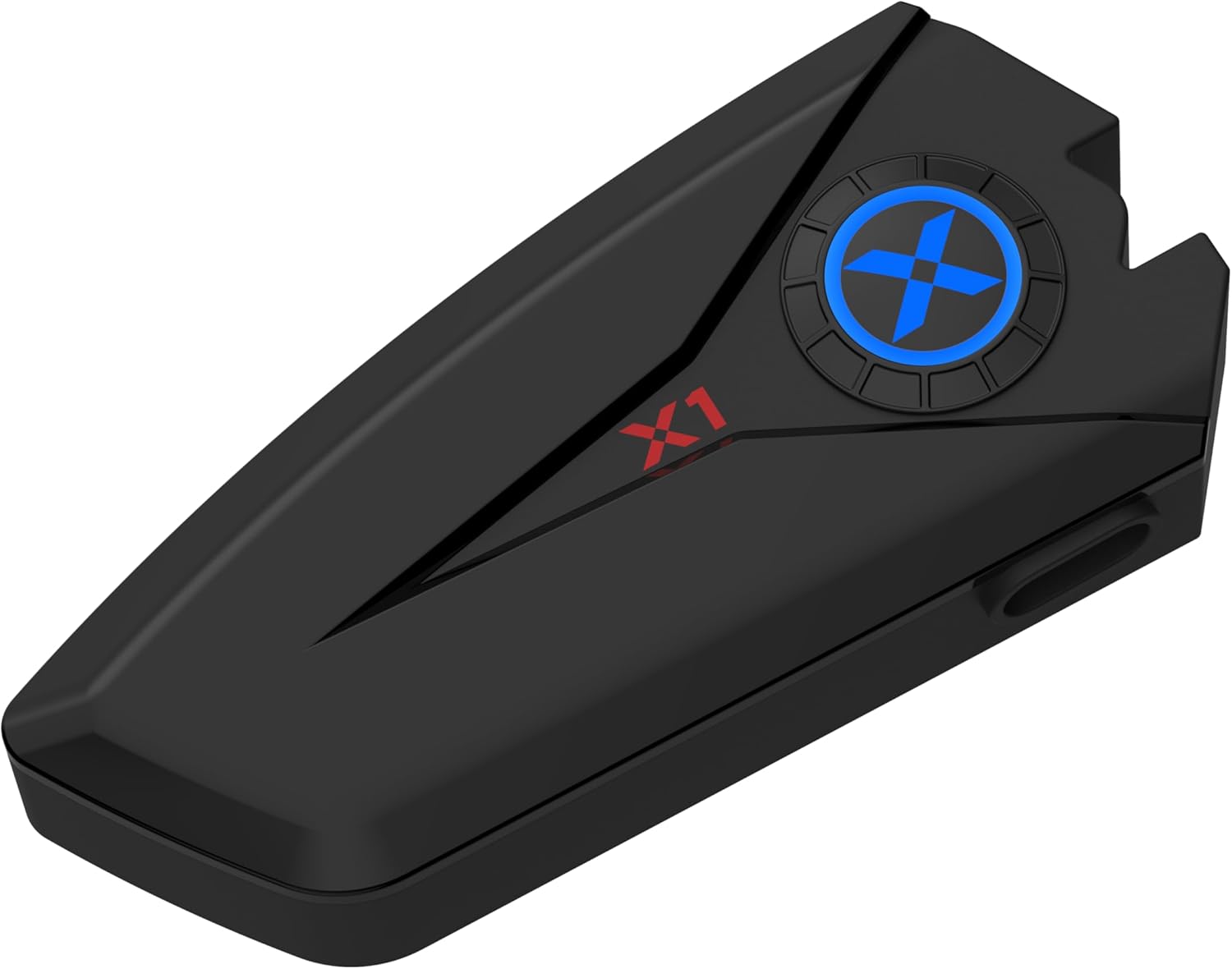
Figure 2: XGP X1 Main Unit

Figure 3: High-Capacity Bluetooth V5.3 Chip

Figure 4: 40mm Hi-Fi Stereo Sound Quality Components
Kurulum ve Yükleme
The X1 is designed for broad helmet compatibility, offering two microphone types and two mounting bracket options to suit various helmet styles.
Choosing Your Microphone
- Boom Mikrofon: Ideal for open-face, modular, or flip-up helmets where the microphone needs to extend closer to your mouth.
- Düğme Mikrofon: Suitable for full-face helmets where the microphone can be discreetly placed inside the chin bar.

Figure 5: Two Forms of Microphone
Ana Ünitenin Montajı
Choose between the metal bracket or the 3M sticker bracket based on your helmet type and preference.
- Metal bileklik: Provides a secure, clamp-on attachment to the helmet shell.
- 3M Sticker Bracket: Offers a strong adhesive attachment for helmets where clamping is not feasible or preferred. Ensure the surface is clean and dry before applying.
Hoparlör Kurulumu
The 40mm Hi-fi speakers attach inside the helmet using velcro pads. Position them directly over your ears for optimal sound quality. Use the included speaker pads for comfort and proper fit.

Figure 6: Great Helmet Compatibility
Kullanım Talimatları
Güç Açık/Kapalı
- Güç Açık: Gösterge ışığı yanana kadar Güç düğmesini yaklaşık 3 saniye basılı tutun.
- Kapat: Gösterge ışığı sönene kadar Güç düğmesini yaklaşık 5 saniye basılı tutun.
Bluetooth Eşleştirme
- Ensure the X1 is powered off.
- Eşleştirme modunu göstermek için gösterge ışığı kırmızı ve mavi renkte dönüşümlü olarak yanıp sönene kadar Güç düğmesini yaklaşık 5-7 saniye basılı tutun.
- Cep telefonunuzda Bluetooth'u etkinleştirin ve kullanılabilir cihazları arayın.
- Select "XGP X1" from the list of devices.
- Bağlantı kurulduktan sonra gösterge ışığı sabit mavi renkte yanacaktır.
İki Cep Telefonunu Bağlama
The X1 supports simultaneous connection to two mobile phones without the need for re-pairing. This is convenient for users with separate personal and work phones.
- Pair the first phone following the Bluetooth Pairing steps above.
- Once the first phone is connected, disable Bluetooth on the first phone temporarily.
- Put the X1 back into pairing mode (red and blue flashing).
- Pair the second phone.
- Re-enable Bluetooth on the first phone. Both phones should now be connected to the X1.

Figure 7: Two Mobile Phones Connection
Yönetim Çağrı
- Cevap Çağrısı: Güç düğmesine kısa basın.
- Çağrı Sonu: Görüşme sırasında Güç düğmesine kısa süre basın.
- Çağrıyı Reddet: Güç düğmesini 2 saniye basılı tutun.
- Otomatik Yanıt: The X1 can be set to auto-answer incoming calls after 6 seconds. Refer to the user manual for specific settings if this feature is not enabled by default.

Figure 8: Auto-Answer Incoming Phone Call
Müzik Çalma
- Oynat/Duraklat: Güç düğmesine kısa basın.
- Sonraki Parça: Sesi Açma tuşuna kısa basın.
- Önceki parça: Sesi Azaltma düğmesine kısa basın.
- Ses Kontrolü: Long press Volume Up or Volume Down buttons.
Sesli asistan
Activate your phone's voice assistant (Siri, Google Assistant) directly from the X1.
- Voice Assistant'ı etkinleştirin: Double-click the Power button. You can then issue commands for GPS navigation, music playback, making calls, and more.

Şekil 9: Sesli Asistan İşlevselliği
Şarj ve Pil Ömrü
The X1 is equipped with an 800mAh battery, providing extensive usage time.
- Şarj Süresi: Ürünle birlikte verilen USB-C kablosu kullanılarak tam şarj yaklaşık 2 saat sürer.
- Music Playback/Phone Call Time: 60 saate kadar.
- Bekleme Süresi: 360 saate kadar.
Connect the USB-C cable to the charging port on the X1 unit and a suitable USB power source (e.g., computer USB port, wall adapter). The indicator light will show charging status (refer to the full user manual for specific light indications).

Şekil 10: Pil Ömrü ve Şarj
Waterproofing (IP67)
The XGP X1 features an IP67 waterproof rating, meaning it is protected from dust and can withstand immersion in water up to 1 meter for 30 minutes. This design ensures reliable performance even in rainy conditions.
- Each component is carefully sealed to prevent water ingress.
- Allows you to focus on riding without concern for light rain or splashes.
While the device is waterproof, avoid prolonged submersion or exposure to high-pressure water jets to maintain its integrity.

Şekil 11: IP67 Su Geçirmezlik Özelliği
Bakım
To ensure the longevity and optimal performance of your XGP X1 headset, follow these maintenance guidelines:
- Temizlik: Wipe the main unit and speakers with a soft, damp bez. Sert kimyasallar veya aşındırıcı temizleyiciler kullanmayın.
- Depolamak: Uzun süre kullanılmayacaksa, cihazı serin ve kuru bir yerde, doğrudan güneş ışığından ve aşırı sıcaklıklardan uzakta saklayın.
- Şarj: Charge the battery regularly, even if not in frequent use, to maintain battery health. Avoid fully discharging the battery for prolonged periods.
- Bağlantı Noktası Koruması: Ensure the USB-C charging port cover is securely closed when not charging to maintain waterproofing.
- Mikrofon Bakımı: Keep the microphone foam cover clean and free from debris to ensure clear voice pickup.
Sorun giderme
If you encounter issues with your XGP X1, please refer to the following common solutions:
| Sorun | Olası Neden | Çözüm |
|---|---|---|
| Cihaz açılmıyor. | Düşük pil; Güç düğmesine yeterince uzun süre basılmamış | Charge the device fully; Press and hold the Power button for 3 seconds. |
| Telefonla eşleştirilemiyor | Cihaz eşleştirme modunda değil; Telefonda Bluetooth kapalı; Çok fazla eşleştirilmiş cihaz var. | Ensure device is flashing red/blue; Enable phone Bluetooth; Delete old Bluetooth connections on phone. |
| Hoparlörlerden ses gelmiyor | Volume too low; Speakers not connected properly; Phone volume low | Increase X1 volume; Check speaker connections; Increase phone volume. |
| Poor call quality/noise | Microphone position; Excessive wind noise; DSP/CVC not active | Adjust microphone closer to mouth; Ensure microphone foam is intact; DSP/CVC is automatic, but check for obstructions. |
| Kısa pil ömrü | Battery not fully charged; Old battery | Ensure full 2-hour charge; Contact support if battery life significantly degrades over time. |
If the problem persists after trying these solutions, please contact XGP customer support for further assistance.
Özellikler
| Özellik | Detay |
|---|---|
| Model Adı | XGP X1 |
| Bağlantı Teknolojisi | Bluetooth 5.3 |
| Kulaklık Girişi | C tipi |
| Pil Ömrü | 60 Hours (Music/Talk), 360 Hours (Standby) |
| Şarj Süresi | 2 Saat |
| Su Direnç Seviyesi | IP67 Su Geçirmez |
| Ses Sürücüsü Türü | Dynamic Driver (40mm Hi-fi Speaker) |
| Gürültü Kontrolü | Aktif Gürültü Engelleme (DSP/CVC) |
| Kontrol Yöntemi | Ses, Düğme |
| Uyumlu Cihazlar | Cep Telefonları |
| Ürün Ağırlığı | 6.7 ons |
| Üretici | XGP |
| İlk Mevcut Tarih | 10 Ekim 2024 |
Garanti ve Destek
XGP products are manufactured to high-quality standards. For information regarding warranty coverage, please refer to the warranty card included in your product packaging or visit the official XGP website. If you require technical assistance, troubleshooting beyond this manual, or have questions about your XGP X1, please contact XGP customer support through the contact information provided on our websiteniz veya satın alma platformunuz.
Çevrimiçi destek: Visit the XGP official website for FAQs, updated manuals, and contact forms.
E-posta Desteği: Refer to your product packaging or the XGP webMüşteri hizmetleri e-posta adresi için site.


