
VIRTAVO LJH10
VIRTAVO VistaFlask Wireless Outdoor Security Camera User Manual
Model: LJH10
1. Giriş
This manual provides instructions for the installation, operation, and maintenance of your VIRTAVO VistaFlask Wireless Outdoor Security Camera (Model: LJH10). Please read this manual thoroughly before using the product to ensure proper function and safety. Keep this manual for future reference.
2. Paket İçeriği
Aşağıda listelenen tüm öğelerin paketinizde mevcut olduğundan emin olun:
- VIRTAVO VistaFlask Wireless Outdoor Security Camera (LJH10)
- Montaj Braketi
- Montaj Vidaları ve Duvar Dübelleri
- USB Şarj Kablosu
- Kullanım Kılavuzu (bu belge)
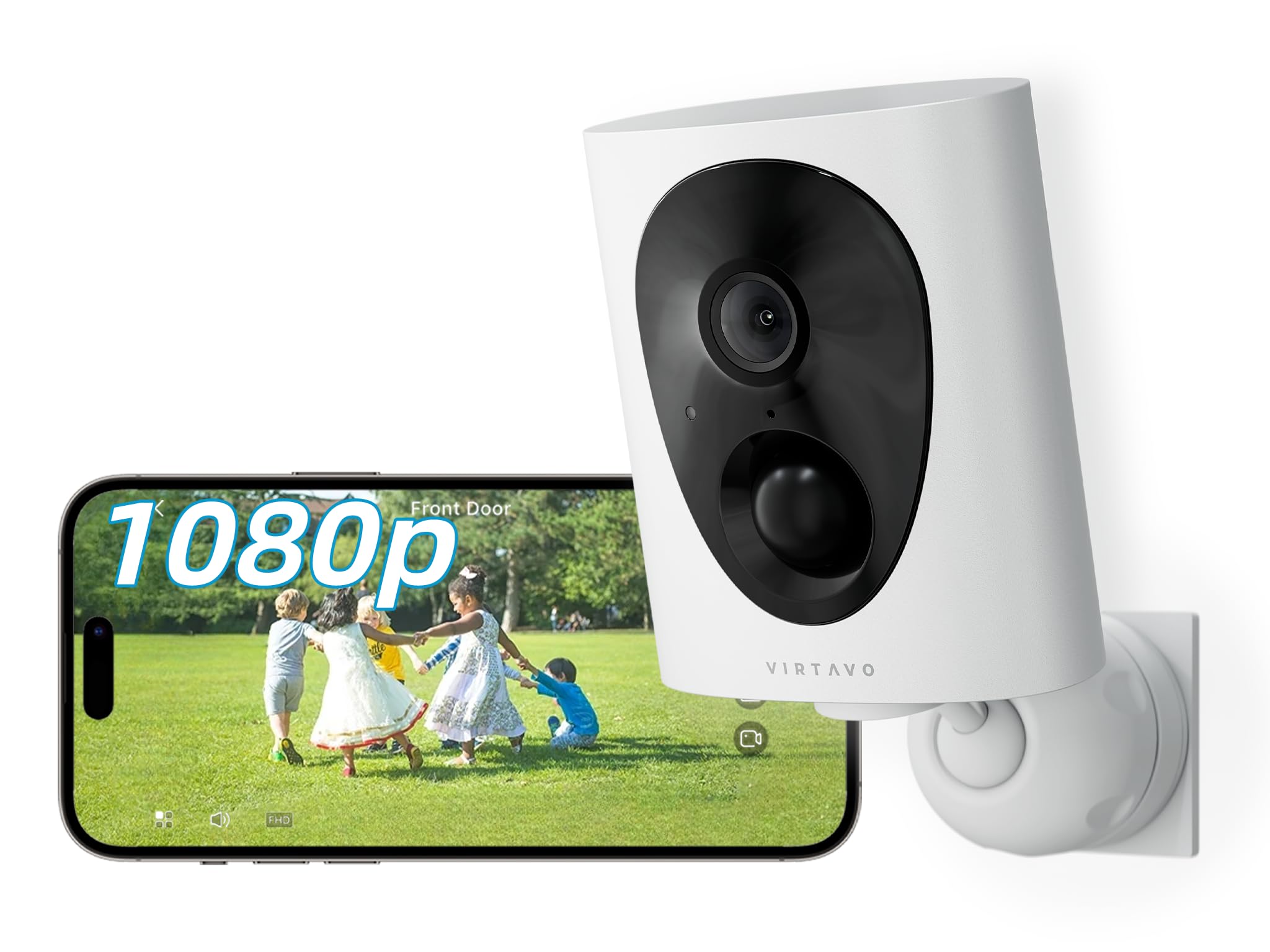
Image 1: VIRTAVO VistaFlask Camera and included accessories. The image shows the camera unit, a mounting bracket, screws, and a charging cable.
3. Ürün Bittiview
Familiarize yourself with the components of your VIRTAVO VistaFlask camera.
Resim 2: Ön ve yan görünüm view of the VIRTAVO VistaFlask camera. Key components include the lens, IR LEDs, PIR sensor, microphone, speaker, and charging port.
- Kamera Lensi: Captures 1080P FHD video.
- Starlight Sensor: Enables color-rich night vision in low-light conditions.
- IR LEDs (x2): Provides infrared illumination for clear night vision.
- Pir hareket sensörü: Detects passive infrared changes for motion detection.
- Mikrofon: İki yönlü iletişim için ses kaydı yapar.
- Konuşmacı: Çift yönlü iletişim ve uyarılar için ses çıkışı sağlar.
- Durum Gösterge Işığı: Displays camera status (e.g., charging, connected, recording).
- Sıfırlama Düğmesi: Kamerayı fabrika ayarlarına sıfırlamak için kullanılır.
- Mikro SD Kart Yuvası: Supports local storage (32GB to 256GB, not included).
- USB Şarj Noktası: Dahili bataryayı şarj etmek için.
4. Kurulum
4.1 Kamerayı Şarj Etme
Before initial use, fully charge the camera's internal 4400mAh battery. Connect the provided USB charging cable to the camera's charging port and a standard 5V/1A USB power adapter (not included). The status indicator light will show charging status and turn off when fully charged. A full charge typically takes 6-8 hours.
4.2 Installing the 'HOME V' App
The VIRTAVO VistaFlask camera operates via the 'HOME V' mobile application.
- Scan the QR code below or search for "HOME V" in your device's app store (App Store for iOS, Google Play Store for Android).
- Uygulamayı indirin ve kurun.
- Yeni bir hesap oluşturun veya zaten bir hesabınız varsa giriş yapın.
Image 3: Placeholder QR code for downloading the 'HOME V' application. Scan this code with your smartphone to quickly find and install the app.
4.3 Kamerayı Wi-Fi'ye Bağlama
Follow these steps to connect your camera to your home Wi-Fi network:
- Akıllı telefonunuzun 2.4 GHz Wi-Fi ağına bağlı olduğundan emin olun. Kamera 5 GHz Wi-Fi'yi desteklemez.
- Open the 'HOME V' app and tap "Add Device" or the "+" icon.
- Select "Battery Camera" or the appropriate camera type.
- Power on the camera. The status indicator light should blink blue, indicating it's ready for pairing. If not, press and hold the reset button for 5 seconds until it blinks.
- Wi-Fi ağınızın adını (SSID) ve şifresini girmek için uygulama içi yönergeleri izleyin.
- The app will generate a QR code. Hold your phone approximately 6-8 inches (15-20 cm) in front of the camera lens until you hear a confirmation sound.
- Once connected, the status indicator light will turn solid blue, and the camera will appear in your 'HOME V' app.
4.4 Kamerayı Monte Etme
Choose a suitable location for mounting, ensuring good Wi-Fi signal strength and an unobstructed view. The camera is weatherproof for outdoor use.
- Mark the desired drilling spots using the mounting bracket as a template.
- Drill pilot holes and insert wall anchors if mounting on masonry or drywall.
- Verilen vidaları kullanarak montaj braketini duvara veya tavana sabitleyin.
- Kamerayı montaj braketine takın ve en iyi kapsama alanı için açıyı ayarlayın.
Image 4: Illustrative diagram of the camera mounting process. It depicts marking drill points, securing the bracket, and attaching the camera.
5. Kullanım Talimatları
5.1 Canlı View ve Oynatma
Access the 'HOME V' app to view canlı footage veya yenidenview Kaydedilen olaylar.
- Open the 'HOME V' app and select your camera from the device list.
- Tap on the camera feed to enter live view.
- İle view kaydedilmiş footage, tap the "Playback" or "History" icon within the live view arayüz.
5.2 İki Yönlü Ses
The camera supports two-way audio communication.
- Canlı yayında view, kameranın hoparlöründen konuşmak için mikrofon simgesine dokunun.
- Kameranın mikrofonundan gelen sesi dinlemek için hoparlör simgesine dokunun.
5.3 Hareket Algılama ve Uyarılar
The camera uses PIR motion detection to trigger recordings and send alerts.
- Enable or disable motion detection in the camera settings within the 'HOME V' app.
- Yanlış alarmları en aza indirmek için hassasiyet seviyelerini ayarlayın.
- Hareket algılandığında akıllı telefonunuza anında bildirimler alın.
5.4 Gece Görüşü
The camera automatically switches to night vision mode in low-light conditions, utilizing its Starlight lens and IR LEDs for clear imaging up to 30 feet.
- The camera will automatically activate IR LEDs for black and white night vision.
- The Starlight lens provides color-rich images in very low ambient light before IR activation.
5.5 Depolama Seçenekleri
The camera supports both local Micro SD card storage and optional cloud storage.
- Mikro SD kart: Insert a Micro SD card (32GB-256GB, Class 10 or higher) into the designated slot. The camera will automatically begin recording motion-triggered events to the card.
- Bulut Depolama: Subscribe to the optional cloud storage service via the 'HOME V' app for additional features and secure off-site storage.
6. Bakım
6.1 Kamerayı Temizleme
To ensure optimal performance, periodically clean the camera lens and housing.
- Fotoğraf makinesinin gövdesini silmek için yumuşak, kuru bir bez kullanın.
- For the lens, use a lens cleaning cloth and a specialized lens cleaning solution if necessary. Avoid abrasive materials.
6.2 Pil Yönetimi
The camera's 4400mAh rechargeable battery provides 1-3 months of operation depending on usage and motion detection frequency.
- Recharge the battery when the app indicates a low battery level.
- Use the provided USB cable and a 5V/1A power adapter for charging.
- Avoid exposing the camera to extreme temperatures during charging or operation, as this can affect battery life.
6.3 Firmware Güncellemesi
Periodically check the 'HOME V' app for available firmware updates. Updates can improve performance, add new features, and enhance security.
- Follow the in-app instructions to download and install firmware updates.
- Ensure the camera has sufficient battery charge before starting an update.
7. Sorun Giderme
| Sorun | Olası Neden | Çözüm |
|---|---|---|
| Kamera Wi-Fi'ye bağlanamıyor. | Incorrect Wi-Fi password; 5GHz Wi-Fi network; weak Wi-Fi signal; camera too far from router. |
|
| Hareket algılama uyarısı yok. | Motion detection disabled; low sensitivity; app notifications blocked; camera offline. |
|
| Gece görüş kalitesi zayıf. | Dirty lens; obstructions near IR LEDs; insufficient ambient light for Starlight vision. |
|
| Pil çabuk bitiyor. | Frequent motion detection; live view accessed often; extreme temperatures. |
|
8. Özellikler
| Özellik | Detay |
|---|---|
| Örnek | LJH10 |
| Çözünürlük | 1080P FHD |
| Alanı View | 130 Derece |
| Gece Görüşü | Starlight Color Night Vision, 2x IR LEDs (up to 30 feet) |
| Ses | Çift Yönlü Ses |
| Hareket Algılama | PIR (Passive Infrared), 30-foot range |
| Bağlantı | 2.4 GHz Wi-Fi (IEEE 802.11b/g/n) |
| Güç Kaynağı | 4400mAh Şarj Edilebilir Pil |
| Depolamak | Micro SD Card (32GB-256GB), Cloud Storage (optional) |
| Hava Direnci | Hava koşullarına dayanıklı |
| Uygulama Uyumluluğu | 'HOME V' (iOS, Android) |
| Boyutlar | 2.7 x 1.3 x 3.2 inç |
| Ağırlık | 11.2 ons |
9. Garanti ve Destek
VIRTAVO products come with a limited warranty. For detailed warranty information, please refer to the warranty card included in your package or visit the official VIRTAVO webalan.
For technical support, troubleshooting assistance, or customer service inquiries, please contact VIRTAVO support through the 'HOME V' app or visit our webalan.
- Çevrimiçi destek: VIRTAVO Official Store
- E-posta Desteği: Refer to the 'HOME V' app or product packaging for contact details.
Ask a question about this manual
Ask about setup, troubleshooting, compatibility, parts, safety, or missing instructions. Manuals+ will review the question and use this page’s manual context to help answer it.