
1. Giriş
The Groov-e Lisbon Portable DAB & FM Digital Radio offers a versatile listening experience with its dual-band radio capabilities and Bluetooth connectivity. Designed for portability, it features an intuitive LCD display, a built-in alarm clock, and a headphone jack for private listening. This manual provides detailed instructions for setup, operation, and maintenance of your Lisbon radio.

Resim: Üzeriview of the Groov-e Lisbon radio highlighting its key features like DAB/FM, Bluetooth, LCD display, alarm clock, and headphone socket.
2. Ürün Özellikleri
- DAB/FM Digital Stations & Bluetooth Streaming: This portable digital radio comes with DAB & FM technology, so tune into preset stations with auto-scan and manual tuning. Plus use Bluetooth to turn your radio into a speaker and stream your music on the go.
- Blue LCD Display: The LCD screen features a blue background light that notifies you of the radio station that you're tuned into and can be dimmed or turned off, while the easy front-on buttons are simple to use for easy tuning and navigation.
- Built-In Alarm Clock: The handy built-in alarm clock allows you to set your alarm clock as to when you want it to go off so you can stay organised and also features a snooze and timer function.
- 3.5 mm Kulaklık Girişi: Thanks to the 3.5mm jack input you can easily plug in your own earphones so you can listen quietly and in peace while the expanding telescopic antenna allows for crystal clear signal.
- Designed to Travel: Portable, sleek, and sized to fit on a shelf or table, this radio can be powered using a USB cable or batteries (not included); a convenient travel companion that can be easily carried or tucked into your backpack or luggage.
3. Paket İçeriği
Lütfen tüm öğelerin mevcut olduğundan emin olun:
- Groov-e Lisbon Portable DAB & FM Digital Radio
- USB Güç Kablosu
- Kullanım Kılavuzu (bu belge)
4. Kontroller ve Ekran
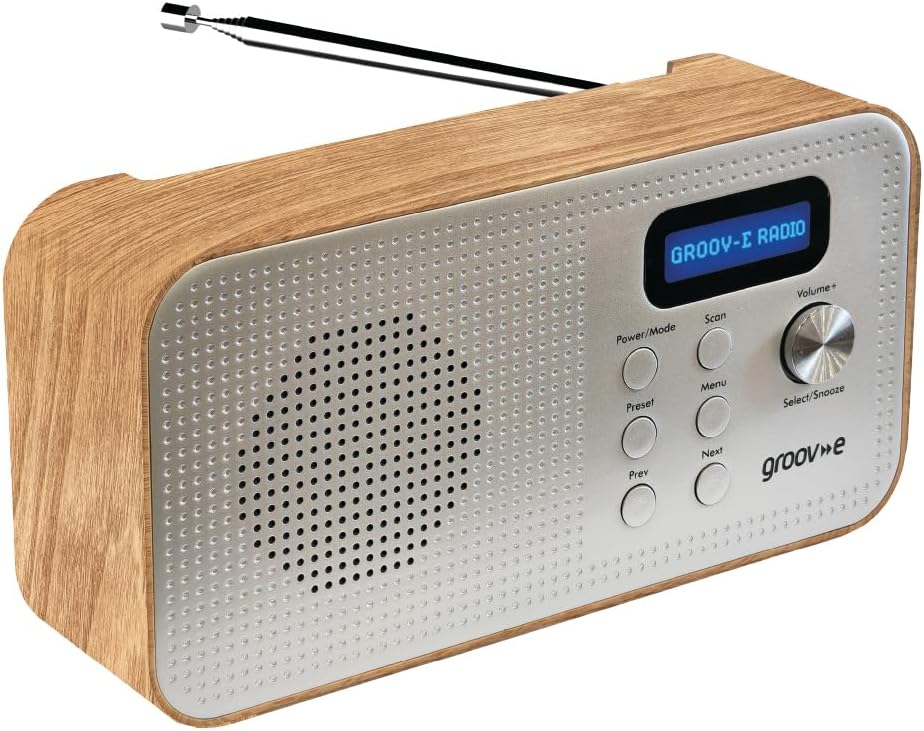
Image: Front panel of the Groov-e Lisbon radio, detailing the layout of buttons, the volume knob, and the LCD screen.
Ön Panel Kontrolleri:
- Güç / Mod Düğmesi: Press to turn the radio on or off. Press repeatedly to cycle through DAB, FM, and Bluetooth modes.
- Tarama Düğmesi: Initiates an auto-scan for available radio stations in DAB or FM mode.
- Menü Düğmesi: Accesses the menu options for the current mode.
- Ön Ayar Düğmesi: Used to save and recall your favorite radio stations.
- Prev Button: Navigates to the previous station, menu option, or track.
- Sonraki düğmesi: Navigates to the next station, menu option, or track.
- Volume+ / Select/Snooze Knob: Rotate to adjust volume. Press to select a menu option or to activate the snooze function when an alarm sounds.
LCD Ekran:
The blue backlit LCD display shows current station information, time, alarm status, and menu options. It can be dimmed or turned off to conserve power or for nighttime use.

Image: A graphic icon symbolizing an LCD display, indicating the presence of a digital screen on the radio.
5. Kurulum
Powering Your Radio:
The Groov-e Lisbon radio can be powered in two ways:
- USB Gücü: Connect the supplied USB cable to the radio's USB port and plug the other end into a compatible USB power adapter (not included) or a powered USB port.
- Pil Gücü: For portable use, insert 4 x AA batteries (not included) into the battery compartment located on the back of the unit. Ensure correct polarity.
Anten:
Extend the telescopic antenna fully for optimal DAB and FM radio reception.

Image: A woman enjoying the Groov-e Lisbon radio outdoors, illustrating its portable design and ease of use for travel.
6. Kullanım Talimatları
6.1 Güç Açma/Kapatma ve Mod Seçimi
- Radyoyu açmak için tuşuna basın. Güç/Mod düğme.
- Radyoyu kapatmak için tuşuna basın ve basılı tutun. Güç/Mod düğme.
- To switch between DAB, FM, and Bluetooth modes, press the Güç/Mod düğmesine tekrar tekrar basın.
6.2 DAB Radyo Çalışması
- Otomatik tarama: DAB modunda tuşuna basın. Tarama button to automatically search for and store all available DAB stations.
- Manuel Ayarlama: Kullanın Önceki or Sonraki Mevcut istasyonlar arasında gezinmek için düğmeler.
- Ön Ayarların Kaydedilmesi: İstediğiniz radyo istasyonuna ayarlayın. Basılı tutun. Ön ayar "Ön Ayar Mağazası" görünene kadar düğmeye basın. Kullanın. Önceki/Sonraki Önceden belirlenmiş bir sayı (1-20) seçmek için basın. Select/Snooze onaylamak için düğmeye basın.
- Ön Ayarların Geri Çağrılması: Kısaca basın Ön ayar buton. Kullanmak Önceki/Sonraki to select the desired preset number, then press Select/Snooze onaylamak için düğmeye basın.
6.3 FM Radyo Çalışması
- Otomatik tarama: FM modunda, Tarama Mevcut FM radyo istasyonlarını otomatik olarak aramak ve kaydetmek için kullanılan düğme.
- Manuel Ayarlama: Kullanın Önceki or Sonraki Frekansı hassas bir şekilde ayarlamak için düğmeler.
- Ön Ayarların Kaydedilmesi: İstediğiniz radyo istasyonuna ayarlayın. Basılı tutun. Ön ayar "Ön Ayar Mağazası" görünene kadar düğmeye basın. Kullanın. Önceki/Sonraki Önceden belirlenmiş bir sayı (1-20) seçmek için basın. Select/Snooze onaylamak için düğmeye basın.
- Ön Ayarların Geri Çağrılması: Kısaca basın Ön ayar buton. Kullanmak Önceki/Sonraki to select the desired preset number, then press Select/Snooze onaylamak için düğmeye basın.

Image: The Groov-e Lisbon radio displayed with text emphasizing its DAB/FM digital station capabilities and Bluetooth streaming functionality.
6.4 Bluetooth Bağlantısı
- Switch the radio to Bluetooth modu kullanarak Güç/Mod Düğmeye basın. Ekranda "Bluetooth Eşleştirme" yazısı görünecektir.
- On your Bluetooth-enabled device (smartphone, tablet, etc.), search for "Groov-e Lisbon" in the Bluetooth settings.
- Select "Groov-e Lisbon" to pair. Once connected, the radio will indicate successful pairing.
- You can now stream audio from your device to the radio. Use the Önceki/Sonraki buttons on the radio to skip tracks, and the Hacim+ ses seviyesini ayarlamak için düğmeyi kullanın.
6.5 Çalar Saat Fonksiyonu
- Alarmı Ayarlama: Basın Menü düğmesine basın ve ardından kullanın Önceki/Sonraki to navigate to "Alarm Setup". Press Select/Snooze to enter. Follow the on-screen prompts to set the alarm time, source (DAB/FM/Buzzer), and volume.
- Uyuklama: Alarm çaldığında, düğmesine basın. Select/Snooze knob to activate snooze. The alarm will temporarily stop and sound again after a set interval.
- Alarmı Durdurmak: Press any other button (except Snooze) to turn off the alarm for the day.
- Uyku Zamanlayıcısı: Basın Menü button, then navigate to "Sleep Timer". Use Önceki/Sonraki to set the desired sleep duration (e.g., 15, 30, 60 minutes). The radio will automatically turn off after the set time.

Image: A graphic icon symbolizing an alarm clock, indicating the radio's built-in alarm functionality.
6.6 Kulaklık Kullanımı
- Plug any standard 3.5mm headphones into the headphone jack located on the side or back of the radio.
- The radio's internal speaker will automatically mute when headphones are connected.
- kullanarak ses seviyesini ayarlayın. Hacim+ topuz.

Image: A graphic icon symbolizing headphones, indicating the radio's headphone jack for private listening.
7. Bakım
- Temizlik: Radyonun yüzeyini temizlemek için yumuşak, kuru bir bez kullanın. Aşındırıcı temizleyiciler veya çözücüler kullanmayın.
- Pil Bakım: If using batteries, remove them if the radio will not be used for an extended period to prevent leakage.
- Depolamak: Radyo cihazınızı serin, kuru ve doğrudan güneş ışığından ve aşırı sıcaklıklardan uzak bir yerde saklayın.
- Anten: Handle the telescopic antenna with care to avoid bending or breaking.
8. Sorun Giderme
| Sorun | Olası Neden | Çözüm |
|---|---|---|
| Radyo açılmıyor. | No power, flat batteries, or USB cable not connected properly. | USB kablosunun güvenli bir şekilde bağlı olduğundan emin olun veya pilleri değiştirin. |
| Zayıf radyo sinyali (DAB/FM). | Antenna not extended, weak signal area, or interference. | Fully extend the telescopic antenna. Try repositioning the radio. Avoid placing near other electronic devices. |
| Ses yok. | Volume too low, headphones connected, or incorrect mode. | Increase volume. Disconnect headphones if not needed. Ensure correct mode (DAB/FM/Bluetooth). |
| Bluetooth eşleştirme başarısız. | Radyo eşleştirme modunda değil, cihaz çok uzakta veya zaten eşleştirilmiş. | Ensure radio is in Bluetooth mode and "Pairing" is displayed. Move device closer. Unpair from other devices if necessary. |
| Alarm çalmıyor. | Alarm ayarlanmamış, alarm sesi çok düşük veya alarm kapatılmış. | Verify alarm settings (time, source, volume) in the menu. Ensure alarm is enabled. |
9. Özellikler
- Modeli: Lisbon (5060108299435)
- Ürün Ölçüleri: 18.1U x 7G x 10Y santimetre
- Ağırlık: 360 gr
- Bağlantı Teknolojisi: Bluetooth
- Ayarlayıcı Teknolojisi: DAB, FM
- Güç Kaynağı: Battery Powered (4 x AA, not included), AC Adapter (via USB cable)
- Desteklenen Radyo Bantları: DAB, FM
- Özel Özellikler: Portable, Headphone Socket, Alarm Clock, Bluetooth Connectivity, LCD Display
- Renk: Kahverengi
- Üretici: Rashmian Ltd.
10. Garanti ve Destek
For warranty information and technical support, please refer to the documentation provided at the time of purchase or visit the official Groov-e webSiteyi ziyaret edebilirsiniz. Ayrıca yardım için satıcınızla da iletişime geçebilirsiniz.
Groov-e Official Webalan: www.groov-e.co.uk