
Panasonic NN-ST21QWEPG
Panasonic NN-ST21QWEPG Solo Mikrodalga Fırın Kullanım Kılavuzu
Model: NN-ST21QWEPG | Brand: Panasonic
1. Giriş
This manual provides essential information for the safe and efficient operation of your Panasonic NN-ST21QWEPG Solo Microwave Oven. Please read it thoroughly before using the appliance and retain it for future reference.
The Panasonic NN-ST21QWEPG is a compact 20-liter solo microwave oven designed for quick heating, easy meal preparation, and fast defrosting. Its modern, minimalist design integrates seamlessly into various kitchen environments, optimizing space without compromising functionality.

Şekil 1.1: Ön view of the Panasonic NN-ST21QWEPG Solo Microwave Oven in a kitchen setting, with a dish of pasta in the foreground.
2. Önemli Güvenlik Talimatları
Cihazınızı kullanırken yangın, elektrik çarpması, yaralanma veya aşırı mikrodalga enerjisine maruz kalma riskini azaltmak için aşağıdakiler de dahil olmak üzere temel önlemleri izleyin:
- Cihazı kullanmadan önce tüm talimatları okuyun.
- Fırının kapağı açıkken çalıştırmayı denemeyin, bu mikrodalga enerjisine zararlı bir şekilde maruz kalmanıza neden olabilir.
- Fırının ön yüzü ile kapağı arasına herhangi bir nesne koymayın veya sızdırmazlık yüzeylerinde toprak veya temizlik maddesi artıklarının birikmesine izin vermeyin.
- Fırın hasarlıysa çalıştırmayın. Fırın kapağının düzgün bir şekilde kapanması ve (1) kapak (eğik), (2) menteşeler ve mandallar (kırılmış veya gevşemiş), (3) kapak contaları ve sızdırmazlık yüzeylerinde herhangi bir hasar olmaması özellikle önemlidir.
- Fırının ayarı ve onarımı yetkili servis personeli dışında hiç kimse tarafından yapılmamalıdır.
- Cihazın çevresinde yeterli havalandırma olduğundan emin olun. Havalandırma açıklıklarını hiçbir şekilde kapatmayın.
- Bu cihazda aşındırıcı kimyasallar veya buharlar kullanmayın.
- Bu cihaz yalnızca evlerde kullanım için tasarlanmıştır.
- Sıvılar veya diğer yiyecekler, patlamaya meyilli oldukları için kapalı kaplarda ısıtılmamalıdır.
- Her zaman mikrodalgaya uygun pişirme kapları kullanın.
- Bu cihaz, güvenli bir şekilde cihazın kullanımı konusunda gözetim veya talimat verilmesi ve içerdiği tehlikelerin anlaşılması halinde 8 yaş ve üzeri çocuklar ve fiziksel, duyusal veya zihinsel yetenekleri azalmış veya deneyim ve bilgi eksikliği olan kişiler tarafından kullanılabilir.
- Temizlik ve kullanıcı bakımı, 8 yaşından büyük ve gözetim altında olmayan çocuklar tarafından yapılmamalıdır.
3. Kurulum ve Kurulum
3.1 Paketin açılması
Carefully remove the microwave oven and all packing materials from the carton. Check the oven for any damage, such as dents or a misaligned door. Do not install if the oven is damaged.
3.2 Dahil Edilen Bileşenler
The following components are included with your microwave oven:
- Mikrodalga Fırın Ünitesi
- Cam Pikap
- Roller Ring (Turntable Support)
- Kullanım Kılavuzu (bu belge)
3.3 Yerleştirme
Place the oven on a flat, stable surface that can support its weight and the heaviest food item likely to be cooked in it. Ensure there is adequate space for ventilation:
- Fırının üzerinde en az 20 cm (7.9 inç) boş alan bulunmalıdır.
- Arka ve yanlarda en az 10 cm (3.9 inç) boş alan bulunmalıdır.

Figure 3.1: Compact dimensions of the microwave oven, illustrating its suitability for various kitchen spaces.
3.4 Pikap Montajı
İlk kullanımdan önce, döner tabla parçalarını birleştirin:
- Silindir halkayı fırın tabanındaki ortadaki çukura yerleştirin.
- Place the glass turntable on top of the roller ring, ensuring it sits securely in the center drive hub.

Şekil 3.2: İç mekan view of the microwave, highlighting the 20L capacity and 255mm glass turntable.
3.5 Güç Bağlantısı
Güç kablosunu topraklı bir elektrik prizine takın. Ses seviyesinin düşük olduğundan emin olun.tage, cihazın gereksinimlerine uygundur (230 Volt).
4. Kullanım Talimatları
Your Panasonic NN-ST21QWEPG microwave oven features a user-friendly LED display and touch controls for various cooking functions.

Figure 4.1: The control panel with LED display, showing buttons for Micro Power, Defrost, Auto programs, Quick 30, and time adjustments.
4.1 Saati Ayarlama
İlk bağlantıda veya elektrik kesintisinden sonratagÖrneğin, ekranda "0:00" görünecektir.
- Basın Saat button (if available, otherwise consult the specific model's detailed manual for clock setting).
- Use the time adjustment buttons (e.g., 10 min, 1 min, 10 sec) to set the current time.
- Basın Başlangıç Onaylamak için düğmeye basın.
4.2 Manual Cooking (Microwave Power)
The oven offers 5 power levels up to 800 Watts for precise cooking and reheating.
- Yiyecekleri mikrodalgaya uygun bir kapta cam döner tablanın üzerine yerleştirin.
- Fırın kapağını sıkıca kapatın.
- Basın Mikro güç button repeatedly to select the desired power level (e.g., 800W, 600W, 400W, 200W).
- Use the time adjustment buttons (e.g., 10 min, 1 min, 10 sec) to set the cooking time.
- Basın Başlangıç düğmesine basarak pişirmeye başlayın.

Figure 4.2: Illustration of the microwave's 800 Watt power output and 5 power level options.
4.3 Otomatik Program
Simplify meal preparation with 11 automatic programs, including automatic reheating, for optimal results.
- Small/Large Portions
- Ekmek/Kek
- Refrigerated Meal
- Donmuş yemek
- Taze Sebzeler
- Dondurulmuş Sebzeler
- Taze Balık
- Ceket Patates
- Fresh Chicken Portions
- Pirinç
- Otomatik Yeniden Isıtma
- Yemeği fırına koyun.
- Basın Otomatik button repeatedly to select the desired program number.
- Follow on-screen prompts or refer to the program chart (if provided separately) for weight input or portion size.
- Basın Başlangıç düğme.
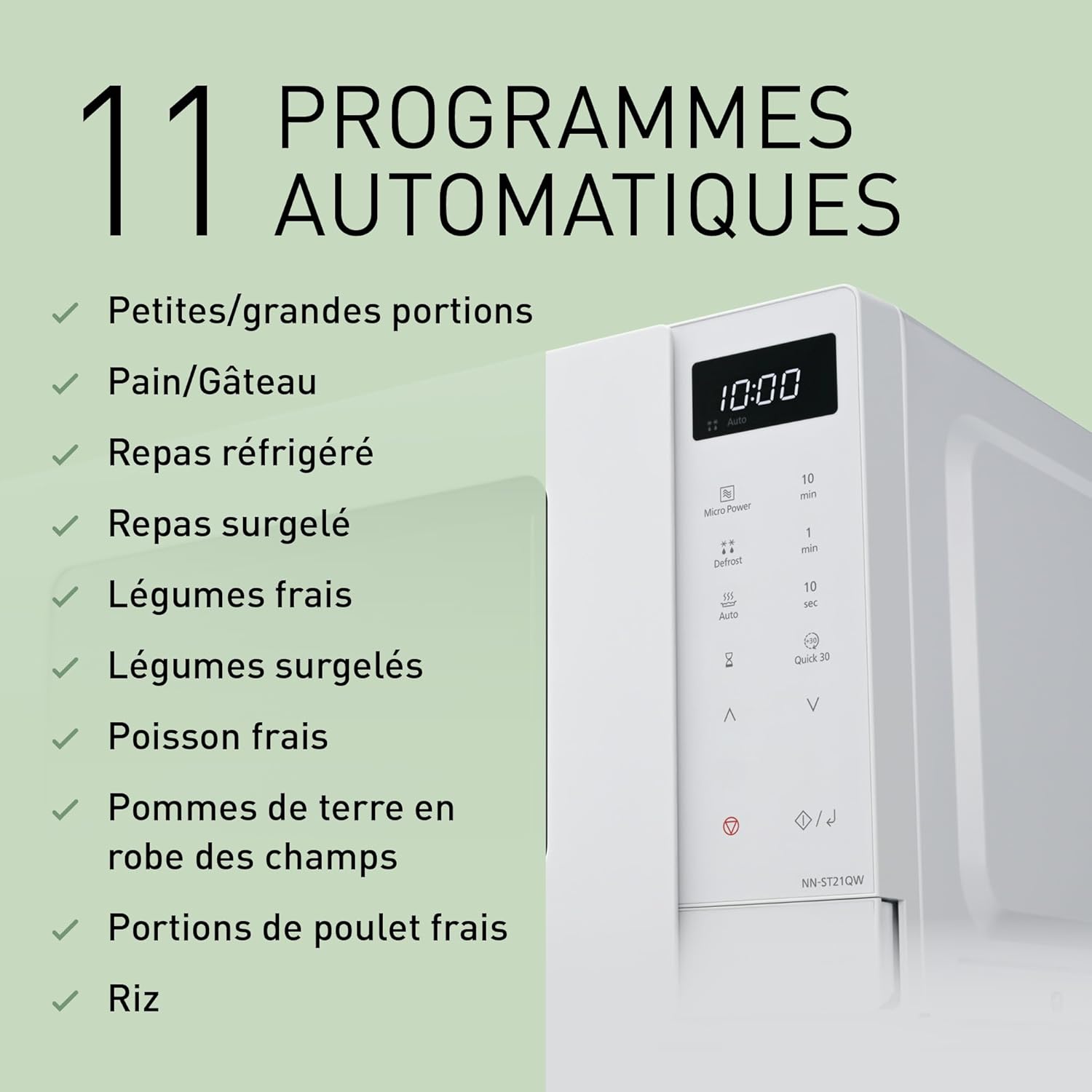
Figure 4.3: The 11 automatic programs offered by the microwave for various food types.
4.4 Automatic Defrost Modes
The oven features 3 automatic defrost modes that adjust heat based on weight, preserving food texture and flavor.
- Dondurulmuş gıdaları fırına koyun.
- Basın Defrost button repeatedly to select the appropriate defrost category (e.g., Meat, Poultry, Seafood).
- Use the time adjustment buttons to input the weight of the food.
- Basın Başlangıç düğme.

Figure 4.4: Visual representation of the automatic defrost function, suitable for frozen foods like berries.
4.5 Hızlı 30 Fonksiyonu
The Hızlı 30 function allows for instant heating for 30 seconds at full power. Each press adds 30 seconds to the cooking time.
- Yemeği fırına koyun.
- Basın Hızlı 30 button. The oven will start immediately.
- Basmak Hızlı 30 again to add more time in 30-second increments.

Figure 4.5: The Quick 30 button on the control panel for rapid heating.
4.6 Add Time Function
During manual cooking or certain automatic programs, you can easily extend the heating time by pressing the Zaman ekle button (often represented by the 10 sec or 1 min buttons during active cooking).
4.7 Çocuk Güvenlik Kilidi
To prevent unintended operation, especially by children, the oven is equipped with a child safety lock. Consult your specific model's detailed manual for activation and deactivation steps, typically involving holding down a specific button for a few seconds.
5. Bakım ve Temizlik
Mikrodalga fırınınızın uzun ömürlü olmasını ve optimum performans göstermesini sağlamak için düzenli temizlik ve bakımını yapın.
5.1 Dış Temizlik
Dış yüzeyleri yumuşak, damp Bez kullanın. Aşındırıcı temizleyiciler veya sert kimyasallar kullanmayın, çünkü bunlar yüzeye zarar verebilir.
5.2 İç Temizlik
Clean the interior cavity after each use to prevent food splatters from drying and becoming difficult to remove.
- Yumuşak bir bezle silin.amp bez ve yumuşak deterjanla temizleyin.
- For stubborn stains, place a bowl of water with lemon slices inside and heat on high for 2-3 minutes. The steam will loosen the residue, making it easier to wipe away.
- Kapıyı kapatmadan önce iç kısmın kuru olduğundan emin olun.
5.3 Pikap ve Silindir Halkası
Cam döner tabla ve silindir halkası temizlik için çıkarılabilir. Bunları ılık, sabunlu suda veya bulaşık makinesinde yıkayın. Fırına geri yerleştirmeden önce tamamen kuruduklarından emin olun.
5.4 Kapı Contaları
Regularly clean the door seals and adjacent parts with a soft, damp cloth to ensure proper sealing and prevent microwave energy leakage.
6. Sorun Giderme
Mikrodalga fırınınızda sorun yaşıyorsanız, aşağıdaki yaygın sorunlara ve çözümlere bakın:
| Sorun | Olası Neden | Çözüm |
|---|---|---|
| Fırın çalışmıyor. | Power cord not plugged in; Door not closed properly; Fuse blown or circuit breaker tripped; Child safety lock activated. | Ensure power cord is securely plugged in; Close door firmly; Check household fuse/circuit breaker; Deactivate child safety lock. |
| Yemek ısınmıyor. | Incorrect power level or cooking time set; Door not closed properly; Microwave-safe cookware not used. | Adjust power level and cooking time; Close door firmly; Use appropriate microwave-safe dishes. |
| Pikap dönmüyor. | Turntable or roller ring not correctly placed; Obstruction under the turntable. | Ensure turntable and roller ring are correctly seated; Remove any obstructions. |
| Fırının içinde kıvılcım veya ark oluşması. | Metal objects or foil inside; Damaged oven interior. | Remove all metal objects; Discontinue use and contact service if interior is damaged. |
| Fırının lambası çalışmıyor. | Ampul yandı. | Ampul değişimi için yetkili servis personeli ile iletişime geçiniz. |
Bu çözümleri denedikten sonra sorun devam ederse lütfen müşteri desteğiyle iletişime geçin.
7. Özellikler
Detailed technical specifications for the Panasonic NN-ST21QWEPG Solo Microwave Oven:
| Özellik | Şartname |
|---|---|
| Marka | Panasonic |
| Model Numarası | NN-ST21QWEPG |
| Ürün Boyutları (U x G x Y) | 44 cm x 32.4 cm x 25.8 cm (17.3 x 12.8 x 10.2 inç) |
| Ağırlık | 11 Kilogram (24.25 lbs) |
| Kapasite | 20 Litre |
| Kurulum Türü | Solo |
| Mikrodalga Güç Çıkışı | 800 Watt |
| Güç Seviyeleri | 5 |
| Cilttage | 230 Volt |
| Kontrol Türü | Touch Control, Digital |
| Özel Özellikler | Digital Control, Automatic Cooking, Defrost, Turntable, Shortcut Keys |
| Dahil Bileşenler | Roller Ring, Turntable Support |
| Renk | Beyaz |
8. Garanti ve Destek
Panasonic products are manufactured to high-quality standards and are backed by a manufacturer's warranty. Please refer to the warranty card included with your product for specific terms and conditions, including warranty period and coverage details.
8.1 Müşteri Desteği
For technical assistance, service, or to inquire about replacement parts, please contact Panasonic customer support. You can find contact information on the official Panasonic webÜrünü satın aldığınız site veya perakendeci aracılığıyla.
You can also visit the official Panasonic store for more information and products: Panasonic Brand Store
Ask a question about this manual
Ask about setup, troubleshooting, compatibility, parts, safety, or missing instructions. Manuals+ will review the question and use this page’s manual context to help answer it.