
giriiş
This manual provides detailed instructions for the setup, operation, and maintenance of your La Crosse Technology 314-1410 Battery Operated Digital Thermometer with Wired Probe. Please read these instructions carefully before using the device to ensure proper function and longevity.
The digital thermometer is designed to provide accurate temperature readings for both indoor and remote locations using its 6-foot water-resistant wired probe. It features a clear digital display, 24-hour high/low temperature records, and selectable Fahrenheit or Celsius display.
Paket İçeriği
- Digital Thermometer Unit (Model 314-1410)
- Wired Temperature Probe (6-foot length)
- Kullanım Kılavuzu
Kurmak
- Pilleri Takın:
Locate the battery compartment on the back of the thermometer unit. Insert two fresh AAA batteries, ensuring correct polarity (+ and -). Close the battery compartment cover securely.

Resim: Arka view of the thermometer, highlighting the battery compartment for two AAA batteries.
- Connect Wired Probe:
Plug the wired temperature probe into the designated port on the side of the thermometer unit. Ensure the connection is firm.

Resim: Açısal view of the thermometer with the wired probe connected to the side port.
- İlk Yerleştirme:
Place the main thermometer unit in your desired indoor location. Position the wired probe in the area where you wish to measure the remote temperature, such as a refrigerator, freezer, or outdoors. The probe is water-resistant.
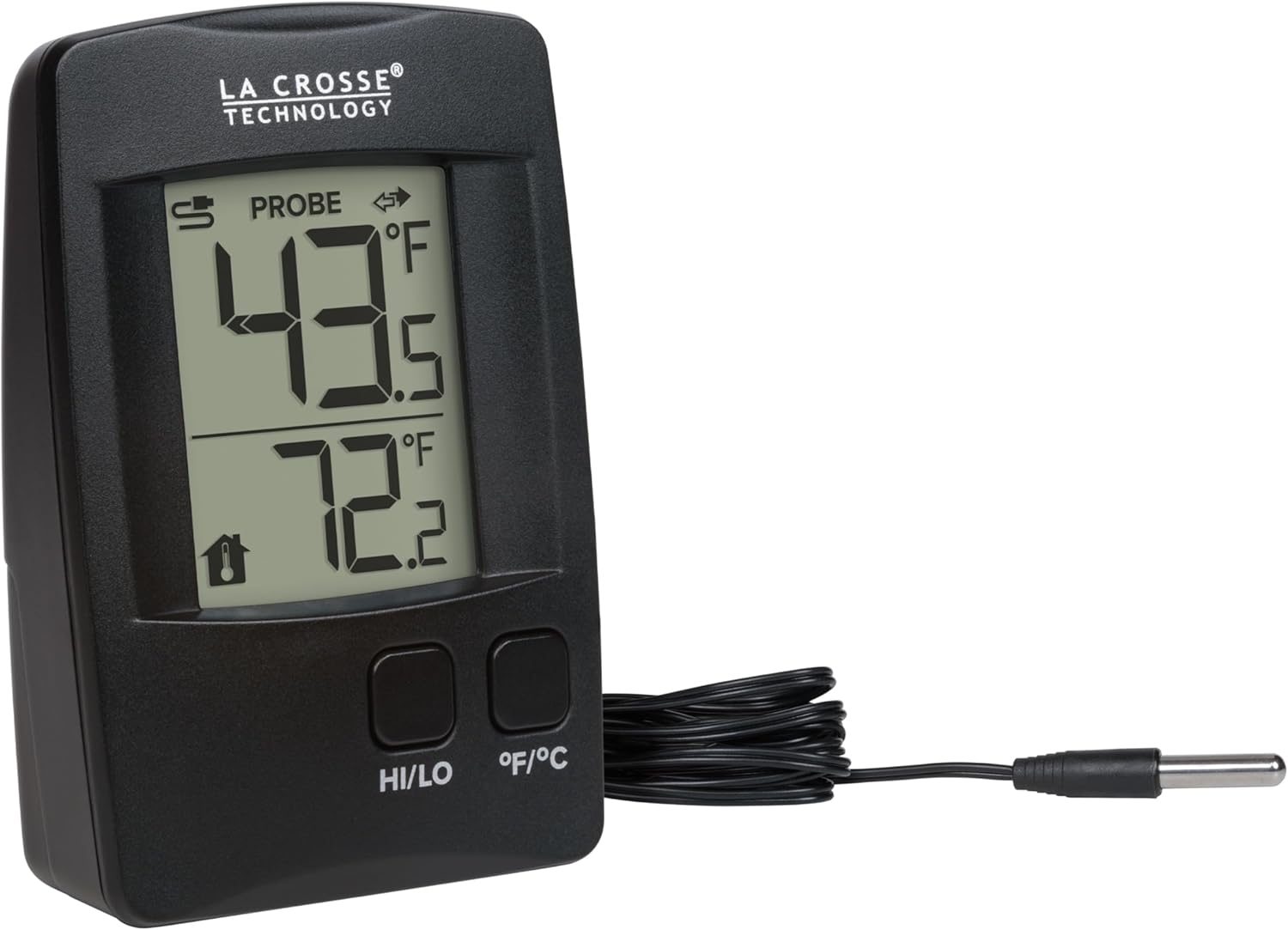
Resim: Ön view of the thermometer, showing the main display with probe and indoor temperature readings.
Kullanım Talimatları
- Sıcaklık Göstergesi:
The top reading on the display shows the temperature from the wired probe. The bottom reading shows the indoor temperature measured by the main unit.

Image: The thermometer's display showing both probe and indoor temperature readings.
- Switching Fahrenheit/Celsius:
Press the "°F/°C" button on the front of the unit to toggle between Fahrenheit and Celsius temperature display.
- Viewing High/Low Records:
Press the "HI/LO" button to view the 24-hour high and low temperature records for both the probe and indoor sensors. Each press will cycle through High Probe, Low Probe, High Indoor, Low Indoor, and then return to current temperatures.
- En Yüksek/En Düşük Kayıtları Sıfırlama:
Sırasında viewing the high or low records, press and hold the "HI/LO" button for approximately 3 seconds to clear and reset the 24-hour high/low records.
- Decimal Point Readings:
The thermometer provides temperature readings with decimal-point precision. To turn decimal readings on/off, press and hold the "°F/°C" button.
Bakım
- Pil Değişimi:
When the low battery indicator appears on the display, replace the two AAA batteries with fresh ones. Ensure correct polarity.
- Temizlik:
Clean the thermometer unit and probe with a soft, damp Bez kullanın. Aşındırıcı temizleyiciler veya çözücüler kullanmayın, çünkü bunlar ekranı veya cihazı hasar verebilir.asing.
- Prob Bakımı:
The wired probe is water-resistant and suitable for outdoor or damp environments. However, avoid prolonged submersion in water to prevent damage.
Sorun giderme
| Sorun | Çözüm |
|---|---|
| Ekran yok veya soluk ekran | Check battery installation. Replace with fresh AAA batteries. |
| Yanlış sıcaklık okumaları | Ensure the wired probe is securely connected. Verify the probe is placed correctly in the desired measurement area. Check battery power. |
| "LO" veya "HI" görüntüleniyor | The measured temperature is outside the device's operational range. |
Özellikler
- Modeli: 314-1410
- Marka: La Crosse Teknolojisi
- İç Sıcaklık Aralığı: Not explicitly stated, typically 32°F to 122°F (0°C to 50°C)
- Prob Sıcaklık Aralığı: 140 °F'ye (60 °C) kadar
- Güç Gereksinimleri: 2 x AAA pil (dahil değildir)
- Prob Uzunluğu: 6 fit (1.83 metre)
- Boyutlar (Birim): 3.74 inches (Length) x 2.56 inches (Width) x 1.11 inches (Depth)
- Özel Özellikler: Fast Reading System, Fast Refresh, High Accuracy, Low Battery Indicator

Image: Dimensional drawing of the thermometer and probe, indicating measurements in inches and centimeters.
Garanti
La Crosse Technology products are designed for reliability. For specific warranty information, including duration and terms, please refer to the warranty card included with your product or visit the official La Crosse Technology website. Herhangi bir garanti talebi için satın alma belgeniz olarak satın alma makbuzunuzu saklayın.
Destek
For additional assistance, troubleshooting tips, or to access video tutorials, please visit the official La Crosse Technology website. You may also contact their USA-based support team for direct assistance.
Çevrimiçi Kaynaklar: www.lacrosseteknoloji.com


