
1. Giriş
Thank you for choosing the Candy Wave 600 Built-in Microwave. This manual provides essential information for the safe and efficient operation, installation, and maintenance of your appliance. Please read these instructions carefully before using the microwave oven and keep them for future reference.
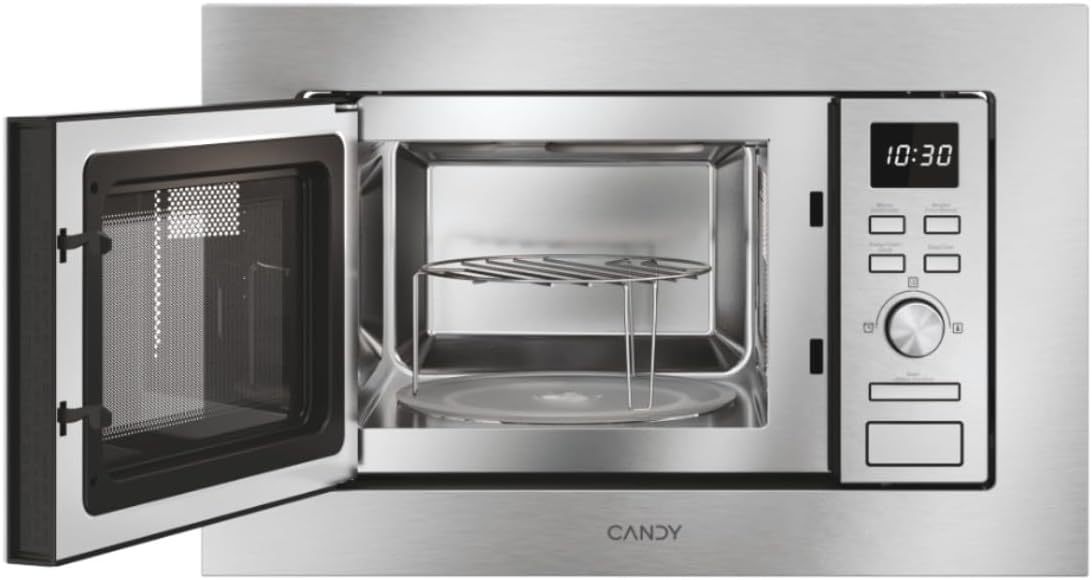
Şekil 1: Ön view of the Candy Wave 600 Built-in Microwave.
2. Güvenlik Bilgileri
Yangın, elektrik çarpması, kişilerin yaralanması veya aşırı mikrodalga enerjisine maruz kalma riskini azaltmak için elektrikli cihazları kullanırken her zaman temel güvenlik önlemlerine uyun.
- Tüm talimatları okuyun Cihazı kullanmadan önce.
- Fırının kapağı açıkken çalıştırmayı denemeyin, bu mikrodalga enerjisine zararlı bir şekilde maruz kalmanıza neden olabilir.
- Patlamaya yatkın oldukları için sıvıları veya diğer yiyecekleri kapalı kaplarda ısıtmayın.
- Çocukların fırını gözetimsiz olarak kullanmalarına, yalnızca çocuğun fırını güvenli bir şekilde kullanabilmesi ve uygunsuz kullanımın tehlikelerini anlayabilmesi için yeterli talimatlar verildiğinde izin verin.
- Bu cihazda aşındırıcı kimyasallar veya buharlar kullanmayın.
- Fırın kapağı veya kapak contaları hasarlı ise yetkili bir kişi tarafından onarılıncaya kadar fırın çalıştırılmamalıdır.
- The appliance must be earthed. Connect only to a properly earthed outlet.
3. Kurulum ve Kurulum
Proper installation is crucial for the performance and safety of your microwave oven. This appliance is designed for built-in installation.
3.1 Paketin açılması
- Remove all packaging materials from inside the oven cavity and from the door.
- Fırında ezik veya kırık kapı gibi herhangi bir hasar olup olmadığını kontrol edin. Hasarlıysa monte etmeyin.
- Ensure all accessories are present: turntable, turntable support, and grill rack.
3.2 Yerleştirme ve Boyutlar
The microwave must be installed in a cabinet opening that meets the specified dimensions. Ensure adequate ventilation around the appliance.

Figure 2: Installation dimensions for the Candy Wave 600 Built-in Microwave.
- The cabinet opening should be 560mm wide and 362mm high.
- The microwave itself measures 59.5 cm (width) x 34.4 cm (depth) x 38.2 cm (height).
- Ensure a minimum depth of 500mm for the cabinet.
3.3 Elektrik Bağlantısı
- Connect the microwave to a properly earthed 230V AC power outlet.
- Uzatma kablosu veya çoklu priz kullanmayınız.
- The power cord should be easily accessible after installation.
3.4 İlk Temizlik
İlk kullanımdan önce mikrodalganın içini ve dışını bir temizleyici ile silin.amp cloth. Ensure the turntable and support are clean and correctly placed.

Şekil 3: İç mekan view with turntable and grill rack.
4. Kullanım Talimatları
Your Candy Wave 600 microwave offers various functions for convenient cooking. Familiarize yourself with the control panel for optimal use.
4.1 Kontrol Paneli Üstüview
The microwave features an integrated screen and touch controls for easy operation. A rotary knob is used for setting time and selecting options.
4.2 Saati Ayarlama
- When the oven is plugged in, the display will show '0:00'.
- Press the clock button (usually indicated by a clock icon).
- Use the rotary knob to set the hour, then press the clock button again.
- Use the rotary knob to set the minutes, then press the clock button to confirm.
4.3 Microwave Cooking (Power Levels)
The microwave offers 5 power levels. To cook with microwave power:
- Yiyecekleri fırına koyun ve kapağını kapatın.
- Press the 'Microwave' button repeatedly to select the desired power level (e.g., P100 for 100% power).
- Pişirme süresini ayarlamak için döner düğmeyi kullanın.
- Pişirmeye başlamak için 'Başlat' düğmesine basın.
4.4 Izgara Fonksiyonu
Izgara fonksiyonu, yiyecekleri kızartmak ve çıtırlaştırmak için idealdir.
- Place food on the grill rack (if provided) directly on the turntable.
- 'Izgara' düğmesine basın.
- Use the rotary knob to set the grilling time.
- 'Başlat' düğmesine basın.
4.5 Otomatik Pişirme Programı
The microwave features 7 automatic cooking programs for various food types. These programs automatically adjust cooking time and power.
- Press the 'Auto Menu' button.
- Use the rotary knob to select the desired program number.
- Enter the food weight (if prompted) using the rotary knob.
- 'Başlat' düğmesine basın.
4.6 Easy Touch Controls
The Easy Touch controls allow you to select the food weight, and the microwave will automatically adjust the cooking time and power.
- Select the desired cooking function (e.g., Microwave).
- Press the 'Easy Touch' button (or similar icon).
- Use the rotary knob to input the food weight.
- 'Başlat' düğmesine basın.
4.7 Start Express Function
The Start Express button provides quick cooking at maximum power.
- Press the 'Start Express' button once for 30 seconds of cooking at maximum power.
- Each subsequent press adds another 30 seconds.
4.8 Çözme Programı
The defrost program thaws food based on weight.
- 'Buz Çözme' düğmesine basın.
- Yiyecek ağırlığını seçmek için döner düğmeyi kullanın.
- Press 'Start'. The oven will automatically calculate the defrosting time.
4.9 Çocuk Kilidi İşlevi
The Child Lock prevents accidental operation, especially by children.
- To activate: Press and hold the 'Stop/Cancel' button for approximately 3 seconds until a 'beep' sounds and a lock indicator appears on the display.
- To deactivate: Press and hold the 'Stop/Cancel' button again for approximately 3 seconds until the lock indicator disappears.
5. Bakım ve Temizlik
Mikrodalga fırınınızın uzun ömürlü olmasını ve optimum performans göstermesini sağlamak için düzenli temizlik ve bakımını yapın.
5.1 İç Temizlik
- Fırın içini her kullanımdan sonra bir temizleyici ile temizleyin.amp Kumaş.
- İnatçı lekeler için hafif bir deterjan veya mikrodalga fırında kullanıma uygun bir temizleyici kullanın.
- Aşındırıcı temizleyiciler veya metal ovma pedleri kullanmayın.
- Remove and wash the glass turntable and turntable support in warm soapy water.
5.2 Dış Temizlik
- Dış yüzeyleri yumuşak, damp Kumaş.
- Clean the door and door seals regularly to ensure proper closure.
- Avoid excessive moisture near the control panel.
6. Sorun Giderme
Mikrodalga fırınınızda sorun yaşıyorsanız, servisle iletişime geçmeden önce aşağıdaki yaygın sorunlar ve çözümlere göz atın.
| Sorun | Olası Neden | Çözüm |
|---|---|---|
| Fırın çalışmıyor | Güç kablosu takılı değil; Kapı düzgün kapatılmamış; Sigorta atmış veya devre kesici devreye girmiş. | Fişin prize sıkıca takılı olduğundan emin olun; Kapıyı güvenli bir şekilde kapatın; Evdeki sigortayı kontrol edin veya devre kesiciyi sıfırlayın. |
| No microwave power | Yanlış güç seviyesi seçildi; Teknik arıza. | Güç seviyesi ayarını doğrulayın; sorun devam ederse müşteri desteğiyle iletişime geçin. |
| Yiyecekler eşit şekilde ısınmıyor | Yiyecekler karıştırılmıyor veya yeniden düzenlenmiyor; Döner tabla dönmüyor. | Stir or rearrange food during cooking; Check if turntable is correctly placed and rotating. |
| Işık çalışmıyor | Ampulün değiştirilmesi gerekiyor. | Ampul değişimi için yetkili servis personeli ile iletişime geçiniz. |
7. Özellikler
Technical details for the Candy Wave 600 Built-in Microwave (Model CA20FMW7NG).
| Özellik | Şartname |
|---|---|
| Model Numarası | CA20FMW7NG |
| Marka | ŞEKER |
| Kapasite | 20 Litre |
| Mikrodalga Gücü | 800 Watt |
| Cilttage | 230 Volt (AC) |
| Kontrol Türü | Dokunmatik Kontrol |
| Malzeme | Paslanmaz çelik |
| Boyutlar (D x G x Y) | 34.4 cm x 59.5 cm x 38.2 cm |
| Ağırlık | 15 Kilogram |
| Isıtma Yöntemi | Radiant and Grill |
| Dahil Bileşenler | Izgara Rafı |
8. Garanti ve Destek
Your Candy Wave 600 Built-in Microwave comes with a 2 yıl ürün garantisi.
For warranty claims, technical assistance, or to purchase spare parts, please contact Candy customer support. Refer to the contact information provided with your purchase documentation or visit the official Candy webalan.
Please have your model number (CA20FMW7NG) and proof of purchase ready when contacting support.