
FOLAI TH
FOLAI Stud Finder Wall Scanner Model TH User Manual
Model: TH | Brand: FOLAI
1. Giriş
The FOLAI Stud Finder Wall Scanner Model TH is an advanced electronic device designed to accurately detect various objects hidden behind walls, floors, and ceilings. This 5-in-1 scanner helps locate wood studs, metal pipes, steel bars, and live AC wires, ensuring safety and precision for your projects. Please read this manual thoroughly before use to ensure proper operation and to maximize the device's capabilities.

Image: The FOLAI Stud Finder Wall Scanner, showing its ergonomic design and the included 9V battery.
2. Ürün Özellikleri
- 5-in-1 Scanning Modes: Detects wood, metal, and live AC wires.
- Yüksek Doğruluk: Utilizes advanced sensor technology for precise detection.
- HD LCD Ekran: Clear visual indication of detected objects, edges, and center.
- Sesli Alarm: Tespit edildiğinde sesli uyarı verir.
- WireWarning Detection: Alerts to live, unshielded AC wires in all scanning modes.
- Otomatik Kalibrasyon: Simplifies setup and ensures reliable readings.

Image: Illustration of the internal microprocessor and the various materials the scanner can detect, including metal pipes, AC wires, wooden beams, and rebars.
3. Kurulum ve Pil Takılması
- Pil Bölmesini Aç: Locate the battery compartment cover on the back of the device. Slide or unclip the cover to open it.
- Pili takın: Insert one 9V alkaline battery, ensuring the positive (+) and negative (-) terminals align correctly with the markings inside the compartment. A 9V battery is included with your device.
- Pil Bölmesini Kapatın: Pil bölmesi kapağını yerine tam oturana kadar kapatın.
The device is now ready for initial use. It is recommended to perform a quick calibration before each scanning session.
4. Kullanım Talimatları
4.1 Genel İşlem Adımları
- Güç Açık: Press the power button (usually marked with a power symbol or "U/MODE") to turn on the device.
- Mod seç: Use the mode button (often the same as the power button, or a separate one) to cycle through the available scanning modes until the desired mode is displayed on the LCD screen.
- Kalibrasyon: Place the device flat against the wall surface where you intend to scan. Press and hold the "Scan" button (typically on the side) until you hear a short beep sound, indicating successful calibration. Ensure there are no objects or your hand under the scanner during calibration.
- Tarama: While holding the "Scan" button, slowly and steadily slide the device horizontally across the surface. Maintain full contact with the wall.
- Tespit: The LCD display will show indicators (e.g., arrows, bars, "EDGE", "CENTER") as it approaches and detects an object. An audio alarm will also sound.
- İşaretleme: Once the center of an object is indicated, mark its position with a pencil. For best accuracy, scan the area from both left and right directions and mark the center point where the readings converge.
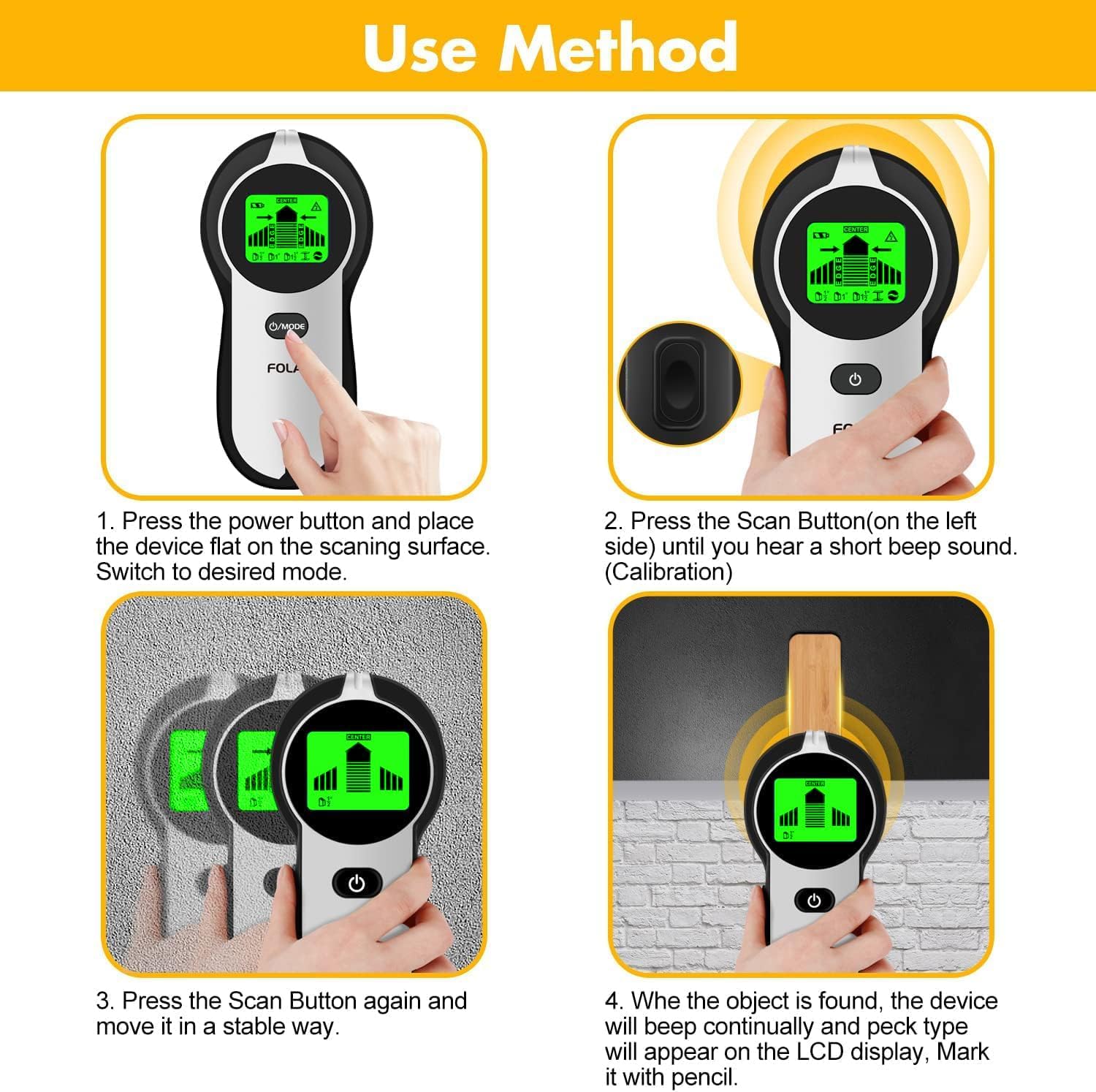
Image: A visual guide demonstrating the four-step process for using the stud finder, from powering on and calibrating to scanning and marking detected objects.
4.2 Scanning Modes and Depths
The FOLAI Stud Finder offers five distinct scanning modes to accommodate various materials and depths:
- Stud Scan (0.5 inch / 12mm): Detects wood studs through a single layer of drywall up to 0.5 inches (12mm) thick.
- Stud Scan (1 inch / 25mm): Detects wood studs through a single layer of drywall up to 1 inch (25mm) thick.
- Deep Stud Scan (1.5 inches / 38mm): Designed for thicker walls, detecting wood studs through up to two layers of drywall, 1.5 inches (38mm) deep.
- Metal Scan (2.36 inches / 60mm): Locates metal objects such as pipes, rebar, and metal studs up to 2.36 inches (60mm) deep.
- AC Scan (2 inches / 51mm): Detects live, unshielded AC electrical wires up to 2 inches (51mm) deep.

Image: A visual representation of the five scanning modes, detailing the maximum detection depths for wood studs (0.5", 1", 1.5"), metal (2.36"), and live AC wires (2").
4.3 WireWarning Indicator
The WireWarning feature is always active in StudScan, DeepScan, and MetalScan modes. It alerts you to the presence of live, unshielded electrical AC wires up to 2 inches (51mm) deep, helping to prevent accidental drilling or cutting into electrical lines. If a live wire is detected, the AC warning icon will appear on the display, and an audio alarm will sound.
Önemli: While WireWarning is a safety feature, it is always recommended to switch to AC Scan mode to precisely locate and confirm the center of any detected live AC wires before proceeding with any work.

Image: A user operating the stud finder, highlighting its ability to detect various hidden elements like studs, beams, metal, and AC wires, thereby enhancing safety during drilling tasks.
4.4 LCD Display and Audio Alarm
The large HD LCD display provides clear visual feedback:
- Sinyal Gücü Çubukları: Indicate proximity to the detected object. More bars mean closer proximity.
- Edge Indicators: Arrows or "EDGE" text appear when the device detects the edge of a stud or object.
- Merkez Göstergesi: "CENTER" text and a distinct icon appear when the device is directly over the center of a stud or object.
- Pil Göstergesi: Mevcut pil seviyesini gösterir.
- Mod Göstergesi: Displays the currently selected scanning mode.
- AC Warning Icon: Appears when live AC wires are detected.
The audio alarm will beep continuously and change pitch as the device approaches and locates the center of an object, providing an additional cue for detection.

Resim: Yan yana view of the LCD display, demonstrating how it indicates the edge of a stud and then precisely pinpoints its center with clear visual cues.
5. Bakım ve Özen
- Pil Değişimi: Replace the 9V battery when the low battery indicator appears on the LCD screen to ensure accurate readings. Always use a fresh alkaline 9V battery.
- Temizlik: Cihazı yumuşak, kuru bir bezle silin. Aşındırıcı temizleyiciler, çözücüler kullanmayın ve cihazı suya batırmayın.
- Depolamak: Store the stud finder in a cool, dry place, away from direct sunlight and extreme temperatures. If storing for extended periods, remove the battery to prevent leakage.
- Damlalardan Kaçının: Düşme veya darbelerden dolayı oluşabilecek hasarları önlemek için cihazı dikkatli tutun.
6. Sorun Giderme
| Sorun | Olası Neden | Çözüm |
|---|---|---|
| Hatalı okumalar veya yanlış pozitif sonuçlar. |
|
|
| Cihaz açılmıyor. |
|
|
| No detection in Stud Scan mode. |
|
|
| AC WireWarning constantly active. |
|
|
7. Özellikler
| Özellik | Detay |
|---|---|
| Model Numarası | TH |
| Marka | FOLAI |
| Stud Scan Depth | 0.5 in (12mm), 1 in (25mm), 1.5 in (38mm) |
| Metal Tarama Derinliği | Up to 2.36 in (60mm) |
| AC Wire Detection Depth | Up to 2 in (51mm) |
| Güç Kaynağı | 1 adet 9V Alkalin Pil (dahil) |
| Ürün Ağırlığı | 7.8 ons |
| Paket Boyutları | 6.97 x 3.46 x 1.73 inç |
| Görüntülemek | HD LCD with Audio Alarm |
8. Garanti ve Destek
FOLAI is committed to providing high-quality products. This product comes with a standard manufacturer's warranty. For specific warranty details, technical support, or any questions regarding the operation of your Stud Finder Wall Scanner Model TH, please contact FOLAI customer service through the retailer's platform or the contact information provided with your purchase.
Garanti talepleri için lütfen satın alma belgenizi saklayın.
Ask a question about this manual
Ask about setup, troubleshooting, compatibility, parts, safety, or missing instructions. Manuals+ will review the question and use this page’s manual context to help answer it.