
LIECTROUX M7S PRO
LIECTROUX M7S Pro Robot Vacuum Cleaner User Manual
Model: M7S Pro
1. Giriş
Satın aldığınız için teşekkür ederizasing the LIECTROUX M7S Pro Robot Vacuum Cleaner. This manual provides essential information for the safe operation, maintenance, and troubleshooting of your device. Please read this manual thoroughly before using the product and retain it for future reference.
Güvenlik Talimatları
- İlk kullanımdan önce robotun tamamen şarj olduğundan emin olun.
- Robotu ıslak ortamlarda veya sıvıların yakınında çalıştırmayın.
- Robotun yoluna çıkabilecek kabloları, perdeleri ve küçük nesneleri, robotun dolanmasını önlemek için yoldan uzak tutun.
- Robot çalışırken çocukları ve evcil hayvanları gözetim altında tutun.
- Robotu büyük parçaları, keskin cisimleri veya yanan maddeleri toplamak için kullanmayın.
- Yalnızca robotla birlikte verilen orijinal şarj istasyonunu ve güç adaptörünü kullanın.
- Turn off the robot and unplug it from the charging dock before performing any maintenance.
2. Paket İçeriği
Paketin içinde tüm öğelerin mevcut olduğundan emin olun:
- LIECTROUX M7S Pro Robot Vacuum Cleaner
- Şarj İstasyonu
- Güç Adaptörü
- Yan Fırçalar (set)
- HEPA Filtre (önceden takılı veya yedek)
- Temizleme Aracı
- Uzaktan kumanda
- Kullanıcı Kılavuzu
3. Ürün Bittiview
Familiarize yourself with the components of your LIECTROUX M7S Pro robot vacuum cleaner.

Şekil 3.1: The LIECTROUX M7S Pro robot vacuum cleaner, showcasing its sleek black design, along with its remote control and a smartphone displaying the cleaning map via the app.
Ana bileşenler:
- Üst panel: Power button, Wi-Fi indicator, charging indicator.
- Ön tampon: Obstacle detection sensors.
- Yan Fırçalar: Collect dust and debris from edges and corners.
- Sürüş Tekerlekleri: Çeşitli zemin tipleri arasında hareket kabiliyeti sağlar.
- Çöp kovası: Collects dry debris.
- Su deposu (yer silme için): Holds water for wet cleaning.
- Şarj Kişileri: Şarj istasyonuna bağlanır.
- Uçurum Sensörleri: Detects drops and prevents falls.
4. Kurulum
4.1 Şarj İstasyonunun Yerleştirilmesi
Şarj istasyonunu açık bir alanda duvara yaslayın ve istasyonun yanlarında 1 metre (3 fit) ve önünde 2 metre (6 fit) mesafede herhangi bir engel olmadığından emin olun. Güç adaptörünü şarj istasyonuna bağlayın ve bir elektrik prizine takın.
4.2 İlk Şarj
Place the robot onto the charging dock, ensuring the charging contacts align. The robot will begin charging automatically. For first use, allow the robot to charge completely (approximately 4-5 hours) before operation.

Şekil 4.1: The robot vacuum cleaner automatically returning to its charging dock when its battery is low, ensuring it is always ready for the next cleaning cycle.
4.3 App Connection (TUYA App)
- Download the "TUYA Smart" app from your smartphone's app store (iOS or Android).
- TUYA hesabınıza kaydolun veya giriş yapın.
- Ensure your robot is charged and powered on.
- Follow the in-app instructions to add your LIECTROUX M7S Pro robot vacuum cleaner. This typically involves pressing and holding a button on the robot to enter pairing mode and connecting to your home Wi-Fi network.
- Bağlandıktan sonra robotu kontrol edebilirsiniz. view cleaning maps, and set schedules via the app.
4.4 Sesli Asistan Entegrasyonu
The LIECTROUX M7S Pro supports voice control via Amazon Alexa and Google Home. Refer to the respective app (Alexa app or Google Home app) for instructions on how to link your TUYA Smart account and control your robot with voice commands.
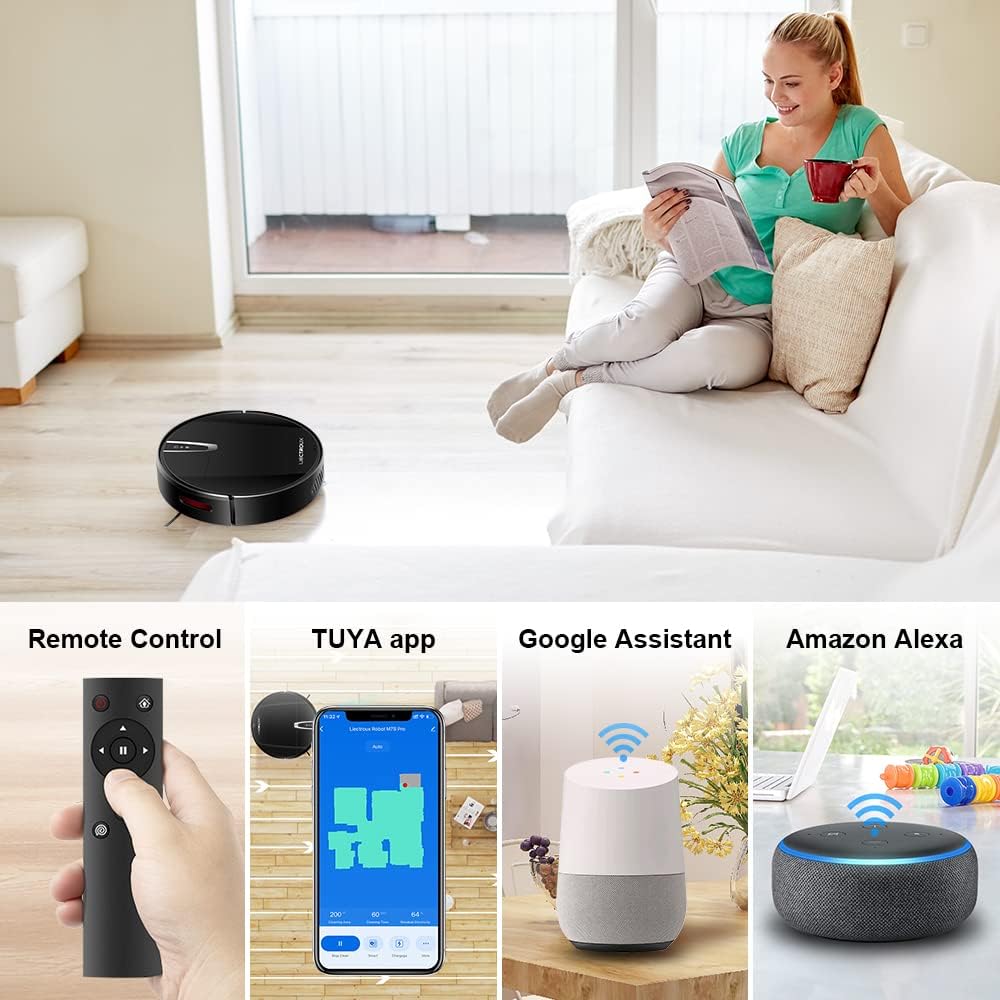
Şekil 4.2: Various control methods for the robot vacuum, including a physical remote control, the TUYA smartphone application displaying a cleaning map, and integration with voice assistants like Google Assistant and Amazon Alexa.
5. Kullanım Talimatları
5.1 Temizleme Modu
The robot offers multiple cleaning modes to suit different needs, accessible via the app, remote control, or voice commands:
- Otomatik Temizleme: Robot, akıllı bir şekilde hareket ederek tüm zemin alanını temizliyor.
- Nokta Temizleme: Belirli bir kirli bölgeye odaklanarak, spiral şeklinde temizlik yapar.
- Kenar Temizleme: Duvar ve mobilya kenarlarını temizler.
- Paspas Modu: For wet cleaning, attach the water tank and mopping cloth.

Şekil 5.1: The robot vacuum cleaner operating on a floor with scattered debris, illustrating its powerful suction and various cleaning modes: Scheduled Cleaning, Auto Cleaning, Edge Cleaning, and Spot Cleaning.
5.2 Navigasyon ve Haritalama
The M7S Pro utilizes smart gyroscope navigation to create a 2D map of your environment, allowing for precise positioning and efficient route planning. This ensures comprehensive coverage and minimizes missed spots.

Şekil 5.2: The robot vacuum cleaner navigating a room, with a grid overlay illustrating its smart gyroscope navigation system for precise positioning and thorough cleaning.

Şekil 5.3: A visual comparison showing the efficient, systematic cleaning path generated by the LIECTROUX M7S Pro's gyroscope navigation versus a less organized common route planning method, highlighting intelligent route planning.
5.3 Otomatik Şarj
When the battery level is low or a cleaning task is complete, the robot will automatically return to its charging dock to recharge. Ensure the charging dock is always powered on and accessible.
5.4 Anti-Drop System
The robot is equipped with cliff sensors to detect stairs and elevated surfaces, preventing it from falling. It also intelligently detects different floor types and adjusts its direction within 10 milliseconds.
6. Bakım
Düzenli bakım robot süpürgenizin optimum performans göstermesini sağlar ve ömrünü uzatır.
6.1 Çöp Kutusunun Boşaltılması
Empty the dustbin after each cleaning cycle or when the 'full' indicator appears. Open the top cover, remove the dustbin, and dispose of the collected debris.
6.2 Filtrenin Temizlenmesi
The HEPA filter should be cleaned regularly (e.g., weekly) using the provided cleaning tool or a soft brush. Replace the HEPA filter every 3-6 months, depending on usage, to maintain suction efficiency.
6.3 Yan Fırçaların Temizlenmesi
Inspect and clean the side brushes regularly. Remove any tangled hair or debris. If brushes are worn or damaged, replace them with new ones.
6.4 Sensörlerin ve Şarj Kontaklarının Temizlenmesi
Wipe the cliff sensors and charging contacts on both the robot and the charging dock with a clean, dry cloth to ensure proper function and charging.
6.5 Brush-less Suction Nozzle
The M7S Pro features an advanced brush-less suction nozzle designed to minimize hair entanglement, reducing the frequency of cleaning the main suction path.

Şekil 6.1: An illustration of the robot vacuum's underside, highlighting the advanced brush-less suction nozzle designed to prevent hair entanglement and ensure consistent cleaning performance.
7. Sorun Giderme
Robot süpürgenizle ilgili sorunlarla karşılaşırsanız, aşağıdaki yaygın sorunlara ve çözümlere bakın:
| Sorun | Olası Neden | Çözüm |
|---|---|---|
| Robot açılmıyor. | Pil seviyesi düşük; güç kapatma. | Charge the robot; ensure the main power switch is on. |
| Robot şarj olmuyor. | Charging contacts dirty; charging dock not powered. | Clean charging contacts; ensure charging dock is plugged in. |
| Robot sık sık takılıyor. | Obstacles (cables, rugs); narrow spaces. | Clear the cleaning area; use virtual walls if available. |
| Zayıf temizleme performansı. | Çöp kutusu dolu; filtre tıkalı; fırçalar birbirine dolanmış. | Çöp haznesini boşaltın; filtreyi temizleyin/değiştirin; fırçaları temizleyin. |
| Uygulama bağlantı sorunları. | Incorrect Wi-Fi password; robot not in pairing mode; 5GHz Wi-Fi network. | Verify Wi-Fi details; re-enter pairing mode; ensure 2.4GHz Wi-Fi is used. |
8. Özellikler
| Özellik | Detay |
|---|---|
| Marka | YATAK |
| Model Adı | M7S PRO |
| Renk | Siyah |
| Ürün Boyutları | 32U x 32G x 7.8Y cm |
| Ürün Ağırlığı | 4 Kilogram |
| Maksimum Emiş Gücü | 4000Pa |
| Pil Kapasitesi | 2500 mAh Lityum İyon |
| Çalışma zamanı | 120 dakikaya kadar |
| Filtre Türü | HEPA |
| Denetleyici Türü | App Control, Touchpad Control, Voice Control |
| Sesli Asistan Uyumluluğu | Google Home, Amazon Alexa |
| Gezinme Türü | Gyroscope Navigation (2D Map) |
| Özel Özellik | Anti-drop system, Brush-less suction nozzle |
| Yüzey Önerisi | Low-pile carpet, hard floors, ceramic tiles |
9. Garanti ve Destek
The LIECTROUX M7S Pro Robot Vacuum Cleaner comes with a standard manufacturer's warranty. Please refer to the warranty card included in your package for specific terms and conditions, including the warranty period and coverage details.
For technical support, troubleshooting assistance, or warranty claims, please contact the seller or LIECTROUX customer service. Contact information can typically be found on the product packaging, the seller's website, or within the TUYA Smart app.
When contacting support, please have your product model number (M7S Pro) and purchase details readily available.
Ask a question about this manual
Ask about setup, troubleshooting, compatibility, parts, safety, or missing instructions. Manuals+ will review the question and use this page’s manual context to help answer it.