
1. Ürün Bittiview
This document provides instructions for the FCPLEXSW Tmall Genie Intelligent LED Driver Power Supply, model 12-24W*2. This device is a constant current low voltage transformer designed to power LED ceiling lamps, supporting smart dimming and color adjustment functions via Tmall Genie integration. It ensures stable and efficient power delivery to compatible LED lighting fixtures.
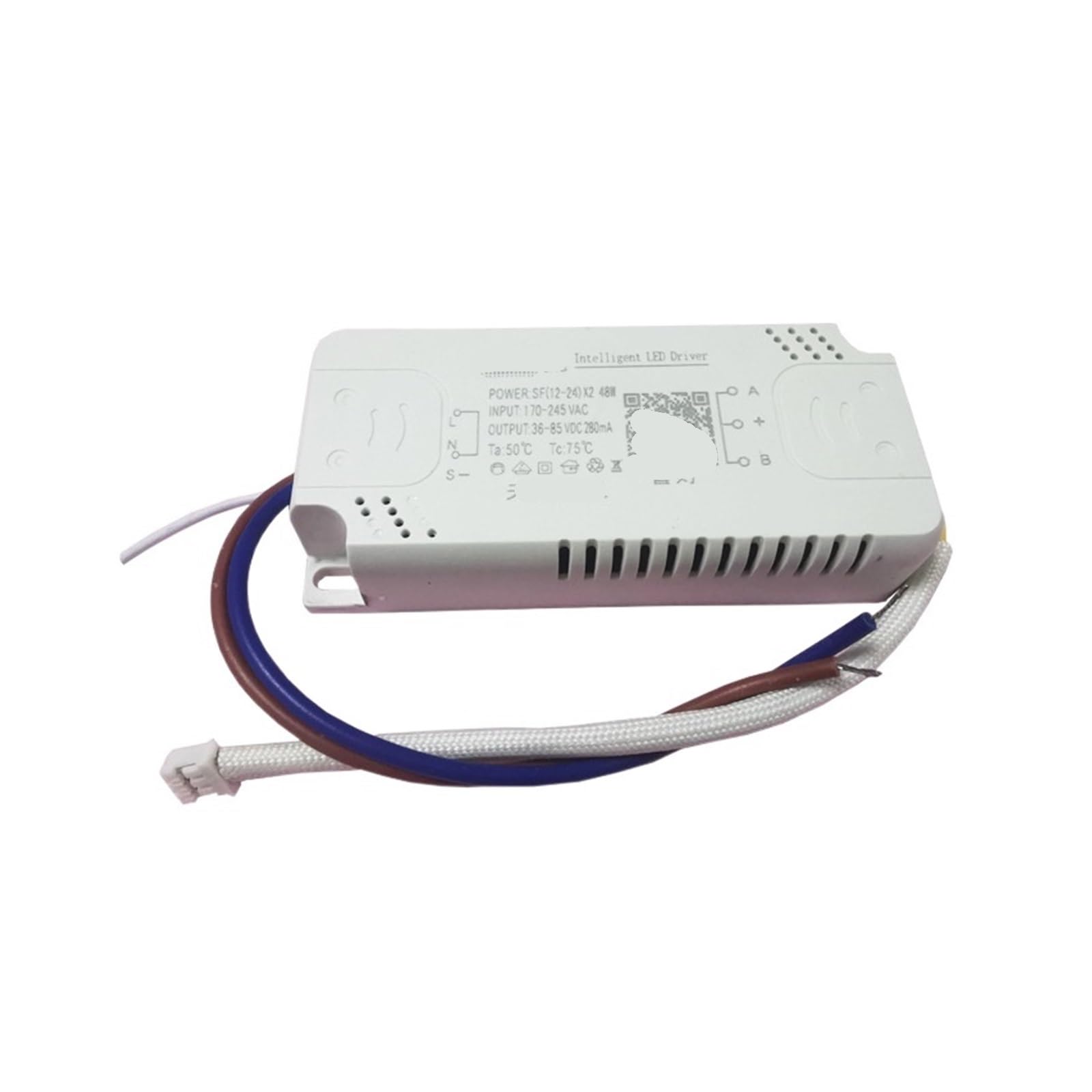
Image 1: FCPLEXSW Tmall Genie Intelligent LED Driver Power Supply (12-24W*2). The image shows the white rectangular driver unit with input and output wires. The label indicates 'Intelligent LED Driver', 'POWER SF(12-24) X2 48W', 'INPUT: 170-245 VAC', 'OUTPUT 36-85 VDC 280mA', 'Ta: 50°C Tc:75°C'.
2. Güvenlik Talimatları
Lütfen kurulum ve çalıştırmadan önce tüm güvenlik talimatlarını okuyun ve anlayın. Bu talimatlara uyulmaması elektrik çarpmasına, yangına veya diğer tehlikelere yol açabilir.
- Profesyonel Kurulum Önerilen: Kurulum kalifiye bir elektrikçi tarafından yapılmalıdır.
- Gücü Kesin: Always disconnect power at the circuit breaker before installing, servicing, or removing the device.
- Cilttage Uyumluluk: Giriş hacmini sağlayıntage of your electrical system matches the driver's specifications.
- Uygun Kablolama: Connect wires according to the wiring diagram provided in this manual. Incorrect wiring can damage the device or cause fire.
- Aşırı Yüklemeden Kaçının: Do not exceed the maximum output power or current ratings of the driver.
- Çevresel Koşullar: Do not expose the driver to moisture, extreme temperatures, or corrosive environments.
3. Ürün Özellikleri
| Özellik | Şartname |
|---|---|
| Model Türü | Sabit Akım Kaynağı |
| Giriş Voltage | 170 245-VAC |
| Giriş Frekansı | 50/60 Hz |
| Çıkış Gücü | 12-24W * 2 (Total 48W) |
| Çıkış Hacmitage | 36-85 VDC |
| Çıkış Akımı | 280mA |
| Yeterlik | %90 |
| Güç faktörü | 0.7 |
| Koruma | Aşırı Yük Koruması |
| Working Temperature (Ta) | -25°C ila 50°C |
| Kasa Sıcaklığı (Tc) | Maksimum 75°C |
| Boyutlar (U*G*Y) | 90*40*17MM |
| Ömür | 50,000 saat |
4. Kurulum ve Kurulum
Follow these steps for proper installation of the LED driver. Ensure power is disconnected before proceeding.
- Kablolamayı Hazırlayın: Identify the AC input wires (Live and Neutral) from your mains supply and the DC output wires for your LED lamp.
- Connect AC Input: Connect the mains Live (L) and Neutral (N) wires to the corresponding input terminals on the LED driver. Refer to the driver's label for 'L' and 'N' markings.
- Connect DC Output: Connect the positive (+) and negative (-) wires from your LED lamp to the corresponding output terminals on the LED driver. The driver supports two output channels, typically marked 'A' and 'B' with '+' and '-' for each. Ensure correct polarity.
- Güvenli Bağlantılar: Kısa devreleri önlemek için tüm kablo bağlantılarının sağlam ve uygun şekilde yalıtılmış olduğundan emin olun.
- Mount Driver: Mount the LED driver in a suitable location, ensuring adequate ventilation and protection from moisture.
- Gücü Geri Yükle: Tüm bağlantılar güvenli bir şekilde kurulup doğrulandıktan sonra, devre kesiciden gücü tekrar açın.
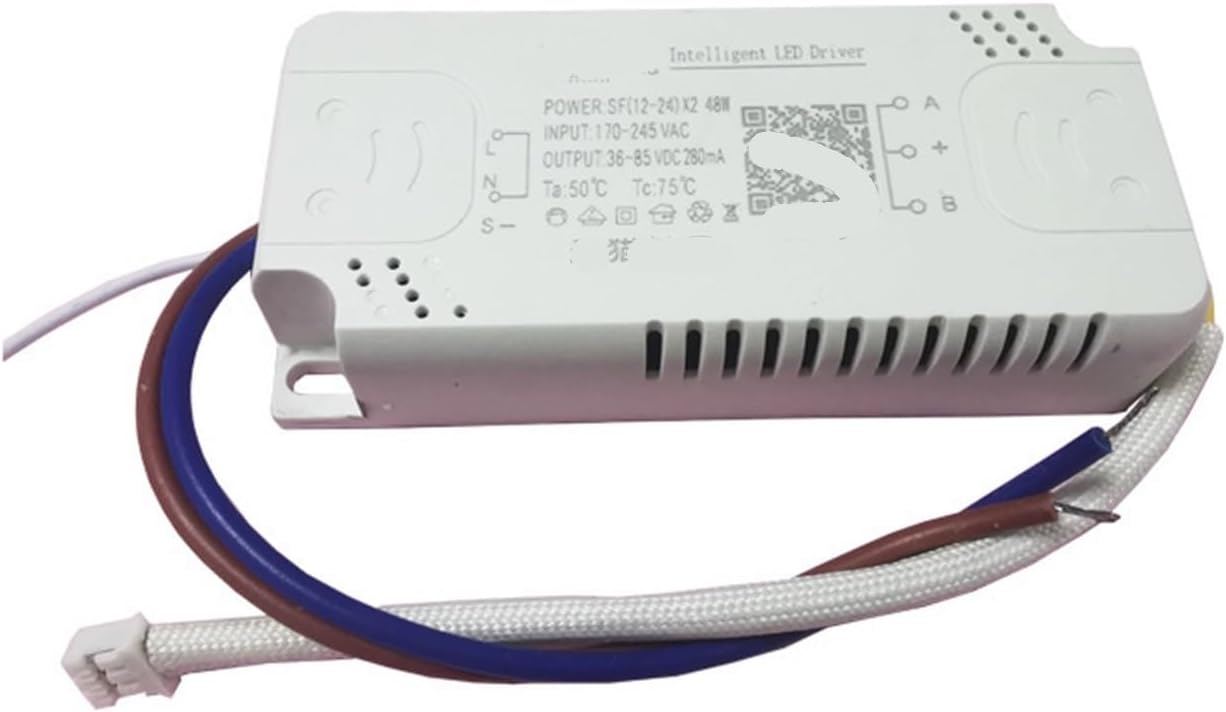
Image 2: Close-up of the FCPLEXSW LED Driver showing input and output terminals. The input side has 'L' and 'N' for AC connection, and the output side has 'A', '+', '-', 'B' for connecting to LED channels.
5. Kullanım Talimatları
This intelligent LED driver is designed for use with Tmall Genie for smart control.
- Güç Açma/Kapatma: Once installed and powered, the connected LED lamp will be ready for operation.
- Tmall Genie Integration: Follow the instructions provided with your Tmall Genie device to pair it with the LED driver for smart dimming and color adjustment functionalities. This typically involves adding a new device within the Tmall Genie app.
- Ses Kontrolü: After successful pairing, you can control the LED lamp's brightness and color temperature using voice commands through your Tmall Genie device.
6. Bakım
The FCPLEXSW LED Driver is designed for long-term, maintenance-free operation. However, periodic checks can help ensure optimal performance.
- Temizlik: Ensure the driver unit is free from dust and debris. Use a dry, soft cloth for cleaning. Do not use liquid cleaners.
- Denetleme: Periodically inspect the wiring for any signs of damage, fraying, or loose connections.
- Kullanıcı Tarafından Bakımı Yapılabilecek Parça Yok: The driver contains no user-serviceable parts. Do not attempt to open or repair the unit, as this will void any warranty and may pose a safety risk.
7. Sorun Giderme
If you encounter issues with your LED driver, refer to the following troubleshooting steps:
| Sorun | Olası Neden | Çözüm |
|---|---|---|
| LED lamp yanmıyor | Güç kaynağı yok Yanlış kablolama Arızalı LEDamp | Devre kesiciyi ve güç bağlantılarını kontrol edin. Verify input (AC) and output (DC) wiring. Test LED lamp with a known working driver or power source. |
| LED lamp beklenmedik şekilde titriyor veya kararıyor | Gevşek bağlantılar Incompatible LED lamp Aşırı ısınma | Tüm kablo bağlantılarının sıkılığını kontrol edin. LED'i sağlayın lamp specifications match driver output. Sürücünün etrafında yeterli havalandırmanın olduğundan emin olun. |
| Tmall Genie control not working | Doğru eşlenmemiş Ağ sorunları Tmall Genie device malfunction | Refer to Tmall Genie pairing instructions. Check Wi-Fi connection and Tmall Genie status. Restart Tmall Genie device. |
Bu çözümleri denedikten sonra sorun devam ederse müşteri desteğiyle iletişime geçin.
8. Garanti ve Destek
For warranty information, please refer to the purchase documentation or contact the seller directly. FCPLEXSW provides technical support for its products.
- Müşteri Desteği: For technical assistance, troubleshooting beyond this manual, or warranty claims, please contact the seller or manufacturer through the platform where the product was purchased.
- Satın Alma Kanıtı: Keep your proof of purchase for any warranty-related inquiries.