
DOOGEE V40 Rugged Smartphone Unlocked 5G
DOOGEE V40 Dayanıklı Akıllı Telefon Kullanım Kılavuzu
Model: V40 | Brand: DOOGEE
1. Giriş
Thank you for choosing the DOOGEE V40 Rugged Smartphone. This device is engineered for exceptional durability and performance, making it suitable for various demanding conditions. It combines advanced technology with robust construction to provide a reliable mobile experience. This manual will guide you through the setup, operation, and maintenance of your new smartphone.
2. Güvenlik Bilgileri
Please read this section carefully before using your device to ensure safe and proper operation. Failure to follow these guidelines may result in injury, damage to the device, or voiding of the warranty.
- Su ve Toz Direnci: While the DOOGEE V40 is rated IP68, IP69K, and MIL-STD-810H for water, dust, and drop resistance, it is not indestructible. Ensure all port covers are securely closed before exposing the device to water or dust. Avoid prolonged submersion or exposure to high-pressure water jets.
- Sıcaklık: Do not expose the device to extreme temperatures (below -40°C or above +70°C). This can damage the battery and internal components.
- Pil: Do not attempt to replace the battery yourself. Only authorized service centers should perform battery replacement. Avoid puncturing, heating, or disassembling the battery.
- Şarj: Use only DOOGEE-approved chargers and cables. Unapproved accessories may cause fire, explosion, or other hazards.
- Onarımlar: Do not attempt to repair the device yourself. Unauthorized repairs will void the warranty and may cause further damage.
- İmha etmek: Cihazı ve pilini yerel yönetmeliklere uygun şekilde, sorumlu bir biçimde imha edin. Evsel atıklarla birlikte atmayın.
3. Paket İçeriği
Verify that all items are present in your DOOGEE V40 package:
- 1 x DOOGEE V40 5G Cellphone
- 1 x Tip-C USB Kablosu
- 1 x Charger (33W Fast Charger)
- 1 x Paketleme Kutusu
- 1 x Kullanım Kılavuzu ve Garanti Kartı
- 1 x Screen Protector Accessories (including thick protective film)

Image: Contents included in the DOOGEE V40 retail box.
4. Ürün Bittiview
Familiarize yourself with the physical components and key features of your DOOGEE V40 Rugged Smartphone.

Resim: Ön ve arka view of the DOOGEE V40 Rugged Smartphone.
4.1 Temel Bileşen
- Görüntülemek: 6.78-inch FHD+ IPS display with 120Hz refresh rate for smooth visuals and responsive touch.
- Arka Kamera Sistemi: Features a 108MP main camera, 20MP night vision camera, and an 8MP ultra-wide/macro camera.
- Ön Kamera: 16MP Ultra HD front camera for high-quality selfies and video calls.
- Yan tarafa monte edilmiş parmak izi sensörü: Hızlı ve güvenli kilit açma için güç düğmesine entegre edilmiştir.
- USB Tip-C Bağlantı Noktası: Şarj ve veri aktarımı için.
- SIM/TF Kart Yuvası: Supports dual 5G SIM cards and a TF card for expandable storage up to 2TB.
4.2 Core Technologies

Image: Illustration of the 4nm MediaTek Dimensity 7300 Octa-core 5G Chip.
- İşlemci: Powered by the 4nm MediaTek Dimensity 7300 Octa-core 5G chip, ensuring powerful performance and energy efficiency.
- Bellek saklama alanı: Equipped with 12GB Basic RAM (expandable to 32GB with virtual expansion) and 512GB ROM, supporting up to 2TB TF card expansion.

Image: Visual representation of the 12GB RAM and 512GB ROM with expansion capabilities.
- Pil: A large 8680mAh battery provides extended usage, complemented by 33W fast charging.
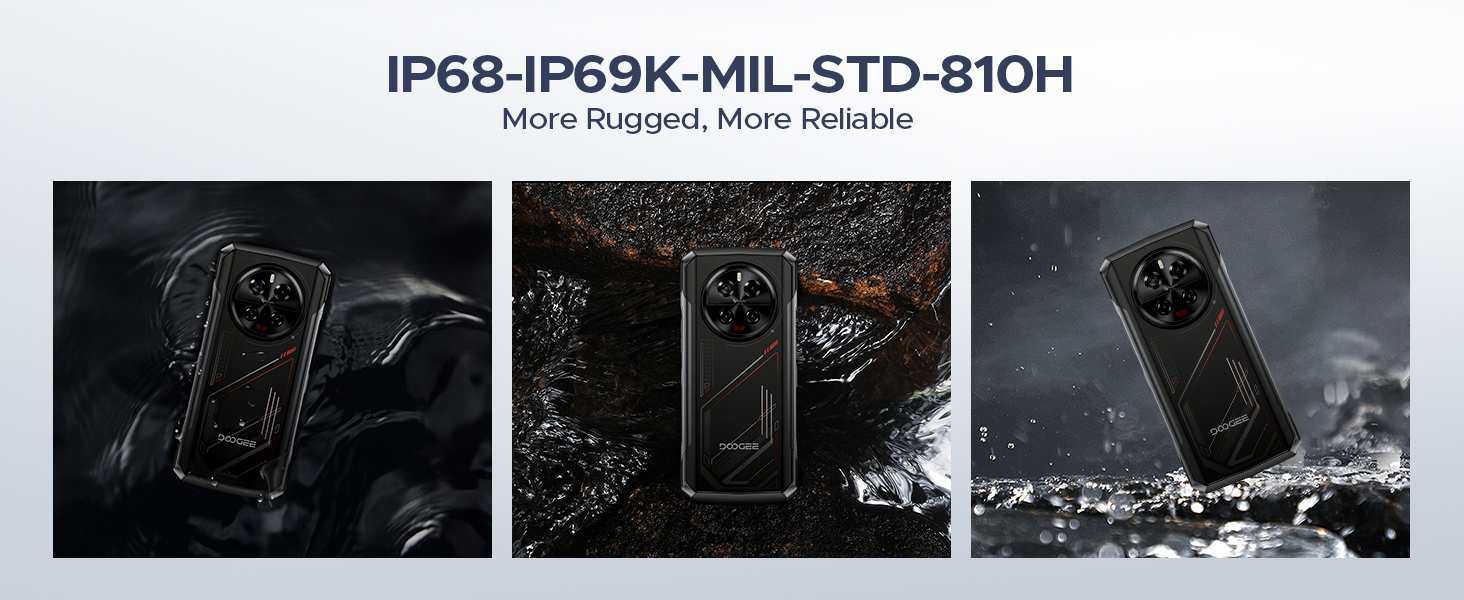
Image: The 8680mAh large battery with 33W fast charging capability.
- İşletim Sistemi: Runs on the latest Android 14 with DOOGEE OS 4.0, offering enhanced features like Game Mode, App Cloning, and Dynamic Capsule.

Resim: Üzeriview of the new DOOGEE OS 4.0 based on Android 14.
4.3 Dayanıklılık Özellikleri

Image: The DOOGEE V40 demonstrating its IP68, IP69K, and MIL-STD-810H durability in various environments.
The DOOGEE V40 is built to withstand harsh conditions, certified with:
- IP68: Suya ve toza dayanıklıdır.
- IP69K: Yüksek basınçlı ve yüksek sıcaklıktaki su jetlerine karşı dayanıklıdır.
- MIL-STD-810H: Düşmelere, darbelere ve aşırı sıcaklıklara karşı askeri standartlarda dayanıklılık.
5. Kurulum
5.1 SIM ve TF Kart Kurulumu
- Cihazın yan tarafında bulunan SIM kart tepsisini bulun.
- SIM kart çıkarma aletini (veya küçük bir ataşı) tepsinin yanındaki küçük deliğe yerleştirin ve tepsi çıkana kadar sıkıca bastırın.
- Tepsiyi dikkatlice dışarı çekin.
- Place your Nano-SIM cards and/or TF card into the designated slots on the tray. Ensure the gold contacts are facing down and the cards are correctly oriented.
- Tepsiyi, cihazla aynı hizaya gelene kadar yavaşça yuvasına geri itin.
5.2 İlk Güç Açma ve Kurulum Sihirbazı
- Yan tarafta bulunan Güç düğmesine, DOOGEE logosu görünene kadar basılı tutun.
- Follow the on-screen instructions to complete the initial setup. This typically includes selecting your language, connecting to a Wi-Fi network, setting up your Google account, and configuring security features like fingerprint or Face ID.
5.3 Cihazı Şarj Etme
Before first use, it is recommended to fully charge your DOOGEE V40. Connect the provided Type-C USB cable to the phone's charging port and the other end to the 33W fast charger. Plug the charger into a power outlet. The battery indicator on the screen will show the charging status.
6. Kullanım Talimatları
6.1 Temel Gezinme
- Dokunmatik Ekran Hareketleri: Seçmek için dokunun, kaydırmak için kaydırın, yakınlaştırmak için sıkıştırın.
- Güç Düğmesi: Ekranı uyandırmak/uyku moduna almak için basın, kapatmak veya yeniden başlatmak için basılı tutun.
- Ses Düğmeleri: Medya ses seviyesini, arama ses seviyesini ve zil sesi ses seviyesini ayarlayın.
6.2 Çağrılar ve Mesajlaşma
- Arama Yapma: Telefon uygulamasını açın, numarayı girin ve arama simgesine dokunun.
- Mesaj Gönderme: Mesajlar uygulamasını açın, yeni bir konuşma başlatın, alıcıyı ve mesajınızı girin.
6.3 Kamera Kullanımı
DOOGEE V40, çok yönlü bir kamera sistemine sahiptir:

Resim: Üzeriview of the DOOGEE V40's camera system and Morpho Imaging Algorithm.
- Kamera uygulamasını açın: Ana ekranınızdaki veya uygulama çekmecenizdeki Kamera simgesine dokunun.
- Modları Değiştir: Swipe left or right on the screen to switch between Photo, Video, Night Vision, Macro, and other modes.
- Fotoğraf/Video Çek: Fotoğraf çekmek veya video kaydını başlatmak/durdurmak için deklanşör düğmesine dokunun.
- Yakınlaştır: Pinch in or out on the screen to adjust zoom.
Video: DOOGEE V40 Android 14 Rugged Smartphone, Gaming Phone. This video demonstrates the phone's performance and gaming capabilities.
Video: DOOGEE V40 Rugged Phone, 200MP AI Camera+20MP Night Vision. This video highlights the advanced camera features of the phone.
6.4 Bağlantı
- Wifi: Connect to Wi-Fi networks via Settings > Network & internet > Wi-Fi. Supports Wi-Fi 6E for fast and stable connections.
- Bluetooth: Pair with Bluetooth devices via Settings > Connected devices > Bluetooth. Supports Bluetooth 5.4.
- NFC: Enable NFC for contactless payments (Google Pay) and quick data sharing via Settings > Connected devices > Connection preferences > NFC.
6.5 Güvenlik Özellikleri
- Parmak İzi Kilidi: Register your fingerprints via Settings > Security & privacy > Device unlock > Fingerprint unlock.
- Yüz Kimliği: Set up face recognition for convenient unlocking via Settings > Security & privacy > Device unlock > Face unlock.
6.6 Pil Yönetimi
- Enerji tasarrufu modu: Activate battery saver to extend battery life when needed via Settings > Battery > Battery Saver.
- Reverse Charging (OTG): Use your DOOGEE V40 as a power bank to charge other devices. Connect the devices using an OTG cable.

Image: The DOOGEE V40's OTG reverse charging capability, allowing it to charge other devices.
6.7 DOOGEE OS 4.0 Features
- Game Mode (No Disturb): Optimize your gaming experience by minimizing distractions.
- Uygulama Klonlama: Run multiple instances of the same app, useful for managing different accounts.
- Drama Mode (Video): Enhance video viewDeneyim.
- Dinamik Kapsül: Provides quick access to notifications and system information.
7. Bakım
Proper maintenance will extend the lifespan of your DOOGEE V40.
- Temizlik: Ekranı ve gövdeyi temizlemek için yumuşak, tüy bırakmayan bir bez kullanın. İnatçı kirler için hafifçe silin.ampBezi suyla yıkayın. Sert kimyasallardan veya aşındırıcı malzemelerden kaçının.
- Yazılım Güncellemeleri: Regularly check for and install system updates via Settings > System > System update. Updates provide new features, security patches, and performance improvements.
- Pil Bakım: Pilini sık sık tamamen boşaltmaktan kaçının. Uzun süreli saklama için cihazı yaklaşık %50'ye kadar şarj edin ve serin, kuru bir yerde saklayın.
- Depolama Yönetimi: Gereksiz olanları periyodik olarak temizleyin fileDepolama alanını boşaltmak ve optimum performansı korumak için uygulamalar ve yazılımlar.
8. Sorun Giderme
If you encounter issues with your DOOGEE V40, try the following solutions before contacting support:
| Sorun | Olası Çözüm |
|---|---|
| Cihaz açılmıyor | Ensure the battery is charged. Connect to the charger and wait a few minutes before attempting to power on again. If it still doesn't turn on, try holding the Power button for 10-15 seconds. |
| Pil çabuk bitiyor | Close unused apps running in the background. Reduce screen brightness. Turn off Wi-Fi, Bluetooth, or GPS when not in use. Check battery usage in Settings to identify power-hungry apps. |
| Uygulamalar çöküyor veya donuyor | Restart the app. Clear the app's cache and data (Settings > Apps > [App Name] > Storage > Clear cache/Clear data). Update the app to the latest version. If the problem persists, uninstall and reinstall the app. |
| Cannot connect to Wi-Fi/Mobile Network | Restart the device. Toggle Wi-Fi/Mobile Data off and on. Check if Airplane Mode is enabled. For Wi-Fi, restart your router. For mobile network, ensure SIM card is properly inserted and you have signal. |
| Parmak izi sensörü çalışmıyor | Parmak izinizin temiz ve kuru olduğundan emin olun. Ayarlar bölümünden parmak izlerinizi yeniden kaydedin. |
| Cihaz yavaş veya yanıt vermiyor. | Clear cache, uninstall unnecessary apps, and free up storage space. Restart the device. As a last resort, perform a factory reset (back up your data first). |
Video: DOOGEE V40 5G Rugged Phone, 36GB+512GB Android 14. This video showcases the phone's overall performance and features.
9. Özellikler
Detailed technical specifications for the DOOGEE V40 Rugged Smartphone:
| Özellik | Şartname |
|---|---|
| Model Adı | V40 Rugged Smartphone Unlocked 5G |
| İşletim Sistemi | Android 14 |
| CPU Modeli | MediaTek Dimensity 7300 Octa-core (4nm) |
| Veri deposu | 12 GB (32 GB'a kadar genişletilebilir) |
| Dahili Depolama (ROM) | 512 GB |
| Genişletilebilir Depolama | TF kartı ile 2 TB'a kadar depolama alanı. |
| Ekran Boyutu | 6.78 inç |
| Ekran Çözünürlüğü | 2560x1440 (FHD+) |
| Yenileme Hızı | 120 Hz |
| Ana Kamera | 108 MP |
| Gece Görüş Kamerası | 20 MP |
| Ultra Geniş/Makro Kamera | 8 MP |
| Ön Kamera | 16 MP |
| Pil Kapasitesi | 8680mAh |
| Şarj etme | 33W Hızlı Şarj |
| Dayanıklılık Derecelendirmeleri | IP68, IP69K, MIL-STD-810H |
| Bağlantı | 5G, Dual SIM, Wi-Fi 6E, Bluetooth 5.4, NFC |
| Ürün Ağırlığı | 13.3 ons |
| Renk | KIRMIZI |
Video: DOOGEE V40 Rugged Smartphone 5G Unlocked, NFC/WiFi 6E/Face ID. This video highlights the connectivity and security features.
10. Garanti ve Destek
Your DOOGEE V40 Rugged Smartphone comes with a limited warranty. Please refer to the 'Manual and Warranty Card' included in your package for detailed terms and conditions, including warranty period and coverage.
For technical support, troubleshooting assistance, or warranty claims, please visit the official DOOGEE website or contact their customer service. Keep your purchase receipt as proof of purchase for warranty services.
Video: DOOGEE V40 Rugged Phone 5G, Android 14 Rugged Smartphone. This video provides a general overview Telefonun yetenekleri hakkında.
Video: DOOGEE V40 Rugged SmartPhone Unlocked with 1.47" Rear Screen. This video highlights the unique rear screen feature.
Ask a question about this manual
Ask about setup, troubleshooting, compatibility, parts, safety, or missing instructions. Manuals+ will review the question and use this page’s manual context to help answer it.