
1. Giriş
This instruction manual provides essential information for the safe and efficient installation, operation, and maintenance of your FCPLEXSW 40W Indoor Constant Current LED Driver, Model ZF-NEH050S1000WWW. Please read this manual thoroughly before installation and keep it for future reference.
This LED driver is designed to provide a stable constant current output for various LED lighting applications, including panel lamps and downlights, ensuring optimal performance and longevity of your LED fixtures.
2. Önemli Güvenlik Talimatları
WARNING: Risk of electric shock. Installation should only be performed by a qualified electrician in accordance with all national and local electrical codes.
- Disconnect power at the circuit breaker before installing or servicing the LED driver.
- Giriş hacmini sağlayıntage and current ratings of the driver match your electrical supply and LED load requirements.
- Bu ürün için tasarlanmıştır sadece iç mekanda kullanılabilir. Do not expose to moisture or direct water.
- Do not open the driver casing. İçerisinde kullanıcının müdahale edebileceği herhangi bir parça bulunmamaktadır.
- Ensure proper ventilation around the driver to prevent overheating.
- Use appropriate wire gauges for connections to prevent overheating and ensure safe operation.
3. Ürün Bittiview
The FCPLEXSW ZF-NEH050S1000WWW is a 40W constant current LED driver designed for reliable power delivery to compatible LED luminaires. It features an isolated power supply design for enhanced safety and electromagnetic compatibility.
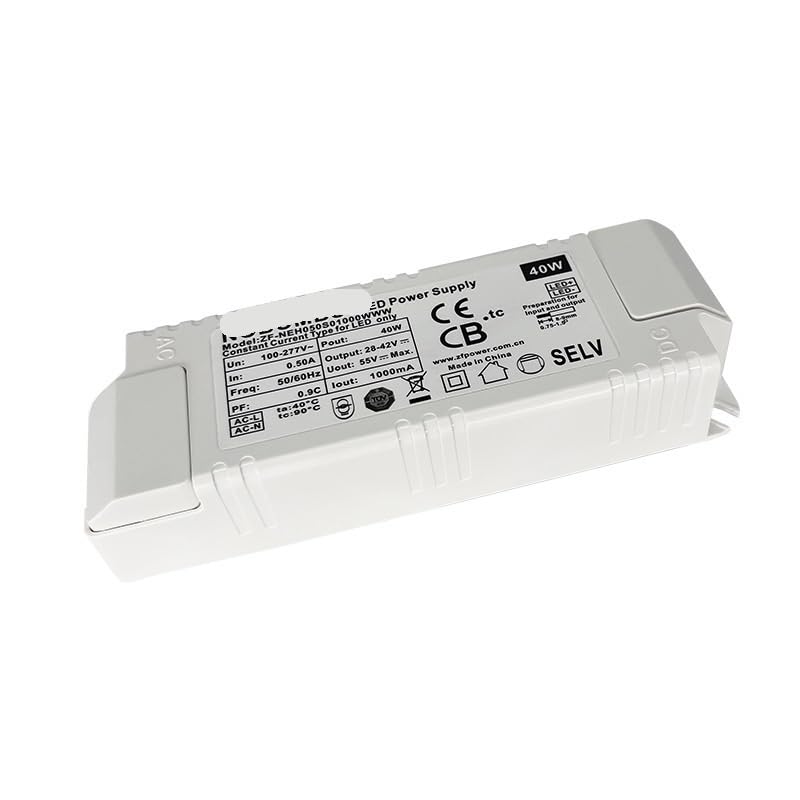
Şekil 1: Ön view of the FCPLEXSW 40W LED Driver, showing input/output terminals and technical specifications printed on the label.
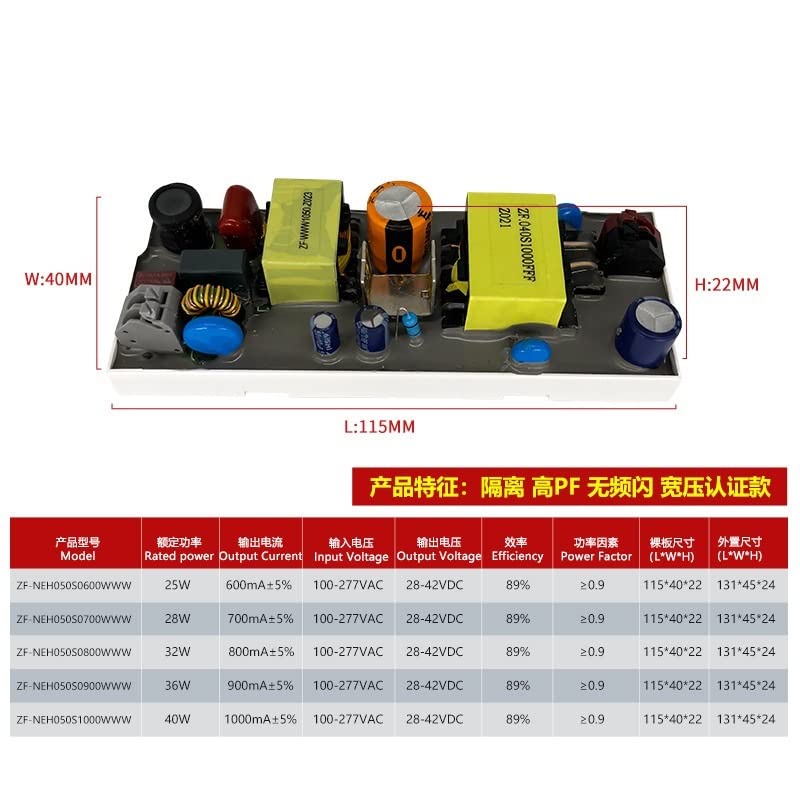
Figure 2: Internal components and overall dimensions of the LED driver, including a table of various models and their specifications.
4. Teknik Özellikler
| Parametre | Değer |
|---|---|
| Örnek | ZF-NEH050S1000WWW |
| Tip | İzole Güç Kaynağı |
| Giriş Voltage | 100-277V AC |
| Giriş Frekansı | 50/60 Hz |
| Giriş Akımı | 0.50A (Maks.) |
| Çıkış Hacmitage | 28-42V DC |
| Çıkış Akımı | 1000mA (1A) Constant Current |
| Çıkış Gücü | 40W |
| Yeterlik | %89 |
| Güç faktörü (pf) | ≥ 0.9 |
| Koruma | Aşırı Yük Koruması |
| Kurulum Yeri | Harici |
| Koruma Sınıfı | Sınıf I |
| Çalışma Sıcaklığı (Ortam) | -40°C ila 60°C |
| Maksimum Kasa Sıcaklığı (Tc) | 80°C |
| Applicable Lamps | LED Solamps (Panel, Downlight, etc.) |
| Genel Boyutlar (U*G*Y) | 131x45x24 mm |
| Sertifikalar | CE, CB, SELV |
| Ömür | 43,800 saat |
| Ağırlık | 145 gr |
5. Kurulum Kılavuzu
5.1 Kurulumdan Önce
- Verify that the LED driver's specifications (input voltage, çıkış hacmitage, and current) are compatible with your LED fixtures and electrical supply.
- Ensure the installation environment is dry and well-ventilated, within the specified operating temperature range.
- Turn off the main power supply at the circuit breaker before beginning any wiring.
5.2 Kablolama Talimatları
The LED driver has clearly marked input and output terminals. Follow the diagram below and ensure all connections are secure and insulated.
- Giriş (AC): Connect the AC Live (L) wire to the 'AC-L' terminal and the AC Neutral (N) wire to the 'AC-N' terminal.
- Çıkış (DC): Connect the positive (+) wire of your LED fixture to the '+' terminal and the negative (-) wire to the '-' terminal of the driver's output.
- Ensure all wiring is done according to local electrical codes and standards.
- Gücü geri yüklemeden önce tüm bağlantıları iki kez kontrol edin.
Note: Incorrect wiring can damage the driver, LED fixtures, or pose a safety hazard. If you are unsure, consult a qualified electrician.
6. Operasyon
Once properly installed and connected, the FCPLEXSW LED driver operates automatically. It provides a constant current output to the connected LED fixtures. There are no user-adjustable settings or controls on the driver itself.
- Upon power-up, the driver will supply power to the connected LEDs.
- Toplam su miktarını sağlayıntage of the connected LEDs does not exceed the driver's maximum output power of 40W.
7. Bakım
The FCPLEXSW LED driver is designed for long-term, maintenance-free operation. However, periodic inspection can help ensure its continued performance.
- Temizlik: Keep the driver free from dust and debris. Use a soft, dry cloth to gently wipe the exterior. Do not use liquid cleaners.
- Denetleme: Periodically check for any visible signs of damage to the casing or wiring. Ensure all connections remain secure.
- Havalandırma: Ensure that the area around the driver remains unobstructed to allow for proper heat dissipation.
Note: Do not attempt to open or repair the driver. Refer all servicing to qualified personnel.
8. Sorun Giderme
If you encounter issues with your LED lighting system, refer to the following troubleshooting steps:
| Sorun | Olası Neden | Çözüm |
|---|---|---|
| LED'ler yanmıyor | Güç kaynağı yok Yanlış kablolama Arızalı LED armatür Sürücü arızası | Check power source and circuit breaker. Verify all input and output connections. Test LED fixture with a known good driver. Replace driver if necessary. |
| LED'ler titriyor veya sönükleşiyor | Gevşek bağlantılar Overloaded driver Incompatible LED fixture Driver overheating | Tüm kablo bağlantılarını kontrol edin ve sabitleyin. Ensure total LED wattage is within driver's capacity. Verify LED fixture compatibility with constant current driver. Sürücünün etrafında yeterli havalandırmanın olduğundan emin olun. |
| Driver is hot to touch | Kötü havalandırma Aşırı yük | Improve airflow around the driver. Reduce the load on the driver to within its rated capacity. |
If the problem persists after following these steps, contact customer support or a qualified electrician.
9. Garanti ve Destek
FCPLEXSW products are manufactured to high-quality standards. While specific warranty details are not provided in this manual, please refer to the product packaging or your point of purchase for warranty information.
For technical support, troubleshooting assistance, or warranty claims, please contact your retailer or the FCPLEXSW customer service department. Keep your purchase receipt and model number handy when contacting support.