
Jazmm 088V
Jazmm Digital AM FM Radio with Bluetooth 5.3 (Model 088V) User Manual
Model: 088V | Brand: Jazmm
giriiş
This manual provides detailed instructions for the operation and maintenance of your Jazmm Digital AM FM Radio with Bluetooth 5.3, Model 088V. Please read this manual thoroughly before using the device to ensure proper function and longevity.

Resim: Ön view of the Jazmm Digital AM FM Radio, Model 088V, showing the speaker grille and control panel.
Kutuda Neler Var?
Kutuyu açtığınızda tüm öğelerin mevcut olduğundan emin olun:
- Jazmm Digital AM FM Bluetooth Radio (Model 088V)
- Kullanım Kılavuzu
- C Tipi Şarj Kablosu
- Bilek Kayışı
Ürün Bittiview
Radyonun kontrollerini ve bağlantı noktalarını iyice öğrenin:
Ön Panel:
- Hoparlör Izgarası: Main audio output.
- Dijital gösterge: Shows frequency, mode, and track information.
- Sayısal Tuş Takımı (0-9): For direct frequency input or track selection.
- TARAMA Düğmesi: Otomatik istasyon taramasını başlatır.
- REC Düğmesi: Activates voice recording (requires TF card).
- LED Düğmesi: Toggles the flashlight on/off.
- Oynat/Duraklat Düğmesi: Controls playback in MP3 mode.
- Önceki/Sonraki Parça Düğmeleri: Raylarda veya istasyonlarda gezinmeyi sağlar.
- M (Mod) Düğmesi: Switches between AM, FM, Bluetooth, TF Card, and USB modes.
Yan panel:
- Açma / kapama düğmesi: Cihazı açar veya kapatır.
- Ses Seviyesi Arama: Ses seviyesini ayarlar.
- C Tipi Şarj Bağlantı Noktası: Dahili bataryayı şarj etmek için.
- USB Bağlantı Noktası: USB flash bellekten oynatma için.
- TF Kart Girişi: TF karttan oynatma ve kayıt için.
- 3.5mm Kulaklık Jakı: Özel dinleme için.
- El feneri LED'i: Entegre ışık kaynağı.
- Wrist Strap Attachment Point: Birlikte verilen bilek kayışını sabitlemek için.

Resim: Yan view of the radio highlighting the flashlight and wrist strap attachment.
Kurmak
1. Pilin Şarj Edilmesi
The radio is equipped with a 2000mAh rechargeable battery. Before first use, fully charge the device.
- Kutu içeriğinde bulunan Type-C şarj kablosunu radyonun şarj portuna bağlayın.
- Kablonun diğer ucunu bir USB güç adaptörüne (dahil değildir) veya bir bilgisayarın USB portuna bağlayın.
- The charging indicator on the display will show charging status. A full charge takes approximately 2.5 hours.
- Once fully charged, the radio can operate for up to 12 hours.

Image: The radio connected to a Type-C charging cable, illustrating the charging process.
2. Inserting TF Card (Optional)
To use the MP3 playback or recording functions, insert a TF (Micro SD) card into the designated slot.
- Radyonun yan tarafında bulunan TF kart yuvasını bulun.
- TF kartını metal temas noktaları aşağı bakacak şekilde yerine oturana kadar yavaşça yerleştirin.
- Çıkarmak için kartı dışarı fırlayana kadar içeri doğru itin.
Kullanım Talimatları
1. Güç Açma/Kapatma
Slide the ON/OFF switch on the side of the radio to power it on or off.
2. AM/FM Radyo Kullanımı
Upon powering on, the radio typically defaults to FM mode. Press the 'M' (Mode) button to switch between AM and FM bands.
- Otomatik Tarama: Press the 'SCAN' button to automatically search for and save available stations.
- Manuel Ayarlama: Use the numeric keypad to directly input the desired frequency. For example, to tune to 98.5 FM, press '9', '8', '5'.
- Sesi Ayarlama: Rotate the volume dial on the side of the radio.
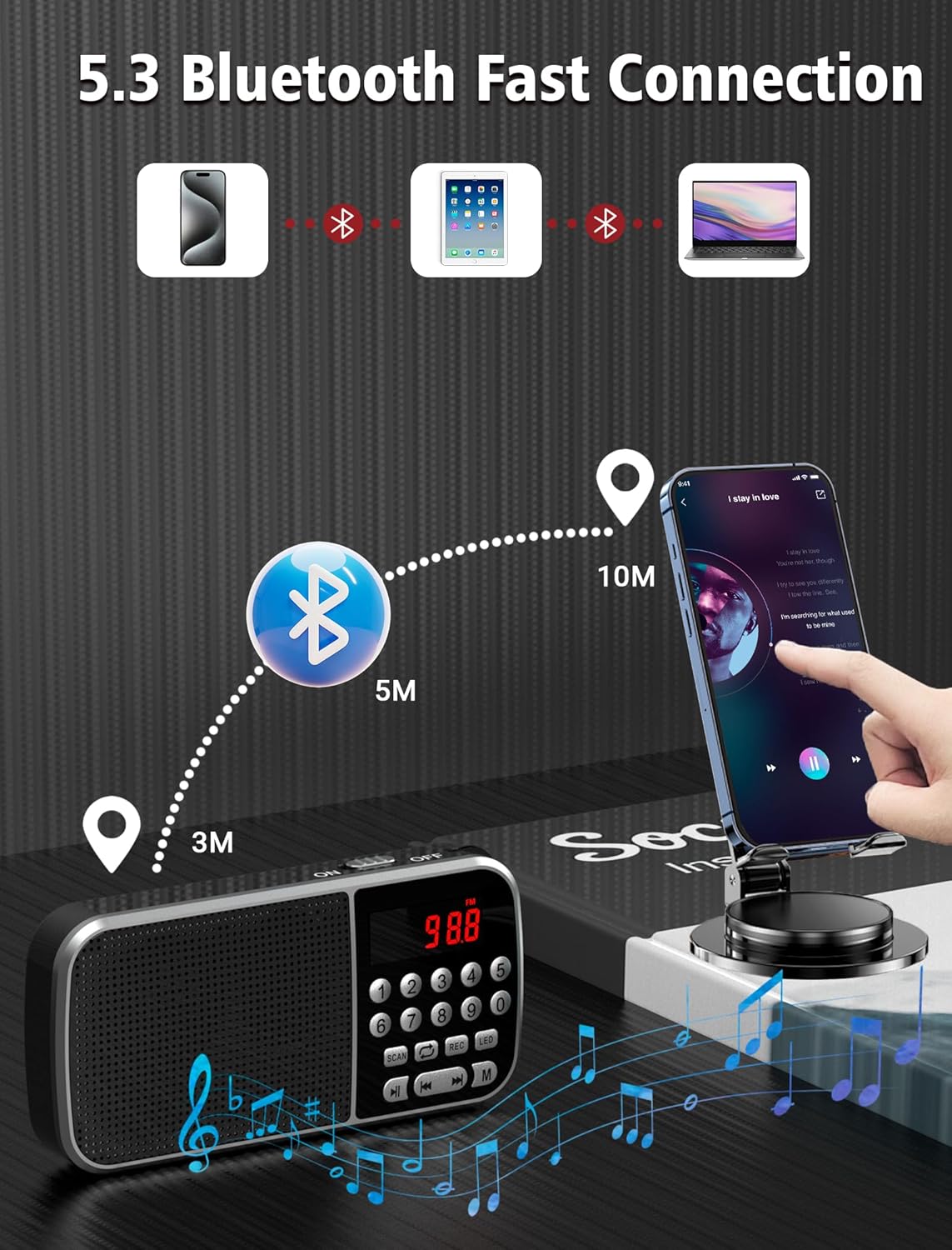
Image: The radio displaying various AM and FM frequencies, illustrating its reception capabilities.
3. Bluetooth 5.3 Modu
Connect your smartphone or other Bluetooth-enabled devices to the radio for wireless audio playback.
- Press the 'M' (Mode) button until "Bluetooth" or a Bluetooth icon appears on the display. The radio will enter pairing mode.
- Cihazınızda Bluetooth'u etkinleştirin ve kullanılabilir cihazları arayın.
- Select "Jazmm 088V" (or similar) from the list to pair.
- Once connected, you can play audio from your device through the radio's speaker.
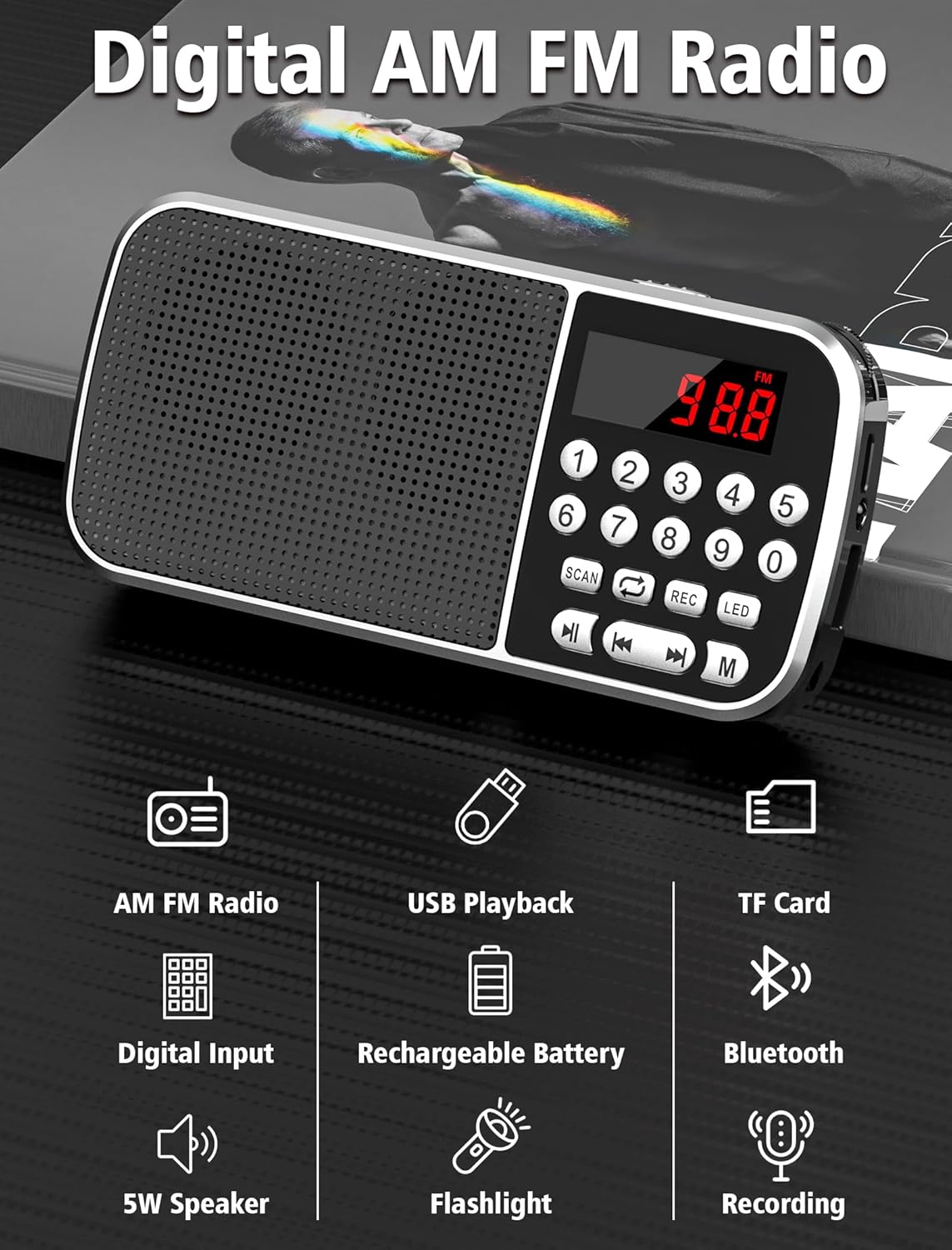
Image: Diagram showing the radio wirelessly connected to various devices via Bluetooth 5.3.
4. MP3 Playback (TF Card / USB)
The radio supports MP3 playback from both TF cards and USB flash drives.
- TF Kart Oynatma: MP3'lü bir TF kartı takın files. Press the 'M' button to select TF card mode.
- USB Oynatma: MP3 içeren bir USB flash sürücü takın files. Press the 'M' button to select USB mode.
- Oynat/Duraklat ve Önceki/Sonraki Parça düğmelerini kullanarak oynatmayı kontrol edin.
- You can also use the numeric keypad to jump to specific track numbers.

Image: A person listening to music through headphones connected to the radio, demonstrating MP3 playback.
5. Ses Kaydedici
Record audio directly to an inserted TF card.
- TF kartının takılı olduğundan emin olun.
- Press the 'REC' button to start recording. The display will indicate recording status.
- Press 'REC' again to stop and save the recording.
- Kayıtlar MP3 olarak kaydedilir fileTF kartında.

Image: The radio with a microphone icon, illustrating its sound recording capability to a TF card.
6. El Feneri Fonksiyonu
The radio includes a built-in LED flashlight for convenience.
- Press the 'LED' button to turn the flashlight on.
- Press the 'LED' button again to turn the flashlight off.
7. Kulaklık Kullanımı
For private listening, plug 3.5mm headphones (not included) into the earphone jack on the side of the radio.
Bakım
- Keep the radio dry. Avoid exposure to moisture or liquids.
- Cihazı yumuşak ve kuru bir bezle temizleyin. Aşındırıcı temizleyiciler veya çözücüler kullanmayın.
- Radyo kullanılmadığı zaman serin ve kuru bir yerde saklanmalıdır.
- Telsizi düşürmekten veya şiddetli darbelere maruz bırakmaktan kaçının.
Sorun giderme
| Sorun | Olası Neden | Çözüm |
|---|---|---|
| Çalışmıyor/Açılmıyor | Pil bitmiş. | Charge the battery fully using the provided Type-C cable. |
| Zayıf radyo alımı | Zayıf sinyal; çevresel parazit. | Adjust the radio's position. Try scanning again. |
| Bluetooth bağlanmıyor | Radio not in pairing mode; device too far. | Ensure radio is in Bluetooth mode. Keep devices within 10 meters. Re-pair if necessary. |
| MP3 fileoynamıyor | Yanlış file format; TF card/USB not inserted correctly. | Emin olmak files are in MP3 format. Reinsert TF card/USB drive. Check if the radio is in the correct mode. |
| Kayıt çalışmıyor | No TF card inserted; TF card full. | Insert a TF card. Check available space on the TF card. |
Özellikler
- Modeli: 088V
- Marka: caz
- Ürün Ölçüleri: 1.14 x 2.68 x 5.39 inç
- Ürün Ağırlığı: 6.2 ons
- Pil: 2000mAh Lityum Polimer (dahil)
- Şarj Süresi: Yaklaşık 2.5 saat
- Kullanım Süresi: 12 saate kadar
- Bağlantı: Bluetooth 5.3
- Radyo Bantları: AM (520-1710 KHZ) / FM (87.5-108 MHZ)
- Hoparlör Çıkışı: 5W
- Medya Oynatma: TF Card, USB (MP3 format)
- Ek Özellikler: Voice Recorder, Flashlight, 3.5mm Earphone Jack
Garanti ve Destek
For warranty information and technical support, please refer to the contact details provided on the product packaging or visit the official Jazmm webSite. Satın alma fişinizi, garanti talepleriniz için satın alma belgeniz olarak saklayın.