
giriiş
This user manual provides comprehensive instructions for the ASD Remote Control, designed to enhance the functionality and convenience of your ASD Motion Sensors. This remote allows for quick and easy adjustment of various settings, ensuring optimal performance and control from a distance.
Please read this manual thoroughly before operating the device to ensure proper use and to maximize its capabilities.
Kutuda Neler Var?
- 1 x ASD Remote Control

Image: The ASD Remote Control, its packaging box, and a white wall-mount holder. The remote is white with a display screen and multiple buttons.
Ürün Özellikleri
- Effortless Configuration: Simplifies the adjustment of motion sensor settings, eliminating the need for manual tuning.
- On-Demand Customization: Easily alter detection ranges, sensitivity levels, and lighting duration times from a distance.
- Kolay Erişim: Adjust motion sensor settings from a safe and comfortable distance, avoiding the need for ladders or direct contact.
- Multiple Sensor Pairing: Capable of pairing with multiple motion sensors for centralized control of various units.
- Gelişmiş İşlevsellik: Offers additional features such as instant manual override, temporary deactivation, and daylight sensing adjustments.
- Kullanıcı Odaklı Tasarım: Intuitive interface with clear buttons and functions for all user levels.
Kurmak
1. Pil Kurulumu
The remote control requires batteries for operation. Ensure correct polarity when inserting batteries. Batteries are not included with the remote control.
2. İlk Güç Açma
Basın AÇIK/KAPALI button to power on the remote control. The display screen will illuminate.
3. Pairing with Motion Sensors
To pair the remote control with your ASD Motion Sensor(s), ensure the sensor is powered on and within range. Follow the specific pairing instructions provided with your motion sensor. The remote control can be paired with multiple compatible ASD motion sensors.
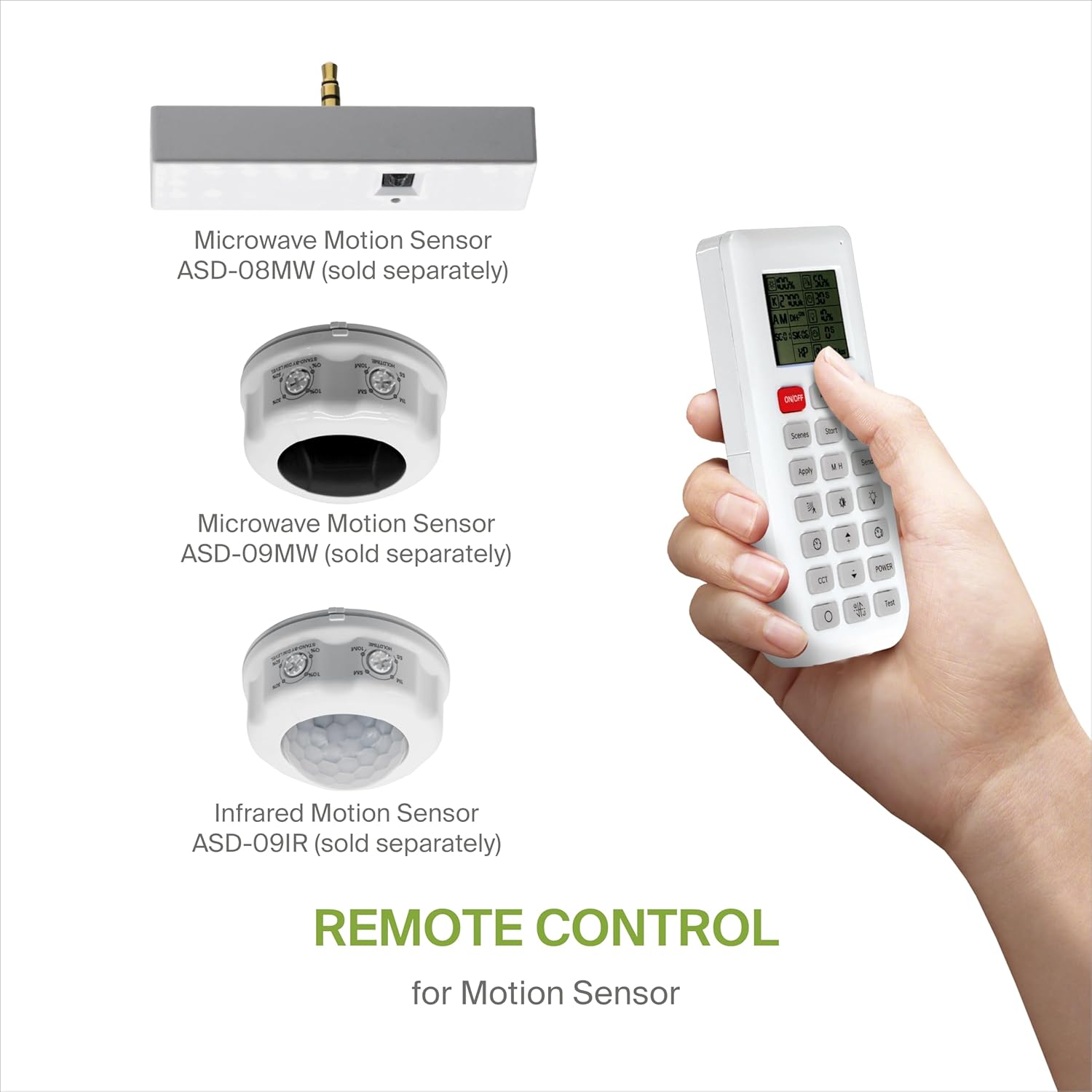
Image: The ASD Remote Control alongside three different types of ASD motion sensors (Microwave Motion Sensor ASD-08MW, Microwave Motion Sensor ASD-09MW, and Infrared Motion Sensor ASD-09IR), indicating compatibility.
Kullanım Talimatları
The remote control features a clear display and intuitive buttons for managing your motion sensor settings. Refer to the table below for a detailed explanation of each button's function.

Image: The ASD Remote Control displayed next to a comprehensive table that lists each button on the remote and its corresponding function and remarks.
| Düğme | Notlar |
|---|---|
| AÇIK/KAPALI | Sensörü AÇIK/KAPALI konuma getirin. |
| Otomatik | Enter "sensor mode" and perform previous settings. |
| Sıfırla | Enter "sensor mode" and perform the default settings. |
| Sahneler | Shows current settings saved in the remote. |
| Başlangıç | Sahne kurulumunu başlatmak için buna basın. |
| Hafıza | Sahne ayarlarını kaydeder. |
| Uygula | Geçerli sahne ayarlarını fikstüre uygular. |
| MH | Adjust detection area/sensitivity levels according to real installation situations, higher or lower. |
| Göndermek | Memorize and send out the previous setting of individual parameters. |
| (Sensitivity Icon) | Also known as "sensitivity". 100% means the highest sensitivity and longest distance. Use this button and the + - ayarlamak için düğmeler. |
| (Daylight Sensor Icon) | The preset lux level at which motion will be detected. Use this button and the + - ayarlamak için düğmeler. |
| (Stand-by Dimming Icon) | After hold time, the light will dim from 100% to optional standby dimming levels. Use this button and the + - ayarlamak için düğmeler. |
| (Hold Time Icon) | The period the light will stay illuminated 100% after no motion is detected. Use this button and the + - ayarlamak için düğmeler. |
| (Stand-by Period Icon) | The period after holdtime, during which the light keeps standby dimming level. Use this button and the + - ayarlamak için düğmeler. |
| + | Faktörleri istenen seviyeye ayarlamak için ana işlevsel düğmeler. |
| - | Basmak - button to dim light directly in non-detection mode. |
| ÇKT | Bu ürün için geçerli değildir. |
| GÜÇ | Adjust brightness in both ON/OFF mode & sensor mode, minimum 10%, max 100%. each time this button is pressed it changes by 5%. |
| (Reserved Button Icon) | Bu ürün için geçerli değildir. |
| Gün Işığı Hasadı | Gün ışığından yararlanma fonksiyonu etkin veya devre dışı. |
| Test | Press this button to test the sensor, it will temporarily change the hold time to 2s. This setting cannot be saved. |
Bakım
- Temizlik: Uzaktan kumandayı temizlemek için yumuşak, kuru bir bez kullanın. Aşındırıcı temizleyiciler veya çözücüler kullanmayın.
- Pil Değişimi: Replace batteries when the display becomes dim or the remote's response is slow. Dispose of old batteries responsibly according to local regulations.
- Depolamak: Uzaktan kumandayı doğrudan güneş ışığından ve aşırı sıcaklıklardan uzak, serin ve kuru bir yerde saklayın.
Sorun giderme
Uzaktan Kumanda Yanıt Vermiyor:
- Pillerin doğru takılıp takılmadığını ve yeterli şarja sahip olup olmadığını kontrol edin. Gerekirse değiştirin.
- Ensure there are no obstructions between the remote control and the motion sensor.
- Verify that the remote control is within the effective operating range of the motion sensor.
- Re-pair the remote control with the motion sensor if connection issues persist.
Ayarlar Uygulanmıyor:
- Ensure you press the "Apply" or "Send" button after making changes.
- Confirm that the remote control is successfully paired with the target motion sensor.
Özellikler

Image: A diagram illustrating the physical dimensions of the ASD Remote Control, including its length (5-11/16 inches or 145 mm), width (1-3/4 inches or 45 mm), and thickness (13/16 inches or 21 mm).
| Bağlanmak | Detay |
|---|---|
| Marka | otizm spektrum bozukluğu |
| Model Numarası | A-06RC |
| Üretici | ASD Aydınlatma Şirketi |
| Renk | Beyaz |
| Malzeme | Plastik |
| Boyutlar (U x G x Y) | 14.5 x 4.4 x 2.1 Centimeters (5.69 x 1.75 x 0.81 Inches) |
| Güç Kaynağı | Piller (Dahil Değildir) |
| Belirli Kullanımlar | Damp Konumlar |
| UPC | 810128114370 |
Garanti ve Destek
Specific warranty information for the ASD Remote Control is typically provided with the product packaging or can be found on the manufacturer's official website. Please refer to those resources for detailed warranty terms and conditions.
For technical support, product inquiries, or assistance with troubleshooting, please contact ASD customer service through the contact information provided on their official website veya ürün belgeleri.