
1. Giriş
Satın aldığınız için teşekkür ederizasing the RCA SP550BT Portable Speaker. This manual provides important information regarding the setup, operation, and maintenance of your new speaker. Please read it thoroughly before use and keep it for future reference.
The RCA SP550BT is a versatile portable speaker featuring 50W output, Bluetooth connectivity, USB playback, FM radio, AUX input, True Wireless Stereo (TWS) function, LED lights, and a microphone input for an enhanced audio experience.
2. Paket İçeriği
Lütfen paketi aşağıdaki öğeler açısından kontrol edin:
- RCA SP550BT Portable Speaker
- Uzaktan kumanda
- Güç kablosu
- Kullanım Kılavuzu (bu belge)
3. Ürün Bittiview
Familiarize yourself with the main components and features of your RCA SP550BT speaker.

Şekil 3.1: Ön view of the RCA SP550BT portable speaker. This image displays the speaker in an upright position, highlighting the top control panel and the three prominent speaker cones with red illumination.

Şekil 3.2: Taraf view of the RCA SP550BT portable speaker. This perspective shows the depth of the speaker and the integrated handle for portability.

Şekil 3.3: Yatay view of the RCA SP550BT portable speaker. This image illustrates the speaker's design when placed on its side, emphasizing the speaker grille and LED lighting.
3.1 Uzaktan Kumanda
The included remote control allows for convenient operation of the speaker from a distance.
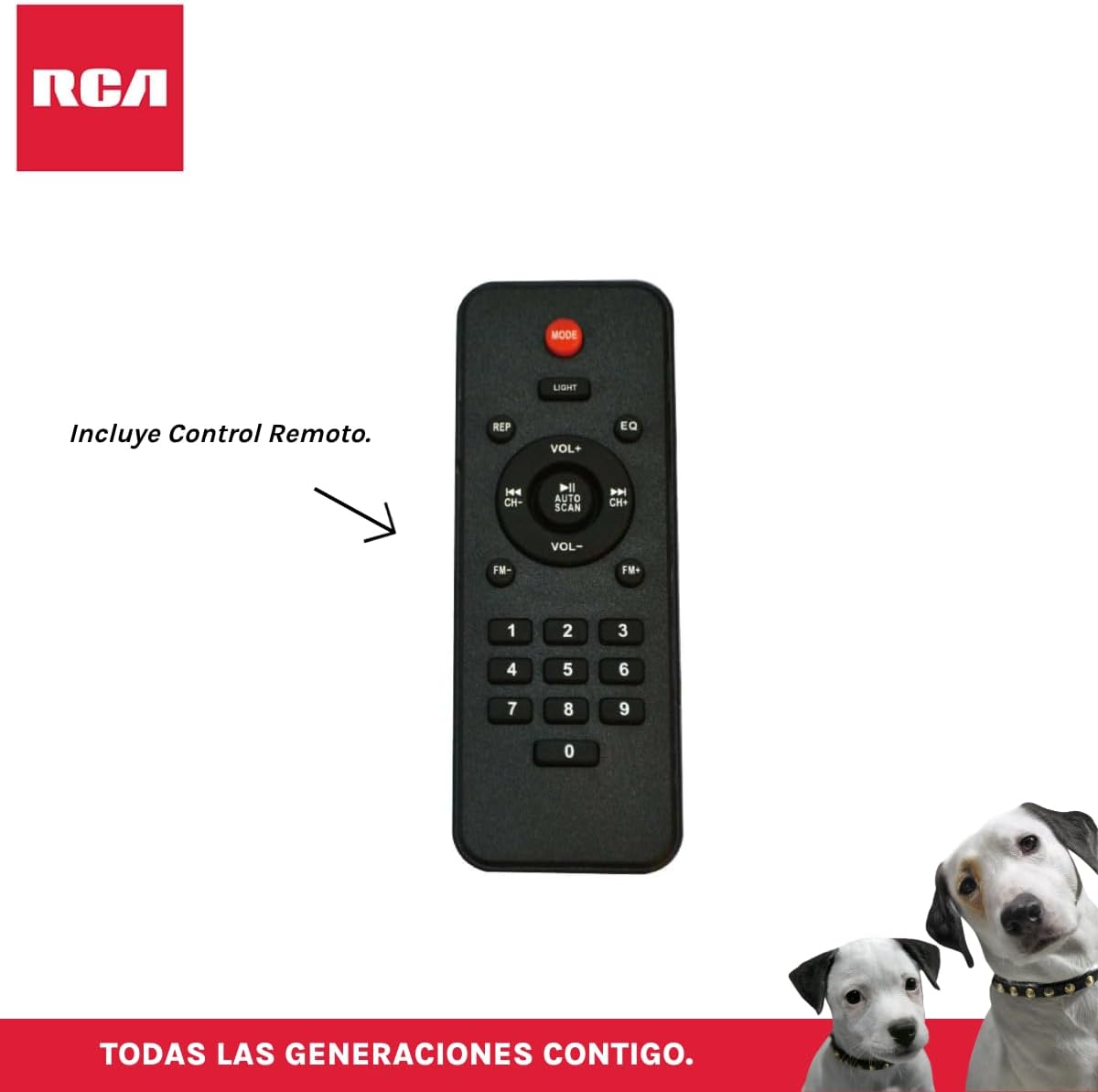
Şekil 3.4: RCA SP550BT Remote Control. This image displays the full layout of the remote control, including buttons for power, mode selection, volume adjustment, track navigation, equalizer settings, and a numeric keypad.
4. Kurulum
4.1 Güç Bağlantısı
- Hoparlörün sağlam ve düz bir yüzeye yerleştirildiğinden emin olun.
- Connect the power cable to the speaker's power input port.
- Plug the other end of the power cable into a standard electrical outlet (AC 100-240V, 50/60Hz).
- Press the power button on the speaker or remote control to turn it on.
5. Kullanım Talimatları
5.1 Güç Açma/Kapatma
- Hoparlörü açmak için, tuşuna basın. GÜÇ button on the control panel or the remote control.
- Hoparlörü kapatmak için, tuşuna basın. GÜÇ Tekrar düğmeye basın.
5.2 Mod Seçimi
Basın MOD button on the control panel or remote control to switch between Bluetooth, USB, FM, and AUX input modes.
5.3 Bluetooth Eşleştirme
- Hoparlörü açın ve aşağıdaki komutları kullanarak Bluetooth modunu seçin. MOD button. The display will show "BLUE" and a pairing indicator will flash.
- Mobil cihazınızda (akıllı telefon, tablet vb.) Bluetooth'u etkinleştirin.
- Arama "RCA SP550BT" in your device's Bluetooth list and select it to pair.
- Eşleştirme tamamlandığında, hoparlör bir onay sesi çıkaracak ve Bluetooth göstergesi yanıp sönmeyi durduracaktır.
- Artık cihazınızdaki sesleri hoparlörünüz aracılığıyla oynatabilirsiniz.
5.4 USB Oynatma
- Insert a USB flash drive (FAT32 format, max 32GB) containing MP3 audio fileUSB bağlantı noktasına takın.
- The speaker will automatically switch to USB mode and begin playing the first track. If not, press the MOD USB modunu seçmek için düğmesine basın.
- Kullanın OYNAT/DURDUR, ÖNCESİ, Ve SONRAKİ buttons on the control panel or remote to control playback.
5.5 FM Radyo
- Turn on the speaker and select FM mode using the MOD düğme.
- Basılı tutun OYNAT/DURDUR düğme (veya OTOMATİK TARAMA (uzaktan kumanda üzerinden) mevcut FM istasyonlarını otomatik olarak tarayıp kaydetmek.
- Kullanın ÖNCESİ Ve SONRAKİ Kaydedilmiş istasyonlar arasında gezinmek için düğmeler.
5.6 AUX Girişi
- Harici bir ses cihazını (örneğin, MP3 çalar, dizüstü bilgisayar) 3.5 mm ses kablosu (dahil değildir) kullanarak hoparlörün AUX giriş portuna bağlayın.
- AUX modunu seçmek için şunu kullanın: MOD düğme.
- Bağlı cihazınızdan oynatmayı ve ses seviyesini kontrol edin.
5.7 TWS (Gerçek Kablosuz Stereo) İşlevi
The TWS function allows you to connect two RCA SP550BT speakers wirelessly for a stereo sound experience.
- Ensure both SP550BT speakers are powered on and in Bluetooth mode, but not yet paired with any device.
- Hoparlörlerden birinde, tuşuna basılı tutun TWS button (if available, or a dedicated TWS pairing button) until you hear a confirmation tone. The speakers will attempt to pair with each other.
- Once successfully paired, one speaker will act as the master (left channel) and the other as the slave (right channel).
- Now, pair your mobile device with the master speaker via Bluetooth as described in section 5.3.
5.8 LED Işık
Basın IŞIK button on the control panel or remote control to cycle through different LED light modes or to turn them off.
5.9 Mikrofon Kullanımı
Connect a wired microphone (not included) to the microphone input port on the speaker. Adjust the microphone volume using the dedicated knob (if available) or the main volume control.
6. Bakım
- Temizlik: Hoparlörün dış yüzeyini temizlemek için yumuşak ve kuru bir bez kullanın. Aşındırıcı temizleyiciler veya çözücüler kullanmayın.
- Depolamak: Uzun süre kullanılmayacaksa hoparlörü serin, kuru ve doğrudan güneş ışığından ve aşırı sıcaklıklardan uzak bir yerde saklayın.
- Suya Maruz Kalma: Bu hoparlör su geçirmez değildir. Suya veya aşırı neme maruz bırakmaktan kaçının.
7. Sorun Giderme
Hoparlörünüzle ilgili sorunlarla karşılaşırsanız, aşağıdaki yaygın sorunlara ve çözümlere bakın:
| Sorun | Olası Neden | Çözüm |
|---|---|---|
| Güç yok | Power cable not connected; Power outlet not working; Speaker off. | Check power cable connection; Try a different outlet; Press the POWER button. |
| Ses yok | Ses çok düşük; Yanlış mod seçildi; Cihaz düzgün bağlanmadı. | Increase volume; Select correct input mode (Bluetooth, USB, AUX); Reconnect device. |
| Bluetooth eşleştirme başarısız oldu | Speaker not in pairing mode; Device Bluetooth off; Speaker already paired. | Ensure speaker is in Bluetooth pairing mode; Turn on device Bluetooth; Disconnect from other devices. |
| USB oynatma çalışmıyor | USB drive format incompatible; Corrupt files; USB drive not inserted correctly. | USB belleğin FAT32 formatında olduğundan emin olun; kontrol edin. file integrity; Reinsert USB drive. |
| FM radyo alımı zayıf | Zayıf sinyal; Girişim. | Relocate speaker; Extend antenna (if applicable). |
8. Özellikler
| Özellik | Şartname |
|---|---|
| Örnek | SP550BT |
| Marka | RCA |
| Hoparlör Çıkış Gücü | 50 Watt (Maksimum) |
| Bağlantı Teknolojisi | Bluetooth, USB, AUX |
| Kablosuz Teknoloji | Bluetooth |
| Ses Çıkışı Modu | Stereo |
| Hoparlör Tipi | Taşınabilir, Dış Mekan |
| Montaj Tipi | Masa Üstü Montaj |
| Kontrol Yöntemi | Uzaktan kumanda |
| Hoparlör Boyutu | 6.5 inç |
| Woofer Çapı | 6.5 inç |
| Pil Kapasitesi | 4400 Miliamp Saat |
| Güç Kaynağı | Elektrik kablosu |
| Uyumlu Cihazlar | Dizüstü bilgisayar, MP3 çalar, akıllı telefon, tablet |
| GTIN / UPC | 044476152061 |
9. Garanti ve Destek
This product comes with a limited warranty. Please refer to the warranty card included in your package for specific terms and conditions. For technical support or service inquiries, please contact RCA customer service through their official webSiteye veya satın alma işleminizle birlikte verilen iletişim bilgilerine.
Not: Garanti koşulları bölgeye göre değişiklik gösterebilir. Garanti talepleri için satın alma belgenizi saklayın.