
1. Giriş
The Keychron K17 Max is an ultra-slim wireless mechanical keyboard designed for enhanced productivity and gaming. It features a compact 96% layout, QMK firmware, and supports multiple connection modes including 2.4 GHz, Bluetooth, and wired USB Type-C. This manual provides detailed instructions for setting up, operating, maintaining, and troubleshooting your K17 Max keyboard.

Image 1.1: The Keychron K17 Max keyboard highlighting its key features such as Launcher Web Configurator, ultra-slim design, 2.4 GHz & Bluetooth connectivity, macOS & Windows compatibility, 1000 Hz Polling Rate, Numpad, Acoustic Foam, and Double-Shot PBT Keycaps.
2. Kurulum
2.1 Paket İçeriği
Paketinizde tüm öğelerin mevcut olduğundan emin olun:
- 1x Keychron K17 Max Fully Assembled Keyboard
- 1x Tip-A'dan Tip-C'ye Kablo
- 1x Extension Adapter for 2.4 GHz Receiver
- 1x A Tipi 2.4 GHz Alıcı
- 1x Tuş Çektirmesi

Image 2.1: Illustration of the included accessories: keyboard, USB-C cable, 2.4 GHz receiver, and keycap puller.
2.2 Klavyeyi Şarj Etme
Connect the provided USB Type-A to Type-C cable to the keyboard's USB-C port and the other end to a power source (e.g., computer USB port or USB wall adapter). The charging indicator light will show the charging status.
2.3 Bağlantı Modları
K17 Max üç farklı bağlantı türünü destekler:
- 2.4 GHz Kablosuz: For high-performance gaming with a 1000 Hz polling rate. Insert the 2.4 GHz receiver into your computer's USB-A port. Use the extension adapter if needed for better signal.
- Bluetooth 5.1: Connect up to three devices and switch between them seamlessly. Enable Bluetooth on your device and pair with the keyboard.
- Kablolu (USB Type-C): Klavyeyi, birlikte verilen USB-C kablosunu kullanarak doğrudan bilgisayarınıza bağlayın.

Image 2.2: The keyboard illustrating its three connection modes: 2.4 GHz, Bluetooth 5.1, and USB Wired.
2.4 İşletim Sistemi Değiştirme
Locate the OS toggle switch on the side of the keyboard. Switch it to the appropriate position for your operating system (Windows/Android or Mac/iOS) to ensure correct key mapping.

Image 2.3: Close-up of the multi-OS toggle switch on the side of the keyboard, indicating settings for Windows and macOS.
3. Kullanım Talimatları
3.1 Temel Klavye Kullanımı
The K17 Max features a standard QWERTY layout with a 96% form factor, including a numeric keypad. Keys are designed for a comfortable typing experience with low-profile Gateron mechanical brown switches.
3.2 RGB Arka Aydınlatma Kontrolü
The keyboard features customizable RGB backlighting. Use the dedicated function keys or the Keychron Launcher web app to cycle through various lighting effects, adjust brightness, and change colors.

Image 3.1: The Keychron K17 Max keyboard displaying its customizable RGB backlights in a desk setup.
3.3 QMK Firmware and Keychron Launcher
The K17 Max runs on QMK open-source firmware, allowing for advanced customization. Use the Keychron Launcher web app to remap keys, create macros, and configure lighting effects. This web-based tool requires no installation and provides regular updates.
- Access the Keychron Launcher via your web tarayıcı.
- Connect your keyboard via USB-C to your computer.
- Klavye ayarlarınızı özelleştirmek için ekrandaki yönergeleri izleyin.
Resim 3.2: Keychron Başlatıcısının Ekran Görüntüsü Web App interface on a laptop, showing key remapping and customization options for the K17 Max.
4. Bakım
4.1 Klavyeyi Temizleme
To clean your keyboard, disconnect it from all power sources. Use a soft, lint-free cloth slightly dampSu veya hafif bir temizleme solüsyonu ile temizleyin. Tuş başlıkları arasındaki toz ve kirler için basınçlı hava kullanın. Sıvıları doğrudan klavyeye püskürtmekten kaçının.
4.2 Tuş Kapağı Bakımı
The K17 Max features durable double-shot PBT keycaps. If you need to remove keycaps for cleaning or replacement, use the provided keycap puller to avoid damage. Gently pull the keycap straight up.

Resim 4.1: Yakın çekim view düşük profillifile double-shot PBT keycaps, highlighting their LSA profile and durable construction.
5. Sorun Giderme
5.1 Bağlantı Sorunları
- 2.4 GHz: Ensure the receiver is securely plugged in and the keyboard is in 2.4 GHz mode. Try a different USB port or use the extension adapter to position the receiver closer to the keyboard.
- Bluetooth: Ensure Bluetooth is enabled on your device and the keyboard is in Bluetooth pairing mode. Forget the device on your computer and re-pair if connection fails.
- Kablolu: USB-C kablosunun her iki ucundaki bağlantıyı kontrol edin. Farklı bir USB-C kablosu veya bağlantı noktası deneyin.
5.2 Tuşlar Yanıt Vermiyor
- Klavyenin açık ve bağlı olduğundan emin olun.
- Check the OS switch is set correctly for your system.
- If specific keys are not working, gently remove the keycap with the keycap puller and inspect for any obstructions.
- Perform a factory reset if issues persist (refer to Keychron support for specific instructions).
5.3 Arka Aydınlatma Sorunları
- Ensure the backlight is enabled and brightness is adjusted.
- Check settings in the Keychron Launcher web uygulama.
5.4 Firmware Güncellemesi
Regularly check the Keychron website or the Keychron Launcher web app for firmware updates to ensure optimal performance and access to new features. Follow the provided instructions carefully during the update process.
6. Özellikler
| Özellik | Detay |
|---|---|
| Marka | Anahtarkron |
| Model Numarası | K17 Maks |
| Düzen | %96 (100 Anahtar) |
| Bağlantı | 2.4 GHz Wireless, Bluetooth 5.1, USB Type-C Wired |
| Anahtarlar | Düşük Profesyonelfile Gateron Mechanical Brown |
| keycaps | Çift Atışlı PBT |
| Arka ışık | RGB |
| Polling Rate (2.4 GHz) | 1000 Hz |
| Uyumlu işletim sistemi | macOS, Windows, Linux, Android, iOS |
| Malzeme | Alüminyum, Plastik |
| Güç Kaynağı | Şarj edilebilir pil, USB ile çalışır. |
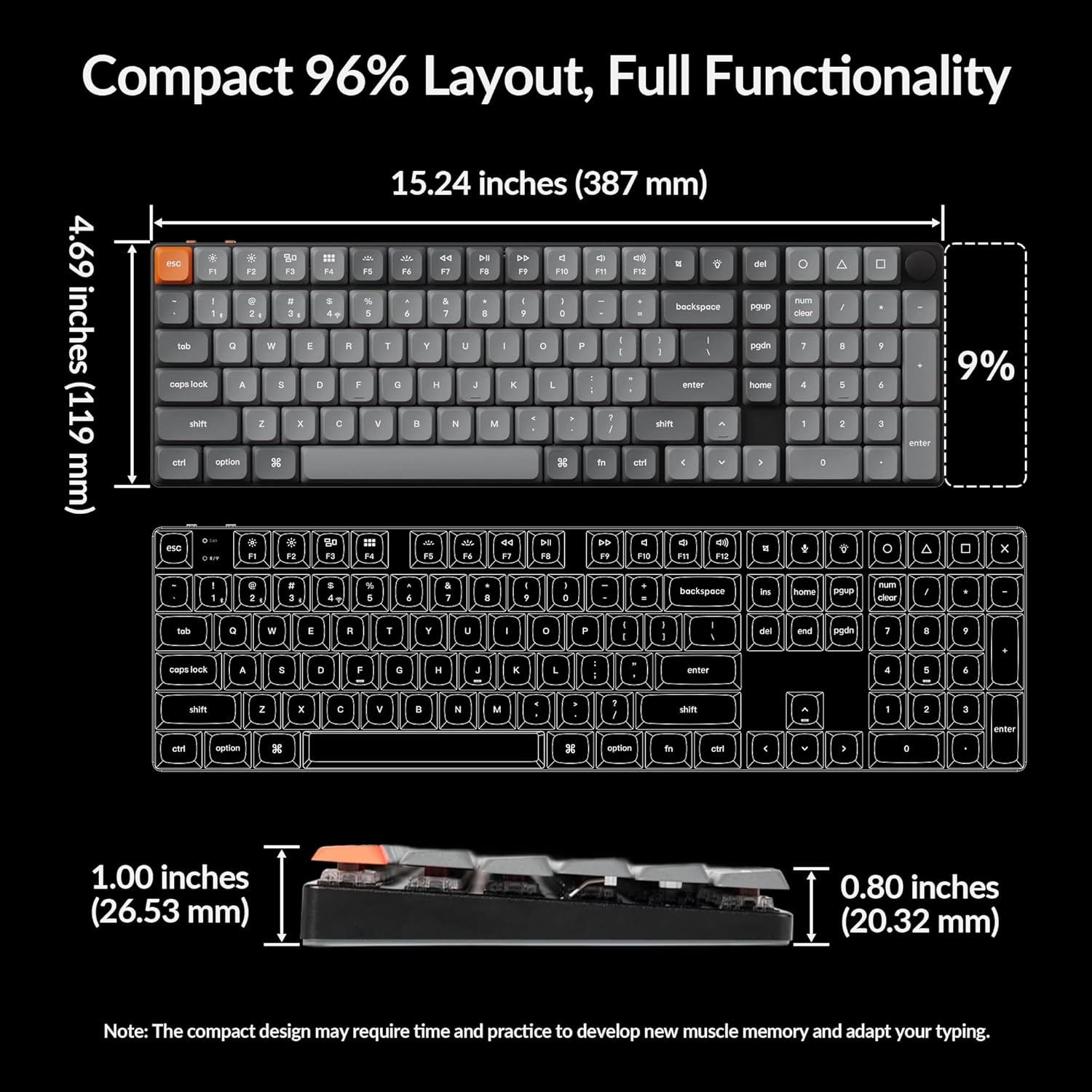
| Boyutlar (Yaklaşık) | 15.24 inç (387 mm) x 4.69 inç (119 mm) |

Image 6.1: Detailed dimensions of the Keychron K17 Max keyboard, illustrating its compact 96% layout.

Resim 6.2: Yakın çekim view düşük profillifile Gateron mechanical brown switches beneath the keycaps.
7. Garanti ve Destek
7.1 Garanti Bilgileri
The Keychron K17 Max keyboard comes with a 1-year limited warranty from the date of purchase. This warranty covers manufacturing defects under normal use. It does not cover damage caused by misuse, accidents, unauthorized modifications, or normal wear and tear.
7.2 Müşteri Desteği
For technical assistance, warranty claims, or further inquiries, please visit the official Keychron website or contact their customer support team. You can find contact information and FAQs on the Keychron support page.
Official Keychron Webalan: www.keychron.com