
1. Giriş
Welcome to the user manual for your Orbic JOURNEY Pro 4G flip phone. This device is designed for essential communication with the added benefits of 4G connectivity and smart features powered by KaiOS 3.1. This manual will guide you through the setup, operation, maintenance, and troubleshooting of your new phone, ensuring you can utilize all its functionalities effectively.
2. Paket İçeriği
Lütfen ürün paketinizde aşağıdaki tüm öğelerin bulunduğundan emin olun:
- Orbic JOURNEY Pro 4G Main Unit
- AC Adaptörü
- USB Kablosu (Tip-C)
- Pil
- Hızlı Başlangıç Kılavuzu
3. Cihaz Bittiview
The Orbic JOURNEY Pro 4G features a classic flip phone design with a physical keypad and two displays for convenience.


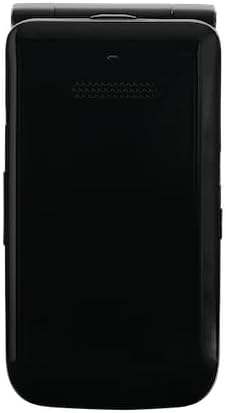
Temel Bileşenler:
- Ana Ekran: The internal 3.2-inch TFT LCD screen for primary interaction.
- Harici Ekran: A 1.77-inch external display for time, notifications, and caller ID when the phone is closed.
- Klavye: Alphanumeric keys and navigation buttons for easy input and menu navigation.
- Kamera: A 5-megapixel rear camera with flash for capturing photos.
- USB Tip-C Bağlantı Noktası: Şarj ve veri aktarımı için.
- 3.5 mm Kulaklık Girişi: Kablolu kulaklıkları bağlamak için.
4. İlk Kurulum
4.1. Pil ve SIM Kartın Takılması
- Telefonun arka kapağını çıkarın.
- Insert the nanoSIM card into the designated SIM slot. Ensure the gold contacts face downwards and the card is correctly oriented.
- Insert the 1850mAh removable battery into its compartment, aligning the contacts.
- Arka kapağı yerine takın ve iyice oturduğundan emin olun.
4.2. Cihazın Şarj Edilmesi
- USB Type-C kablosunu telefonun şarj portuna bağlayın.
- USB kablosunun diğer ucunu kutuda bulunan AC adaptörüne bağlayın.
- AC adaptörünü elektrik prizine takın.
- The phone will indicate that it is charging. Allow the battery to fully charge before initial use.
4.3. Açma/Kapama
- Açmak İçin: Ekran ışığı yanana kadar Güç/Çağrı Sonlandırma düğmesini basılı tutun.
- Kapatmak İçin: Güç/Çağrı Sonlandırma düğmesine basılı tutun, ardından ekrandaki seçeneklerden 'Kapat'ı seçin.
5. Temel İşlem
5.1. Arama Yapma ve Alma
- Telefon çağrısı yapmak: Open the phone, enter the phone number using the keypad, and press the Green Call button.
- Bir Aramayı Cevaplamak için: When the phone rings, press the Green Call button. You can answer with the phone closed by pressing the Green Call button, or open the phone to answer.
- Aramayı Bitirmek İçin: Kırmızı renkli Çağrı Sonlandırma düğmesine basın.
5.2. Mesaj Gönderme ve Alma
- Ana menüden 'Mesajlar' uygulamasına gidin.
- Select 'New Message' to compose a new text message.
- Enter the recipient's number or select from contacts, then type your message using the keypad.
- Mesajı iletmek için 'Gönder'e basın.
5.3. Navigation and Smart Features
The Orbic JOURNEY Pro 4G runs on KaiOS 3.1, offering access to various smart applications:
- Web Tarayıcı: Access the internet to browse webSiteler.
- Google Haritalar: Use for navigation and location services.
- YouTube: Watch videos directly on your device.
- Wi-Fi Hotspot (Tethering): Share your phone's 4G internet connection with up to 8 other devices simultaneously. Access this feature through the phone's settings menu.
6. Bakım ve Özen
- Temizlik: Telefonun dış yüzeyini temizlemek için yumuşak, kuru bir bez kullanın. Sert kimyasallar veya aşındırıcı malzemeler kullanmaktan kaçının.
- Pil Bakım: Pil ömrünü uzatmak için telefonu aşırı sıcaklıklara maruz bırakmaktan kaçının. Pilin uzun süre tamamen boşalmış halde kalmasına izin vermeyin.
- Su ve Toz: This device is not rated for water or dust resistance. Avoid exposure to liquids and dusty environments.
- İşleme: Telefonu dikkatli kullanın. Düşürmekten veya sert darbelere maruz bırakmaktan kaçının.
7. Sorun Giderme
If you encounter issues with your Orbic JOURNEY Pro 4G, please refer to the following common solutions:
| Sorun | Çözüm |
|---|---|
| Telefon açılmıyor | Pilinin doğru takıldığından ve şarj edildiğinden emin olun. Şarj cihazını bağlayın ve tekrar deneyin. |
| Arama yapılamıyor veya alınamıyor. | Check if the SIM card is properly inserted and activated. Verify network signal strength. Contact your service provider if the issue persists. |
| İnternet bağlantısı yok | Ensure mobile data is enabled in settings. Check Wi-Fi connection if using Wi-Fi. Verify your data plan with your service provider. |
| Pil çabuk bitiyor | Reduce screen brightness, close unused applications, and disable Wi-Fi/Bluetooth when not in use. Avoid extreme temperatures. |
| Telefon yanıt vermiyor | Yazılım sıfırlaması yapmak için pili çıkarıp tekrar takın. |
8. Özellikler
| Özellik | Şartname |
|---|---|
| Ürün Adı | Orbic JOURNEY Pro 4G |
| Model Numarası | O4F231JP |
| Renk | Jet Siyahı |
| İşletim Sistemi | KaiOS® 3.1 |
| İşlemci | Qualcomm® QM215 Quad-Core (4x 1.3 GHz-ARM Cortex A53) |
| Veri deposu | 1 GB |
| Dahili Depolama | 8 GB |
| Genişletilebilir Depolama | Supports up to 128GB Micro SD |
| Sensörler | Magnetic Sensor, Barometric Sensor |
| Parmak İzi Kimlik Doğrulaması | Desteklenmiyor |
| Pil Kapasitesi | 1,850mAh (Çıkarılabilir) |
| Şarj cihazı | 5W (Type C 2.0) Charger |
| Hızlı Şarj | Desteklenmiyor |
| Kablosuz Şarj | Desteklenmiyor |
| Sürekli Konuşma Süresi | Maksimum 5.6 saat |
| Sürekli Bekleme Süresi | Maksimum 150 saat |
| Ana Ekran Boyutu | 3.2 inç TFT LCD |
| Ana Ekran Çözünürlüğü | 240x320 (125ppi) |
| Harici Ekran Boyutu | 1.77 inç TFT LCD |
| Harici Ekran Çözünürlüğü | 128x160 (116ppi) |
| Boyutlar (Y x G x D) | Yaklaşık 115.3 x 60.9 x 19.8 mm |
| Ağırlık | Yaklaşık 148g |
| Gövde Malzemesi | Reçine |
| Bağlayıcı | USB Tip-C 2.0 |
| Suya/Toza Dayanıklılık | Uygulanamaz |
| Dayanıklılık | Uygulanamaz |
| Konuşmacılar | 2 |
| Mikrofonlar | 2 |
| 3.5 mm Kulaklık Jakı | Evet |
| Arka Kamera | 5 Megapixels (f/2.2) with Flash |
| Ön Kamera | Desteklenmiyor |
| 2G Bantları | GSM: 850/900/1800/1900MHz |
| 3G Bantları | UMTS: B1/B5/B6/B8/B19 |
| 4G Bantları | LTE: B1/B3/B5/B7/B8/B18/B19/B20/B26/B28/B38/B40/B41 |
| 5G Bantları | Desteklenmiyor |
| SIM Tipi | nanoSIM/4EF |
| Wi-Fi® Connectivity | 802.11 b/g/n 2.4 GHz |
| Bağlama | Supported (up to 8 devices simultaneously) |
| Bluetooth ® | 4.2 |
| NFC | Desteklenmiyor |
| FeliCa | Desteklenmiyor |
| Konumlandırma Sistemi | GPS/AGPS/GLONASS |
9. Garanti ve Destek
9.1. Garanti Bilgileri
The Orbic JOURNEY Pro 4G comes with a 1 yıllık sınırlı garanti Satın alma tarihinden itibaren geçerlidir. Bu garanti, normal kullanım koşullarındaki üretim hatalarını kapsar. Garanti talepleriniz için lütfen satın alma belgenizi saklayın.
Garanti Kapsamı Dışında Kalanlar:
- Damage caused by misuse, alteration, or unauthorized repair.
- Damage due to fire, earthquake, water damage, lightning, or other natural disasters.
- Damage or injury resulting from operations or usage methods contrary to the warnings and instructions in this manual.
- Loss of personal data or property damage incurred from the use or malfunction of this product.
- Products imported privately or parallel imports from overseas businesses are not covered by the product warranty.
9.2. Müşteri Desteği
For further assistance, technical support, or warranty inquiries, please refer to the contact information provided in your Quick Start Guide or visit the official Orbic webBölgeniz için site.