1. Giriş
This manual provides essential information for the proper installation, operation, and maintenance of your Fortinet FortiAP 441K Wi-Fi 7 Indoor Wireless Access Point. Please read this manual thoroughly before using the device to ensure optimal performance and safety.

Figure 1: Fortinet FortiAP 441K Wi-Fi 7 Indoor Wireless Access Point, top view.
2. Güvenlik Bilgileri
Cihaza zarar gelmesini veya kendinize zarar gelmesini önlemek için aşağıdaki güvenlik önlemlerine uyun:
- Install the device in a dry, well-ventilated area, away from direct sunlight and heat sources.
- Elektrik çarpmasını önlemek için topraklamanın uygun olduğundan emin olun.
- Cihazı açmayınasing. Tüm servis işlemlerini yetkili personele yaptırın.
- Use only the power supply methods specified for this device (PoE++).
- Cihazı su ve nemden uzak tutunuz.
3. Paket İçeriği
Paketinizde tüm öğelerin mevcut olduğundan emin olun:
- Fortinet FortiAP 441K Wireless Access Point
- Mounting Bracket (for ceiling or wall mounting)
- Kurulum Kılavuzu
- Band (referring to the device itself, as per product data)
4. Kurulum
4.1 Montaj
The FortiAP 441K is designed for indoor ceiling or wall mounting. Use the provided mounting bracket and hardware to secure the device in a central location for optimal Wi-Fi coverage.
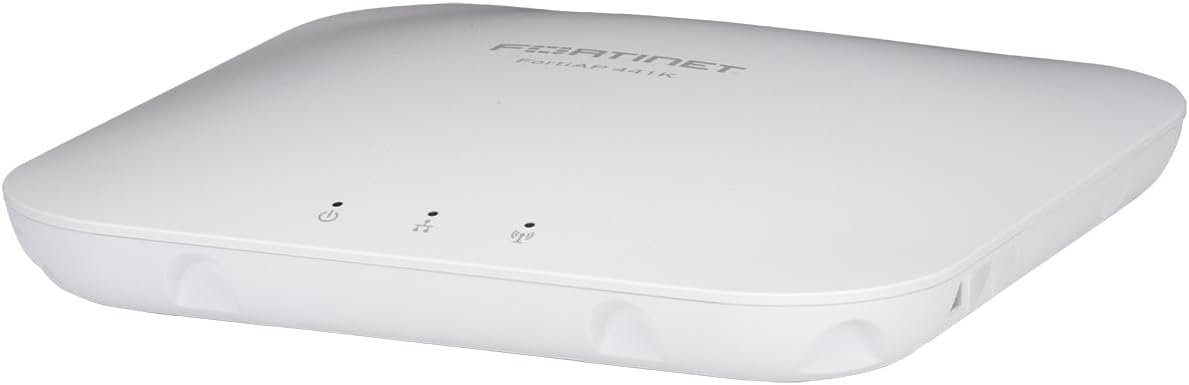
Figure 2: Fortinet FortiAP 441K, suitable for discreet ceiling or wall mounting.
4.2 Açma
The FortiAP 441K supports Power over Ethernet (PoE++). Connect an Ethernet cable from a PoE++ compliant switch or injector to the device's Ethernet port. The device will power on automatically.
4.3 Ağ Bağlantısı
Connect the FortiAP 441K to your network infrastructure using one of its 10 Gigabit Ethernet ports. These ports provide high-speed connectivity for optimal performance.
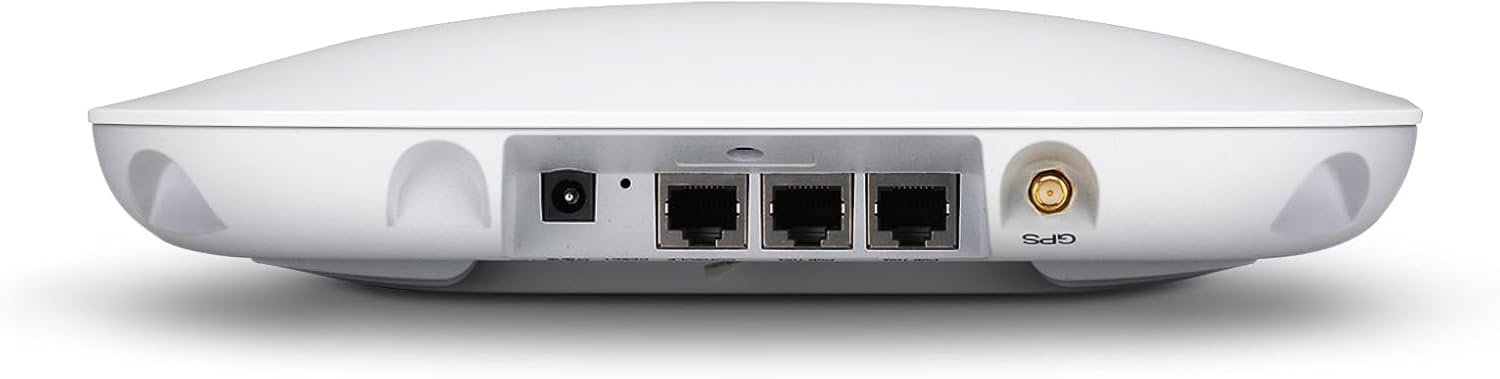
Şekil 3: Arka view of FortiAP 441K, highlighting the Ethernet ports for network connection and power.
5. Kullanım Talimatları
Once powered on and connected to the network, the FortiAP 441K will begin broadcasting Wi-Fi signals across its tri-band frequencies (2.4 GHz, 5 GHz, and 6 GHz). Clients can connect to the appropriate SSID (Service Set Identifier) as configured in your Fortinet network management system. The access point is designed to provide 24/7 scanning across all bands while simultaneously offering client access.
6. Temel Özellikler
The FortiAP 441K offers advanced features for high-performance wireless networking:
- Wi-Fi 7 Standardı: Supports the latest Wi-Fi 7 (802.11ax) standard for enhanced speed and efficiency.
- Üç Bantlı Çalışma: Utilizes 2.4 GHz, 5 GHz, and 6 GHz bands for flexible and high-capacity wireless connectivity.
- 4x4 MU-MIMO: Features 4x4 Multi-User Multiple-Input, Multiple-Output technology for improved performance with multiple connected devices.
- Dahili Antenler: Equipped with internal antennas for a sleek design and optimized signal coverage.
- 2x 10G Ethernet Ports: Provides two 10 Gigabit Ethernet ports for high-speed wired backhaul.
- OFDMA'nın: Orthogonal Frequency-Division Multiple Access for efficient channel utilization.
- Entegre BLE/ZigBee Radyo: Can be used for beaconing and location-based applications.

Şekil 4: Üzeriview of FortiAP 441K key specifications and features.
7. Bakım
To ensure the longevity and optimal performance of your FortiAP 441K, follow these maintenance guidelines:
- Regularly check for firmware updates through your Fortinet management interface to ensure the latest security patches and features.
- Cihazınızı temiz ve tozdan uzak tutun. Temizlik için yumuşak ve kuru bir bez kullanın.
- Ensure adequate airflow around the device to prevent overheating.
- Cihazın üzerine ağır nesneler koymaktan kaçının.
8. Sorun Giderme
If you encounter issues with your FortiAP 441K, refer to the following common troubleshooting steps:
- Güç Yok: Verify that the Ethernet cable is securely connected and that the PoE++ switch/injector is functioning correctly.
- Wi-Fi sinyali yok: Check the device status indicators. Ensure the access point is properly configured and broadcasting SSIDs.
- Yavaş Performans: Check network congestion, client device capabilities (Wi-Fi 7 clients will perform best), and ensure the 10G Ethernet ports are utilized for backhaul.
- Bağlantı Sorunları: Restart the access point and any connected network devices. Verify network settings in your Fortinet management system.
For more advanced troubleshooting, consult the Fortinet support documentation or contact technical support.
9. Özellikler
| Bağlanmak | Değer |
|---|---|
| Ürün Boyutları | 10 x 10 x 2 inç |
| Ürün Ağırlığı | 7 pound |
| ASIN | B0D9R166L5 |
| Ürün Model Numarası | FAP-441K-A |
| Marka | FORTİNET |
| Model Adı | FAP-441K-A 25550886 |
| Özel Özellik | Uzaktan Erişim |
| Frekans Bant Sınıfı | Üç bantlı |
| Kablosuz İletişim Standardı | 802.11ax (Wi-Fi 7) |
| Uyumlu Cihazlar | Dizüstü Bilgisayar, Kişisel Bilgisayar, Akıllı Telefon, Tablet |
| Ürün İçin Önerilen Kullanımlar | Ofis, Oyun |
| Bağlantı Teknolojisi | Wi-Fi 7, Ethernet |
| Renk | Çok renkli |
| Üretici | Fortinet |
| İlk Mevcut Tarih | 19 Temmuz 2024 |

Figure 5: FortiAP 441K dimensions for installation planning.
10. Garanti ve Destek
The Fortinet FortiAP 441K is covered by a manufacturer's warranty. For specific warranty terms and conditions, please refer to the documentation included with your product or visit the official Fortinet website. For technical support, product registration, and additional resources, please visit the Fortinet support portal.