
Turtle Beach TBM-1003-15
Turtle Beach Kone II Wired Ergonomic RGB Gaming Mouse User Manual
Marka: Turtle Beach | Modeli: TBM-1003-15
giriiş
The Turtle Beach Kone II wired ergonomic gaming mouse is designed for superior gaming performance and comfort. It features an ergonomic shape suitable for medium to larger hands and various grip styles, including claw, palm, or fingertip. This manual provides detailed instructions for setting up, operating, maintaining, and troubleshooting your Kone II gaming mouse.
Key features include a 26K DPI optical sensor, 100M click life optical switches, 23 customizable inputs, a 4D scroll wheel, and pure PTFE glides for smooth movement. The mouse also incorporates three-zone AIMO intelligent RGB illumination and is NVIDIA Reflex compatible for enhanced responsiveness.
Paket İçeriği
- Turtle Beach Kone II Mouse
- Kavrama bandı
- Hızlı başlangıç Kılavuzu

Image: Contents of the Turtle Beach Kone II package, including the mouse, grip tape, and quick-start guide.
Kurmak
Fareyi Bağlama
- Locate an available USB-A port on your PC.
- Plug the PhantomFlex USB-A cable of the Turtle Beach Kone II mouse into the USB-A port.
- The mouse will be automatically detected by your operating system (Windows 10 or later).
Software Installation (Swarm II)
For full customization options, including RGB illumination, button remapping, and DPI adjustments, download and install the Swarm II software from the official Turtle Beach website. Ensure your operating system is Windows 10 or later for compatibility.
- Turtle Beach'in resmi destek sitesini ziyaret edin. webalan.
- Navigate to the support page for the Kone II gaming mouse.
- Download the latest version of the Swarm II software.
- Yükleyiciyi çalıştırın ve kurulumu tamamlamak için ekrandaki talimatları izleyin.
- Launch Swarm II to configure your mouse settings.
Kullanım Talimatları
Ergonomik Tasarım

Image: The ergonomic shape of the Turtle Beach Kone II mouse, designed for comfort during extended use.
The Kone II is engineered with an ergonomic shape to perfectly suit medium and larger hand sizes. It supports various grip styles, including claw, palm, and fingertip, ensuring comfort during long gaming sessions. Additional grip tape is included in the package for enhanced control and customization of your grip.
Buttons and 4D Scroll Wheel

Image: The Turtle Beach Kone II mouse highlighting its 7 buttons and 4D scroll wheel, which can be expanded to 23 customizable functions using Easy-Shift [+].
The Kone II features 7 programmable buttons and a 4D scroll wheel with tilt capability. Utilizing Easy-Shift [+] button duplicator technology, these inputs can be expanded to provide up to 23 customizable functions. The 4D scroll wheel allows for tactile scrolling and can be tilted left and right for two additional customizable controls.
TITAN Optical Switches

Resim: Dahili view illustrating the TITAN Optical Switches, designed for tactile feedback and a 100 million click life cycle.
Equipped with TITAN Optical Switches, the Kone II provides a tactile feel with high speed and durability. These switches boast a 100 million click life cycle, and a pre-tensioning system enhances reliability and response time for precise clicks.
Owl-Eye Optical Sensor

Image: The internal structure of the mouse highlighting the Owl-Eye optical sensor, capable of 26K DPI and 650 IPS tracking.
The advanced Owl-Eye optical sensor delivers smooth and precise tracking, ranging from 50 DPI up to 26,000 DPI with a 650 IPS (16.5m/s) tracking speed. Dedicated DPI buttons allow for quick adjustments without needing software.
Pure PTFE Glides

Image: The underside of the Turtle Beach Kone II mouse, showcasing the pure, heat-treated PTFE feet for smooth gliding.
The mouse features pure, heat-treated PTFE feet, which provide incredible glide and the smoothest mouse movements right out of the box, reducing friction for effortless control.
PhantomFlex Cable
The lightweight and ultra-flexible PhantomFlex braided USB-A cable is designed to minimize drag, making it feel almost wireless during use.
Multi-Zone RGB Illumination
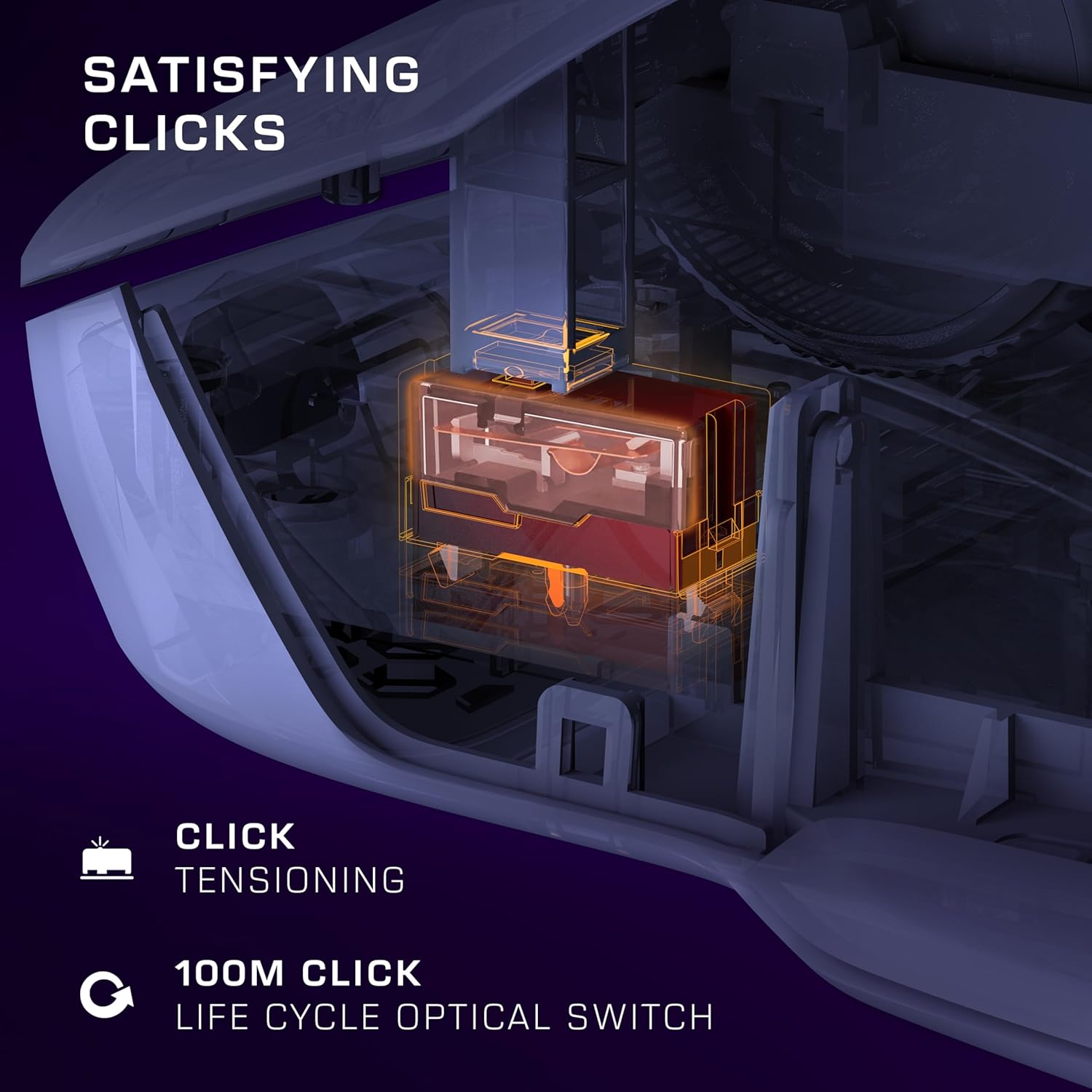
Image: The Turtle Beach Kone II mouse displaying its vibrant multi-zone RGB illumination.
The Kone II features three fully customizable RGB lighting zones. These can be programmed via the Swarm II app and include synchronized AIMO intelligent lighting for dynamic effects.
NVIDIA Reflex Compatibility
The Kone II is NVIDIA Reflex compatible, which, when paired with GeForce RTX GPUs and NVIDIA G-SYNC monitors, helps deliver sub-25ms response times. This feature is designed to help users acquire targets faster and increase aim precision in compatible games.
Customization with Swarm II
The Swarm II software is your central hub for customizing your Turtle Beach Kone II mouse. After installation, launch the application to access various settings:
- Düğme Ataması: Remap any of the 7 buttons and the 4D scroll wheel functions. Utilize Easy-Shift [+] to assign secondary functions, effectively expanding your control options to 23 inputs.
- DPI Ayarları: Adjust and save multiple DPI profiles, allowing you to switch sensitivity on the fly using the dedicated DPI buttons.
- RGB Aydınlatma: Customize the three-zone RGB illumination with various effects, colors, and brightness levels. Synchronize lighting with other AIMO-compatible devices.
- Anket Oranı: Adjust the mouse's polling rate to suit your preferences.
- Kalkış Mesafesi: Fine-tune the lift-off distance for optimal tracking performance.
- Makro Yönetimi: Programlanabilir herhangi bir düğmeye karmaşık makrolar oluşturun ve atayın.
Regularly check the Swarm II software for firmware updates to ensure optimal performance and access to the latest features.
Bakım
Temizlik
- Fareyi temizlemek için yumuşak, tüy bırakmayan bir bez kullanın.ampsu veya hafif bir temizleme solüsyonu ile sonlandırıldı.
- Avoid using harsh chemicals, abrasive cleaners, or solvents, as these can damage the mouse's surface.
- Temizlik solüsyonlarını doğrudan farenin üzerine püskürtmeyin.
- Regularly clean the optical sensor area on the underside of the mouse to ensure accurate tracking.
Kablo Bakımı
- Avoid sharp bends or kinks in the PhantomFlex cable to prevent internal damage.
- Do not pull the mouse by its cable. Always grasp the mouse body when moving it.
Sorun giderme
Fare Yanıt Vermiyor
- USB Bağlantısını Kontrol Edin: Ensure the USB-A cable is securely plugged into a working USB port on your PC. Try a different USB port.
- Bilgisayarı yeniden başlatın: Basit bir sistem yeniden başlatması genellikle bağlantı sorunlarını çözebilir.
- Test on Another PC: If possible, test the mouse on another computer to determine if the issue is with the mouse or your PC.
Tracking Issues / Cursor Lag
- Sensörü Temizleyin: Farenin altındaki optik sensörün temiz ve toz veya kirden arındırılmış olduğundan emin olun.
- Fare Altlığı Yüzeyi: Use the mouse on a clean, uniform surface or a high-quality mouse pad. Avoid highly reflective or transparent surfaces.
- DPI Ayarı: Adjust the DPI setting using the dedicated buttons or the Swarm II software. A very high DPI might feel erratic on some surfaces.
Swarm II Software Not Detecting Mouse
- Yazılımı Yeniden Yükle: Uninstall and then reinstall the Swarm II software from the official Turtle Beach webalan.
- Sürücüleri Güncelle: Ensure your PC's USB drivers are up to date.
- Yönetici olarak çalıştır: Try running the Swarm II software as an administrator.
Düğmeler Yanıt Vermiyor
- Yazılım Ayarlarını Kontrol Edin: Verify button assignments in the Swarm II software. Ensure no conflicting profile'ler aktif.
- Yazılım güncellemesi: Check if a firmware update is available for your mouse via the Swarm II software.
Özellikler
| Özellik | Detay |
|---|---|
| Marka | Kaplumbağa Plajı |
| Model Numarası | TBM-1003-15 |
| Bağlantı | Wired (PhantomFlex USB-A Cable) |
| Sensör | Owl-Eye Optical Sensor |
| DPI Aralığı | 50 - 26,000 DPI |
| İzleme Hızı | 650 IPS (16.5 m/s) |
| Anahtarlar | TITAN Optical Switches |
| Switch Life Cycle | 100 Milyon Tıklama |
| Düğmeler | 7 programmable buttons + 4D scroll wheel (23 customizable functions with Easy-Shift [+]) |
| Kayarlar | Pure, Heat-Treated PTFE |
| Aydınlatma | Three-zone AIMO Intelligent RGB |
| İşletim Sistemi Uyumluluğu | Windows 10 veya üzeri |
| Ağırlık | 3.2 ons (yaklaşık 90.7 gram) |
| Boyutlar (UxGxY) | 7.09 x 4.96 x 0.1 inç (yaklaşık 18 x 12.6 x 0.25 cm) |
Garanti ve Destek
Turtle Beach products come with a manufacturer's warranty. For specific warranty terms and conditions, please refer to the warranty information provided with your product packaging or visit the official Turtle Beach webalan.
For technical support, FAQs, driver downloads, and additional resources, please visit the Turtle Beach support portal:
Kaplumbağa Plajı Desteği Webalan
When contacting support, please have your product model number (TBM-1003-15) and purchase information ready.
Ask a question about this manual
Ask about setup, troubleshooting, compatibility, parts, safety, or missing instructions. Manuals+ will review the question and use this page’s manual context to help answer it.