
giriiş
This manual provides comprehensive instructions for the ECONTROLLY EUR7729KE0 Replacement Remote Control. This remote is designed to function as a direct replacement for various Panasonic DVD HDD TV Recorders, offering full functionality without the need for complex programming.
Uyumlu Modeller:
- UR7729KE0
- EUR7721X10
- DMR-EH50
- DMR-E55K
- DMR-EH50S
- DMR-E55P9
- DMR-E55S
- DMR-ES10
- DMR-EH50P
- DMR-EH60
This replacement remote control covers all functions of the original remote, ensuring a seamless user experience.
Kurmak
Pil Kurulumu
The EUR7729KE0 remote control requires two AAA batteries (not included) for operation. Please follow these steps to install the batteries:
- Uzaktan kumandanın arkasındaki pil bölmesini bulun.
- Pil bölmesi kapağını aşağı doğru kaydırın ve kaldırın.
- İki adet AAA pil takın ve pozitif (+) ve negatif (-) kutupların bölmenin içindeki işaretlerle doğru şekilde hizalandığından emin olun.
- Pil bölmesi kapağını yerine oturtmak için, güvenli bir şekilde yerine oturana kadar kaydırın.

Arka view of the ECONTROLLY EUR7729KE0 remote control with the battery cover removed, showing the compartment for two AAA batteries.
Not: Her zaman her iki pili de aynı anda yenileriyle değiştirin. Eski ve yeni pilleri veya farklı pil türlerini karıştırmayın.
Kullanım Talimatları
To operate the remote control, point it directly at the infrared sensor on your Panasonic DVD HDD TV Recorder. Ensure there are no obstructions between the remote and the device.
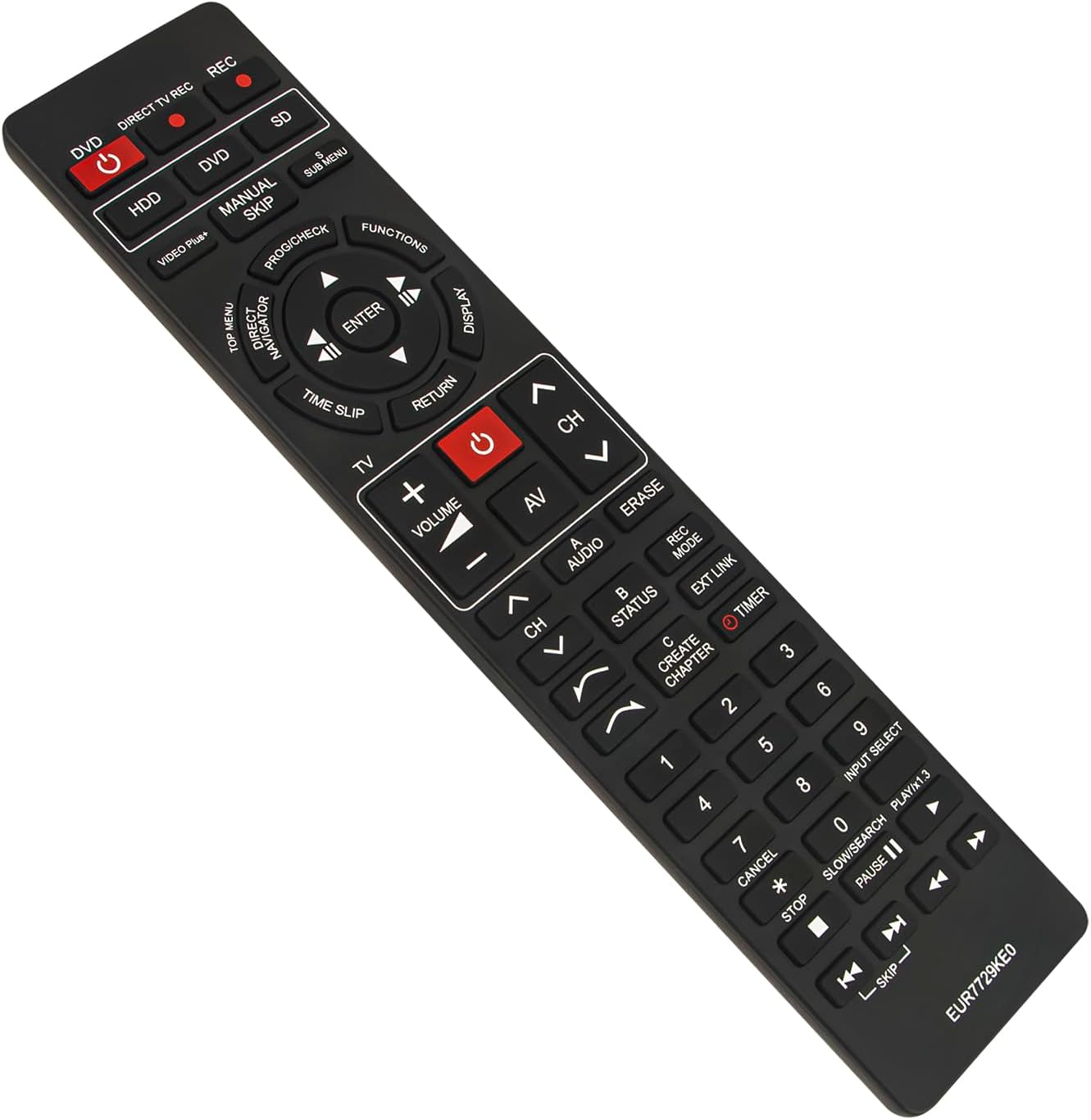
Ön view of the ECONTROLLY EUR7729KE0 replacement remote control, showing all buttons and their labels.
Temel Fonksiyonlarview:
- Power Buttons (DVD, HDD, DIRECT TV REC, REC, SD): Used to power on/off or select specific modes for the respective components.
- Sayı Düğmeleri (0-9): For direct channel selection, inputting numbers, or menu navigation.
- Hacim (+/-): Ses seviyesini ayarlar.
- Channel (CH ^/v): Kanalları yukarı veya aşağı değiştirir.
- Gezinti Tuş Takımı (Yukarı, Aşağı, Sol, Sağ, ENTER): Menülerde gezinmek ve seçimleri onaylamak için kullanılır.
- Playback Controls (PLAY/x1.3, PAUSE, STOP, SKIP, SLOW/SEARCH): Medya oynatma için standart kontroller.
- MENU Buttons (TOP MENU, SUB MENU, DIRECT NAVIGATOR): Access various menu options for DVD, HDD, or TV functions.
- Special Function Buttons (PROG/CHECK, FUNCTIONS, DISPLAY, TIME SLIP, RETURN, AV, AUDIO, ERASE, STATUS, REC MODE, EXT LINK, CREATE CHAPTER, TIMER): These buttons provide access to advanced features specific to your Panasonic recorder, such as recording options, chapter creation, and display settings. Refer to your recorder's manual for detailed use of these functions.

Comparison image showing the ECONTROLLY EUR7729KE0 replacement remote control on the left and an original Panasonic remote control on the right, highlighting their similar button layouts.
Bakım
Temizlik
Uzaktan kumandayı temizlemek için yumuşak, kuru bir bez kullanın. İnatçı kirler için hafifçe kurulayın.ampBezi su veya hafif bir temizleme solüsyonuyla silin. Aşındırıcı temizleyiciler, alkol veya çözücüler kullanmaktan kaçının, çünkü bunlar kumandanın yüzeyine veya iç bileşenlerine zarar verebilir.
Depolamak
Uzaktan kumandayı serin, kuru ve doğrudan güneş ışığından ve aşırı sıcaklıklardan uzak bir yerde saklayın. Uzaktan kumanda uzun süre kullanılmayacaksa, sızıntıyı ve olası hasarı önlemek için pilleri çıkarmanız önerilir.
Sorun giderme
- Uzaktan kumanda yanıt vermiyor:
- Pillerin doğru kutuplara (+/-) göre takılıp takılmadığını kontrol edin.
- Pilleri yenileriyle değiştirin.
- Ensure there are no obstructions between the remote control and the device's infrared sensor.
- Make sure you are pointing the remote directly at the device.
- Bazı düğmeler çalışmıyor:
- This remote is designed to replicate all functions of the original. If specific buttons are not working, ensure your device is in the correct mode (e.g., DVD mode for DVD functions).
- Clean the remote's surface, as dirt or debris might be interfering with button presses.
If the issue persists after following these steps, please refer to the support section for further assistance.
Özellikler
| Marka | EKONTROLLÜ |
| Model Adı | EUR7729KE0 |
| Renk | Siyah |
| Özel Özellik | Programlamaya Gerek Yok |
| Uyumlu Cihazlar | DVD HDD TV Recorder (Panasonic DMR-EH50, etc.) |
| Bağlantı Teknolojisi | Kızılötesi |
| Denetleyici Türü | Düğme Kontrolü |
| Maksimum Menzil | 33 feet |
| Ürün Ağırlığı | 1 ons |
| Ürün Boyutları (U x G x Y) | 5"L x 2"W x 0.6"H (approx. 22.4 cm x 5 cm x 1.5 cm) |

Image displaying the dimensions of the ECONTROLLY EUR7729KE0 remote control: approximately 22.4 cm (8.82 inches) in length and 5 cm (1.97 inches) in width.
Garanti ve Destek
This ECONTROLLY product has been tested to ensure proper functionality before shipping. As a replacement remote control, it is designed for immediate use without additional setup.
For further assistance, compatibility inquiries, or troubleshooting that is not covered in this manual, please contact ECONTROLLY customer support through the retailer's platform where the product was purchased. Provide your product model number (EUR7729KE0) and a detailed description of your issue for efficient support.