
ARROWMAX 230313
AM ARROWMAX SGS MAX Smart Engraving Pen User Manual
Modeli: 230313
Marka: ARROWMAX
1. Giriş
Thank you for choosing the AM ARROWMAX SGS MAX Smart Engraving Pen. This versatile tool is designed for precision engraving and polishing on a wide range of materials, including metal, wood, glass, and plastic. Featuring a hollow cup motor, OLED display, and magnetic charging, the SGS MAX offers an intuitive and powerful experience for all your crafting needs. Please read this manual thoroughly before use to ensure proper operation and maintenance.
2. Güvenlik Bilgileri
- Always wear appropriate personal protective equipment, such as safety glasses, to protect your eyes from debris.
- Ensure your workspace is well-lit and clear of obstructions.
- Keep the engraving pen and its accessories out of reach of children and pets.
- Aleti yanıcı sıvıların veya gazların yakınında kullanmayın.
- Avoid touching the bit during or immediately after operation, as it may be hot.
- Do not immerse the engraving pen in water or any other liquid.
- Use only approved accessories and bits with the SGS MAX.
- If the tool shows signs of damage or malfunction, discontinue use immediately and contact customer support.
3. Paket İçeriği
Aşağıda listelenen tüm öğelerin paketinizde bulunduğunu doğrulayın:

Image: All items included in the SGS MAX package, neatly arranged.
- AM ARROWMAX SGS MAX Smart Engraving Pen
- Aluminum Storage Case
- Magnetic USB-C Charging Cable
- 30 Gravür Ucu
- 12 Parlatma Ucu
- Quick Start Guide (Physical or Digital)
4. Ürün Bittiview
Familiarize yourself with the components of your SGS MAX engraving pen:

Image: Labeled diagram of the SGS MAX engraving pen highlighting its key parts.
- Chuck: Holds the engraving/polishing bits securely.
- Alüminyum Alaşımlı Gövde: Durable and ergonomic design for comfortable grip.
- Güç Düğmesi: Cihazı açar/kapatır.
- Vites Ayar Düğmesi: Cycles through speed modes and adjusts direction.
- Status Display (OLED): Pil durumunu, seçilen modu ve dönüş yönünü gösterir.
- Manyetik Şarj Bağlantı Noktası: For convenient and quick charging.
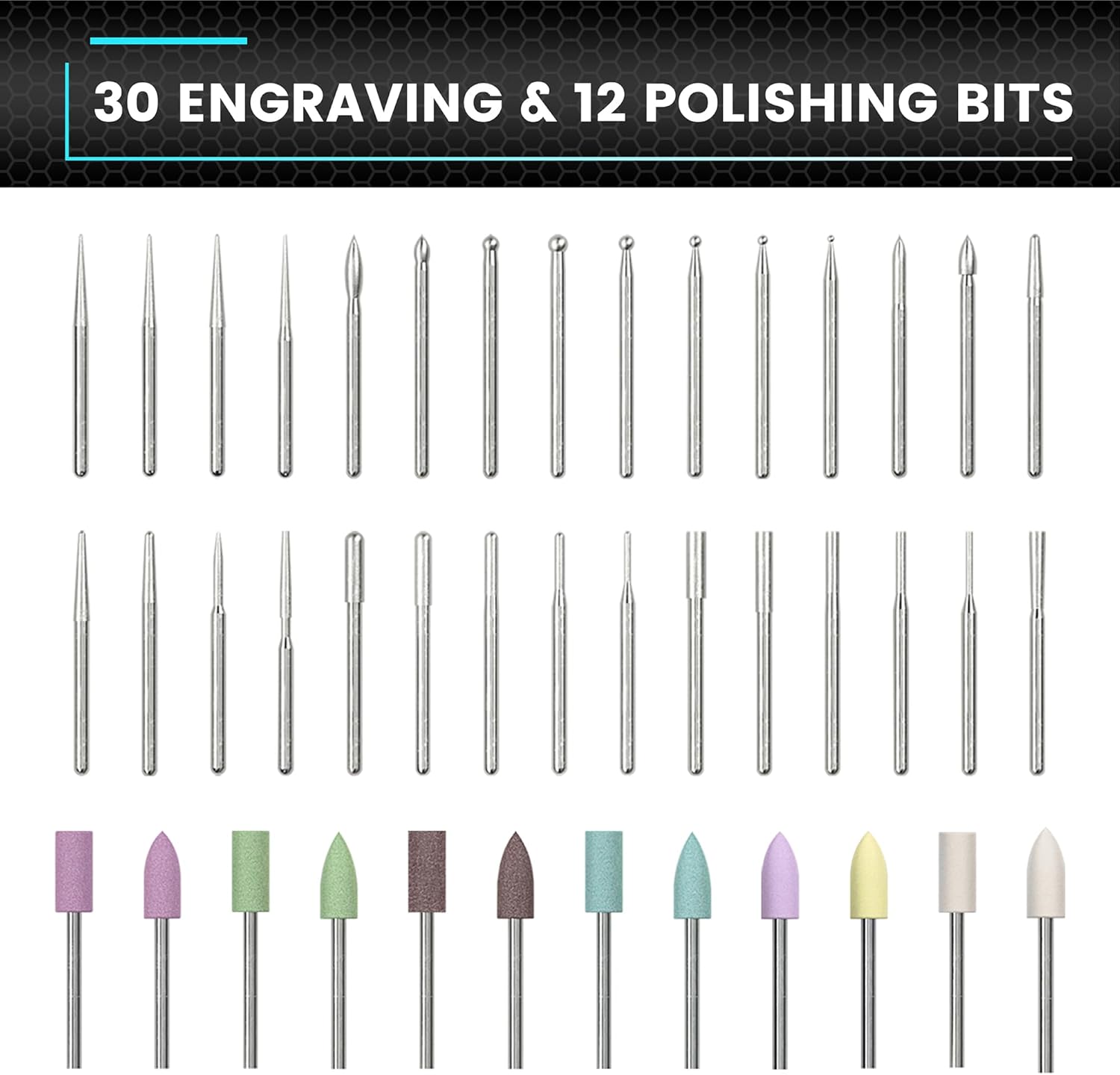
Resim: Kapsamlı bir view of the 30 engraving bits and 12 polishing bits.
5. Kurulum
5.1. İlk Şarj
Before first use, fully charge the SGS MAX engraving pen. Connect the magnetic charging cable to the charging port on the pen and plug the other end into a USB power source (e.g., computer, wall adapter). The OLED display will indicate charging status. A full charge typically takes approximately 60 minutes.
5.2. Bitlerin Takılması/Değiştirilmesi
- Oyma kaleminin kapalı olduğundan emin olun.
- Gently unscrew the chuck counter-clockwise to loosen it.
- Insert the desired engraving or polishing bit into the chuck. Ensure it is seated firmly.
- Tighten the chuck clockwise until the bit is securely held. Do not overtighten.
6. Kullanım Talimatları
6.1. Güç Açma/Kapatma
Press and hold the Power Button for 2 seconds to turn the engraving pen on or off. The OLED display will illuminate upon power-on.
6.2. Hız Modlarını Ayarlama
SGS MAX, çeşitli uygulamalar için 5 farklı devir modu sunar:

Image: Visual representation of the five speed modes and their corresponding RPMs.
- A Modu (Otomatik Algılama): 10,000-30,000 RPM. The Smart Motion System dynamically adjusts speed based on your twist angle.
- Mod 1 (Düşük): 15,000 RPM
- Mod 2 (Orta): 20,000 RPM
- Mod 3 (Yüksek): 25,000 RPM
- Mod 4 (Maksimum): 30,000 RPM
To cycle through the speed modes, short press the Gear Adjustment Button. The current mode will be displayed on the OLED screen.

Image: OLED display showing battery, dynamic display, and current gear.
6.3. Dönme Yönünün Değiştirilmesi
Within each speed mode, you can toggle between forward (clockwise) and reverse (anti-clockwise) directions. Double-press the Gear Adjustment Button to switch directions. The OLED display will indicate the current rotation direction.
6.4. ARROWMAX Uygulamasını Kullanma
For enhanced control and customization, download the official ARROWMAX app from your device's app store. The app allows you to fine-tune speed settings beyond the factory presets and provides additional features.

Image: ARROWMAX app interface for controlling the engraving pen.
6.5. Malzeme Uyumluluğu
The SGS MAX is suitable for engraving and polishing various materials:

Resim: EskiampKristal, ahşap, altın ve cam üzerine gravür sanatı.

Image: Diverse materials compatible with the engraving pen, such as plastic, PCB, shell, wood, glass, leather, and stone.
Always test on a scrap piece of material first to determine the optimal speed and bit for your project.
7. Bakım
7.1. Temizlik
- After each use, gently wipe the body of the engraving pen with a soft, dry cloth.
- Mandren bölgesindeki toz ve kalıntıları küçük bir fırça veya basınçlı hava kullanarak temizleyin.
- Sert kimyasallar veya aşındırıcı temizleyiciler kullanmayın.
7.2. Bit Care and Storage
- Clean bits after use to remove any material residue.
- Uçları hasar ve kayıptan korumak için alüminyum kutunun içindeki belirlenmiş yuvalarında saklayın.
- Replace worn or damaged bits to ensure optimal performance and safety.
7.3. Pil Bakımı
- Pilin sık sık tamamen boşaltılmasından kaçının.
- Uzun süre kullanılmayacaksa cihazı serin ve kuru bir yerde saklayın.
- Charge the battery at least once every three months to maintain its health.
8. Sorun Giderme
| Sorun | Olası Neden | Çözüm |
|---|---|---|
| Kalem açılmıyor | Düşük pil; Güç düğmesine doğru basılmamış | Charge the pen fully; Press and hold the Power Button for 2 seconds |
| Bit is loose or wobbles | Chuck not tightened; Bit not inserted correctly | Ensure bit is fully inserted and chuck is tightened securely |
| Reduced performance/engraving quality | Worn bit; Incorrect speed setting; Material too hard | Replace bit; Adjust speed mode; Ensure material is suitable for engraving |
| Pen stops unexpectedly | Overload protection activated; Low battery | Reduce pressure; Charge the pen |
9. Özellikler
- Modeli: SGS MAX
- Ürün Model Numarası: 230313
- Marka: ARROMAX
- Motor Tipi: HollowCup Motor
- Hız Modları: 5 (10,000-30,000 RPM, including Auto Sensing)
- Pil: 1 Lityum Polimer pil (dahil)
- Şarj: Magnetic, 5V rechargeable
- Included Bits: 30 Engraving Bits, 12 Polishing Bits (Total 42)
- Gövde Malzemesi: Alüminyum Alaşımı
- Görüntülemek: OLED
- Ürün Ağırlığı: 13.7 ons
- Paket Boyutları: 8.74 x 3.07 x 1.22 inç
10. Garanti ve Destek
The AM ARROWMAX SGS MAX Smart Engraving Pen comes with a standard manufacturer's warranty. For detailed warranty information, please refer to the warranty card included in your package or visit the official ARROWMAX website. If you encounter any issues or require technical assistance, please contact ARROWMAX customer support through their official channels or the retailer from whom you purchased the product.
Daha fazla yardım için şu adresi ziyaret edebilirsiniz: ARROWMAX Store on Amazon.
İlgili Belgeler - 230313
 |
ARROWMAX SGS MAX Electric Polishing & Engraving Pen - User Manual Comprehensive user manual for the ARROWMAX SGS MAX Electric Polishing & Engraving Pen (Model AM-230313), detailing features, operation, specifications, and warranty information. |
 |
ARROWMAX SGS MINI Elektrikli Gravür ve Parlatma Kalemi Kullanım Kılavuzu Kompakt elektrikli gravür ve parlatma kalemi ARROWMAX SGS MINI için kapsamlı kullanım kılavuzu. Özellikleri, çalışma prensibi, uç takma, saklama ve teknik özellikleri hakkında bilgi edinin. 350mAh LiPo pil, manyetik şarj ve ARROWMAX uygulaması uyumluluğu hakkında detaylı bilgiler içerir. |
 |
ARROWMAX SES Electric Screwdriver User Manual and Specifications Comprehensive user manual for the ARROWMAX SES Electric Screwdriver, detailing its structure, operation, product parameters, storage instructions, and warranty information. Features OLED display, adjustable torque, and a 34-bit set. |
 |
Manuel du Stylo de Gravure Électrique ARROWMAX SGS MAX AM-230313 Elektrikli gravür stilinin kullanımı için ayrıntılı talimatlar içeren manuel ARROWMAX SGS MAX (AM-230313 modeli). Ürünün açıklamasını, çalışma yöntemlerini, makinelerin kurulumunu, saklama talimatlarını, spesifikasyon tekniklerini, dahil ürün listesini ve garanti ve bakım bilgilerini bulabilirsiniz. |
 |
SES ULTRA Elektrikli Tornavida Kalem Kullanım Kılavuzu - ARROWMAX ARROWMAX SES ULTRA Elektrikli Tornavida Kaleminin özelliklerini, çalışma şeklini, saklama koşullarını, teknik özelliklerini ve garanti bilgilerini ayrıntılı olarak açıklayan kapsamlı kullanım kılavuzu. |
 |
ARROWMAX SES Elektrikli Tornavida Kullanım Kılavuzu ARROWMAX SES Elektrikli Tornavidayı keşfedin: Kompakt ve güçlü bu alet, OLED ekranı, ayarlanabilir torku ve hassas işler için 34 adet S2 çelik ucuyla öne çıkıyor. Saklama kutusu ve Type-C şarj adaptörü dahildir. |
Ask a question about this manual
Ask about setup, troubleshooting, compatibility, parts, safety, or missing instructions. Manuals+ will review the question and use this page’s manual context to help answer it.