
giriiş
Thank you for choosing the Oakcastle HIFI150 Stereo System. This manual provides essential information for setting up, operating, and maintaining your device. Please read it thoroughly before use and retain it for future reference.
Güvenlik Bilgileri
Güvenli çalışmayı sağlamak ve hasarı önlemek için lütfen aşağıdaki güvenlik önlemlerine uyun:
- Üniteyi yağmura, neme veya aşırı sıcaklıklara maruz bırakmayın.
- C'yi açmayınasing. Tüm servis işlemlerini yetkili personele yaptırın.
- Ünitenin çevresinde yeterli havalandırma olduğundan emin olun. Havalandırma açıklıklarını hiçbir şekilde kapatmayın.
- Yalnızca üniteyle birlikte verilen güç adaptörünü kullanın.
- Keep the unit away from heat sources such as radiators, stoves, or other heat-producing appliances.
- Üniteyi sadece kuru bir bezle temizleyin.
Paket İçeriği
Lütfen paketinizde tüm öğelerin mevcut olduğundan emin olun:
- Oakcastle HIFI150 Stereo System
- Uzaktan kumanda
- Uzaktan Kumanda Pilleri
- Güç kablosu
- Kullanıcı Kılavuzu
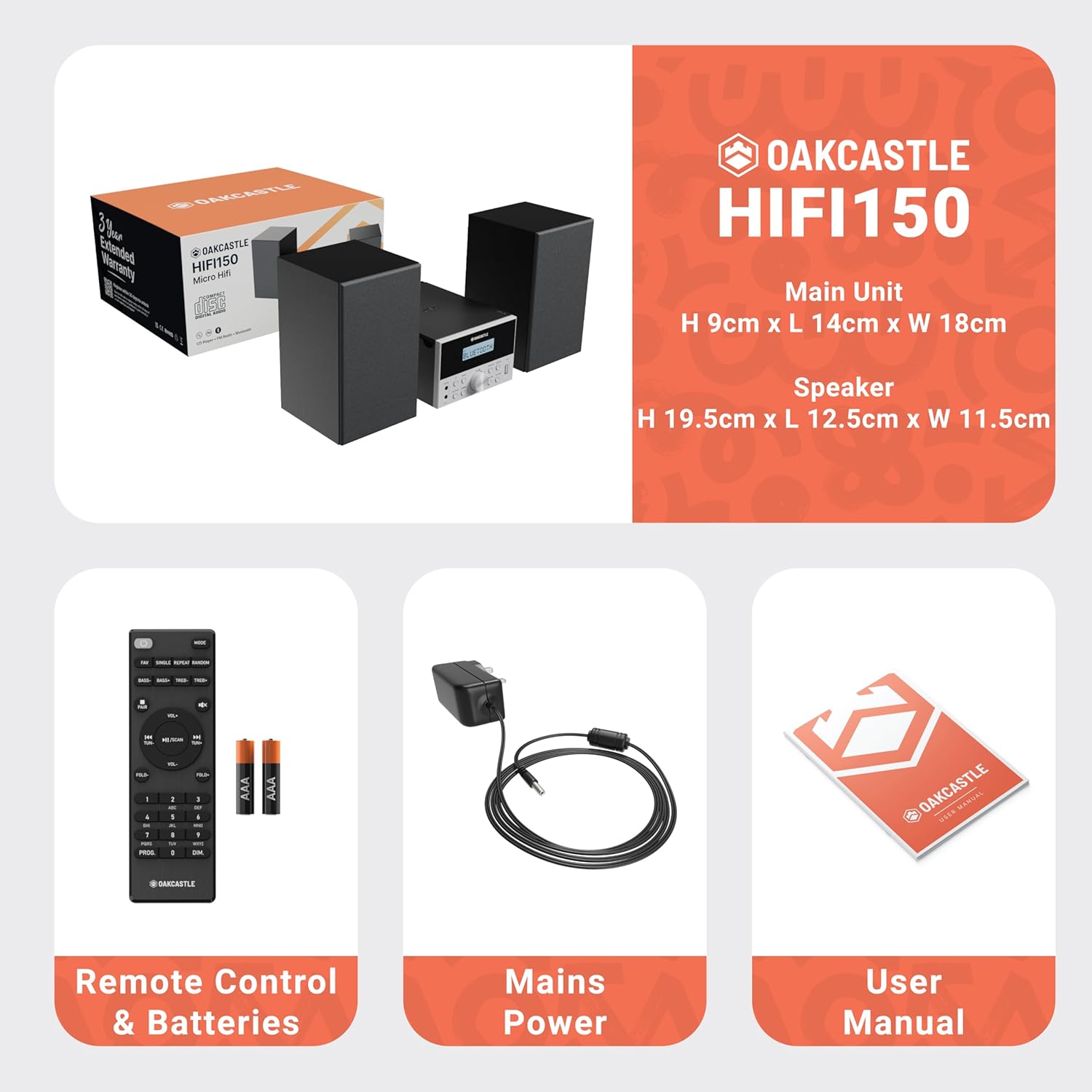
Image: The Oakcastle HIFI150 package contents, showing the main unit, two speakers, remote control with batteries, power adapter, and user manual.
Ürün Bittiview
The Oakcastle HIFI150 features a compact design with intuitive controls and multiple connectivity options.
Ön Panel Kontrolleri ve Ekran

Image: A close-up of the Oakcastle HIFI150 main unit's front panel, highlighting the digital display, central volume knob, mode selection buttons, and front-facing AUX In and USB ports. The display shows 'BLUETOOTH'.
- Görüntülemek: Geçerli modu, parça bilgilerini ve radyo frekansını gösterir.
- Güç Düğmesi: Üniteyi açar veya kapatır.
- Mod Düğmesi: Cycles through input sources (CD, FM, Bluetooth, AUX, USB).
- Ses Düğmesi: Ana ses seviyesini ayarlar.
- Oynat/Duraklat Düğmesi: CD, USB ve Bluetooth üzerinden oynatmayı kontrol eder.
- Atla/Ayarla Düğmeleri: Navigates tracks or tunes radio frequencies.
- AUX Giriş Limanı: Harici ses cihazlarını 3.5 mm kablo ile bağlamak için.
- USB Bağlantı Noktası: Ses oynatmak için files bir USB sürücüsünden.
Arka Panel Bağlantıları
The rear panel includes connections for speakers and power.
Kurmak
1. Hoparlörleri Bağlama
Connect the included speakers to the speaker terminals on the rear of the main unit. Ensure correct polarity (red to red, black to black) for optimal sound quality.
2. Güç Bağlantısı
Plug the power cable into the AC inlet on the rear of the main unit, then plug the other end into a standard wall outlet.
Kullanım Talimatları
Güç Açık/Kapalı
Basın Güç Cihazı açmak veya kapatmak için ön paneldeki düğmeyi veya uzaktan kumandayı kullanın.
Mod Seçimi
Basın Mod button on the front panel or remote control repeatedly to cycle through the available input sources: CD, FM Radyo, Bluetooth, Yardımcı, Ve USB.
Bluetooth İşlemi
- Seçme Bluetooth mode using the Mode button. The display will show 'BLUETOOTH' and the unit will enter pairing mode.
- Akıllı telefonunuzda veya diğer Bluetooth cihazınızda Bluetooth'u etkinleştirin ve kullanılabilir cihazları arayın.
- Select 'OAKCASTLE HIFI150' from the list. Once connected, the unit will confirm the connection.
- You can now stream audio wirelessly from your device to the HIFI150.
CD Çalma

Image: The Oakcastle HIFI150 with its top-loading CD player mechanism open, revealing a compact disc placed inside. The display shows 'CD'.
- CD bölmesinin kapağını açın.
- Place a CD (MP3, CD, WMA, or CD-R format) onto the spindle with the label side facing up.
- CD bölmesi kapağını kapatın.
- Seçme CD mode. The unit will read the disc and begin playback automatically.
- Oynat/Duraklat ve Atla düğmelerini kullanarak oynatmayı kontrol edin.
FM Radyo İşlemi

Image: The Oakcastle HIFI150 main unit with its telescopic antenna extended, displaying an FM radio frequency on its screen. The unit is placed between two speakers.
- Seçme FM Radyo mod.
- Daha iyi alım için teleskopik anteni uzatın.
- Otomatik tarama: Press and hold the Play/Pause button to automatically scan and save available FM stations (up to 30 presets).
- Manuel Ayarlama: Use the Skip/Tune buttons to manually adjust the frequency.
- Ön Ayarları Geri Çağır: Use the 'FAV/PROG' button on the remote to cycle through saved stations.
USB Oynatma
- Ön paneldeki USB bağlantı noktasına bir USB sürücü takın.
- Seçme USB mode. The unit will automatically detect and begin playing compatible audio file(MP3, WMA).
- Oynat/Duraklat ve Atla düğmelerini kullanarak oynatmayı kontrol edin.
AUX Girişi
- Harici bir ses cihazını (örneğin, MP3 çalar, akıllı telefon) bağlayın. AUX Girişi port on the front panel using a 3.5mm audio cable (not included).
- Seçme Yardımcı mod.
- Bağlı harici cihazınızdan oynatmayı kontrol edin.
Ses Kontrolü
Döndür Ses Düğmesi ön panelde veya şunu kullanın SES +/- Uzaktan kumanda üzerindeki düğmeler ses seviyesini ayarlamak için kullanılır.
Uzaktan Kumanda Kullanımı
The included remote control provides full functionality for the HIFI150. Ensure batteries are correctly inserted. Point the remote control towards the front panel of the main unit for optimal response.
Bakım
Temizlik
- Cihazı yumuşak, kuru bir bezle silin.
- Cilaya zarar verebileceğinden aşındırıcı temizleyiciler, cilalar veya çözücüler kullanmayın.
Depolamak
If the unit is not used for an extended period, unplug it from the power outlet and store it in a cool, dry place.
Sorun giderme
If you encounter issues with your HIFI150, please refer to the following common problems and solutions:
| Sorun | Olası Neden | Çözüm |
|---|---|---|
| Güç yok | Güç kablosu bağlı değil; Elektrik prizi arızalı. | Güç kablosunun güvenli bir şekilde bağlandığından emin olun; Farklı bir elektrik prizini deneyin. |
| Ses yok | Volume too low; Incorrect input mode; Speakers not connected | Increase volume; Select correct input mode; Check speaker connections. |
| CD çalmıyor | CD inserted incorrectly; Disc scratched/dirty; Incorrect format | Reinsert CD correctly; Clean or replace disc; Ensure disc is compatible (MP3, CD, WMA, CD-R). |
| Bluetooth bağlanmıyor | Bluetooth mode not selected; Device too far; Device already connected to another unit | Bluetooth modunu seçin; Cihazı daha yakına getirin; Diğer cihazlardan bağlantıyı kesin ve tekrar deneyin. |
| Zayıf FM alımı | Anten uzatılmamış; Zayıf sinyal | Fully extend the telescopic antenna; Try repositioning the unit. |
Özellikler
| Model Numarası | 1000002971 |
| Marka | meşe kalesi |
| Bağlantı | Bluetooth 5.2, USB, AUX |
| Ses Çıkışı | 20W |
| Desteklenen Medya | CD, MP3, WMA, CD-R, USB |
| Radyo | FM Radio with 30 Presets |
| Uyumlu Cihazlar | MP3 Çalar, Akıllı Telefon, Tablet |
| Dolap Malzemesi | Odun |
| Renk | Siyah |
| Ürün Boyutları (U x G x Y) | 13.7x17.8x9 cm |
| Ürün Ağırlığı | 2 Kilogram |
Garanti ve Destek
The Oakcastle HIFI150 comes with an extended 3-year warranty. Registration is required to activate the full warranty period. Please refer to the warranty card included in your package or visit the official Oakcastle website for registration details and support information.
For technical assistance or further inquiries, please contact Oakcastle customer support through their official channels.