
GN HEARING TV Streamer +
Resound TV Streamer+ User Manual
Model: TV Streamer +
1. Giriş
The Resound TV Streamer+ is an innovative device designed to enhance your television viewing experience by wirelessly transmitting audio directly to your compatible Resound Nexia hearing aids. This allows for exceptional voice clarity and personalized volume control, ensuring you can fully enjoy your favorite programs and movies.
Temel özellikler şunlardır:
- Only compatible with Resound Nexia hearing aids.
- Instant voice clarity for better understanding.
- Auracast compatibility for improved sound quality.
- Audio streaming up to 7 meters away.
- Wireless audio streaming from TV to compatible hearing aids.
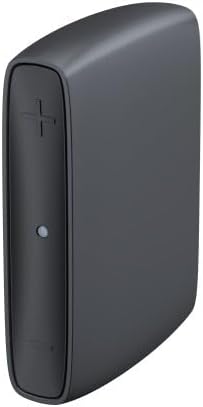
Image 1: The Resound TV Streamer+ device, a compact black unit with a plus sign button and an indicator light on the front.

Image 2: The Resound TV Streamer+ packaging, showing the device on a white background with "TV-Streamer+" text.
2. Kurulum
Follow these steps to set up your Resound TV Streamer+:
- Cihazın Paketini Açın: Carefully remove the TV Streamer+ and all accessories from its packaging.
- Güce Bağlanın: Plug the power adapter into the TV Streamer+ and then into a wall outlet. The indicator light on the device should illuminate.
- Connect to TV Audio Output:
- Optical Cable (Recommended): Connect one end of the optical cable to the optical audio output port on your TV and the other end to the optical input port on the TV Streamer+.
- RCA Cables (if optical is not available): Connect the red and white RCA cables to the corresponding audio output ports on your TV and the other ends to the RCA input ports on the TV Streamer+.
- İşitme cihazlarıyla birlikte kullanın:
- Ensure your Resound Nexia hearing aids are turned on and within range (within 7 meters) of the TV Streamer+.
- Press and hold the pairing button on the TV Streamer+ (refer to the device diagram for exact location, usually a small button on the back or side) until the indicator light starts blinking rapidly.
- Open and close the battery doors of your hearing aids (or turn them off and on if rechargeable) to put them into pairing mode.
- The hearing aids should automatically connect to the TV Streamer+. The indicator light on the streamer will turn solid blue or green when connected.
- Test bağlantısı: Play audio on your TV and confirm that the sound is streaming to your hearing aids. Adjust the TV volume as needed.
3. Kullanım Talimatları
Once connected, the Resound TV Streamer+ provides a seamless audio experience:
- Otomatik Yayın: When the TV Streamer+ is on and connected to your TV, and your hearing aids are within range, audio will automatically stream to your hearing aids.
- Ses Kontrolü: You can adjust the volume of the streamed audio directly through your hearing aid controls or via the Resound Smart 3D app on your smartphone. The TV's volume control will typically not affect the streamed audio volume to your hearing aids.
- Switching Programs: If you wish to switch between streamed audio and your hearing aids' regular microphone input, you can usually do so via your hearing aid program button or the Resound Smart 3D app.
- Auracast Compatibility: The device leverages Auracast technology for enhanced sound quality and a stable wireless connection, allowing for a richer audio experience.
4. Bakım
To ensure the longevity and optimal performance of your Resound TV Streamer+, follow these maintenance guidelines:
- Temizlik: Wipe the device regularly with a soft, dry cloth. Do not use liquid cleaners, sprays, or abrasive materials.
- Depolamak: Cihazı serin, kuru ve doğrudan güneş ışığından ve aşırı sıcaklıklardan uzak bir yerde saklayın.
- Nemden Kaçının: Cihazı sudan ve yüksek nemden uzak tutun.
- Dikkatli Kullanın: Cihazı düşürmekten veya güçlü darbelere maruz bırakmaktan kaçının.
5. Sorun Giderme
If you encounter issues with your Resound TV Streamer+, try the following solutions:
| Sorun | Olası Neden | Çözüm |
|---|---|---|
| İşitme cihazlarına ses aktarımı yapılmıyor. |
|
|
| Kötü ses kalitesi. |
|
|
| Cannot pair hearing aids. |
|
|
Sorun devam ederse lütfen müşteri desteğiyle iletişime geçin.
6. Özellikler
| Özellik | Detay |
|---|---|
| Marka | GN HEARING |
| Üretici | GN HEARING |
| Model Adı | TV Streamer + |
| Parça Numarası | 22926500 |
| Bağlantı Teknolojisi | Bluetooth |
| Form Faktörü | TV çubuğu |
| Renk | Kömür Grisi |
| Video Kodlayıcısı | H.264, H.265/HEVC |
| Küresel Ticari Ürün Numarası (GTIN) | 05708296321216 |
| İlk Mevcut Tarih | 2 Temmuz 2024 |
7. Garanti ve Destek
For warranty information, please refer to the documentation included with your purchase or contact your point of sale. GN HEARING provides support for its products.
If you require technical assistance, have questions about your device, or need to report a problem, please contact GN HEARING customer support through their official webSite veya ürününüzle birlikte verilen iletişim bilgileri.
Please have your model name (TV Streamer +) and part number (22926500) ready when contacting support.
Ask a question about this manual
Ask about setup, troubleshooting, compatibility, parts, safety, or missing instructions. Manuals+ will review the question and use this page’s manual context to help answer it.